
giriiş
The Keychron Q6 Max is a full-size, wireless custom mechanical keyboard designed for versatility and performance. This barebone knob version features a full-metal body, multi-mode connectivity (2.4 GHz, Bluetooth, and Type-C wired), QMK/VIA programmability, and a hot-swappable design. It is compatible with macOS, Windows, and Linux operating systems.
This manual provides detailed instructions to help you set up, operate, and maintain your Keychron Q6 Max keyboard.

Image: Keychron Q6 Max keyboard highlighting its key features.
Paket İçeriği
Verify that all items are present in your Keychron Q6 Max package:
- Keyboard Kit (Without Keycaps & Switches):
- 1x Alüminyum Kasa
- 1x PCB (Printed Circuit Board)
- 1x PC Plakası
- 1x Ses Emici Köpük
- 1x IXPE Köpük
- 1x PET Film
- 1x Lateks Alt Ped
- 1x Alt Kasa Akustik Köpük
- 1x Alt Kasa PET Film
- 16x Conta (12 Takılı ve Kutuda 4)
- 8 takım x Stabilizatörler
- Kablo:
- 1x Type-C'den Type-C'ye Kablo
- 1x Type-A - Type-C Adaptörü
- Alıcı için 1x Uzatma Adaptörü
- Alıcı:
- 1x A Tipi 2.4 GHz Alıcı
- Aletler:
- 1x Klavye Tuş Anahtarı ve Anahtar Çektirme
- 1x Tornavida
- 1x Hex Anahtarı

Image: Detailed list of included items for the Keychron Q6 Max.
Kurmak
1. Tuşların ve Anahtarların Takılması
The Keychron Q6 Max is a barebone keyboard, meaning switches and keycaps are not pre-installed. You will need to purchase these separately.
- The keyboard supports 3-pin and 5-pin MX-style mechanical switches.
- Use the included switch puller to carefully insert switches into the hot-swappable sockets on the PCB. Ensure the pins align correctly to avoid bending.
- Once switches are installed, place your desired keycaps onto the switches.

Image: Keychron Q6 Max barebone keyboard, ready for switch and keycap installation.

Image: Hot-swappable socket supporting 3-pin and 5-pin mechanical switches.
2. Bağlantı Seçenekleri
The Keychron Q6 Max offers three connection modes: 2.4 GHz wireless, Bluetooth 5.1, and Type-C wired.
- 2.4 GHz Kablosuz: Insert the included 2.4 GHz receiver into a USB-A port on your computer. Ensure the keyboard's mode switch (located on the back or side) is set to 2.4G.
- Bluetooth 5.1: Set the keyboard's mode switch to BT. On your computer or device, search for Bluetooth devices and select 'Keychron Q6 Max'. You can pair up to three devices.
- Type-C Kablolu: Connect the keyboard to your computer using the provided Type-C to Type-C cable (or Type-A to Type-C adapter). Set the keyboard's mode switch to Cable.

Image: Tri-Mode Connection options for the Keychron Q6 Max.
3. QMK/VIA Software Configuration
The Keychron Q6 Max supports QMK/VIA for advanced customization. VIA is a graphical user interface that allows you to remap keys, create macros, and adjust lighting without flashing firmware.
- VIA yazılımını Keychron'un resmi sitesinden indirin. webalan.
- Klavyenizi Type-C kablosuyla bağlayın.
- Launch VIA. The software should automatically detect your keyboard.
- Use the interface to remap any key, assign macro commands, create shortcuts, or combine key functions.
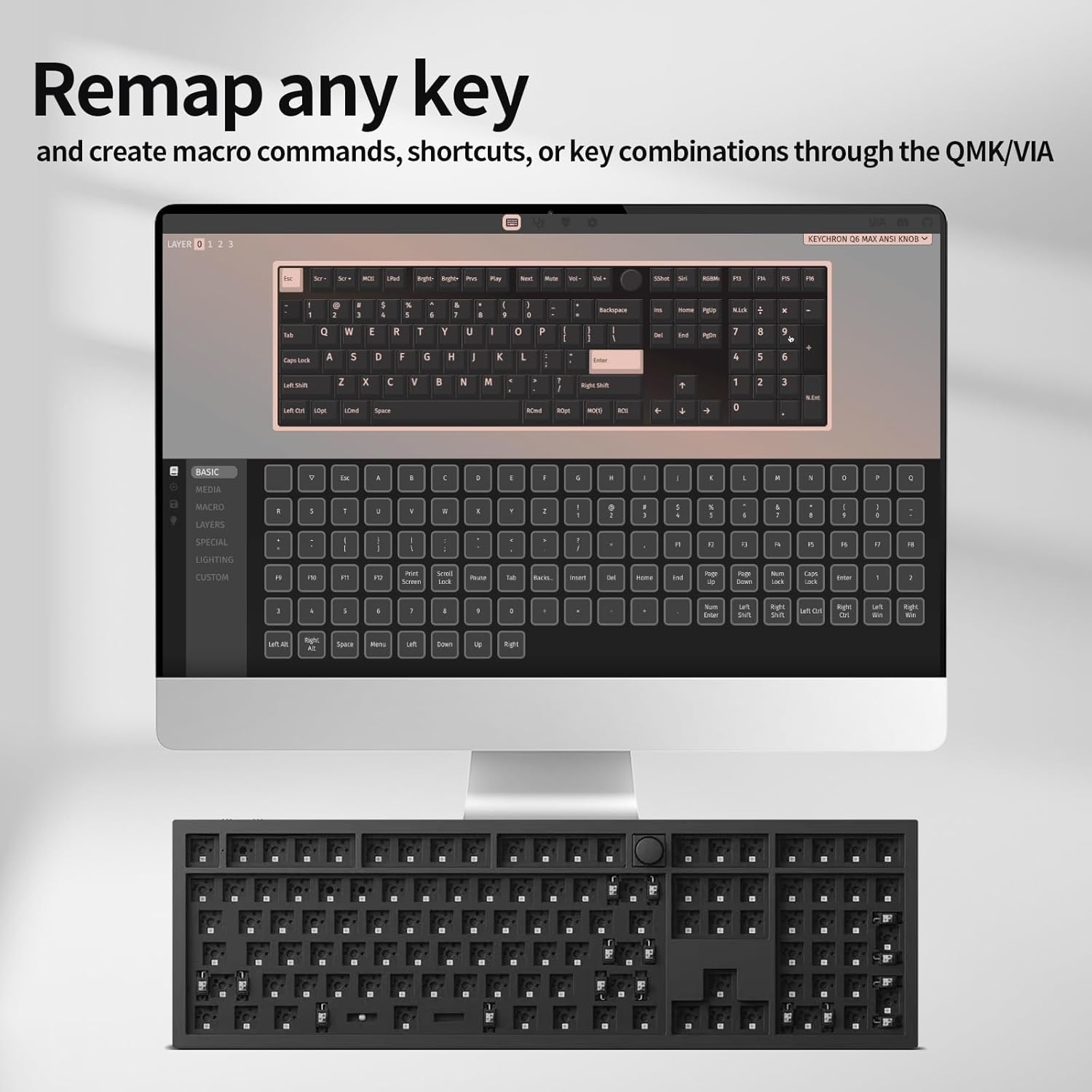
Image: VIA software interface for key remapping and customization.
Operasyon
1. Bağlantı Modlarını Değiştirme
Use the physical switch on the keyboard to toggle between 2.4 GHz, Bluetooth, and wired (Cable) modes. Ensure the switch is set to the desired mode for proper functionality.
2. Key Customization with QMK/VIA
As detailed in the setup section, the VIA software allows for extensive key customization. You can create multiple layers of keymaps, enabling different functions for the same physical keys, which is useful for various applications or operating systems.
3. RGB Arka Aydınlatma
The Keychron Q6 Max features south-facing RGB backlighting. You can adjust lighting effects, colors, and brightness directly on the keyboard using key combinations (refer to the keyboard's quick start guide for specific key commands) or through the VIA software for more granular control.

Image: South-Facing RGB Backlight illumination.
4. Döner Düğme İşlevselliği
The rotary knob typically controls media functions such as volume up/down and mute. Its functionality can also be customized via the QMK/VIA software to perform other actions.
Bakım
1. Temizlik
- Temizlemeden önce klavyeyi tüm güç kaynaklarından ayırın.
- Yumuşak, tiftiksiz bir bez kullanın ve hafifçe kurulayın.ampened with water or a mild cleaning solution to wipe the keyboard surface. Avoid harsh chemicals.
- Tuş başlıkları arasındaki temizliği yaparken, toz ve kalıntıları gidermek için basınçlı hava kullanın.
- To deep clean, remove keycaps using the included keycap puller and clean the switches and plate area.
2. Anahtar Değişimi
Thanks to the hot-swappable design, individual switches can be replaced without soldering. Use the switch puller to gently remove a switch and insert a new one, ensuring the pins are straight and align with the PCB sockets.
Sorun giderme
- Klavye Yanıt Vermiyor:
- Klavyenin şarj edilmiş veya USB-C üzerinden bağlı olduğundan emin olun.
- Check the mode switch (2.4G, BT, Cable) is set correctly for your connection type.
- For 2.4G, ensure the receiver is properly inserted. For Bluetooth, re-pair the device.
- Kablosuz sorunlarını elemek için USB-C kablosuyla bağlanmayı deneyin.
- Anahtarlar Kayıt Olmuyor veya Çift Yazılıyor:
- This can sometimes be due to a faulty switch. Use the switch puller to remove the problematic switch and replace it with a new one.
- Anahtarların yuvalarına tam olarak oturduğundan emin olun.
- Anahtarın etrafındaki kalıntıları temizleyin.
- Bluetooth Bağlantı Sorunları:
- Ensure the keyboard is in Bluetooth mode and discoverable.
- Klavyeyi cihazınızın Bluetooth listesinden kaldırın ve yeniden eşleştirin.
- Başka hiçbir cihazın Bluetooth sinyalini engellemediğinden emin olun.
- QMK/VIA Software Not Detecting Keyboard:
- Klavyenin USB-C kablosuyla bağlı olduğundan emin olun.
- Verify that the keyboard's mode switch is set to 'Cable'.
- Restart the VIA software and/or your computer.
- RGB Arka Aydınlatma Çalışmıyor:
- Check keyboard brightness settings using onboard controls or VIA software.
- Klavyenin düşük güç modunda olmadığından emin olun.
Özellikler
| Özellik | Detay |
|---|---|
| Model Numarası | Q6M-M1 |
| Ürün Boyutları | 17.56 x 5.39 x 12.83 inç (44.6 x 13.7 x 32.6 cm) |
| Ürün Ağırlığı | 5.39 pound (2.44 kg) |
| Üretici | Anahtarkron |
| Piller | 1 Lityum Polimer pil (dahil) |
| Uyumlu Cihazlar | MacOS, Windows, Linux |
| Bağlantı Teknolojisi | 2.4 GHz Wireless, Bluetooth 5.1, Type-C Wired |
| Özel Özellik | Arkadan aydınlatmalı (RGB) |
| Klavye Arka Aydınlatma Renk Desteği | RGB |
| Anket Oranı | 1000 Hz (2.4 GHz & Wired), 90 Hz (Bluetooth) |
| Özelleştirme | QMK/VIA Programlanabilir |
| Anahtar Uyumluluğu | 3-pin and 5-pin MX style mechanical switches (hot-swappable) |
| Yapı | Full-metal body, Double-gasket design |

Image: Response speed comparison for 2.4G and Bluetooth modes.

Resim: Patlamış view illustrating the internal layers and components of the keyboard.
Garanti ve Destek
Warranty information for your Keychron Q6 Max keyboard is typically provided with the product packaging or can be found on the official Keychron website. For technical support, troubleshooting assistance, or warranty claims, please refer to the manufacturer's official support channels.
Manufacturer: Keychron
En güncel destek kaynakları için lütfen şu adresi ziyaret edin: Keychron Resmi Webalan.