
Kuephom W15
Kuephom Portable CD Player Boombox - Model W15
Kullanıcı Talimat Kılavuzu
giriiş
Welcome to the Kuephom Portable CD Player Boombox. This versatile device offers multiple audio playback options including CD, MP3, FM radio, Bluetooth, USB, and TF card support. Designed for both home and portable use, it features stereo speakers and a rechargeable battery for extended listening enjoyment. Please read this manual thoroughly to ensure proper operation and care of your new device.
Önemli Güvenlik Bilgileri
- Uyarı: Bu cihazı yağmura veya neme maruz bırakmayın.
- Dikkat: Elektrik çarpmasını önlemek için kapağı açmayın.asing. Tüm servis işlemlerini yetkili personele yaptırın.
- Üniteyi radyatör, kalorifer ızgarası, soba veya ısı üreten diğer cihazlar gibi ısı kaynaklarının yakınına yerleştirmekten kaçının.
- Yalnızca üretici tarafından belirtilen aparatları/aksesuarları kullanın.
- Güç kablosunun, özellikle fişlerde, prizlerde ve cihazdan çıktıkları yerlerde üzerine basılmasını veya sıkışmasını önleyin.
- Yıldırımlı havalarda veya uzun süre kullanılmayacaksa cihazın fişini çekin.
- Havalandırma açıklıklarını kapatmayın. Üreticinin talimatlarına uygun şekilde kurulum yapın.
- Cihazı çalıştırırken yeterli havalandırmayı sağlayın.
- Do not insert foreign objects into the unit.
- Üniteyi güçlü manyetik alanlardan uzak tutun.
- Pilleri yerel düzenlemelere uygun şekilde atın.
Paket İçeriği
Lütfen tüm öğelerin mevcut olduğundan emin olun:
- Kuephom Portable CD Player Boombox (Model W15)
- USB Şarj Kablosu
- Güç Adaptörü
- Kullanıcı Kılavuzu
Ürün Bittiview
Familiarize yourself with the main components and controls of your CD player boombox.

Şekil 1: Ön View - This image displays the main unit with its top-loading CD compartment open, revealing a CD. The front panel features control buttons for playback (play/pause, skip), a mode button, an LCD screen showing track time, and a large rotary volume knob. Two speaker grilles are visible at the bottom.

Şekil 2: Arka View - The rear of the boombox is shown, highlighting the extendable FM antenna. Below the antenna, from left to right, are the USB port, TF (Micro SD) card slot, DC 5V IN power input, and a headphone jack. The speaker grilles are also visible from this angle.
Kontroller ve Bağlantı Noktaları:
- Oynat/Duraklat Düğmesi (►▮▮): Ses oynatımını başlatmak veya durdurmak için basın.
- Previous/Rewind Button (◀◀): Press to go to the previous track or rewind the current track.
- Next/Fast Forward Button (►►): Press to go to the next track or fast forward the current track.
- Mod Düğmesi (M): Press to switch between CD, FM Radio, Bluetooth, USB, and TF card modes.
- Repeat/Random Button (↺): Press to cycle through repeat modes (repeat one, repeat all) or enable random playback (shuffle).
- Volume Knob (MIN-MAX): Rotate to adjust the volume level. Also serves as the power on/off switch.
- LCD Ekran: Shows current mode, track number, time, and FM frequency.
- CD Bölmesi: Ses CD'lerini yerleştirmek için üstten açılan tepsi.
- FM Anteni: FM radyo alımını iyileştirmek için uzatılabilir anten.
- USB Bağlantı Noktası: For playing MP3/WMA fileUSB flash sürücüden (en fazla 32 GB) veri alın.
- TF Kart Girişi: For playing MP3/WMA files from a TF (Micro SD) card (up to 32GB).
- DC 5V IN Port: Power input for charging the internal battery or operating the unit via the included power adapter.
- Headphone Jack (🎧): Kablolu kulaklıkla özel dinleme için.
Kurmak
1. Üniteye Güç Verme
Your Kuephom CD player boombox comes with a built-in rechargeable Lithium Ion battery. Before first use, it is recommended to fully charge the battery.
- Connect the provided USB charging cable to the DC 5V IN port on the back of the unit.
- USB kablosunun diğer ucunu güç adaptörüne bağlayın ve adaptörü standart bir duvar prizine takın.
- The LCD display will indicate charging status. Charging typically takes 3-4 hours for a full charge.
- Alternatively, the unit can be powered directly from the wall adapter without battery charge.

Şekil 3: Şarj Seçenekleri - This image illustrates the versatility of charging the boombox. It can be charged using a standard wall charger, a car charger (via a USB car adapter, not included), or a portable power bank, making it convenient for both indoor and outdoor use.
2. Açma/Kapatma
To turn the unit on, rotate the Volume Knob clockwise from the MIN position. To turn off, rotate the Volume Knob counter-clockwise to the MIN position until it clicks.
Çalışma Modları
Basın Mod (M) button repeatedly to cycle through the available playback modes: CD, FM Radio, Bluetooth, USB, and TF Card.

Figure 4: 5 Play Modes - This graphic highlights the five primary playback modes of the Kuephom boombox: CD Player, Bluetooth, FM Radio, TF Card, and USB Input, emphasizing its multi-functional capabilities.
1. CD Çalma
- CD bölmesinin kapağını hafifçe kaldırarak açın.
- Place an audio CD or MP3 CD onto the spindle, label side up.
- CD bölmesinin kapağını sıkıca kapatın.
- Basın Mod (M) button until "CD" appears on the LCD display.
- CD otomatik olarak çalmaya başlayacaktır. Başlamazsa, tuşuna basın. Oynat/Duraklat (►▮▮) düğme.
- Kullanın Önceki (◀◀) Ve Sonraki (►►) Parçaları atlamak için düğmeler.
- Basılı tutun Önceki (◀◀) or Sonraki (►►) buttons to fast forward or rewind.
- Basın Repeat/Random (↺) button to cycle through repeat modes (Repeat One, Repeat All) or enable random (shuffle) playback.
2. Bluetooth Oynatma
- Basın Mod (M) button until "BT" appears on the LCD display. The unit will enter Bluetooth pairing mode, indicated by a flashing "BT".
- Bluetooth özellikli cihazınızda (örneğin, akıllı telefon, tablet) Bluetooth'u açın ve kullanılabilir cihazları arayın.
- Select "Kuephom W15" from the list of devices.
- Once paired, "BT" will stop flashing and remain solid. You can now play audio from your device through the boombox.
- Use the playback controls on your connected device or the boombox's Oynat/Duraklat (►▮▮), Önceki (◀◀), Ve Sonraki (►►) oynatmayı kontrol etmek için düğmeler.

Figure 5: CD Player & Bluetooth Speaker Functionality - This image demonstrates the dual functionality of the device, showing it first as a standalone CD player and then as a Bluetooth speaker, with a smartphone successfully paired to it. This highlights its versatility for different audio sources.
3. FM Radyonun Çalıştırılması
- Extend the FM antenna on the back of the unit for optimal reception.
- Basın Mod (M) button until "FM" appears on the LCD display.
- İstasyonları otomatik olarak taramak ve kaydetmek için: Basılı tutun. Oynat/Duraklat (►▮▮) button. The unit will automatically scan for available FM stations and save them as presets (up to 30 stations).
- To tune to a saved preset station: Use the Önceki (◀◀) Ve Sonraki (►►) buttons to navigate through the saved presets.
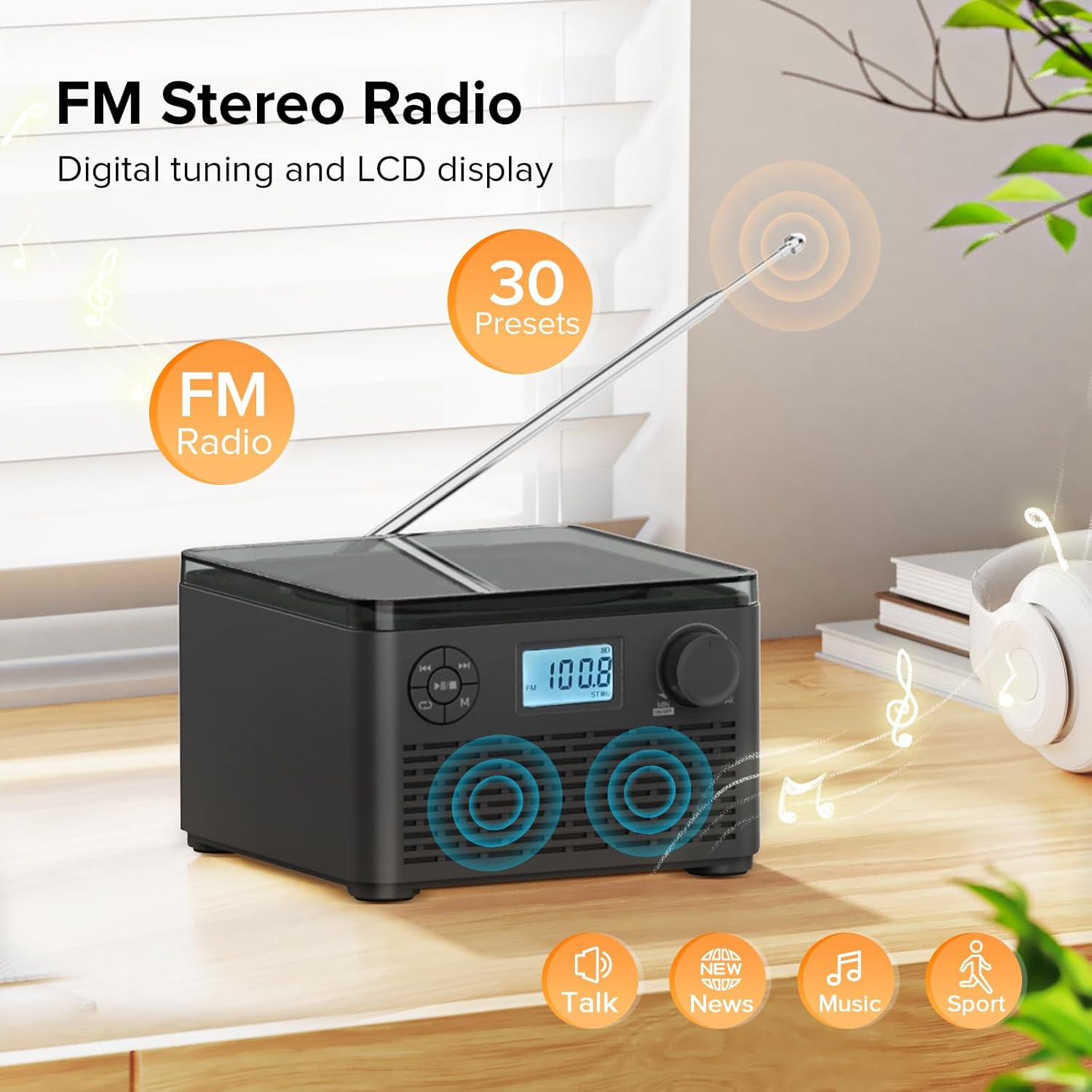
Figure 6: FM Stereo Radio - This image focuses on the FM radio feature, showing the digital display tuned to a frequency and indicating the availability of 30 presets. The extendable antenna is also visible, emphasizing its radio capabilities.
4. USB/TF Kart Oynatma
The unit supports MP3 and WMA audio formats from USB flash drives and TF (Micro SD) cards up to 32GB.
- Insert a USB flash drive into the USB port or a TF card into the TF card slot on the back of the unit. Ensure the antenna is moved out of the way if necessary.
- Basın Mod (M) button until "USB" or "TF" appears on the LCD display.
- The unit will automatically detect and begin playing audio fileTakılı depolama aygıtından.
- Kullanın Oynat/Duraklat (►▮▮), Önceki (◀◀), Ve Sonraki (►►) oynatmayı kontrol etmek için düğmeler.
- Basın Repeat/Random (↺) button to cycle through repeat modes or enable random playback.
5. Kulaklık Kullanımı
For private listening, connect standard 3.5mm headphones to the headphone jack on the back of the unit. The internal speakers will automatically mute when headphones are connected.
Bakım ve Özen
- Temizlik: Cihazın dış yüzeyini temizlemek için yumuşak, kuru bir bez kullanın. Aşındırıcı temizleyiciler veya çözücüler kullanmayın.
- CD Bakımı: Handle CDs by their edges. Keep them clean and free of scratches. Use a soft, lint-free cloth to wipe CDs from the center outwards.
- Depolamak: Uzun süre kullanılmadığı zamanlarda, cihazı serin, kuru bir yerde, doğrudan güneş ışığından ve aşırı sıcaklıklardan uzakta saklayın.
- Pil Bakım: Pil ömrünü uzatmak için pili sık sık tamamen boşaltmaktan kaçının. Cihaz sürekli kullanılmasa bile düzenli olarak şarj edin.
Sorun giderme
| Sorun | Olası Neden | Çözüm |
|---|---|---|
| Ünite açılmıyor. | Pil bitmiş veya güç adaptörü düzgün bağlanmamış. | Ensure the volume knob is rotated clockwise to turn on. Connect the power adapter and charge the unit. |
| CD atlıyor veya çalmıyor. | CD kirli, çizik veya yanlış takılmış. | Clean the CD with a soft cloth. Ensure the CD is placed correctly in the compartment. Try a different CD. |
| FM radyo alımı zayıf. | Anten uzatılmamış veya sinyal zayıf. | Fully extend the FM antenna. Try repositioning the unit for better signal. |
| Bluetooth cihazı eşleştirilemiyor. | Cihaz eşleştirme modunda değil veya cihaz çok uzakta. | Ensure the unit is in "BT" mode and flashing. Move your Bluetooth device closer to the boombox. Disconnect other Bluetooth devices. |
| USB/TF kartı tanınmıyor. | Desteklenmiyor file format veya kart kapasitesi. | Emin olmak files are MP3 or WMA format. Check that the card capacity is 32GB or less. Reinsert the card/drive. |
Özellikler
- Modeli: W15
- Marka: Kuepom
- Ürün Ölçüleri (U x G x Y): 6.3 x 6.3 x 4.2 inç
- Ürün Ağırlığı: 1.9 pound
- Güç Girişi: Doğru Akım 5V
- Pil: 1 Lityum İyon pil (dahil)
- Pil Çalma Süresi: 6-10 hours (approx., varies with usage)
- Desteklenen Disk Biçimleri: CD, CD-R, CD-RW, MP3 CD
- Supported USB/TF Card Formats: MP3, WMA (up to 32GB)
- FM Radio Frequency Range: 87.5 - 108 MHz
- Hoparlör Tipi: Dahili Stereo Hoparlörler
- Kulaklık girişi: 3.5mm
Garanti ve Destek
Kuephom products are designed and manufactured to the highest quality standards. For any questions, technical support, or warranty claims, please contact Kuephom customer service through the retailer where you purchased the product or visit the official Kuephom webdaha fazla bilgi için site.
Lütfen garanti amaçlı satın alma belgenizi saklayın.
Ask a question about this manual
Ask about setup, troubleshooting, compatibility, parts, safety, or missing instructions. Manuals+ will review the question and use this page’s manual context to help answer it.