giriiş
This manual provides essential instructions for the Pioneer Dedicated Home Theater Remote Control, model AXD7731. It covers basic setup, operation, maintenance, and troubleshooting to ensure optimal use with your compatible Pioneer home theater system. Please note that this product is a remote control only, and an instruction manual for the original home theater system or batteries for the remote are not included.
Kurmak
1. Pil Kurulumu
Uzaktan kumanda iki adet AAA pil gerektirir (dahil değildir). Pilleri takmak için şu adımları izleyin:
- Uzaktan kumandanın arkasındaki pil bölmesi kapağını bulun.
- Kapağı aşağı doğru kaydırın veya mandalı bastırıp yukarı kaldırarak açın.
- İki adet AAA pil takın ve pozitif (+) ve negatif (-) terminallerin bölmenin içindeki işaretlerle doğru şekilde hizalandığından emin olun.
- Pil bölmesi kapağını yerine takın ve yerine güvenli bir şekilde oturana kadar kaydırın.
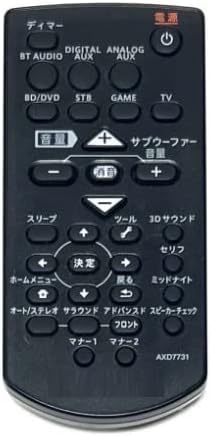
Image: The Pioneer AXD7731 remote control. The battery compartment is typically located on the back, requiring two AAA batteries.
2. İlk Kullanım
Once batteries are installed, the remote control should be ready for immediate use with compatible Pioneer home theater systems. No complex pairing or programming is typically required for dedicated replacement remotes. Point the remote directly at your home theater receiver or device and press the desired function button.
Kullanım Talimatları
This section outlines the general functions of the buttons on your AXD7731 remote control. Button layouts may vary slightly depending on the specific home theater model, but core functions remain consistent.
Resim: Ön view of the Pioneer AXD7731 remote control, displaying its array of control buttons.
- GÜÇ: Turns the home theater system ON or OFF.
- GİRİŞ SEÇİCİ: Cycles through available audio/video input sources (e.g., HDMI 1, HDMI 2, Optical, Coaxial).
- SES +/-: Increases or decreases the master volume level.
- SESSİZ: Silences the audio output. Press again to restore sound.
- MENU / HOME: Accesses the system's main menu or returns to the home screen.
- NAVIGATION (Up/Down/Left/Right) & ENTER: Menülerde gezinmek ve seçimleri onaylamak için kullanılır.
- GERİ DÖN: Önceki menüye veya ekrana geri döner.
- PLAYBACK CONTROLS (Play, Pause, Stop, Fast Forward, Rewind, Skip): Controls media playback for connected devices (e.g., Blu-ray player, media server).
- SOUND MODE / SURROUND: Selects different audio processing modes or surround sound settings.
- TUNER (AM/FM): Switches to radio tuner mode and allows station selection.
For detailed functions of specific buttons, refer to the original instruction manual of your Pioneer home theater system.
Bakım
Uzaktan Kumandayı Temizleme
Uzaktan kumandanın görünümünü ve işlevselliğini korumak için:
- Yüzeyi yumuşak, kuru bir bezle silin.
- İnatçı kirler için hafifçe silinampBezi su veya hafif, aşındırıcı olmayan bir temizleyiciyle ıslatın. Temizleyiciyi doğrudan kumandaya püskürtmeyin.
- Kumandanın yüzeyine veya iç bileşenlerine zarar verebileceğinden, sert kimyasallar, çözücüler veya aşındırıcı temizleme pedleri kullanmaktan kaçının.
Pil Değişimi
Replace batteries when the remote control becomes unresponsive or its range decreases significantly. Always replace both batteries at the same time with new AAA batteries. Do not mix old and new batteries, or different types of batteries.
Depolamak
Uzun süre kullanılmadığı zamanlarda, pil sızıntısını ve uzaktan kumandaya zarar gelmesini önlemek için pilleri çıkarın.
Sorun giderme
If you experience issues with your remote control, try the following solutions:
| Sorun | Olası Neden | Çözüm |
|---|---|---|
| Uzaktan kumanda çalışmıyor. |
|
|
| Bazı düğmeler çalışmıyor. |
|
|
| Uzaktan çalışma aralıklı olarak gerçekleşiyor. |
|
|
Özellikler
| Özellik | Detay |
|---|---|
| Model Numarası | AXD7731 |
| Marka | Generic (Dedicated for Pioneer) |
| Uyumlu Cihaz | Ev Sinema Sistemleri |
| Renk | Siyah |
| Pil Gereksinimi | AAA x 2 (Not included) |
| Düğme Sayısı | 25 |
| Paket Boyutları | 15x12x2 cm |
| Ürün Ağırlığı | 100 gr |
Garanti ve Destek
As this product is often sold as a replacement part, specific warranty information or a dedicated support manual may not be included. For warranty details, technical support, or further assistance, please refer to the original documentation provided with your Pioneer home theater system or visit the official Pioneer support website. If purchased from a third-party seller, please consult their return and warranty policies.