
1. Giriş
Thank you for choosing the NOTABRICK Bluetooth Speaker Model Vi. This portable wireless speaker is designed to deliver high-quality stereo sound with active extra bass, featuring IPX67 waterproofing and LED lights. Please read this manual carefully to ensure proper use and optimal performance of your device.
2. Paket İçeriği
- NOTABRICK Bluetooth Speaker Model Vi
- Şarj Kablosu (USB-C)
- Kullanıcı Kılavuzu
3. Ürün Bittiview
The NOTABRICK Bluetooth Speaker Model Vi features a robust design with intuitive controls. Below is an image of the speaker highlighting its main components.
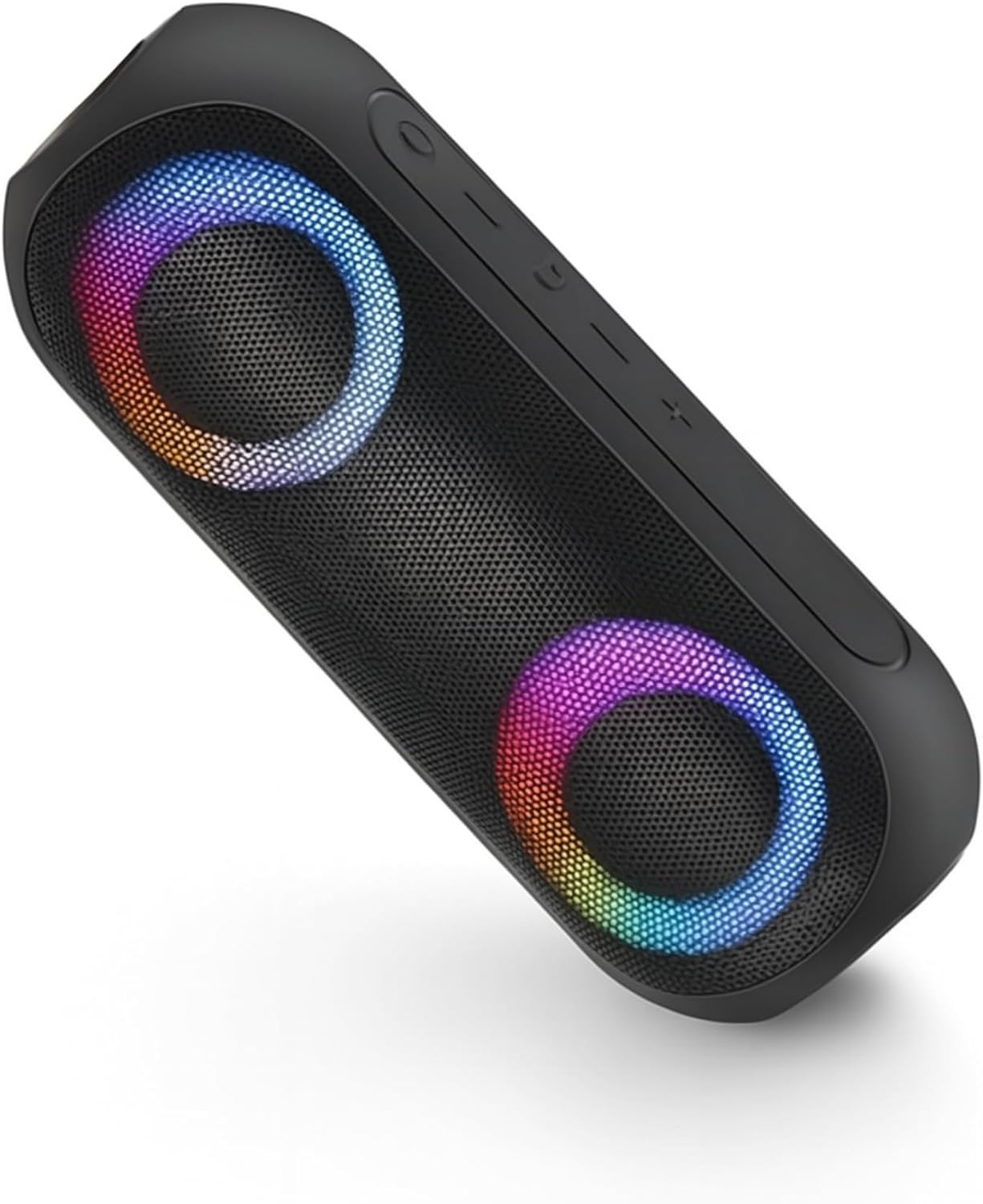
Image: The NOTABRICK Bluetooth Speaker Model Vi, showcasing its dual speaker grilles with colorful LED illumination and top-mounted control buttons.
Temel Özellikler:
- Bluetooth V5.0: Kararlı ve verimli kablosuz bağlantı için.
- 15W Output (30W Peak): Güçlü ve net ses kalitesi sunar.
- Stereo Sound with Active Extra Bass: Gelişmiş ses deneyimi.
- IPX67 Su geçirmez: Protected against dust and immersion in water up to 1 meter for 30 minutes.
- Double Pairing (TWS): Connect two speakers for a true stereo experience.
- Dahili Mikrofon: Eller serbest görüşme için.
- LED Işık Modları: Dinamik aydınlatma efektleri.
- Uzun Pil Ömrü: Up to 1000 minutes (16+ hours) of playtime on a single charge.
4. Kurulum ve Çalıştırma
4.1 Hoparlörü Şarj Etme
Before first use, fully charge the speaker. Connect the provided USB-C charging cable to the speaker's charging port and to a compatible USB power adapter (not included). The charging indicator light will show the charging status and turn off when fully charged. A full charge takes approximately 4 hours.
4.2 Güç Açma/Kapatma
- Açmak İçin: Press and hold the Power button for 2-3 seconds. You will hear an audible prompt, and the LED lights will illuminate.
- Kapatmak İçin: Güç düğmesine 2-3 saniye basılı tutun. Sesli bir uyarı duyacaksınız ve LED ışıkları sönecektir.
4.3 Bluetooth Eşleştirme
- Hoparlörün açık olduğundan ve eşleştirme modunda olduğundan emin olun (Bluetooth gösterge ışığı yanıp sönecektir).
- Cihazınızda (akıllı telefon, tablet vb.) Bluetooth'u etkinleştirin ve kullanılabilir cihazları arayın.
- Select "NOTABRICK Vi" from the list of devices.
- Once paired, you will hear a confirmation sound, and the Bluetooth indicator light will remain solid.
Hoparlör, açıldığında otomatik olarak en son eşleştirilen cihaza yeniden bağlanmayı deneyecektir.
4.4 Gerçek Kablosuz Stereo (TWS) Eşleştirme
To pair two NOTABRICK Bluetooth Speaker Model Vi units for a stereo sound experience:
- Her iki hoparlörün de açık olduğundan ve başka bir Bluetooth cihazına bağlı olmadığından emin olun.
- On one speaker (this will be the primary speaker), press the TWS button (often indicated by a double-arrow or similar icon). The speaker will enter TWS pairing mode.
- Birincil konuşmacı otomatik olarak ikincil konuşmacıyı arayacak ve ona bağlanacaktır.
- Eşleştirme işlemi başarıyla tamamlandığında, bir onay sesi duyacaksınız ve her iki hoparlördeki LED göstergeleri senkronize olacaktır.
- Şimdi, cihazınızı 4.3 bölümünde açıklandığı gibi Bluetooth aracılığıyla ana hoparlöre bağlayın. Ses, her iki hoparlörden de stereo olarak çalacaktır.
4.5 Controlling Playback and Calls
- Oynat/Duraklat: Oynat/Duraklat düğmesine bir kez basın.
- Sesi aç: '+' tuşuna basın.
- Sesi kıs: '-' tuşuna basın.
- Sonraki Parça: '+' tuşuna basılı tutun.
- Önceki parça: '-' tuşuna basılı tutun.
- Çağrıyı Cevapla/Sonlandır: Gelen bir arama sırasında Oynat/Duraklat düğmesine bir kez basın.
- Çağrıyı Reddet: Gelen bir arama sırasında Oynat/Duraklat düğmesini basılı tutun.
4.6 LED Işık Modu
The speaker features multiple LED light modes. Press the Light Mode button (often indicated by a sun or lightbulb icon) to cycle through different lighting effects or to turn the lights off.
5. Bakım ve Onarım
- Temizlik: Yumuşak bir d kullanınamp Hoparlörü temizlemek için bir bez kullanın. Aşındırıcı temizleyiciler veya çözücüler kullanmayın.
- Su Yalıtımı: Ensure the charging port cover is securely closed to maintain IPX67 waterproofing. Do not intentionally submerge the speaker for extended periods or beyond specified depths.
- Pil Bakım: To prolong battery life, avoid fully discharging the speaker frequently. Charge the speaker regularly, even if not in use, to prevent deep discharge.
- Depolamak: Hoparlörü aşırı sıcaklıklardan uzak, serin ve kuru bir yerde saklayın.
6. Sorun Giderme
| Sorun | Olası Neden | Çözüm |
|---|---|---|
| Hoparlör açılmıyor. | Pil zayıf. | Hoparlörü tam olarak şarj edin. |
| Bluetooth üzerinden eşleştirme yapılamıyor. | Hoparlör eşleştirme modunda değil; cihazın Bluetooth'u kapalı; hoparlörden çok uzakta. | Ensure speaker is in pairing mode. Turn Bluetooth on your device. Move device closer to speaker (within 100 feet). |
| Ses yok. | Ses seviyesi çok düşük; hoparlör bağlı değil; ses kaynağı sorunu. | Hoparlör ve cihaz sesini artırın. Bluetooth'u yeniden eşleştirin. Ses kaynağını kontrol edin. |
| TWS eşleştirmesi başarısız. | Speakers already paired to another device; too far apart. | Disconnect speakers from other devices. Ensure speakers are close to each other. |
7. Özellikler
| Özellik | Detay |
|---|---|
| Model Adı | Vi |
| Bluetooth Sürümü | V5.0 |
| Hoparlör Çıkış Gücü | 30 Watt (Tepe) |
| Suya Dayanıklılık Derecesi | IPX67 |
| Pil Kapasitesi | 3600 mAh (1 Lithium Ion battery included) |
| Şarj Süresi | Yaklaşık 4 saat |
| Oyun zamanı | Up to 1000 minutes (16+ hours) |
| Bluetooth Menzili | 100 feet'e (30 metre) kadar |
| Ürün Boyutları | 8.3"D x 2.7"G x 2.7"Y |
| Ürün Ağırlığı | 1.43 pound |
| Malzeme | Acrylonitrile Butadiene Styrene (ABS), Thermoplastic Polyurethane (TPU) |
| Bağlantı Teknolojisi | Yardımcı, Bluetooth |
| Özel Özellikler | Dahili Mikrofon, LED Işık, Taşınabilir, Stereo Eşleştirme, Su Geçirmez |
8. Garanti Bilgileri
The NOTABRICK Bluetooth Speaker Model Vi comes with a limited warranty. Please refer to the warranty card included in your package or contact customer support for specific details regarding warranty coverage and terms.
9. Müşteri Desteği
If you encounter any issues or have questions regarding your NOTABRICK Bluetooth Speaker Model Vi, please contact NOTABRICK customer support. Contact information can typically be found on the product packaging or the official NOTABRICK webalan.