
Ürün Bittiview
This manual provides detailed instructions for the Syncwire Bluetooth 5.4 FM Transmitter Car Adapter, Model SW-XC965. This device allows you to stream audio wirelessly from your Bluetooth-enabled devices to your car's FM radio, make hands-free calls, and fast charge multiple devices simultaneously.
Temel Özellikler
- 66W Fast Charge Adapter with USB-C Coiled Cable
- Latest Bluetooth 5.4 Chip for stable connection
- Stronger Dual Mics with CVC Noise Reduction for clear calls
- Bass Boosted & Hi-Fi Stereo Music
- LED Ambient Light Control
- Wide Compatibility with smartphones and vehicles (12-24V)


Kutuda Neler Var?
- Syncwire Bluetooth 5.4 FM Verici Araç Adaptörü
- 3 Yıl Garanti
Kurulum Talimatları
Adım 1: Gücü Açın
Insert the Syncwire FM Transmitter into your car's cigarette lighter socket. The device will power on automatically and its LED display will light up.
Step 2: Tune FM Radio
Select an unused FM frequency on your car's radio. Choose a frequency that has no existing radio station broadcasting on it, typically indicated by static or a clear, empty channel.

Adjust your car's FM radio to an empty frequency, such as 103.00 MHz. Step 3: Match FM Frequency
On the Syncwire FM Transmitter, adjust its FM frequency to match the one you selected on your car radio. Use the 'CH' button or the multi-function knob to change the frequency.
Step 4: Pair Bluetooth
On your smartphone or Bluetooth-enabled device, enable Bluetooth and search for available devices. Select "SW-XC965" from the list to pair. Once paired, audio from your device will be transmitted to your car's speakers.
Pair your mobile device with the transmitter by selecting "SW-XC965" in your Bluetooth settings.
Kullanım Talimatları
Kontroller Üzerindeview
- FM Ekranı: Geçerli FM frekansını gösterir.
- Multifunction Button (FM+/- / Volume+/- / Answer/Hang up/Reject):
- Sesi ayarlamak için döndürün.
- Çağrıları cevaplamak/sonlandırmak için basın.
- Long press to reject calls.
- Müziği çalmak/duraklatmak için kısa basın.
- Rotate to change FM frequency (after pressing CH button).
- CH Düğmesi: Press to enter FM frequency adjustment mode.
- Deep Bass/Light Switch ('b' button):
- Short press to activate/deactivate Deep Bass mode.
- Long press to turn the LED ambient light on/off.
- Large Mic: Eller serbest görüşme için.
- USB-C Kablosu: Integrated coiled cable for charging.
- QC 3.0 Port: Quick Charge 3.0 USB-A port for fast charging.
- PD 30W Port: Power Delivery 30W USB-C port for fast charging.
Müzik Çalma
Once paired via Bluetooth, music from your device will automatically play through your car's FM radio.
Deep Bass & Hi-Fi Stereo
To enhance your audio experience, press the 'b' button to toggle between standard mode and deep bass mode. This feature provides authentic Hi-Fi sound with boosted bass.

Eller Serbest Arama
The transmitter features a dual-mic system with CVC noise suppression and echo-canceling technology for clear call quality.

- Cevap Çağrısı: Çok Fonksiyonlu Düğmeye kısa süreli basın.
- Çağrı Sonu: Short press the Multifunction Button during a call.
- Çağrıyı Reddet: Long press the Multifunction Button.
Şarj Cihazları
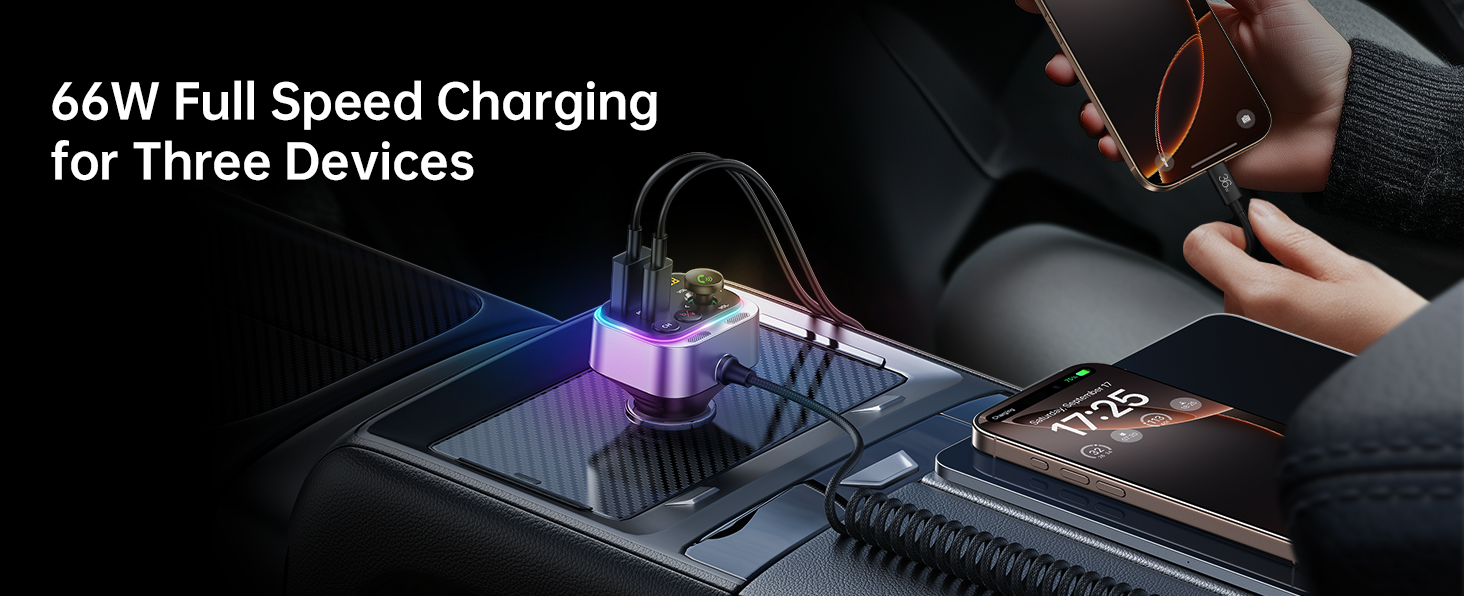
The Syncwire FM Transmitter is equipped with a 66W combined power output, including a PD 3.0 port, a QC 3.0 port, and a 6ft built-in coiled USB-C cable. This allows you to charge up to three devices simultaneously.


LED Ambient Light Control
The transmitter features a vibrant LED display. You can turn the light on or off by long pressing the 'b' button according to your preference.

Bakım
To ensure optimal performance and longevity of your Syncwire FM Transmitter:
- Cihazı yumuşak, kuru bir bezle silerek temiz tutun.
- Cihazı aşırı sıcaklıklara, doğrudan güneş ışığına veya neme maruz bırakmaktan kaçının.
- Cihazı kendiniz sökmeye veya onarmaya çalışmayın. Her türlü onarım için yetkili servis personeline başvurun.
- Ensure the cigarette lighter socket is clean and free of debris for a stable connection.
Sorun giderme
| Sorun | Çözüm |
|---|---|
| No power/device not turning on |
|
| Statik veya zayıf ses kalitesi |
|
| Bluetooth bağlanmıyor |
|
| Şarj yavaş veya çalışmıyor |
|
Özellikler
| Özellik | Detay |
|---|---|
| Model Numarası | SW-XC965 |
| Bluetooth Sürümü | 5.4 |
| Giriş Voltage | 12-24V |
| Şarj Portları | 1x PD 3.0 (USB-C), 1x QC 3.0 (USB-A), 1x Integrated USB-C Coiled Cable |
| Toplam Güç Çıkışı | 66W'a kadar |
| Mikrofon | Dual Mics with CVC Noise Reduction |
| Kablo Uzunluğu | 6ft (1.8m) coiled USB-C cable |
| Ürün Ağırlığı | 3.84 ons (0.11 Kilogram) |
| Boyutlar | 3.62 x 3.46 x 1.93 inç |
Garanti ve Destek
This Syncwire product comes with a 3-year warranty. For technical support, warranty claims, or further assistance, please visit the official SYNCWIRE websitesine gidin veya müşteri hizmetleriyle iletişime geçin.
Official SYNCWIRE Store: SYNCWIRE Amazon Store
Güvenlik Bilgileri
Refer to general wireless audio adapter safety guidelines.
Ürün Videosu
Bu video görsel bir açıklama sağlarview of the Syncwire Bluetooth 5.4 FM Transmitter, showcasinÖzellikleri ve tasarımı.