
1. Giriş
The Sygonix SY-5044422 Digital Timer Switch is designed for easy programming and operation, helping to manage power consumption for various appliances. This device features 20 ON/OFF programs, 3 random settings, and a countdown function, with switching intervals as short as 1 minute. Programs can be set for specific days, combinations of days, or daily. Its IP44 splash-proof rating allows for outdoor use, and an integrated battery retains settings during power outages. The timer supports a maximum switching capacity of 1800 W and includes enhanced touch protection.
2. Güvenlik Talimatları
- Kullanmadan önce tüm talimatları dikkatlice okuyunuz.
- This device is rated IP44, making it splash-proof for outdoor use. However, do not immerse it in water or expose it to direct jets of water.
- Ensure the total load of connected appliances does not exceed 1800 W.
- Do not open the device housing. Repairs should only be performed by qualified personnel.
- Keep out of reach of children. The device features enhanced touch protection.
- Always unplug the timer from the power outlet before cleaning.
3. Paket İçeriği
- Sygonix SY-5044422 Digital Timer Switch
- Kullanım Kılavuzu
- Garanti Bilgileri
4. Ürün Bittiview
Familiarize yourself with the components and controls of your digital timer switch.
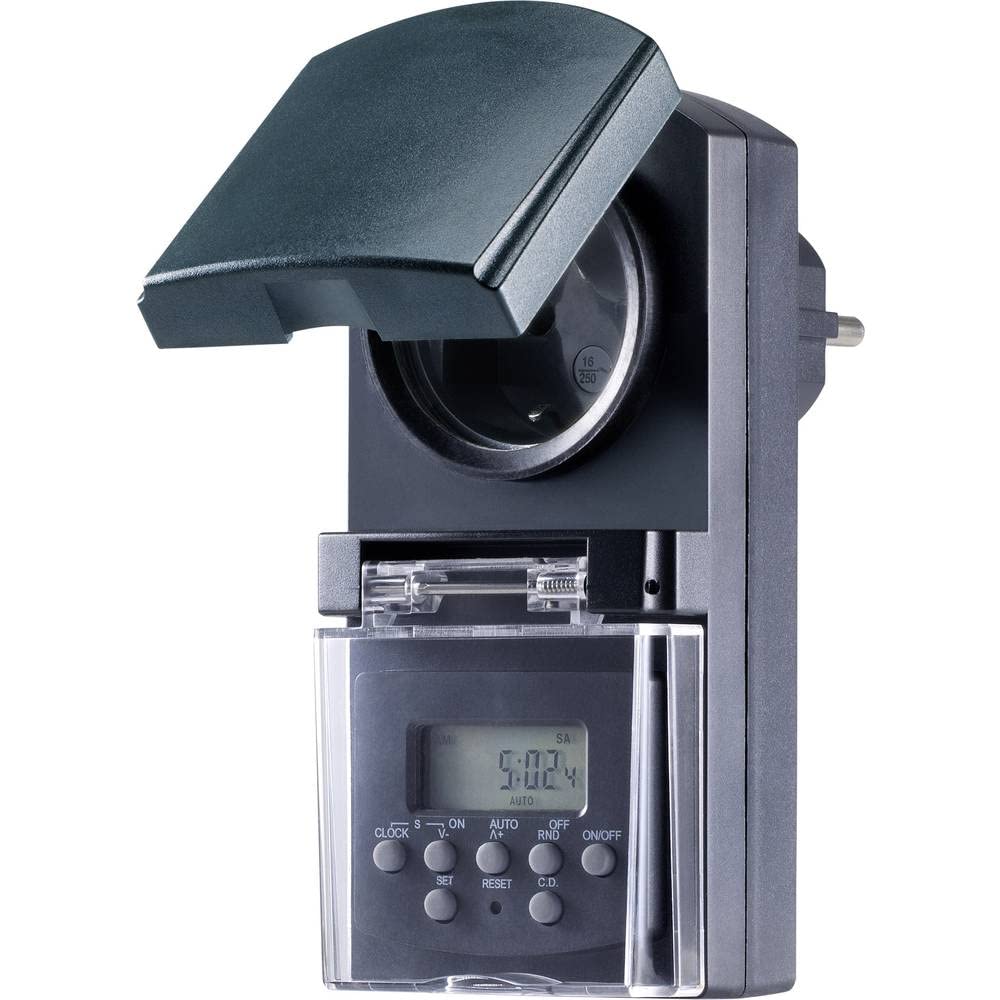
Şekil 1: Ön view of the Sygonix SY-5044422 Digital Timer Switch. This image displays the LCD screen, which shows the current time and day, along with various control buttons including CLOCK, ON/OFF, SET, RESET, AUTO/A+, OFF/RND, and C.D. (Countdown).

Şekil 2: Ön view of the timer with the protective cover opened, showing the integrated power socket. The display and control buttons are visible below the socket.
Kontrol Düğmeleri:
- SAAT: Güncel saat ve günü ayarlamak için kullanılır.
- AÇIK/KAPALI: Manually switches the timer output ON or OFF.
- AYARLAMAK: Programlama moduna girer ve ayarları onaylar.
- SIFIRLA: Clears all settings and resets the timer to factory defaults.
- AUTO/A+: Cycles through automatic mode, program settings, and adjusts values.
- OFF/RND: Activates or deactivates the Random function.
- C.D. (Countdown): Activates or deactivates the Countdown function.
5. Kurulum
5.1 İlk Şarj
Before first use, plug the timer into a power outlet for approximately 30 minutes to charge the internal battery. This ensures the display is active and settings are retained during power outagveya fişi çekildiğinde.
5.2 Geçerli Saati ve Günü Ayarlamak
- Basılı tutun SAAT düğme.
- Tutarken SAAT, basmak AUTO/A+ repeatedly to set the current day (MO, TU, WE, TH, FR, SA, SU).
- Tutarken SAAT, basmak AYARLAMAK repeatedly to set the current hour.
- Tutarken SAAT, basmak OFF/RND repeatedly to set the current minute.
- Serbest bırak SAAT düğmesine basarak ayarları kaydedin.
5.3 Summer Time Adjustment
The timer supports a summer time function. To activate or deactivate:
- Basılı tutun SAAT düğme ve AÇIK/KAPALI button simultaneously for 3 seconds. The display will show "SUMMER" or "WINTER" to indicate the mode.
6. Kullanım Talimatları
6.1 Programming ON/OFF Times (Weekly Program)
The timer allows for up to 20 ON/OFF programs. Each program can be set for specific days or combinations of days.
- Basın AYARLAMAK button once to enter program mode. The display will show "1 ON".
- Basmak AUTO/A+ to select the desired day(s) for the program (e.g., MO, TU, WE, TH, FR, SA, SU, MO-FR, SA-SU, MO-SA, etc.).
- Basmak AYARLAMAK to confirm the day selection.
- Basmak AUTO/A+ İstenilen çalışma saatini ayarlamak için.
- Basmak OFF/RND İstenilen AÇIK kalma süresini ayarlamak için.
- Basmak AYARLAMAK again. The display will now show "1 OFF".
- Repeat steps 2-5 to set the OFF time for the same program.
- Basmaya devam et AYARLAMAK to cycle through all 20 ON/OFF programs. To exit program mode at any time, press the SAAT düğme.
Not: After programming, ensure the timer is in OTOMATİK mode for the programs to execute. Press AÇIK/KAPALI repeatedly until "AUTO" is displayed.
6.2 Geri Sayım Fonksiyonu
The countdown function allows you to switch the connected appliance ON or OFF after a set duration.
- Basın CD button once. The display will show "CD ON" or "CD OFF".
- Basmak AUTO/A+ to set the desired countdown hour.
- Basmak OFF/RND to set the desired countdown minute.
- Basmak CD again to start the countdown. The display will show the remaining time.
- Geri sayımı iptal etmek için basın. CD Bir kez daha.
6.3 Random Function (Presence Simulation)
The random function simulates presence by randomly switching the connected appliance ON and OFF within a set time window, deterring potential intruders.
- Zamanlayıcının açık olduğundan emin olun. OTOMATİK mod.
- Basın OFF/RND button. The display will show "RND" to indicate the random function is active.
- The timer will now randomly switch the output ON and OFF for short periods within the programmed ON/OFF times.
- To deactivate the random function, press OFF/RND again. "RND" will disappear from the display.
6.4 Manual ON/OFF Override
You can manually override the programmed settings at any time.
- Basın AÇIK/KAPALI button repeatedly to cycle through "ON", "OFF", and "AUTO" modes.
- "ON" means the output is continuously ON.
- "OFF" means the output is continuously OFF.
- "AUTO" means the timer will follow the programmed settings.
7. Bakım
- Before cleaning, always unplug the timer from the power outlet.
- Cihazı yumuşak ve kuru bir bezle silin. Aşındırıcı temizleyiciler veya çözücüler kullanmayın.
- Cihazın içine hiçbir sıvının girmemesine dikkat edin.
8. Sorun Giderme
| Sorun | Olası Neden | Çözüm |
|---|---|---|
| Ekran boş veya karanlık. | Dahili pil boşalmış. | Plug the timer into a live power outlet for at least 30 minutes to charge the battery. |
| Programlar çalışmıyor. | Zamanlayıcı otomatik modda değil. | Basın AÇIK/KAPALI button repeatedly until "AUTO" is displayed. |
| Görüntülenen saat veya gün yanlış. | Saat/gün doğru ayarlanmamış veya sıfırlanmış. | Refer to Section 5.2 "Setting Current Time and Day" to re-set. |
| All settings lost after power outage. | Internal battery not charged or faulty. | Ensure the timer is regularly plugged in to keep the internal battery charged. If the issue persists, contact support. |
9. Özellikler
| Model Numarası: | SY-5044422 |
| Max. Switching Capacity: | 1800 B |
| Koruma Sınıfı: | IP44 (Sıçramaya dayanıklı) |
| Görüntüleme Türü: | Dijital |
| Programlar: | 20 AÇIK/KAPALI program |
| Minimum Switching Interval: | 1 dakika |
| Özel Özellikler: | Countdown function, Random function (presence simulation), Summer time, Integrated battery for settings retention, Enhanced touch protection. |
| Ürün Ölçüleri: | 14x10x6 cm |
| Üretici: | Sygonix |
| Menşei ülke: | Çin |
10. Garanti ve Destek
This product comes with a minimum 2-year warranty from the date of purchase. In case of any issues or defects, please contact your retailer or Sygonix customer support for assistance. Keep your proof of purchase for warranty claims.