
giriiş
Welcome to your new Candy Smart CSTG 28TMV5/1-S Top Load Washing Machine. This manual provides essential information for the safe and efficient operation, installation, and maintenance of your appliance. Please read this manual thoroughly before using the washing machine and keep it for future reference.

Resim: Ön view of the Candy Smart CSTG 28TMV5/1-S Top Load Washing Machine.
Güvenlik Bilgileri
Kişisel yaralanmaları veya cihazda hasarı önlemek için, lütfen aşağıdaki güvenlik önlemlerine daima uyun:
- Kullanmadan önce tüm talimatları okuyunuz.
- Çalışma sırasında çocukları ve evcil hayvanları cihazdan uzak tutun.
- Do not operate the washing machine if the power cord is damaged. Contact qualified service personnel.
- Elektrik çarpmasını önlemek için cihazın doğru şekilde topraklanmış olduğundan emin olun.
- Yanıcı veya patlayıcı maddelerle temizlenmiş, yıkanmış, ıslatılmış veya lekelenmiş eşyaları yıkamayın.
- Temizlik veya bakım işlemlerine başlamadan önce cihazın fişini daima çekin.
- Do not attempt to repair or replace any part of your washing machine unless specifically recommended in this manual.
Kurulum ve Yükleme
Proper installation is crucial for the performance and longevity of your washing machine. The following items are included in the box:
- Üstten Yüklemeli Çamaşır Makinesi
- Tahliye Hortumu
- Güç kablosu
- Kullanım Kılavuzu
1. Paketten çıkarma
Tüm ambalaj malzemelerini dikkatlice çıkarın. Önemli: Locate and remove the four transit bolts (shipping bolts) from the rear of the machine. These bolts secure the drum during transport and must be removed before operation to prevent severe vibration and damage.

Image: Illustration of transit bolts on the rear of a washing machine, which must be removed before use.
2. Yerleşim
Place the washing machine on a firm, level surface. Ensure there is adequate space around the machine for ventilation and access. Adjust the leveling feet until the machine is stable and does not wobble.

Image: Dimensions of the Candy Smart Top Load Washing Machine (41cm width, 60cm depth, 86cm height).
3. Su Bağlantısı
Connect the water inlet hose to a cold water tap. Ensure all connections are tight to prevent leaks. Position the drain hose into a standpipe or laundry tub, ensuring it is securely fastened and allows for proper drainage.
4. Elektriksel bağlantı
Plug the power cable into a grounded electrical outlet. Do not use extension cords or adapters.
5. Initial Wash Cycle
Before washing clothes, run an empty wash cycle (e.g., a quick wash program) without detergent to clean the drum and internal components.
Kullanım Talimatları
Your Candy Smart washing machine is designed for ease of use. Familiarize yourself with the control panel and its functions.
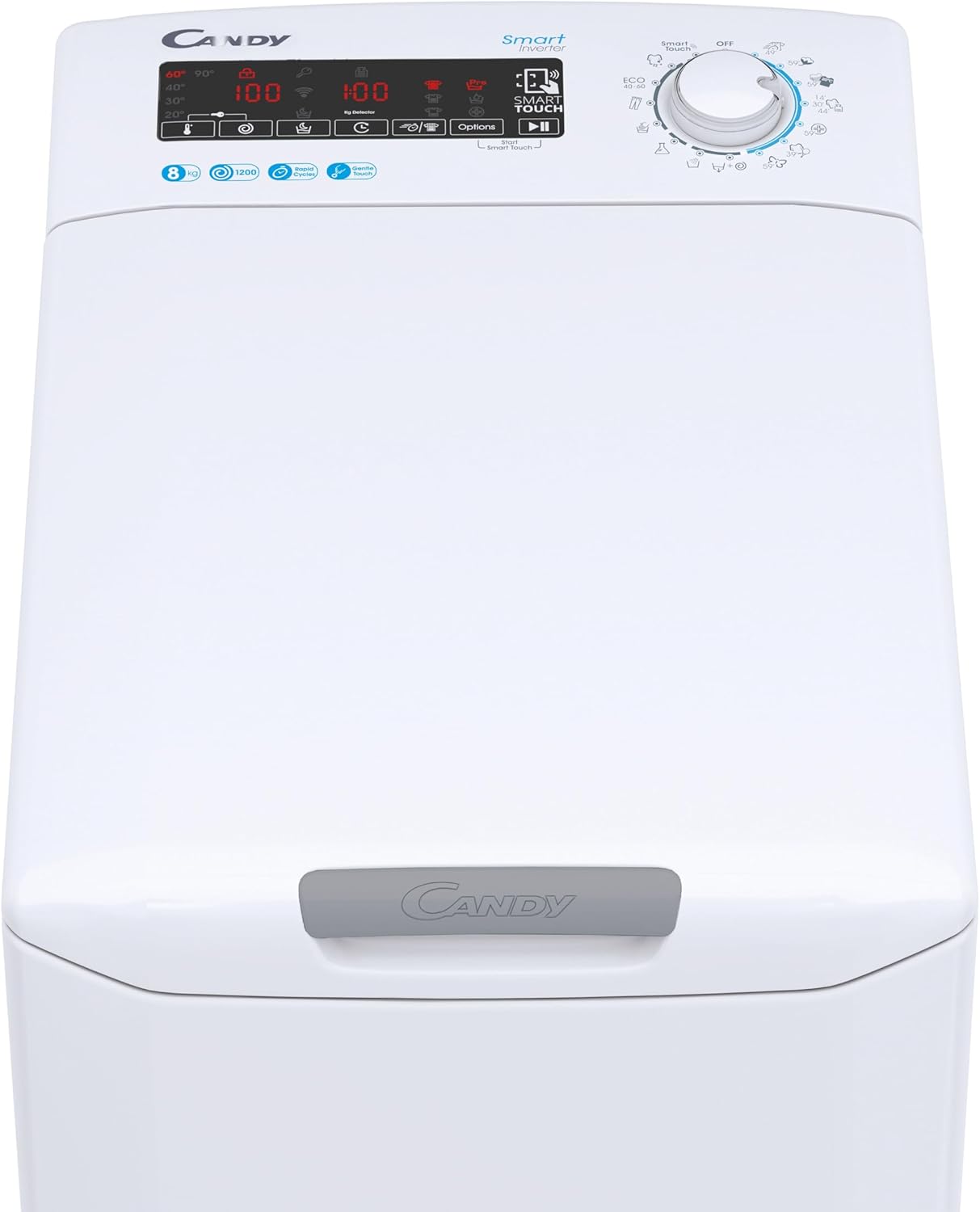
Resim: Ayrıntılı view of the control panel, showing the digital display and program selector.
1. Çamaşırların Yüklenmesi
Open the top lid using the Gentle Opening mechanism. Load laundry into the drum, ensuring not to exceed the 8 kg capacity. Overloading can affect wash performance and damage the machine.
2. Deterjan Ekleme
Add the appropriate amount of detergent and fabric softener to their respective compartments in the dispenser drawer. Refer to your detergent packaging for recommended dosages.
3. Program Seçme
Turn the program selector dial to choose one of the 17 available wash cycles. The digital display will show the default settings for the selected program. Available programs include:
- Perfect Cotton 59'
- Colors and Mixed 59'
- Delicates 59'
- Sport Plus 39'
- Rapid cycles (14', 30', 44')
- Hygienic Cycle
Additional cycles can be accessed via the Candy Simply-Fi App using NFC technology.
4. Seçeneklerin Ayarlanması
Use the tactile buttons on the digital display to adjust options such as spin speed (up to 1200 RPM), temperature, or to activate the 24-hour delayed start function. The KG Detector automatically adjusts water and energy consumption based on the load size.
5. Döngüyü Başlatmak
Press the Start/Pause button to begin the wash cycle. The machine will lock the lid and start filling with water.
6. Smart Features (NFC & Voice Assistant)
Your washing machine is equipped with NFC technology and voice assistant compatibility. Download the Candy Simply-Fi App to your smartphone. Follow the in-app instructions to connect your device and access additional programs, diagnostics, and remote control features.


Image: Icons illustrating NFC connectivity and smart control via a smartphone app.
Bakım
Düzenli bakım, çamaşır makinenizin optimum performansını sağlar ve ömrünü uzatır.
1. Dış Cephenin Temizlenmesi
Dış yüzeyleri yumuşak, damp bezle silin. Aşındırıcı temizleyiciler veya çözücüler kullanmayın.
2. Deterjan Haznesinin Temizlenmesi
Kalıntı birikmesini önlemek için deterjan haznesini periyodik olarak çıkarıp temizleyin. Akan su altında durulayın ve tekrar yerine takın.
3. Tahliye Pompası Filtresinin Temizlenmesi
The drain pump filter should be cleaned regularly to prevent blockages. Refer to the detailed instructions in the full manual for safe access and cleaning procedures. Always drain residual water before opening the filter cover.
4. Tambur Temizliği
Run a maintenance wash cycle (e.g., a hot wash with a specialized washing machine cleaner) periodically to prevent odors and mold buildup in the drum.
Sorun giderme
If you encounter issues with your washing machine, consult the following common troubleshooting tips:
| Sorun | Olası Neden | Çözüm |
|---|---|---|
| Makine başlamıyor | Power cord unplugged, door not closed properly, program not selected, delayed start active. | Check power connection, ensure lid is fully closed, select a program, check for delayed start setting. |
| Su doldurma yok | Su musluğu kapalı, giriş hortumu bükülmüş, su basıncı çok düşük. | Musluğu açın, hortumu düzeltin, su kaynağını kontrol edin. |
| Su akmıyor | Tahliye hortumu bükülmüş veya tıkalı, tahliye pompası filtresi tıkalı. | Check and clear drain hose, clean drain pump filter. |
| Aşırı titreşim/gürültü | Taşıma cıvataları çıkarılmamış, makine düz değil, yük dengesiz. | Ensure transit bolts are removed. Level the machine using adjustable feet. Redistribute laundry inside the drum. |
| Kötü yıkama sonuçları | Overloading, incorrect detergent dosage, wrong program selected. | Reduce load size, adjust detergent amount, select appropriate wash program. |
For error codes displayed on the digital screen or more complex issues, refer to the full user manual available via the Candy Simply-Fi App or the manufacturer's webalan.
Özellikler
Key technical specifications for the Candy Smart CSTG 28TMV5/1-S Washing Machine:
| Özellik | Şartname |
|---|---|
| Model Numarası | 31019930 |
| Marka | Şeker |
| Kapasite | 8 Kilogram |
| Maksimum Sıkma Hızı | 1200 RPM |
| Yükleme Türü | En Yük |
| Boyutlar (D x G x Y) | 60 cm x 41 cm x 86 cm |
| Ağırlık | 58 Kilogram |
| Renk | Beyaz |
| Kontrol Türü | Tactile Digital Display |
| Özel Özellikler | 17 Programs, Gentle Touch Opening, Inverter Motor, Mix Power System+, NFC Technology, Voice Assistant, KG Detector, 24H Delayed Start |
| Malzeme | Plastik |
| Gürültü Seviyesi (Döndürme) | 77 dB |
Garanti ve Destek
Your Candy Smart CSTG 28TMV5/1-S Washing Machine comes with a manufacturer's warranty. Please refer to the warranty card included with your purchase or visit the official Candy webAyrıntılı şartlar ve koşullar için site.
For technical assistance, spare parts, or service requests, please contact Candy customer support. Contact information can typically be found on the manufacturer's webSitede veya ürünün tüm dokümanlarında.
Çevrimiçi Kaynaklar: For the most up-to-date information, FAQs, and digital copies of manuals, visit the official Candy Brand Store or the main Candy webalan.