
FOREVER GSM169761
FOREVER Akıllı Saat SW-800 Kullanım Kılavuzu
Model: SW-800 (GSM169761)
giriiş
This manual provides essential information for the proper use and maintenance of your FOREVER Smartwatch SW-800. Please read it thoroughly before operating the device to ensure optimal performance and longevity. The SW-800 features a 1.3-inch AMOLED display, Bluetooth connectivity, and various fitness tracking capabilities.

Image: The FOREVER Smartwatch SW-800, showcasing its versatile design with both metal and silicone strap options, and various digital watch faces.
Kurmak
1. Akıllı Saati Şarj Etme
Before first use, fully charge your smartwatch. Connect the charging cable to the charging port on the back of the watch and plug the USB end into a power adapter (not included) or a computer's USB port. The watch display will indicate charging status.

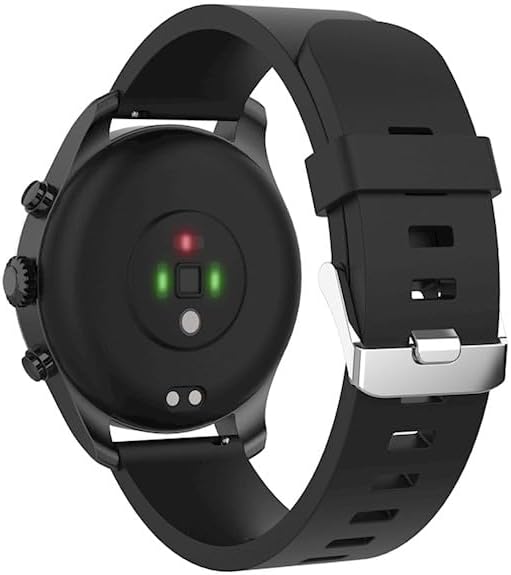
Resim: Arka view of the smartwatch, highlighting the magnetic charging pins and the optical heart rate sensors.
2. Açma/Kapama
- To power on: Press and hold the side button until the FOREVER logo appears.
- To power off: Press and hold the side button, then select "Power Off" on the screen.
3. Akıllı Telefonunuzla Eşleştirme
- Download the companion application from the App Store (for iOS) or Google Play Store (for Android). Arama "FOREVER Smartwatch" or refer to the QR code in the watch's settings.
- Akıllı telefonunuzda Bluetooth'un etkinleştirildiğinden emin olun.
- Uygulamayı açın ve hesap oluşturmak veya giriş yapmak için ekrandaki yönergeleri izleyin.
- Uygulama içinden "Cihaz Ekle" veya "Cihaz Eşleştir" seçeneğini seçin.
- Select "SW-800" from the list of available devices.
- Eşleştirme isteğini hem akıllı telefonunuzdan hem de akıllı saatinizden onaylayın.

Image: A smartphone displaying the FOREVER companion app interface, with the smartwatch screen prompting the user to "Connect APP" via Bluetooth.
Akıllı Saatin Çalıştırılması
1. Temel Gezinme
- Dokunmatik ekran: Menüler ve bildirimler arasında gezinmek için sola, sağa, yukarı veya aşağı kaydırın. Bir öğeyi seçmek için dokunun.
- Yan Düğme: Ana ekrana dönmek veya ekranı uyandırmak için basın. Güç seçenekleri için uzun basın.
2. Temel Özellikler
- Nabız İzleme: The smartwatch continuously monitors your heart rate. Access the heart rate widget or app on the watch to view gerçek zamanlı veriler ve tarihsel eğilimler.
- Pedometre: Günlük adım sayınızı, kat ettiğiniz mesafeyi ve yakılan kalorileri takip eder.
- Spor Modları: The SW-800 supports 14 different sports modes, including running, cycling, and walking. Select a mode before starting an activity to track specific metrics.
- Uyku Takibi: Derin uyku, hafif uyku ve uyanma süreleriniz de dahil olmak üzere uyku düzeninizi izler.
- Kan Oksijen (SpO2) İzlemesi: Kanınızdaki oksijen satürasyon seviyelerini ölçün.
- Sıcaklık İzleme: Provides body temperature readings.
- Müzik Kontrolü: Bağlı akıllı telefonunuzdaki müzik çalma işlemini doğrudan saatinizden kontrol edin.
- Bildirimler: Receive call, message, and app notifications from your smartphone.

Image: A collage of watch faces illustrating the various health and fitness tracking features, including heart rate, step count, calorie burn, sleep analysis, body temperature, and blood oxygen levels.

Image: The smartwatch displaying a graph of body temperature measurements over time, indicating current and historical readings.

Image: The smartwatch screen showing a blood oxygen saturation (SpO2) reading of 97%, along with a trend graph.

Image: The smartwatch worn by a runner, actively tracking fitness metrics during an outdoor exercise session.
Bakım
1. Temizlik
Cilt tahrişini önlemek ve cihazın işlevselliğini korumak için akıllı saatinizi ve kayışınızı düzenli olarak temizleyin. Yumuşak, tiftiksiz bir bez kullanın. Gerekirse, hafifçe kurulayın.ampBezi suyla yıkayın. Sert kimyasallar veya aşındırıcı malzemeler kullanmaktan kaçının.
2. Suya Dayanıklılık (IP68)
The SW-800 is rated IP68, meaning it is resistant to dust and can withstand immersion in water up to 1.5 meters for up to 30 minutes. It is suitable for daily use, such as hand washing or light rain. However, it is not recommended for swimming, diving, or high-pressure water activities.
3. Pil Bakımı
- Pilin sık sık tamamen boşaltılmasından kaçının.
- Cihazı aşırı sıcaklıklara maruz bırakmayın.
- Yalnızca birlikte verilen şarj kablosunu kullanın.
Sorun giderme
1. Saat Açılmıyor
- Saatinizin tam şarjlı olduğundan emin olun. Saatinizi en az 30 dakika şarj cihazına takın.
- Try pressing and holding the side button for 10-15 seconds to force a restart.
2. Bağlantı Sorunları (Bluetooth)
- Hem akıllı saatinizde hem de akıllı telefonunuzda Bluetooth'un etkinleştirildiğinden emin olun.
- Akıllı saatin telefonunuzun Bluetooth menzili içinde olduğundan emin olun.
- Hem akıllı saatinizi hem de akıllı telefonunuzu yeniden başlatın.
- Unpair the device from your phone's Bluetooth settings and re-pair it through the companion app.
3. Yanlış Sağlık Ölçümleri
- Saatin bileğinize tam oturduğundan, ancak çok da sıkı olmadığından emin olun.
- Saatin arkasındaki sensörleri temizleyin.
- Ölçüm sırasında aşırı hareketlerden kaçınınız.
- Note that these devices are not medical instruments and readings are for reference only.
4. App Not Syncing Data
- Akıllı telefonunuzdan internet bağlantınızı kontrol edin.
- Ensure the companion app has all necessary permissions enabled in your phone's settings.
- Close and reopen the app, or restart your phone.
Özellikler
| Model Adı | SW-800 (GSM169761) |
| Görüntülemek | 1.3 inç AMOLED, 360 x 360 piksel |
| Bağlantı | Bluetooth |
| Suya Dayanıklılık | IP68 |
| Sensörler | Heart Rate Monitor, Pedometer, SpO2, Temperature |
| Pil Türü | Lityum İyon |
| Uyumlu Cihazlar | Akıllı telefon |
| İnsan Arayüzü Girişi | Düğmeler, Dokunmatik Ekran |
| Ebatlar (Paket) | 11.2x9.2x7.1 cm |
| Ağırlık (Paket) | 240 gr |
Resim: Ayrıntılı view of the smartwatch, emphasizing its 1.3-inch display with 360x360 pixel resolution, and the sleek design of the metal band.
Garanti ve Destek
Your FOREVER Smartwatch SW-800 comes with a standard manufacturer's warranty. Please refer to the warranty card included in your product packaging for specific terms and conditions, including the warranty period and coverage details.
For technical support, troubleshooting assistance, or warranty claims, please contact FOREVER customer service. Contact information can typically be found on the official FOREVER websitede veya ürün ambalajında yer almamaktadır.
İlgili belgelerGSM169761


Ask a question about this manual
Ask about setup, troubleshooting, compatibility, parts, safety, or missing instructions. Manuals+ will review the question and use this page’s manual context to help answer it.