
FOREVER SW-320
Forever Smartwatch 3 SW-320 User Manual
Model: SW-320 | Brand: FOREVER
giriiş
Thank you for choosing the Forever Smartwatch 3 SW-320. This device is designed to assist you in monitoring your daily activities, health metrics, and staying connected. This manual will guide you through the essential steps to get started and make the most of your smartwatch.

Image: The Forever Smartwatch 3 SW-320, displaying both digital and analog watch face options.
Kurmak
1. Akıllı Saati Şarj Etme
Before initial use, fully charge your smartwatch. Connect the charging cable to the charging contacts on the back of the watch and to a USB power source. The watch display will indicate charging status.
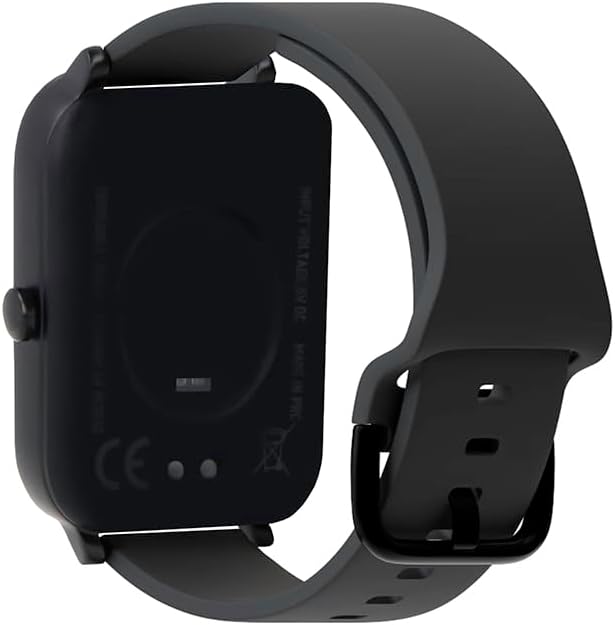
Resim: Arka view of the smartwatch, highlighting the charging contacts and health sensors.
2. Açma/Kapama
To power on, press and hold the side button until the screen lights up. To power off, navigate to the power off option in the settings menu or press and hold the side button and select "Power Off".
3. Akıllı Telefonunuzla Eşleştirme
- Download the official Forever Smartwatch application from your smartphone's app store (iOS or Android).
- Akıllı telefonunuzda Bluetooth'un etkinleştirildiğinden emin olun.
- Open the Forever Smartwatch app and follow the on-screen instructions to search for and pair with your SW-320 smartwatch.
- Hem akıllı telefonunuzda hem de akıllı saatinizde eşleştirme isteğini onaylayın.
The smartwatch is compatible with smartphones and tablets via Bluetooth connectivity.
Kullanım Talimatları
Temel Gezinme
The Forever Smartwatch 3 SW-320 features a full touchscreen interface. Swipe left, right, up, or down to navigate through menus and features. Tap to select an option or open an application.
Temel Özellikler
- Etkinlik Takibi: Monitor steps, distance, calories burned, and active minutes.
- Nabız İzleme: Gün boyunca kalp atış hızınızı sürekli olarak takip edin.
- Pedometre: Counts your steps automatically.
- Uyku Analizi: Tracks your sleep patterns, including deep and light sleep stagee.
- Bildirimler: Aramalar, mesajlar ve uygulama bildirimleri için doğrudan bileğinize uyarılar alın.
- Özelleştirilebilir Saat Yüzleri: Personalize your smartwatch with various pre-installed watch faces or upload your own images.
- Spor Modları: Access various sports modes for accurate tracking during different physical activities.
- Hidrasyon Hatırlatma: Gün boyunca su içmek için hatırlatıcılar ayarlayın.
- Termometre: Measures body temperature.
- Oximeter (SpO2): Kan oksijen seviyelerini izler.
- Adet Döngüsü Takibi: Adet döngülerini takip etmeye ve tahmin etmeye yardımcı olur.

Image: Smartwatch screen showing real-time activity data during a workout, including heart rate and calories burned.

Image: Visual representation of key features: sports modes, thermometer, oximeter, IP68 water resistance, sleep analysis, dual strap options, and 1.7-inch display.

Image: The smartwatch showing sleep duration and quality metrics, with a person sleeping peacefully.
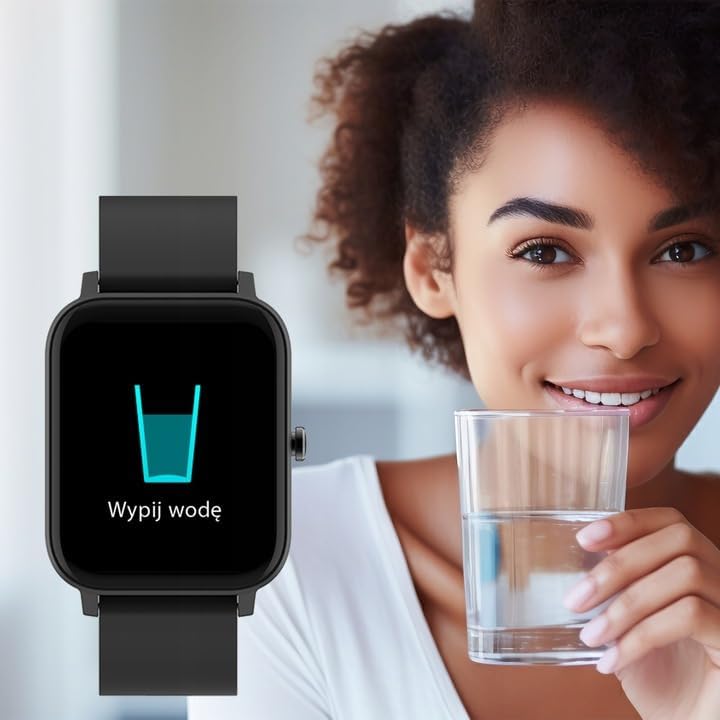
Image: Smartwatch displaying a "Drink Water" reminder, encouraging hydration.
Bakım
Akıllı Saatinizi Temizleme
Cilt tahrişini önlemek ve cihazın işlevselliğini korumak için akıllı saatinizi ve kayışını düzenli olarak temizleyin. Yumuşak, temiz bir bez kullanın.amp Ekranı silmek için bez ve casing. For the strap, follow the manufacturer's recommendations based on the material. Avoid harsh chemicals or abrasive materials.
Suya Dayanıklılık
The Forever Smartwatch 3 SW-320 features IP68 water resistance. This means it is protected against dust and can withstand immersion in water up to 1.5 meters for up to 30 minutes. It is suitable for daily use and light water activities, but not recommended for diving, hot showers, or high-pressure water exposure.
Pil Bakımı
To prolong battery life, avoid exposing the smartwatch to extreme temperatures. Charge the device fully before its first use and when the battery is low. Do not leave the battery completely drained for extended periods.
Sorun giderme
Smartwatch Not Turning On
Ensure the smartwatch is fully charged. Connect it to the charger for at least 30 minutes before attempting to power it on again.
Akıllı telefonla eşleştirilemiyor.
- Make sure Bluetooth is enabled on your smartphone and the smartwatch.
- Ensure the smartwatch is within the Bluetooth range of your phone (typically 10 meters).
- Restart both your smartphone and smartwatch.
- Check if the Forever Smartwatch app is updated to the latest version.
- Daha önce eşleştirildiyse, telefonunuzun Bluetooth ayarları ve uygulama üzerinden cihazın eşleştirmesini kaldırıp yeniden eşleştirmeyi deneyin.
Yanlış Sağlık Ölçümleri
For accurate heart rate and activity tracking, ensure the smartwatch is worn snugly on your wrist, about one finger's width above your wrist bone. Avoid excessive movement during measurements. Environmental factors and skin conditions can affect sensor accuracy.
Bildirimler Görünmüyor
Verify that notification permissions are granted for the Forever Smartwatch app in your smartphone's settings. Also, check the app's settings to ensure notifications are enabled for the desired applications.
Özellikler
| Marka | SONSUZA KADAR |
| Model Adı | 3 SW-320 |
| Model Numarası | GSM169759 |
| Ekran Boyutu | 1.7 inç |
| Ekran Çözünürlüğü | 240x280 |
| Bağlantı | Bluetooth |
| Uyumlu Cihazlar | Akıllı telefon, Tablet |
| Özel Özellikler | Heart Rate Monitor, Pedometer, Thermometer, Oximeter |
| Pil Türü | 1 Lityum İyon |
| Ortalama Pil Ömrü | Up to 1 Day (usage dependent) |
| Ağırlık | 180 gr |
| Boyutlar | 11.5x9x7 cm |
| Suya Dayanıklılık | IP68 |
| İnsan Arayüzü Girişi | Dokunmatik ekran |
Note: Battery life and charging times can vary based on usage and environmental conditions. The "1 Day" for charging time in the original data is likely an error and typically refers to battery life.
Garanti ve Destek
For warranty information and technical support, please refer to the documentation included with your product or visit the official FOREVER webSite. Satın alma belgenizi garanti talepleriniz için saklayın.
If you encounter issues not covered in this manual, please contact FOREVER customer service for assistance.
Ask a question about this manual
Ask about setup, troubleshooting, compatibility, parts, safety, or missing instructions. Manuals+ will review the question and use this page’s manual context to help answer it.