
1. Giriş
This manual provides detailed instructions for the safe and efficient operation of your YITRANIC 2500W Pure Sine Wave Inverter. Please read this manual thoroughly before installation and use, and retain it for future reference.
The YITRANIC 2500W Pure Sine Wave Inverter converts 12V DC battery power to 110V AC household power, suitable for various applications including home backup, camping, and vehicle use. It features a pure sine wave output, ensuring compatibility with sensitive electronics, and includes both wireless and wired LCD remote control options.
2. Güvenlik Bilgileri
UYARI: Failure to follow these safety instructions may result in electric shock, fire, serious injury, or death. Always exercise caution when working with electrical equipment.
- İnvertörü açmayınasing. İçerisinde kullanıcının müdahale edebileceği herhangi bir parça bulunmamaktadır.
- Aşırı ısınmayı önlemek için invertörün etrafında uygun havalandırma olduğundan emin olun.
- Connect the inverter only to a 12V DC power source. Do not connect to 24V or higher DC systems.
- Always connect the inverter to the battery terminals with correct polarity (positive to positive, negative to negative). Reverse polarity connection will damage the inverter.
- İnvertörü sudan, nemden ve yanıcı maddelerden uzak tutun.
- Do not overload the inverter. The continuous output power is 2500W, with a peak surge power of 5000W.
- Herhangi bir bakım veya temizlik işlemi yapmadan önce invertörü bataryadan ayırın.
3. Paket İçeriği
Paketin içinde tüm öğelerin mevcut olduğundan emin olun:
- YITRANIC 2500W Pure Sine Wave Inverter Unit
- 2-in-1 Remote Controller (Wireless and Wired)
- DC Battery Cables (Red and Black)
- Backup Fuses
- USB Charging Cable (for remote controller)
- Kullanım Kılavuzu (bu belge)

Figure 3.1: Inverter unit with DC cables, remote controller, wireless receiver, USB cable, and fuses.
4. Ürün Bittiview ve Özellikler
4.1 İnverter Bileşenleri

Figure 4.1: Front panel with AC outlets, USB ports, Type-C port, and remote connection. Side panel with DC input terminals and cooling fans.
- AC Prizleri: Four standard US 110V AC outlets for connecting appliances.
- USB Bağlantı Noktaları: Dual 5V/3A QC3.0 USB fast charging ports.
- C Tipi Bağlantı Noktası: One PD30W Type-C port for compatible devices.
- Remote Control Interface: Port for wired remote connection and wireless receiver.
- DC Giriş Terminalleri: Red (+) and Black (-) terminals for 12V DC battery connection.
- Soğutma fanları: Dual temperature-controlled fans activate automatically when the internal temperature exceeds 45°C.
- Açma / kapama düğmesi: Main power switch on the inverter unit.
4.2 Uzaktan Kumanda
The inverter includes a versatile 2-in-1 remote controller, offering both wireless and wired operation for convenience.
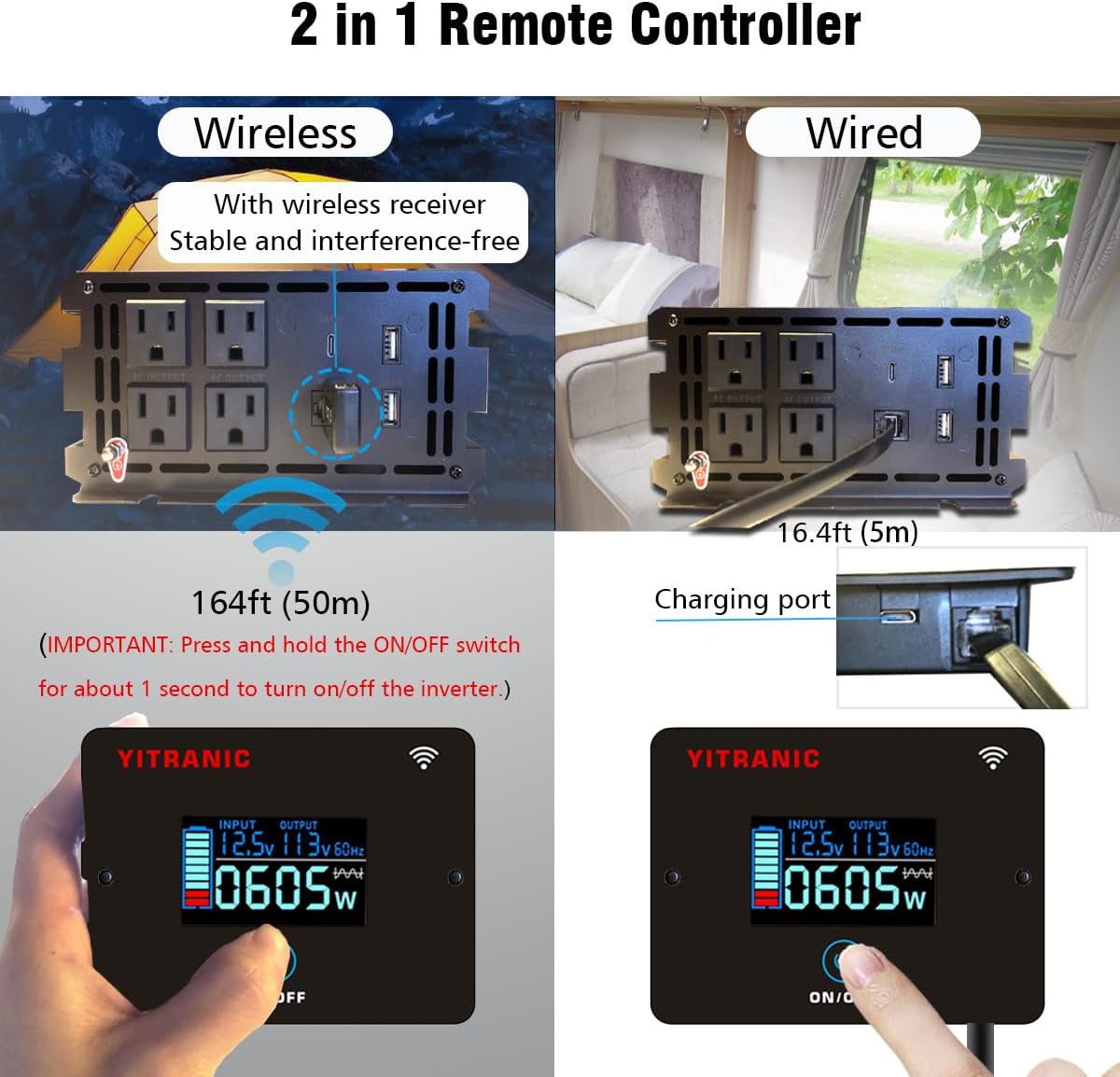
Figure 4.2: Remote controller showing wireless operation with receiver and wired connection via cable.
- Kablosuz Çalışma: Connect the wireless receiver to the inverter's remote port. The remote can operate up to 164 feet (50 meters) away.
- Kablolu Çalışma: Connect the remote directly to the inverter's remote port using the provided 16.4ft (5m) cable.
- LCD Ekran: Giriş hacmini gösterirtage, çıkış hacmitage, frequency, and power consumption.
- AÇIK/KAPALI Düğmesi: Press and hold for approximately 1 second to turn the inverter on or off.
- Şarj Portu: The remote controller has a built-in rechargeable Li-Ion battery, charged via a USB cable.
4.3 Saf Sinüs Dalga Çıkışı
This inverter produces a pure sine wave output, which is identical to the AC power supplied by utility grids. This ensures compatibility and safe operation for all types of electronic devices, including sensitive equipment like laptops, medical devices, and appliances with motors.

Figure 4.3: Pure Sine Wave compatibility with various appliances compared to modified sine wave.
4.4 Çoklu Koruma Özellikleri
The inverter is equipped with multiple safety features to protect both the device and connected equipment:

Figure 4.4: Visual representation of the inverter's built-in protection mechanisms.
- Aşırı Yük Koruması: Shuts down if connected load exceeds rated power.
- Aşırı Isınma Koruması: İç sıcaklık çok yüksekse soğutma fanlarını devreye sokar ve sistemi kapatır.
- düşük hacimtage Koruma: Shuts down if input DC voltage çok düşüyor.
- aşırı sestage Koruma: Shuts down if input DC voltage güvenli sınırları aşıyor.
- Ters Bağlantı Koruması: Protects against incorrect battery polarity connection.
- Kısa Devre Koruması: Çıkışta oluşabilecek kısa devrelere karşı koruma sağlar.
5. Kurulum ve Kurulum
5.1 Kurulum Yeri Seçimi
- Install the inverter in a dry, well-ventilated area, away from direct sunlight and heat sources.
- Ensure there is sufficient space around the inverter for proper airflow, especially around the cooling fans.
- Mount the inverter securely on a flat, stable surface.
5.2 Connecting to a 12V DC Battery
ÖNEMLİ: Before making any connections, ensure the inverter's main ON/OFF switch is in the OFF position.
- Identify the positive (+) and negative (-) terminals on your 12V DC battery.
- Bağlan kırmızı DC cable to the kırmızı (+) terminal of the inverter.
- Diğer ucunu bağlayın kırmızı DC cable to the pozitif (+) pilin terminali.
- Bağlan siyah DC cable to the siyah (-) terminal of the inverter.
- Diğer ucunu bağlayın siyah DC cable to the olumsuz (-) pilin terminali.
- Gevşek temasları ve ark oluşumunu önlemek için tüm bağlantıların sıkı ve güvenli olduğundan emin olun.

Figure 5.1: DC input terminals for battery connection.
5.3 Uzaktan Kumanda Kurulumu
Choose between wired or wireless operation for the remote controller:
- Kablolu Bağlantı: Plug the remote cable into the "REMOTE" port on the inverter and the corresponding port on the remote controller.
- Kablosuz Bağlantı: Plug the wireless receiver into the "REMOTE" port on the inverter. The remote controller will automatically pair with the receiver. Ensure the remote controller's battery is charged using the provided USB cable.
6. Operasyon
6.1 Turning the Inverter On/Off
- After connecting the battery, press and hold the ON/OFF button on the inverter unit or the remote controller for approximately 1 second.
- The LCD display on the remote controller will illuminate, showing input voltage, çıkış hacmitage, and current power consumption.
- To turn off the inverter, press and hold the ON/OFF button again for approximately 1 second.
6.2 AC Cihazların Bağlanması
- Toplam su miktarını sağlayıntage of all connected AC appliances does not exceed the inverter's continuous output power of 2500W.
- Plug your AC appliances into the 110V AC outlets on the inverter's front panel.
- For appliances with high starting currents (e.g., motors, refrigerators), ensure their surge wattage is within the inverter's 5000W surge capacity.
6.3 Using USB and Type-C Ports
- Connect your USB-powered devices to the QC3.0 USB ports for fast charging.
- Connect compatible devices to the PD30W Type-C port for power delivery charging.
6.4 LCD Ekranı Anlama
The remote controller's LCD provides real-time operational status:

Figure 6.1: LCD display indicating input voltage, çıkış hacmitage, power, and potential error codes (OV, LV, OT, OL, SC).
- GİRİŞ: Mevcut DC giriş voltajını gösterir.tage aküden.
- ÇIKIŞ: AC çıkış ses seviyesini gösterir.tage and frequency (e.g., 110V 60Hz).
- NeTAGE: Shows the real-time power consumption of connected devices in watts.
- Pil Simgesi: Indicates the approximate charge level of the remote controller's internal battery.
- Hata Kodları: The display may show codes like OV (Overvoltage), LV (Low Voltage), OT (Over Temperature), OL (Overload), SC (Short Circuit) if a protection mechanism is triggered. Refer to the Troubleshooting section for details.
7. Bakım
- Temizlik: Periodically clean the inverter's exterior with a dry, soft cloth. Ensure the cooling vents are free from dust and debris. Do not use liquid cleaners.
- Bağlantılar: Regularly check battery cable connections for tightness and corrosion. Clean any corrosion with a wire brush and baking soda solution.
- Depolamak: İnvertörü uzun süre saklayacaksanız, aküden ayırın ve serin ve kuru bir yerde saklayın.
- Sigorta Değişimi: The inverter contains internal fuses. If a fuse blows, it indicates a significant issue. Contact customer support for assistance; do not attempt to replace internal fuses yourself.
8. Sorun Giderme
If the inverter is not functioning correctly, refer to the following table for common issues and solutions:
| Sorun | Olası Neden | Çözüm |
|---|---|---|
| No power output, inverter OFF. | Gevşek akü bağlantıları, düşük akü hacmitage, inverter switch OFF. | Check and tighten battery cables. Charge battery. Press and hold ON/OFF switch for 1 second. |
| Inverter shuts down with "OL" (Overload) on LCD. | Connected load exceeds 2500W continuous or 5000W surge. | Toplam su tüketimini azaltıntage of connected appliances. Restart inverter. |
| Inverter shuts down with "LV" (Low Voltage) on LCD. | pil hacmitage çok düşük (10.5V'un altında). | Pili şarj edin veya değiştirin. |
| Inverter shuts down with "OV" (Overvoltage) on LCD. | pil hacmitage çok yüksek (15.5V'un üstünde). | Disconnect from charging source. Check battery voltage. |
| Inverter shuts down with "OT" (Over Temperature) on LCD. | Yetersiz havalandırma veya aşırı yük nedeniyle invertör aşırı ısınıyor. | Yeterli havalandırma sağlayın. Yükü azaltın. İnverterin soğumasını bekleyin. |
| No power from USB/Type-C ports. | Inverter is OFF, or device is incompatible. | Turn on the inverter. Check device compatibility. |
If the problem persists after attempting these solutions, please contact YITRANIC customer support.
9. Özellikler
| Özellik | Şartname |
|---|---|
| Örnek | 2500W-12V |
| Sürekli Güç | 2500W |
| Dalgalanma Gücü | 5000W |
| DC Giriş Hacmitage | 12V |
| AC Çıkış Hacmitage | 110V |
| AC Çıkış Frekansı | 60Hz |
| Çıkış Dalga Formu | Saf sinus dalgası |
| USB Çıkışı | Dual 5V/3A QC3.0 |
| Tip-C Çıkışı | PD30W |
| Yeterlik | ≥ %90 |
| Ürün Boyutları | 15.75 x 3.54 x 7.09 inç (40 x 9 x 18 cm) |
| Ürün Ağırlığı | 10 pound (4.5 kg) |
| Sertifikalar | FCC Sertifikalı |
10. Garanti ve Müşteri Desteği
YITRANIC products are designed and manufactured to high-quality standards. For warranty information, technical support, or any questions regarding your inverter, please contact YITRANIC customer support through the retailer where the product was purchased or visit the official YITRANIC webalan.
Please have your model number (2500W-12V) and purchase date available when contacting support.