
giriiş
The Core Innovations PocketTunes Dozy is an animated LCD digital alarm clock designed to make waking up an engaging experience. It features simple controls for setting and managing alarms, expressive animated eyes, and the ability to switch between various display modes. With its built-in rechargeable battery, Dozy offers portability for use in different locations.

Figure 1: Core Innovations PocketTunes Dozy The Dancing Alarm Bot.
Ürün Özellikleri
- Easy-to-Use Alarm Clock: Simple buttons facilitate setting, canceling, and updating alarms.
- Fun Animation: Dozy's eyes animate to display various expressive states, enhancing user interaction.
- Different Clock Faces and Mode Changes: Tap Dozy's headband to cycle through expression and clock face display modes.
- Taşınabilir: Equipped with a rechargeable battery for convenient use on the go.
- Bluetooth Bağlantısı: Allows for wireless audio streaming.
- FM Radyo Alıcısı: Integrated FM radio functionality for listening to broadcasts.
Kurmak
1. Cihazın Şarj Edilmesi
Before initial use, fully charge Dozy using the provided USB-C charging cable. Connect the cable to the charging port on Dozy and plug the other end into a compatible USB power adapter (not included). The device's display may indicate charging status.
2. Açma/Kapama
To power on Dozy, locate the power button (refer to the device diagram in the operating section for exact location) and press and hold it until the LCD screen illuminates. To power off, press and hold the same button until the screen turns off.
3. Başlangıç Zaman Ayarı
Upon first power-on or after a full discharge, you may need to set the current time. Use the navigation buttons (typically labeled with arrows or +/-) and the clock/alarm button to adjust the hour and minute. Consult the 'Operating Instructions' section for detailed button functions.
Kullanım Talimatları
Kontrol Düğmeleri Üzerindeview

Figure 2: Dozy's front control buttons for navigation and alarm settings.
- Yukarı/Aşağı Oklar (▲ / ▼): Used for navigating menus, adjusting time, volume, or radio frequencies.
- Clock/Alarm Button (⏰): Used to enter time setting mode, alarm setting mode, or confirm selections.
- Headband Tap Sensor: Tapping Dozy's headband switches between different display modes (e.g., clock face, expressive eyes).
Setting and Managing Alarms
- Press the Clock/Alarm button (⏰) to enter alarm setting mode.
- Use the Up/Down arrow buttons (▲ / ▼) to adjust the desired alarm time.
- Press the Clock/Alarm button (⏰) again to confirm the hour and then the minute.
- To activate or deactivate an alarm, navigate to the alarm setting and use the appropriate button (often the Clock/Alarm button or a dedicated toggle) to switch it on or off.
- When an alarm sounds, press the Clock/Alarm button (⏰) or tap Dozy's headband to snooze or cancel the alarm.
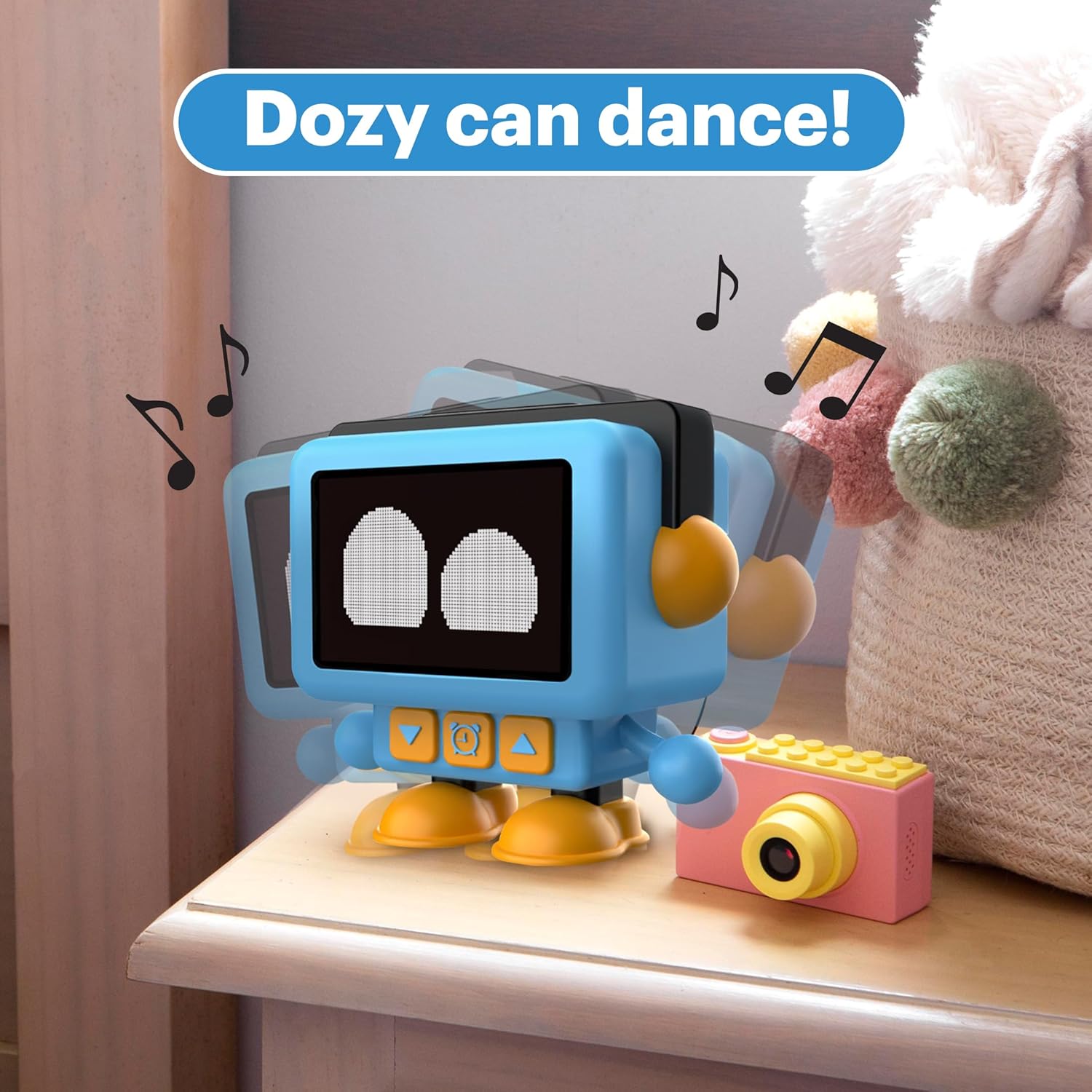
Figure 3: Dozy performs unique dances and music when an alarm activates.
Animated LCD Face and Display Modes
Dozy's LCD screen displays various animated expressions corresponding to its state (e.g., awake, sleeping, dancing, snoozing). Tapping the headband allows you to switch between these expressive modes and standard clock face displays.
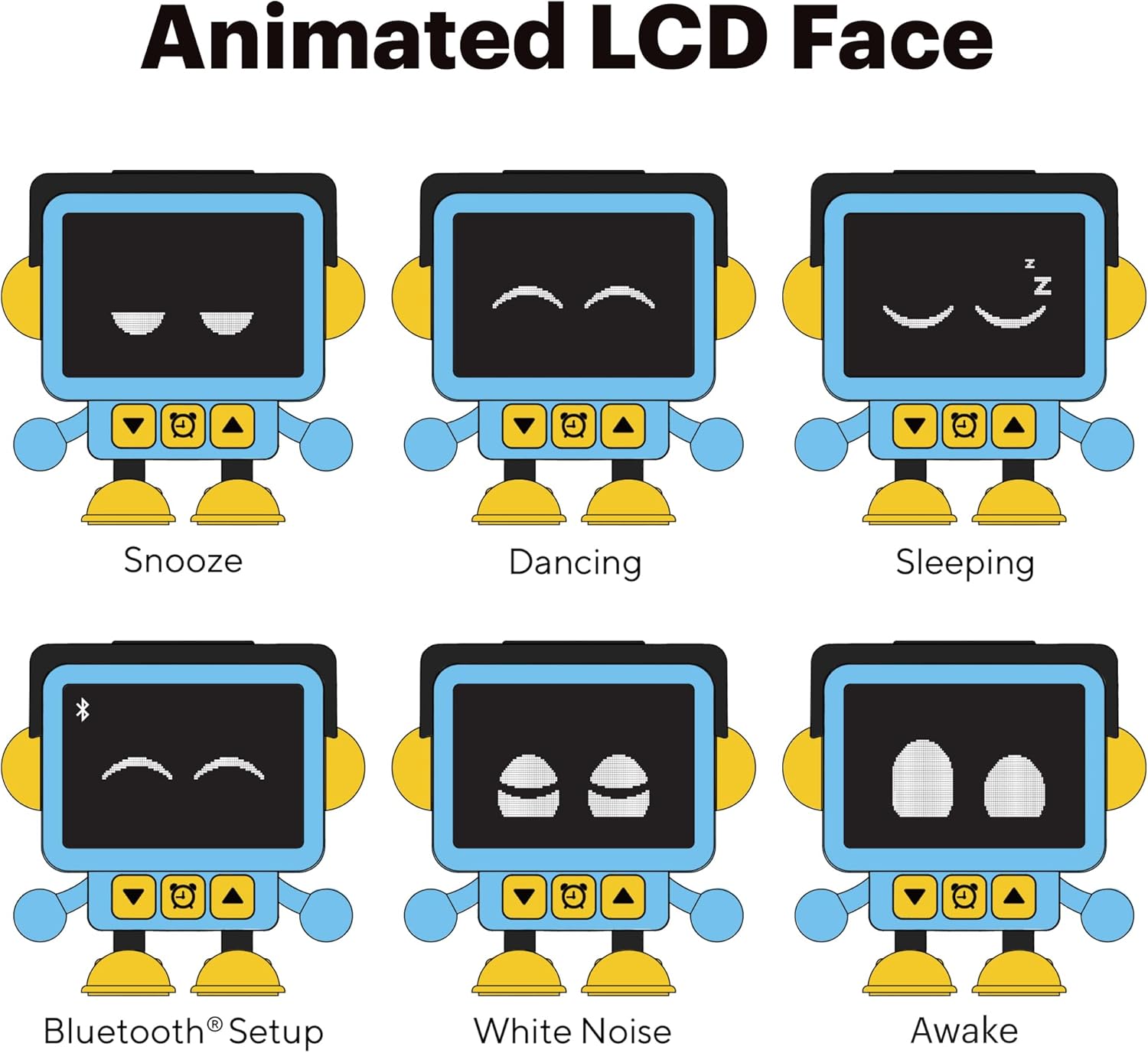
Şekil 4: Ör.amples of Dozy's animated LCD expressions.
Bluetooth Eşleştirme
To pair Dozy with a Bluetooth-enabled device (e.g., smartphone, tablet) for audio streaming:
- Ensure Dozy is powered on and in Bluetooth pairing mode (indicated by a specific icon or animation on the LCD screen, as shown in Figure 4).
- Harici cihazınızda Bluetooth'u etkinleştirin ve kullanılabilir cihazları arayın.
- Select "Dozy" or a similar name from the list of found devices to initiate pairing.
- Once paired, Dozy will confirm the connection, and you can stream audio wirelessly.
FM Radyo Alıcısı
Dozy includes an FM radio tuner. To access and operate the FM radio:
- Switch to FM radio mode using the mode button or by cycling through display modes via the headband tap sensor.
- Use the Up/Down arrow buttons (▲ / ▼) to scan for and select radio stations.
- Adjust the volume using the appropriate controls (refer to device-specific volume adjustment instructions if not covered by arrow buttons).

Figure 5: Dozy's display showing FM radio tuner interface.
Bakım
Temizlik
To clean Dozy, gently wipe the surface with a soft, dry cloth. For stubborn marks, a slightly damp cloth can be used, ensuring no moisture enters the device's ports or openings. Do not use abrasive cleaners, solvents, or strong chemicals, as these may damage the finish or internal components.
Pil Bakımı
Dozy is equipped with a rechargeable Lithium Ion battery. To prolong battery life, avoid fully discharging the battery frequently. Recharge the device when the battery indicator shows low power. If storing the device for an extended period, charge it to approximately 50% and recharge every few months to prevent deep discharge.
Sorun giderme
- Cihaz Açılmıyor: Cihazın tamamen şarj olduğundan emin olun. Cihazı bir güç kaynağına bağlayın ve tekrar açmayı denemeden önce en az 30 dakika şarj olmasına izin verin.
- Alarm Not Sounding/Stopping: Verify that the alarm is correctly set and activated. Check the volume level. If the alarm is active and unresponsive, try a soft reset by holding the power button for an extended period (e.g., 10-15 seconds) until the device restarts.
- Bluetooth Eşleştirme Sorunları: Ensure Dozy is in pairing mode. Turn off and on Bluetooth on your external device. Move Dozy closer to the external device. Clear previous Bluetooth connections on both devices and try pairing again.
- Display Not Responding to Headband Tap: Ensure the device is powered on and not in a locked mode. Try gently tapping the headband in different spots.
- Zayıf FM Radyo Alımı: Reposition Dozy to improve signal reception. Ensure there are no large metallic objects nearby that could interfere with the signal.
Özellikler
| Marka | Temel Yenilikler |
| Model Numarası | DZAL320 |
| Görüntü Türü | Dijital lcd |
| Ürün Boyutları | 4.72"G x 4.33"Y |
| Ürün Ağırlığı | 14.2 ons |
| Güç Kaynağı | Pil ile Çalışır (Şarj Edilebilir Lityum İyon) |
| Piller Dahil | Evet (1 Lityum İyon) |
| Bağlantı | Bluetooth |
| Özel Özellikler | Alarm, Animated LCD Face, FM Radio Tuner, Portable |
| Üretici | DP Audio Video |
| UPC | 810111501781 |

Figure 6: Product dimensions of Dozy.
Garanti ve Destek
For warranty information, technical support, or service inquiries regarding your Core Innovations PocketTunes Dozy, please refer to the documentation included with your product or contact Core Innovations customer service directly. Contact details can typically be found on the manufacturer's official websitede veya ürün ambalajında yer almamaktadır.