
giriiş
The deleyCON Micro HDMI to HDMI Adapter (Model MK6093) is designed to connect devices with a Micro HDMI output to displays or cables with a standard HDMI input. This adapter supports high-resolution video and audio transmission, ensuring a reliable connection for various multimedia applications. It is built with an aluminum casing for enhanced durability and optimal signal integrity.
Ürün Özellikleri
- Yüksek Çözünürlük Desteği: Supports impressive 4K resolutions (4096 x 2160) at 60Hz and 2K resolutions at 120Hz.
- HDMI 2.0 Standardı: Compliant with HDMI 2.0, ensuring compatibility with current and future display technologies.
- Yüksek Veri Hızı: Capable of transmitting data up to 18 Gbit/s.
- Gelişmiş Özellikler: Supports Audio Return Channel (ARC), High Dynamic Range (HDR), 3D video, Variable Refresh Rate (VRR), Auto Low Latency Mode (ALLM), and High-bandwidth Digital Content Protection (HDCP).
- Dayanıklı Yapı: Features a robust black aluminum casing for excellent signal transmission and long-lasting reliability.
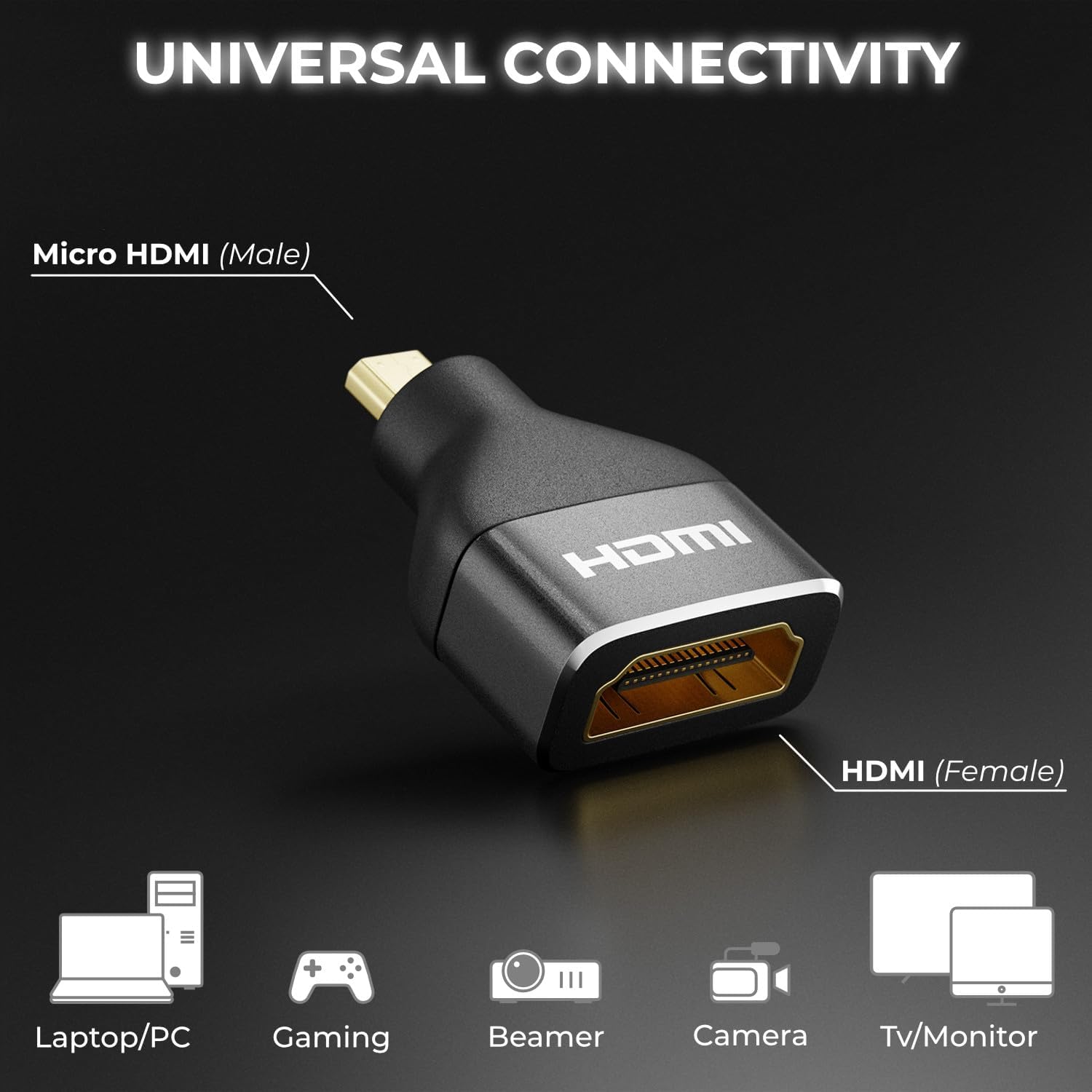
- Evrensel Bağlantı: Connects Micro HDMI (male) to HDMI (female), compatible with a wide range of devices.

Paket İçeriği
The deleyCON Micro HDMI to HDMI Adapter package includes:
- 1 x deleyCON Micro HDMI to HDMI Adapter (Model MK6093)
Güvenlik Bilgileri
Please read and follow these safety guidelines to ensure proper use and prevent damage to the adapter or connected devices:
- Adaptörü suya, neme veya aşırı sıcaklıklara maruz bırakmayın.
- Adaptörü düşürmekten veya şiddetli darbelere maruz bırakmaktan kaçının.
- Adaptörü sökmeye veya üzerinde değişiklik yapmaya çalışmayın. Bu, garantiyi geçersiz kılacaktır.
- Çocukların erişemeyeceği yerde saklayınız.
- Sadece uyumlu cihazlar ve kablolarla kullanın.
Kurmak
The deleyCON Micro HDMI to HDMI Adapter is designed for simple plug-and-play installation. Follow these steps to connect your devices:
- Identify the Micro HDMI output port on your source device (e.g., camera, tablet, laptop).
- Connect the Micro HDMI (male) end of the deleyCON adapter into the Micro HDMI output port of your source device.
- Take a standard HDMI cable (not included) and connect one end into the HDMI (female) port of the deleyCON adapter.
- Connect the other end of the standard HDMI cable to the HDMI input port of your display device (e.g., TV, monitor, projector).
- Hem kaynak cihazınızın hem de görüntü cihazınızın açık olduğundan emin olun.

Kullanım Talimatları
Once the adapter is correctly connected as described in the Setup section, the deleyCON Micro HDMI to HDMI Adapter operates automatically. It functions as a passive converter, transmitting the audio and video signal from your Micro HDMI source device to your HDMI display device.
- Ensure your source device is configured to output video and audio through its Micro HDMI port.
- Görüntüleme cihazınızda doğru HDMI girişini seçin.
- The adapter will automatically negotiate the best possible resolution and refresh rate supported by both your source and display devices, up to its maximum capabilities (4K@60Hz, 2K@120Hz).
Sorun giderme
If you encounter issues while using the deleyCON Micro HDMI to HDMI Adapter, refer to the following common troubleshooting steps:
- Ekranda Sinyal Yok:
- Ensure all cables are securely connected to both the adapter and your devices.
- Ekranınızın doğru HDMI giriş kaynağına ayarlı olduğundan emin olun.
- Test with a different HDMI cable to rule out cable issues.
- Try connecting the source device directly to the display (if possible) to confirm the source device's output functionality.
- Hem kaynak cihazı hem de ekranı yeniden başlatın.
- Poor Picture Quality or Flickering:
- Check the resolution and refresh rate settings on your source device. Ensure they are within the adapter's supported specifications (e.g., 4K@60Hz, 2K@120Hz).
- Ensure the HDMI cable used is rated for the desired resolution and data rate (e.g., High-Speed HDMI for 4K).
- Minimize cable length if possible, especially for high-resolution signals.
- Ses Yok:
- Kaynak cihazınızdaki ses çıkışı ayarlarının HDMI için doğru şekilde yapılandırıldığından emin olun.
- Check the volume levels on both your source device and display.
- Ensure your display device supports audio via HDMI.
Özellikler
| Özellik | Detay |
|---|---|
| Model Numarası | MK6093 |
| Marka | deleyCON |
| Bağlayıcı Türü | Micro HDMI (Male) to HDMI (Female) |
| HDMI Standard | HDMI2.0 |
| Maksimum Çözünürlük Desteği | 4K (4096x2160) @ 60Hz, 2K @ 120Hz, 1440p @ 120Hz, 1080p @ 120Hz |
| Veri Oranı | 18 Gbit/s'ye kadar |
| Desteklenen Teknolojiler | ARC, HDR, 3D, VRR, ALLM, HDCP |
| Malzeme | Aluminum (Metallic finish) |
| Renk | Siyah |
| Ürün Ağırlığı | 7.99 Gram |
| Port Sayısı | 2 |
| Güç Kaynağı | Harici güç gerekmez |
| Uyumlu Cihazlar | TV box, recorder, monitor, DVD player, camera, video game console, PC, projector, TV |
| Menşei ülke | Çin |

Bakım
To ensure the longevity and optimal performance of your deleyCON Micro HDMI to HDMI Adapter, follow these maintenance guidelines:
- Temizlik: Use a soft, dry cloth to gently wipe the adapter. Do not use liquid cleaners or abrasive materials, as they may damage the surface or internal components.
- Depolamak: Kullanılmadığı zaman adaptörü serin, kuru ve doğrudan güneş ışığından ve aşırı sıcaklıklardan uzak bir yerde saklayın.
- İşleme: Always grasp the connector housing when plugging or unplugging the adapter. Avoid pulling on the cable itself, as this can damage the internal wiring.
Garanti ve Destek
deleyCON products are designed for reliability and performance. For information regarding warranty coverage, technical support, or service inquiries, please refer to the documentation provided with your purchase or visit the official deleyCON webSite. Satın alma belgenizi garanti talepleriniz için saklayın.