
1. Giriş
Welcome to the KRUPS Sensation C10 EA910A10 Superautomatic Coffee Machine user manual. This guide provides comprehensive instructions for the safe and efficient operation, maintenance, and troubleshooting of your new coffee machine. Please read this manual thoroughly before first use and keep it for future reference.
2. Önemli Güvenlik Talimatları
Güvenli çalışma sağlamak için, her zaman aşağıdaki temel güvenlik önlemlerine uyun:
- Cihazı kullanmadan önce tüm talimatları okuyun.
- Cihazı, elektrik kablosunu veya fişini suya veya başka sıvılara batırmayın.
- Bu cihaz yalnızca evlerde kullanım için tasarlanmıştır.
- Ses seviyesini garantileyintagCihazda belirtilen e, şebeke voltajınıza karşılık gelirtage.
- Temizlemeden önce veya kullanılmadığı zamanlarda cihazı daima elektrik prizinden çıkarın.
- Kablo veya fişi hasarlı olan veya cihaz arızalandıktan veya herhangi bir şekilde hasar gördükten sonra hiçbir cihazı çalıştırmayın.
- Çalışma sırasında çocukları cihazdan uzak tutun.
- Yalnızca üretici tarafından önerilen aksesuarları kullanın.
- Avoid contact with hot surfaces, such as the coffee spouts or steam nozzle.
3. Ürün Bileşenleri
Familiarize yourself with the main components of your KRUPS Sensation C10 EA910A10 coffee machine:
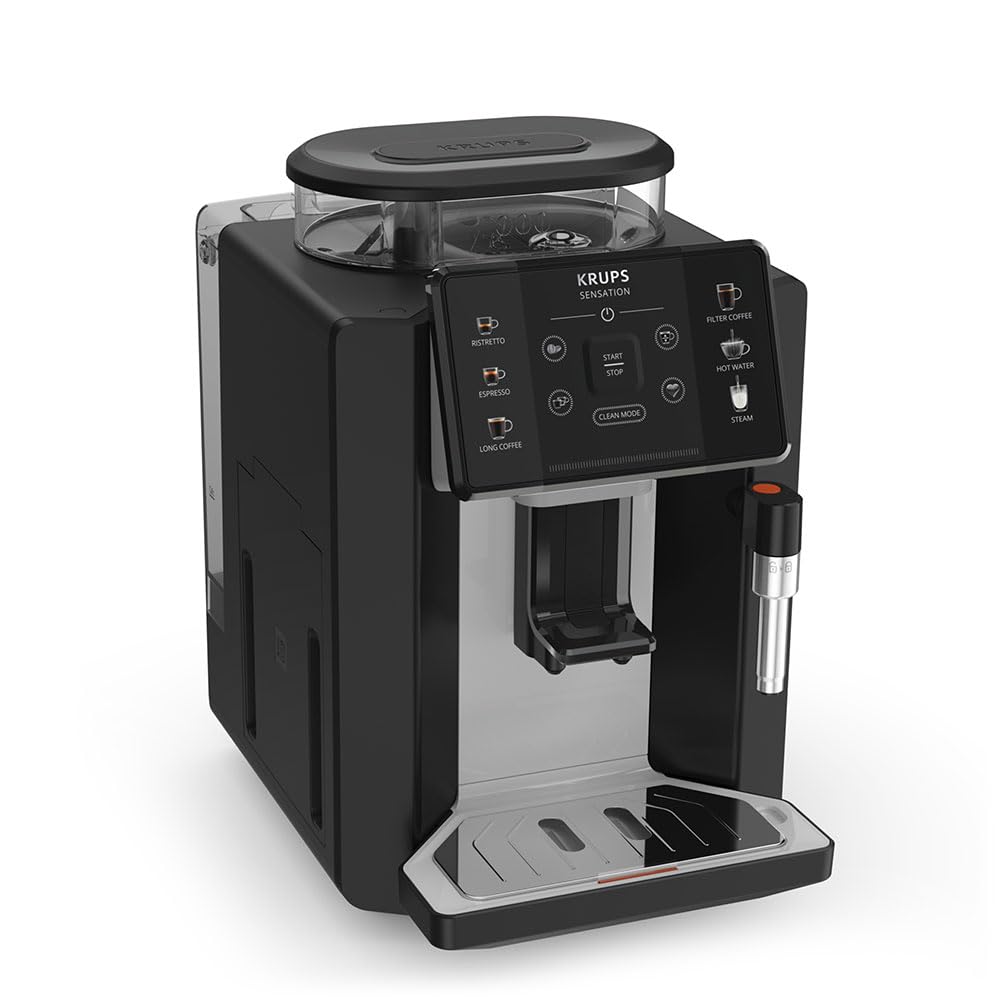
Resim: Ön sağ view of the KRUPS Sensation C10 EA910A10 Superautomatic Coffee Machine, showing the bean hopper, control panel, coffee spouts, and drip tray. Two cups of coffee are being dispensed.
- Kapaklı Fasulye Haznesi
- Su Tankı
- Control Panel (Touchscreen)
- Coffee Spouts (Adjustable)
- Drip Tray with Grid
- Telve Kabı
- Steam Nozzle / Hot Water Spout
- Güç Kablosu Bağlantısı
4. İlk Kurulum
4.1. Paketten çıkarma
- Kahve makinenizi ambalajından dikkatlice çıkarın.
- Koruyucu filmler ve etiketler dahil tüm ambalaj malzemelerini çıkarın.
- Cihazı, su kaynaklarından ve ısıdan uzak, sağlam, düz ve ısıya dayanıklı bir yüzeye yerleştirin.
4.2. İlk Kullanım Hazırlığı
- Su deposunu durulayın: Remove the water tank, rinse it thoroughly with fresh water, and fill it to the MAX level. Reinsert the tank securely.
- Fasulye Haznesini Doldurun: Open the lid of the bean hopper and fill it with fresh coffee beans. Do not use ground coffee in the bean hopper.
- Güç Bağlantısı: Plug the power cord into the machine and then into a grounded electrical outlet.
- İlk Durulama Döngüsü: The machine will prompt you to perform an initial rinse cycle. Follow the instructions on the touchscreen. This primes the system and cleans internal components.
5. Kullanım Talimatları
5.1. Kontrol Paneli Üzerindeview

Image: A hand interacting with the intuitive touchscreen control panel of the KRUPS Sensation C10 EA910A10, highlighting its ease of use.
The KRUPS Sensation C10 EA910A10 features an intuitive touchscreen control panel for easy operation. Key functions include:
- Ristretto: For a very short, concentrated espresso.
- Espresso: For a classic espresso shot.
- Uzun Kahve: For a larger volume of coffee.
- Filtre kahve: For a milder, filter-style coffee.
- Sıcak Su: Çay veya diğer sıcak içecekler için.
- Buhar: Sütü köpürtmek için.
- Başlat/Durdur: To begin or end a brewing cycle.
- Temiz Mod: Initiates cleaning cycles.
- Coffee Strength/Volume Adjustment: Icons to customize your drink.
5.2. Kahve Yapımı
To brew a coffee beverage:
- Su deposunun dolu olduğundan ve fasulye haznesinin yeterli miktarda fasulye içerdiğinden emin olun.
- Place a cup under the coffee spouts. Adjust the spout height if necessary.
- Select your desired coffee type (e.g., Espresso, Long Coffee) from the touchscreen.
- Adjust coffee strength and volume using the on-screen options if desired.
- Demlemeye başlamak için "Başlat" düğmesine basın.
- The machine will grind the beans, brew the coffee, and dispense it into your cup.
- The machine will automatically stop when the brewing is complete.

Image: A selection of coffee beverages, including espresso, long coffee, and a milk-based drink, demonstrating the versatility of the KRUPS Sensation C10 EA910A10.
5.3. Sıcak Su Fonksiyonu
- Sıcak su musluğunun altına bir bardak yerleştirin.
- Select the "Hot Water" option on the touchscreen.
- Press "Start" to dispense hot water. Press "Stop" to cease dispensing.
5.4. Steam Function (for milk frothing)
- Bir sürahiyi soğuk sütle doldurun.
- Buhar püskürtme ucunu sütün içine yerleştirin.
- Select the "Steam" option on the touchscreen.
- Press "Start" to activate the steam. Move the pitcher up and down to froth the milk.
- Press "Stop" when desired froth is achieved.
- Önemli: Clean the steam nozzle immediately after use to prevent milk residue buildup.
6. Bakım ve Temizlik
Kahve makinenizin düzenli temizliği ve bakımı, optimum performans ve uzun ömürlü olmasını sağlar.
6.1. Günlük Temizlik
- Damlama Tepsisi ve Kahve Telvesi Kabı: Damlama tepsisini ve kahve telvesi kabını her gün veya makine tarafından istendiğinde boşaltın ve durulayın.
- Kahve Muslukları: Kahve ağızlarını bir bezle silinamp Kumaş.
- Su Tankı: Su deposunu her gün temiz suyla durulayın.
6.2. Kireç çözme
The machine will indicate when descaling is required. Follow the on-screen instructions and use a KRUPS-approved descaling solution.

Image: A hand inserting a cleaning tablet into the designated slot of the KRUPS Sensation C10 EA910A10, illustrating the ease of the cleaning process.
6.3. Su Filtresi Değişimi
If your machine uses a water filter, replace it every 2-3 months or as indicated by the machine to ensure optimal water quality and prevent limescale buildup.
7. Sorun Giderme
Yaygın sorunlar ve çözümleri için aşağıdaki tabloya bakın.
| Sorun | Olası Neden / Çözüm |
|---|---|
| Makine açılmıyor. | Güç kablosunun cihaza ve elektrik prizine sağlam bir şekilde takılı olduğundan emin olun. Prizin çalışır durumda olduğundan emin olun. |
| Kahve verilmiyor. | Water tank empty: Fill the water tank. Bean hopper empty: Fill with coffee beans. Coffee grounds container full: Empty and clean. Descaling required: Perform descaling cycle. |
| Kahve çok açık. | Adjust coffee strength settings on the control panel. Check if the bean hopper is sufficiently filled. Ensure fresh beans are used. |
| Makineden su sızıyor. | Check if the water tank is correctly inserted. Ensure the drip tray is properly positioned. If leakage persists, contact customer support. |
| "Clean Mode" alert persists. | Perform the indicated cleaning cycle (e.g., descaling, rinsing). Ensure all removable parts are clean and correctly reinserted. |
| Steam nozzle not frothing milk effectively. | Clean the steam nozzle thoroughly after each use to prevent blockages. Ensure cold milk is used. |
| Grinder is unusually loud or not grinding. | Check for foreign objects in the bean hopper. Ensure the bean hopper is not empty. Contact customer support if the issue persists. |
8. Teknik Özellikler
| Özellik | Şartname |
|---|---|
| Model Numarası | EA910A10 |
| Marka | KRUPS |
| Cilttage | 145 Volt |
| Güç | 1450 Watt |
| Malzeme | Çelik |
| Ürün Ağırlığı | 7.5 kilo |
| Arayüz | Dokunmatik ekran |

Image: The KRUPS Sensation C10 EA910A10 coffee machine with indicated dimensions: 24 cm width, 34.6 cm depth, and 36.4 cm height.
9. Garanti Bilgileri
Your KRUPS Sensation C10 EA910A10 Superautomatic Coffee Machine is covered by a manufacturer's warranty. Please refer to the warranty card included in your product packaging for specific terms, conditions, and duration. Keep your proof of purchase for warranty claims.
10. Müşteri Desteği
For further assistance, technical support, or spare parts, please contact KRUPS customer service. Contact details can typically be found on the KRUPS official webGaranti bilgilerine web sitemizden veya cihazınızla birlikte verilen garanti dokümanından ulaşabilirsiniz.


