
giriiş
This manual provides instructions for the VINABTY SYJ-TM-3000-SYJ replacement remote control, designed for use with various TECHNOMATE receiver models including TM-3000, TM-3150, TM-3200, TM-3300, TM-3400, and TM-3500 series. Please read this manual carefully to ensure proper setup and operation of your new remote control.

Resim 1: Ön view of the VINABTY replacement remote control. This image displays the full layout of buttons, including the power button, number pad, navigation controls, and various function keys.
Kurmak
1. Pil Kurulumu
- Uzaktan kumandanın arkasındaki pil bölmesi kapağını bulun.
- Kapağı aşağı doğru kaydırın veya mandalı bastırarak açın.
- Insert two AAA batteries (not included) into the compartment, ensuring the positive (+) and negative (-) terminals match the diagrams inside the compartment.
- Pil bölmesi kapağını yerine oturtmak için, güvenli bir şekilde yerine oturana kadar kaydırın.

Resim 2: View of the battery compartment on the back of the remote control, showing the correct orientation for AAA battery insertion.
2. İlk Kullanım
This VINABTY replacement remote control is pre-programmed for direct use with compatible TECHNOMATE receivers. No additional programming or pairing is typically required. Simply point the remote control towards your receiver and begin operation.
Kullanım Talimatları
The remote control features 18 buttons designed for intuitive control of your TECHNOMATE receiver. Below is a general overview ortak düğme işlevleri.
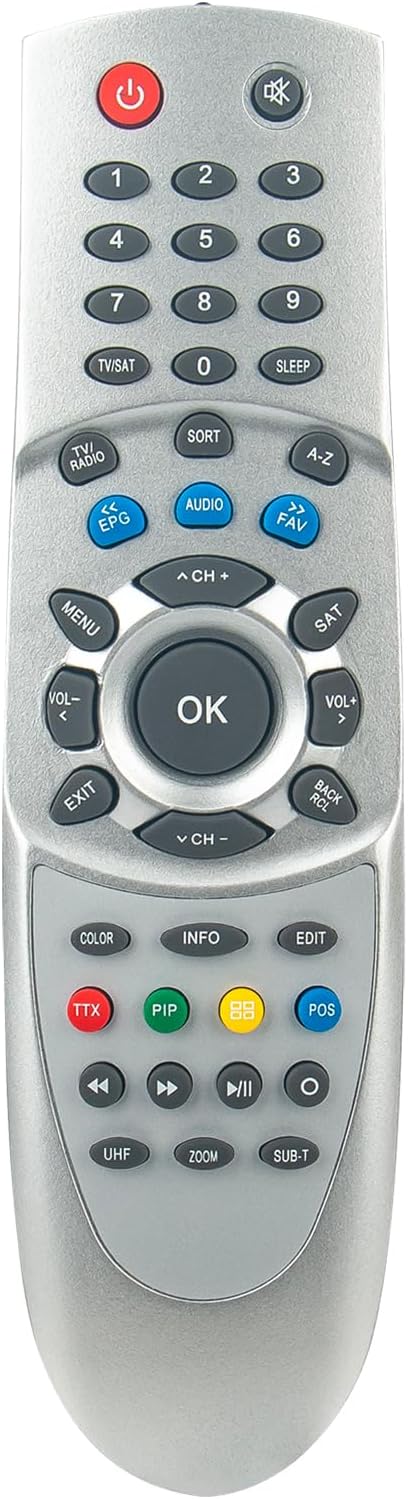
Resim 3: Yukarıdan aşağıya view of the remote control, providing a clear perspective of all buttons and their labels for easy identification.
- Güç düğmesi (⏻): Turns the receiver on or off.
- Sayı Takımı (0-9): Directly input channel numbers or menu selections.
- TV/SAT Button: Switches between TV and Satellite modes.
- Sesi Artırma/Azaltma (VOL+/-)Ses seviyesini ayarlar.
- Channel Up/Down (CH+/-)Kanalı değiştirir.
- Sessiz Düğmesi (✖)Sesi kapatır veya açar.
- Menü Düğmesi: Accesses the receiver's main menu.
- Tamam DüğmesiMenülerdeki seçimleri onaylar.
- Gezinme Düğmeleri (Yukarı, Aşağı, Sol, Sağ)Menüler ve seçenekler arasında gezinmeyi sağlar.
- Çıkış Düğmesi: Exits the current menu or screen.
- EPG Düğmesi: Displays the Electronic Program Guide.
- Ses DüğmesiSes parçalarını veya modlarını seçer.
- FAV Düğmesi: Favori kanallar listesine erişim sağlar.
- Renkli Düğmeler (Kırmızı, Yeşil, Sarı, Mavi): These buttons typically correspond to specific functions displayed on-screen within menus or interactive services.
- Oynatma Kontrolleri (Oynat, Duraklat, Durdur, Geri Sar, İleri Sar): Controls media playback if your receiver supports it.
For detailed functions of specific buttons, refer to your TECHNOMATE receiver's original user manual, as button functionalities can vary slightly between receiver models.
Bakım
Pil Değişimi
When the remote control's range decreases or it becomes unresponsive, it is likely time to replace the batteries. Follow the battery installation steps outlined in the "Setup" section. Always replace both batteries at the same time with new AAA batteries.
Temizlik
Uzaktan kumandayı temizlemek için yüzeyini yumuşak, kuru bir bezle nazikçe silin. İnatçı kirler için hafifçe kurulayın.ampBezi su veya hafif, aşındırıcı olmayan bir temizleyiciyle silin. Kumandanın elektronik aksamına zarar verebileceğinden, sert kimyasallar veya aşırı nem kullanmaktan kaçının.
Sorun giderme
| Sorun | Olası Neden | Çözüm |
|---|---|---|
| Uzaktan kumanda çalışmıyor. |
|
|
| Sınırlı menzil veya aralıklı yanıt. |
|
|
Özellikler
- Marka: VINABTY
- Model Numarası: SYJ-TM-3000-SYJ
- Compatible Receiver Models: TECHNOMATE TM-3000, TM-3150, TM-3200, TM-3300, TM-3400, TM-3500 series
- Bağlantı Teknolojisi: Kızılötesi (IR)
- Düğme Sayısı: 18
- Maksimum Menzil: 10 Metre
- Desteklenen Cihazlar: Home cinema (up to 10 devices, though this remote is specific to TECHNOMATE receivers)
- Güç Kaynağı: 2 adet AAA pil (dahil değildir)
Garanti ve Destek
Specific warranty information for this VINABTY replacement remote control is not provided in the product details. For any warranty claims, technical support, or further assistance, please contact the seller or the manufacturer directly through your purchase platform.