
Flamaker 0214
Flamaker Fireplace Corner TV Stand User Manual
Modeli: 0214
giriiş
Satın aldığınız için teşekkür ederizasing the Flamaker Fireplace Corner TV Stand. This manual provides essential information for the safe assembly, operation, and maintenance of your new entertainment center. This unit combines a stylish TV console with an integrated 18-inch electric fireplace, offering both storage and heating functionality. Please read this manual thoroughly before assembly and use, and retain it for future reference.
Önemli Güvenlik Bilgileri
Yaralanmayı veya ürüne zarar gelmesini önlemek için lütfen aşağıdaki güvenlik önlemlerine uyun:
- Televizyon sehpasını her zaman düz, sağlam ve seviyeli bir yüzeye yerleştirin.
- Do not overload the TV stand. Ensure the weight of your television and other items does not exceed the maximum load capacity (220 lbs).
- Keep children and pets away from the electric fireplace when it is in operation.
- Do not block the air vents of the electric fireplace. Ensure adequate clearance for proper heat dissipation.
- Only use the provided power cord and plug. Do not use extension cords or power strips with the fireplace.
- Unplug the fireplace from the power outlet before cleaning or performing any maintenance.
- Do not attempt to repair or modify the electric fireplace. Contact qualified service personnel for repairs.
- Yanıcı malzemeleri şöminenin yanına koymaktan kaçının.
Paket İçeriği
Montaja başlamadan önce tüm parçaların eksiksiz ve hasarsız olduğundan emin olun. Herhangi bir parça eksik veya hasarlıysa, montaj işlemine devam etmeyin ve müşteri hizmetleriyle iletişime geçin.
- TV Stand Components (panels, shelves, hardware)
- 18 inçlik Elektrikli Şömine Eklentisi
- Şömine için Uzaktan Kumanda
- Montaj Donanımı (vidalar, dübeller, kilitler vb.)
- Kullanım Kılavuzu
Note: The TV stand and fireplace may arrive in separate packages.
Kurulum ve Montaj
Assembly typically requires two adults and basic tools (e.g., screwdriver). Follow the step-by-step instructions provided in the separate assembly guide included with your product. While estimated assembly time may vary, allocate sufficient time for careful construction.
- Parçaları Paketinden Çıkarın ve Tanımlayın: Carefully remove all components from the packaging. Lay them out on a clean, soft surface to prevent scratches. Identify each part using the provided parts list and diagrams.
- Ana Çerçeveyi Birleştirin: Begin by connecting the side panels to the base and top panels according to the diagrams. Use the specified hardware (screws, dowels, cam locks) for each connection.
- Raf ve bölme panellerini monte edin: Secure the fixed shelves and any internal dividers. For adjustable shelves, insert the shelf pins into the desired holes.
- Arka Panelleri Takın: Fasten the back panels to the rear of the unit.
- Install Glass Doors: Menteşeleri önce kapılara, sonra da dolap çerçevesine takın. Kapıların doğru hizalanması için menteşeleri gerektiği gibi ayarlayın.
- Insert Electric Fireplace: Carefully slide the 18-inch electric fireplace insert into the designated opening in the TV stand. Ensure it is securely seated.
- Son Kontroller: Verify all connections are tight and the stand is stable.

Elektrikli Şöminenin Çalıştırılması
Elektrikli şömine, ünitenin üzerindeki kontrol paneli veya birlikte verilen uzaktan kumanda kullanılarak çalıştırılabilir.
Kontrol Paneli ve Uzaktan Kumanda Fonksiyonları:
- Güç Düğmesi: Şömineyi açar veya kapatır.
- Alev Efekti Düğmesi: Adjusts the flame brightness (3 dimming settings) or turns the flame effect ON/OFF independently of heat.
- Isıtıcı Düğmesi: Activates the heating function. Press to cycle through heat settings (e.g., Low Heat 750W, High Heat 1400W) or to turn heating OFF.
- Sıcaklık Kontrolü: Adjusts the desired room temperature (65℉-95℉). The fireplace will cycle ON/OFF to maintain the set temperature.
- Zamanlayıcı Düğmesi: Sets an automatic shut-off timer (30 minutes to 9 hours).


Bakım ve Onarım
Regular care will help maintain the appearance and functionality of your TV stand and fireplace.
- Standın Temizlenmesi: Yüzeyleri yumuşak bir bezle silin.amp Kumaşı sert kimyasallardan veya aşındırıcı temizleyicilerden uzak tutun, bu da kaplamaya zarar verebilir.
- Şöminenin Temizlenmesi: Ensure the fireplace is unplugged and cool before cleaning. Use a soft, dry cloth to wipe the exterior. For the glass panel, use a glass cleaner applied to a cloth, not directly to the unit.
- Toz alma: Regularly dust the unit, especially around the fireplace vents, to ensure proper airflow.
- Donanım Kontrolü: Periodically check all assembly hardware to ensure it remains tight. Retighten if necessary.
Sorun giderme
Sorunlarla karşılaşırsanız aşağıdaki yaygın sorunlara ve çözümlere bakın:
| Sorun | Olası Neden | Çözüm |
|---|---|---|
| Şömine açılmıyor. | Elektrik yok, güç kablosu gevşek, ana güç anahtarı kapalı. | Check power outlet, ensure cord is securely plugged in, verify main power switch on fireplace is ON. |
| Isı yok, ama alev efekti işe yarıyor. | Heater function not activated, temperature setting too low. | Press the Heater button to activate heat. Increase the temperature setting above room temperature. |
| Flame effect not visible. | Flame effect turned off, brightness set to minimum. | Press the Flame Effect button to cycle through brightness settings or turn ON. |
| Uzaktan kumanda çalışmıyor. | Pil bitmiş, engel var, uzaktan kumanda menzil dışında. | Replace batteries. Ensure no obstructions between remote and fireplace. Operate within recommended range. |
| Ünite montajdan sonra dengesizdir. | Loose hardware, uneven floor. | Retighten all assembly hardware. Ensure the stand is on a level surface. |
Ürün Özellikleri
| Marka | alev yapıcı |
| Model Adı | Fireplace Corner TV Stand |
| Model Numarası | 0214 |
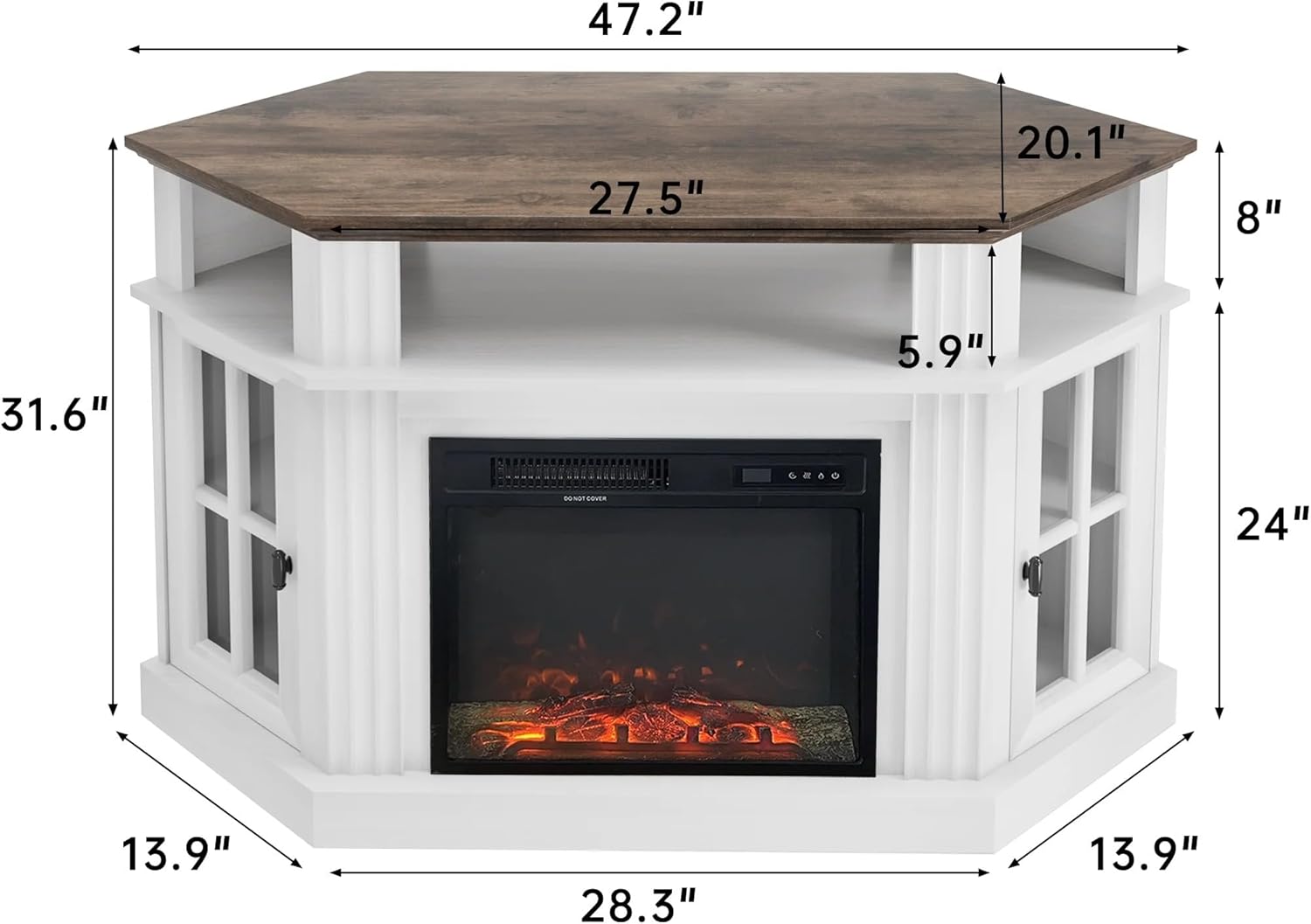
| Ürün Boyutları | 20"D x 47.2"G x 31.7"Y |
| Malzeme | MDF, P2 Class Particle Board, Wood |
| Renk | Beyaz |
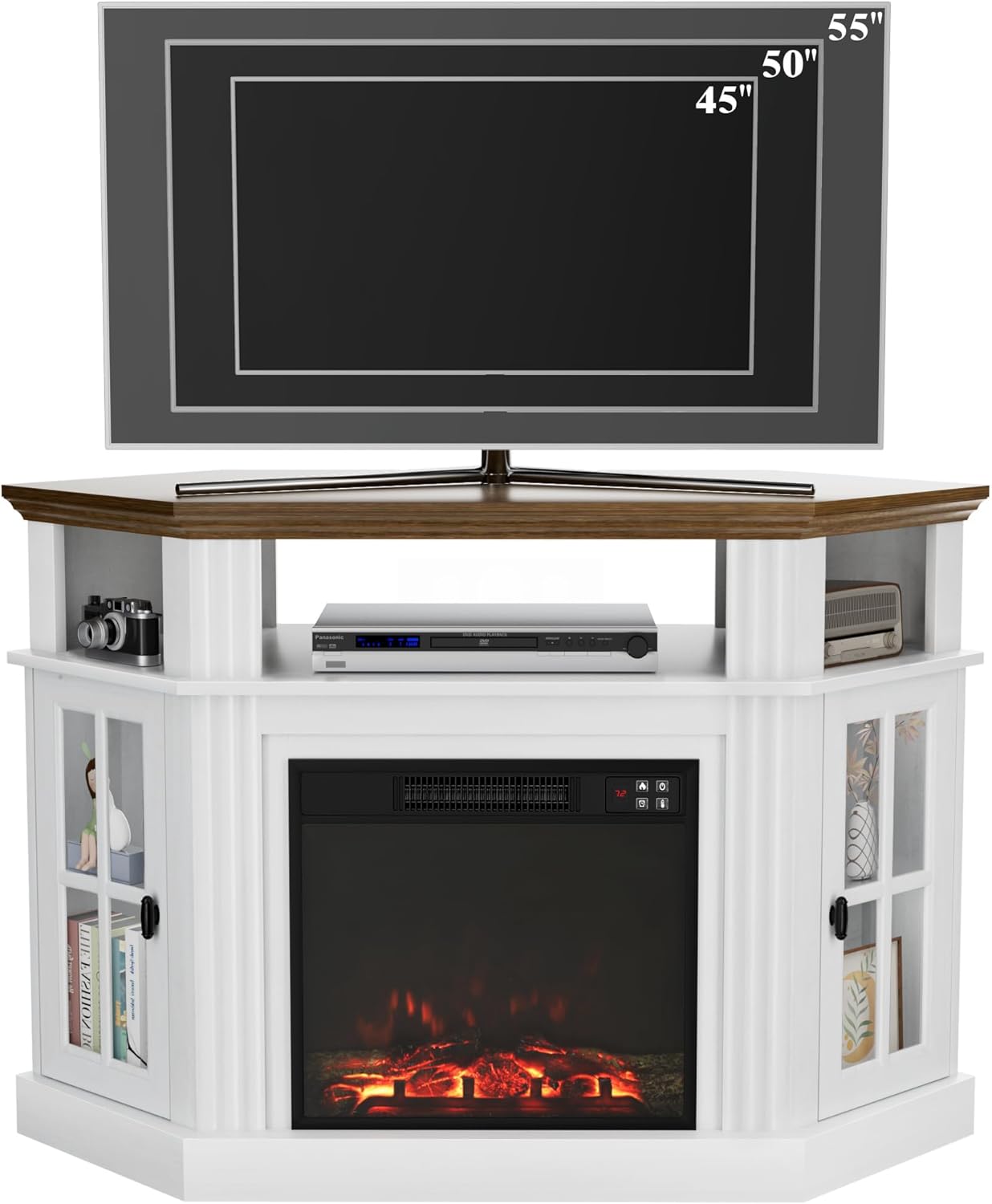
| Maximum TV Size | 55 inçe kadar |
| Ağırlık Kapasitesi | 220 kilo |
| Şömine Tipi | 18-inch Electric Fireplace |
| Isı Çıkışı | 1400 Watts (750W/1400W settings) |
| Isıtma Kapsamı | 400 ft²'ye kadar |
| Sıcaklık Aralığı | 65℉-95℉ |
| Özel Özellikler | Flame Effect, Timer (30min-9h), Remote Control, Adjustable Shelves |
| Güç Kaynağı | Kablolu Elektrik |
| Ürün Ağırlığı | 82.03 Pound |

Garanti Bilgileri
Flamaker products are manufactured with quality and care. This product comes with a limited warranty against manufacturing defects. Please refer to the warranty card included in your package or contact Flamaker customer support for specific warranty terms and conditions.
Müşteri Desteği
For any questions, missing parts, or assistance with assembly or operation, please contact Flamaker customer support. You can typically find contact information on the manufacturer's websitede veya ambalaj malzemelerinde.
Destek ile iletişime geçtiğinizde lütfen model numaranızı (0214) ve satın alma tarihinizi hazır bulundurun.
Ask a question about this manual
Ask about setup, troubleshooting, compatibility, parts, safety, or missing instructions. Manuals+ will review the question and use this page’s manual context to help answer it.