
1. Giriş
This manual provides detailed instructions for the setup, operation, maintenance, and troubleshooting of your new VEILZOR Wireless Keyboard and Mouse Combo. Please read this manual thoroughly before using the product to ensure proper functionality and to prevent damage.
The VEILZOR Wireless Keyboard and Mouse Combo offers advanced 2.4 GHz wireless connectivity, providing a reliable connection up to 10 meters with minimal delays or dropouts. Both the keyboard and mouse feature RGB backlighting, an ergonomic design for comfort, and are rechargeable for extended use.
2. Paket İçeriği
- 1 x VEILZOR Wireless Keyboard
- 1 x VEILZOR Wireless Mouse
- 1 x 2-IN-1 USB-A/C Receiver (located in the back of the keyboard)
- 1 x USB Şarj Kablosu
- 1 x Kullanım Kılavuzu (bu belge)
3. Ürün Özellikleri
- 2.4 GHz Kablosuz Teknolojisi: 10 metreye kadar stabil ve güvenilir bağlantı sağlar.
- RGB Arka Aydınlatma: Keyboard and mouse feature customizable RGB lighting with 3 brightness levels and 22 light modes for enhanced visibility and aesthetics. (Note: Keyboard cannot be set to a single color.)
- Ergonomik Tasarım: Keyboard includes a wrist rest and adjustable tilt legs. Mouse is contoured for comfortable use by both left and right-handed users.
- Sessiz Çalışma: Keys and mouse clicks are designed for quiet operation, reducing noise by 95% compared to traditional peripherals.
- Entegre Telefon/Tablet Tutucu: A U-shaped stand (8.27*0.66in) on the keyboard allows for convenient docking of mobile devices.
- Multimedya Tuşları: 6 independent multimedia keys for quick access to internet, email, media control, and volume.
- Şarj edilebilir pil: Built-in 1000mAh (keyboard) and 650mAh (mouse) lithium batteries with auto-sleep and on/off switches for extended battery life.
- Ayarlanabilir Fare DPI'sı: Three DPI settings (800/1200/1600) for customizable cursor speed and precision.
- Tak ve Çalıştır: Simple setup with a 2-IN-1 USB-A/C receiver.
- Sistem Uyumluluğu: Easily switch between Mac and Windows systems.
4. Kurulum
- USB Alıcısını Bulun: The 2-IN-1 USB-A/C receiver is stored in a compartment on the back of the keyboard. Carefully remove it.
- Alıcıyı bağlayın: Plug the USB receiver into an available USB-A or USB-C port on your computer, PC, or laptop.
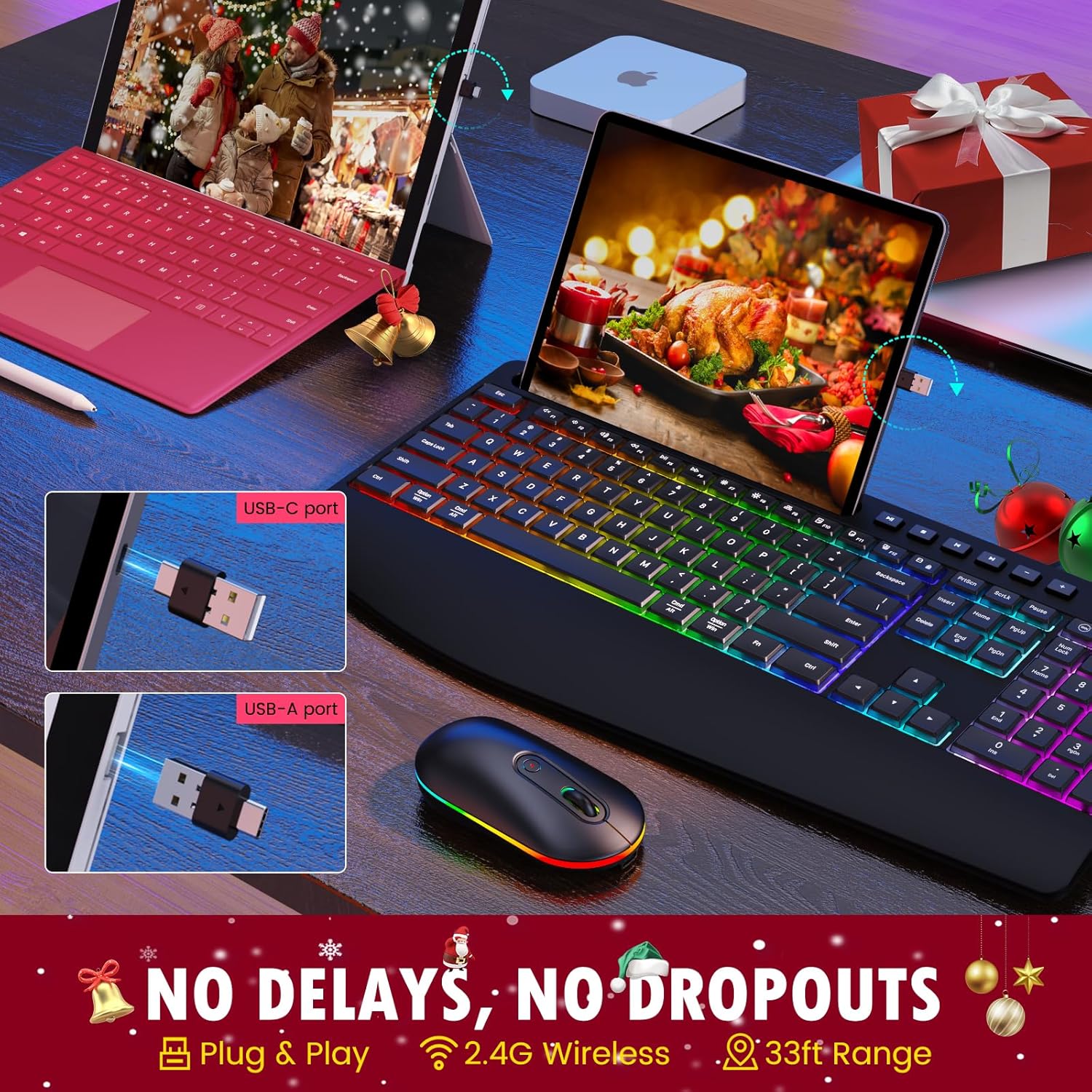
Image: The USB-A and USB-C receiver, demonstrating how it connects to a computer port. This receiver enables wireless communication between the keyboard, mouse, and your device.
- Power On the Keyboard and Mouse: Locate the ON/OFF switches on both the keyboard and the mouse. Slide them to the "ON" position.
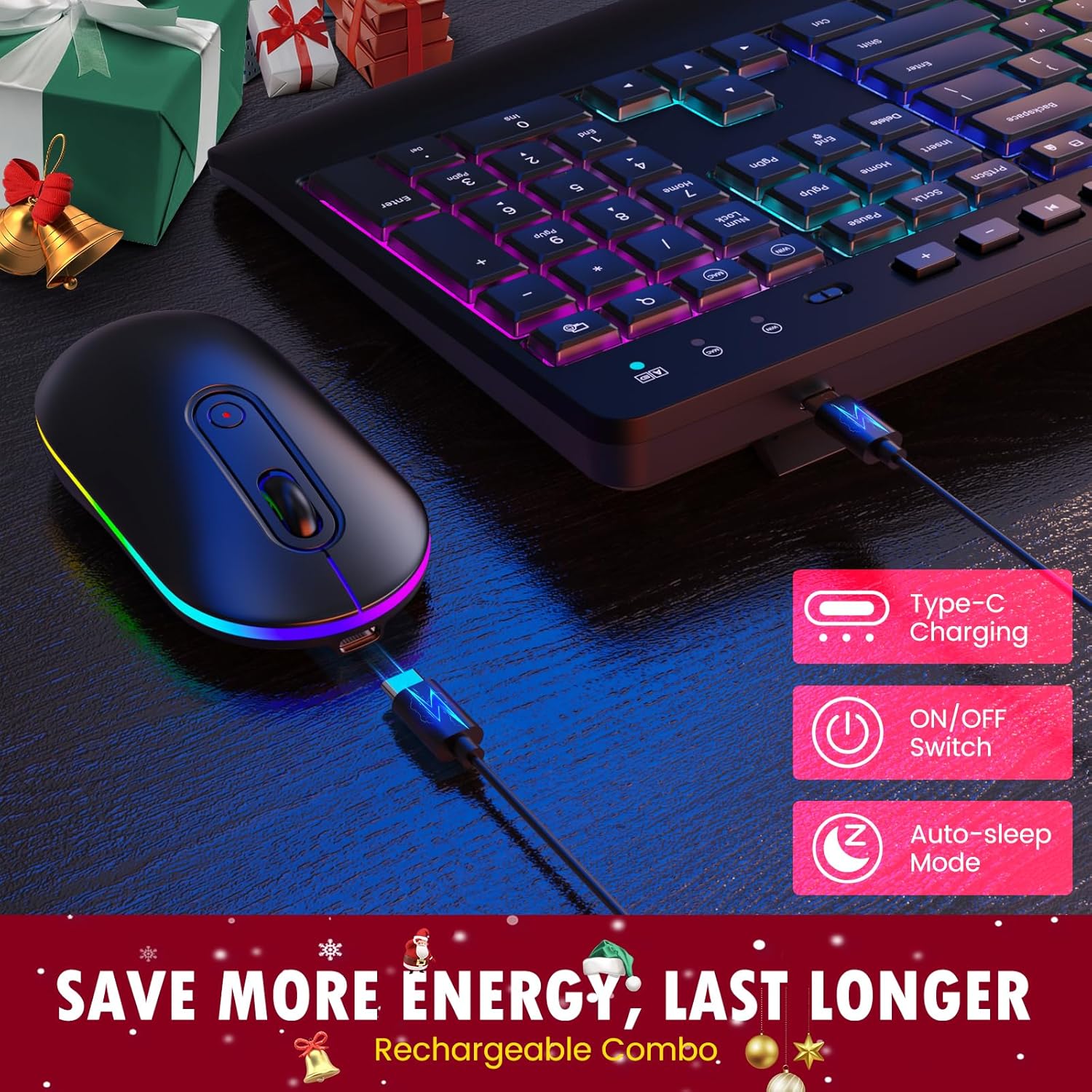
Resim: Yakın çekim view of the keyboard and mouse, highlighting their Type-C charging ports, ON/OFF switches, and auto-sleep mode indicator. These features contribute to energy efficiency and extended battery life.
- Otomatik Bağlantı: The keyboard and mouse should automatically connect to your device. No additional drivers are typically required for basic functionality.
5. Kullanım Talimatları
5.1 Klavye Kullanımı
- Yazma: Begin typing as you would with any standard keyboard.
- Adjusting Keyboard Tilt: Flip out the sturdy tilt legs located on the underside of the keyboard to adjust the typing angle for improved ergonomics.

Image: A user's hands positioned on the keyboard, demonstrating the ergonomic design with a built-in wrist rest and adjustable tilt legs. This design aims to reduce wrist strain during prolonged use.
- Using the Phone/Tablet Holder: Place your smartphone or tablet into the integrated U-shaped groove on the top of the keyboard for convenient viewIng.
- Multimedya Tuşları: Use the dedicated multimedia keys (F1-F12 shortcuts, 6 independent multimedia keys) located above the function row for quick access to common functions like volume control, play/pause, and web tarayıcı.

Image: A close-up of the keyboard, emphasizing the F1-F12 shortcut keys, 6 dedicated multimedia keys, and the full-size number pad. These features are designed to improve work efficiency.
- Sistem Anahtarlama: The keyboard supports both Mac and Windows systems. Use the appropriate key combination (refer to keyboard markings) to switch between operating system layouts if needed.
5.2 Fare Çalışması
- Temel Kullanım: Move the mouse to control the cursor on your screen. Click the left and right buttons for standard functions.
- Kaydırma tekerleği: Belgelerde dikey kaydırma için fare tekerleğini kullanın ve web sayfalar.
6. RGB Arka Aydınlatma Kontrolü
The keyboard and mouse feature dynamic RGB backlighting. Please note that the keyboard's RGB cannot be set to a single static color.
- Işık Modlarını Değiştirme: Press the dedicated backlight key on the keyboard (usually indicated by a light bulb icon or similar) to cycle through the 22 available light modes.
- Parlaklığın Ayarlanması: Use the brightness control keys (often Fn + arrow keys or dedicated keys) to select one of the 3 brightness levels.
- Mouse RGB: The mouse RGB lighting typically cycles automatically or can be turned off via its ON/OFF switch.

Image: The keyboard illuminated with vibrant RGB backlighting in a low-light environment, demonstrating its "easy to type in the dark" feature with adjustable brightness levels.

Image: The wireless mouse featuring RGB backlighting along its base, with indicators for its 3 DPI levels (800, 1200, 1600). This illustrates the mouse's customizable sensitivity and aesthetic appeal.
7. Fare DPI Ayarı
The mouse offers three adjustable DPI (Dots Per Inch) settings to control cursor sensitivity and speed:
- 800DPI: Lower sensitivity, ideal for precise tasks like graphic design.
- 1200DPI: Standard sensitivity, suitable for general use.
- 1600DPI: Higher sensitivity, for quicker cursor movement, often preferred in gaming or large screen setups.
To change the DPI setting, press the DPI button located on the top of the mouse, usually behind the scroll wheel. Each press will cycle through the available DPI levels.
8. Şarj ve Pil Ömrü
Both the keyboard and mouse are equipped with built-in rechargeable lithium batteries (Keyboard: 1000mAh, Mouse: 650mAh). To charge your devices:
- Connect the provided USB charging cable to the charging port on the keyboard or mouse.
- USB şarj kablosunun diğer ucunu bir USB güç kaynağına takın (örneğin, bilgisayarın USB portuna, USB duvar adaptörüne).
- An indicator light will typically show the charging status. Once fully charged, the light may change color or turn off.
To conserve battery life, both devices feature an auto-sleep mode that activates after a period of inactivity. You can also manually turn off the devices using their ON/OFF switches when not in use for extended periods.

Image: The complete VEILZOR Wireless Keyboard and Mouse Combo, showcasing the keyboard's full-size layout, RGB backlighting, and the integrated phone/tablet holder with a smartphone docked. The mouse is positioned next to the keyboard, also featuring RGB lighting.
9. Bakım ve Özen
- Temizlik: Klavye ve farenin yüzeylerini temizlemek için yumuşak ve kuru bir bez kullanın. İnatçı kirler için hafifçe kurulayın.amp bez kullanılabilir, ancak cihazın içine nem girmemesine dikkat edin.
- Sıvılardan Kaçının: Cihazları suya veya diğer sıvılara maruz bırakmayın.
- Depolamak: Klavyeyi ve fareyi serin, kuru bir yerde, doğrudan güneş ışığından ve aşırı sıcaklıklardan uzakta saklayın.
- Dikkatli Kullanın: Cihazları düşürmekten veya sert darbelere maruz bırakmaktan kaçınınız.
10. Sorun Giderme
| Sorun | Olası Neden | Çözüm |
|---|---|---|
| Klavye/Fare yanıt vermiyor. |
|
|
| Gecikme veya gecikmeli yanıt. |
|
|
| Arka aydınlatma çalışmıyor veya loş. |
|
|
| Mouse cursor moves too fast/slow. | DPI setting is not preferred. | Press the DPI button on the mouse to cycle through 800/1200/1600 DPI settings. |
11. Özellikler
| Özellik | Detay |
|---|---|
| Model Adı | PC407 Wireless Keyboard Mouse Combo |
| Kablosuz Teknoloji | 2.4 GHz RF |
| Bağlantı Türü | 2-IN-1 USB-A/C Receiver |
| kablosuz Menzil | 10 metreye (33 feet) kadar |
| Klavye Boyutları | 43.4 X 21 X 2.1 sm (16.93 X 8.19 X 0.82 olarak) |
| Fare Boyutları | 5.8 X 11.2 X 2.8 sm (2.3 X 4.4 X 1.1 olarak) |
| Toplam Ağırlık | 771 gr (27.2 ons) |
| Klavye Pili | Dahili 1000mAh Lityum Pil |
| Fare pili | Dahili 650mAh Lityum Pil |
| Arka ışık | RGB (22 modes, 3 brightness levels) |
| Fare DPI'ı | 800/1200/1600 |
| Uyumluluk | Windows, macOS, PC, Laptop, Tablet |
12. Garanti ve Destek
VEILZOR offers a 1 Yıllık Sınırlı Garanti for this Wireless Keyboard and Mouse Combo. This warranty covers manufacturing defects and issues arising from normal use.
If you encounter any problems or have questions regarding your product, please contact VEILZOR customer service. Our team is available to provide friendly and prompt assistance.
For support, please refer to the contact information provided on the product packaging or the official VEILZOR webalan.
13. Güvenlik Bilgileri
- Do not attempt to disassemble or modify the product. This may void the warranty and could result in damage or injury.
- Keep the product away from extreme temperatures, humidity, and direct sunlight.
- Ürünü düşürmekten veya güçlü darbelere maruz bırakmaktan kaçının.
- Pilleri ve elektronik bileşenleri yerel yönetmeliklere uygun şekilde sorumlu bir şekilde atın.
- Bu ürün oyuncak değildir. Çocukların erişemeyeceği yerde saklayınız.

