
GasDog Data Logging 0-500ppm
GasDog Portable O3 Gas Detector User Manual
Model: Data Logging 0-500ppm
1. Giriş
This user manual provides essential information for the safe and effective operation of your GasDog Portable O3 Gas Detector. This device is designed for high-precision ozone gas monitoring, offering real-time LCD display, sound, light, and vibration alarms, and data logging capabilities for the 0-500ppm range. Please read this manual thoroughly before using the detector.
2. Güvenlik Bilgileri
Yaralanmayı veya cihaza zarar gelmesini önlemek için her zaman aşağıdaki güvenlik önlemlerine uyun:
- Do not attempt to open or modify the detector. This may void the warranty and pose safety risks.
- Cihazın belirtilen çalışma sıcaklığı ve nem aralıklarında kullanıldığından emin olun.
- Avoid exposing the sensor to extreme concentrations of gas, which may damage it.
- Regularly check the device for any signs of damage or malfunction. Do not use if damaged.
- Cihazınızı güçlü elektromanyetik alanlardan uzak tutun.
- Perform regular calibration as recommended to ensure accuracy.
3. Paket İçeriği
Paketin içinde tüm öğelerin mevcut olduğundan emin olun:
- GasDog Portable O3 Gas Detector
- Şarj kablosu
- Sampling Tüp
- Filtre
- Kullanım Kılavuzu (bu belge)
- Taşıma Çantası
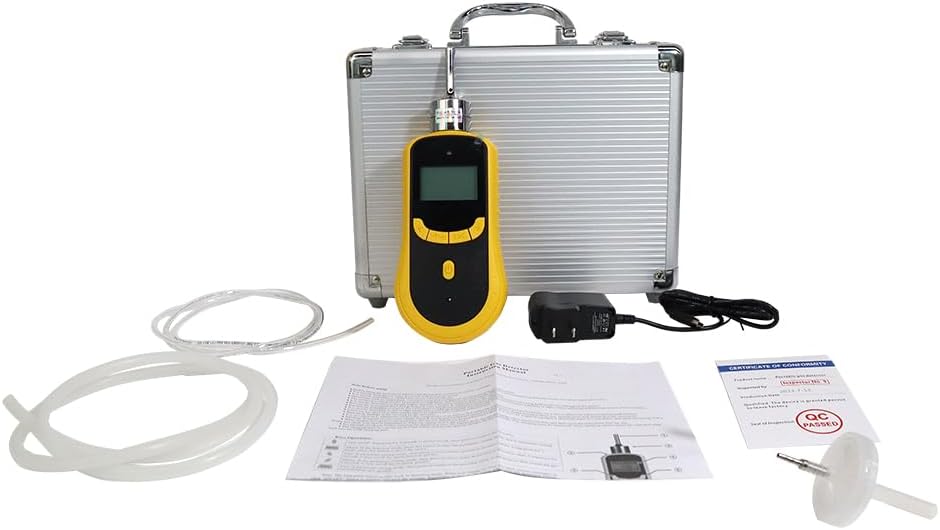
Figure 3.1: Contents of the GasDog Portable O3 Gas Detector package, including the detector, charging cable, sampling tube, filter, and carrying case.
4. Ürün Özellikleri
The GasDog Portable O3 Gas Detector offers the following key features:
- Yüksek Hassasiyetli Sensör: Equipped with an advanced gas sensor for accurate Ozone (O3) gas monitoring.
- Real-Time LCD Display: Provides instant readings of O3 concentration.
- Çoklu Alarmlar: Features sound, light, and vibration alarms for immediate alerts.
- Geniş Algılama Aralığı: Monitors O3 concentration from 0 to 500 ppm.
- Veri Kaydı: Capable of recording and storing measurement data.
- Taşınabilirlik: Compact design with a high-strength ABS engineering plastic casing, suitable for various environments and easy to carry.
- Hızlı Yanıt Süresi: Ensures quick detection of gas leaks.
5. Parçalar ve Kontroller
Familiarize yourself with the components and controls of your O3 gas detector:
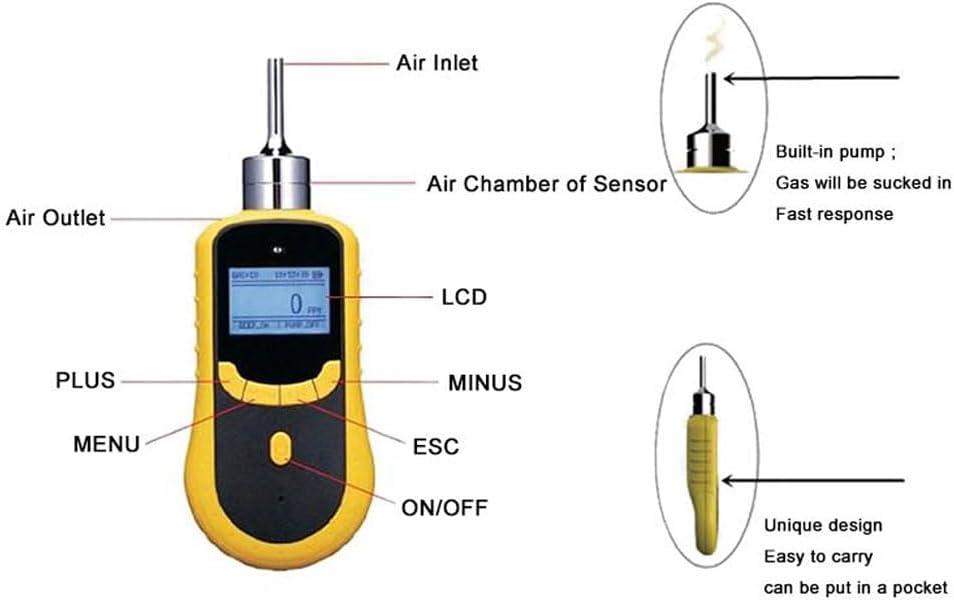
Şekil 5.1: Ön view of the detector with key components labeled.
- Hava girişi: Point where ambient air is drawn into the sensor.
- Air Chamber of Sensor: Internal component housing the O3 sensor.
- Hava çıkışı: Point where processed air exits the device.
- Ekran Kartı: Liquid Crystal Display for real-time readings and menu navigation.
- PLUS Button: Artırmak için kullanılırasing değerleri veya menülerde yukarı doğru gezinme.
- MINUS Button: Azaltmak için kullanılırasing değerleri veya menülerde aşağı doğru gezinme.
- MENÜ Düğmesi: Accesses the device's main menu and confirms selections.
- ESC Düğmesi: Mevcut menüden çıkar veya bir işlemi iptal eder.
- AÇIK/KAPALI Düğmesi: Cihazı açar veya kapatır.
- Dahili Pompa: Actively draws gas into the sensor for fast response.


Şekil 5.2: Çeşitli views of the GasDog Portable O3 Gas Detector.
6. Kurulum
Follow these steps to prepare your detector for first use:
- Pilin Şarj Edilmesi: Connect the provided charging cable to the detector's charging port and plug it into a suitable power source. The battery indicator on the LCD will show charging status. Ensure the device is fully charged before initial use.
- Güç Açık: Basılı tutun AÇIK/KAPALI button until the LCD screen illuminates. The device will perform a self-test and warm-up sequence.
- İlk Kalibrasyon Kontrolü: It is recommended to perform an initial zero-point calibration in a clean air environment to ensure accurate readings. Refer to the "Maintenance" section for calibration procedures.
7. Kullanım Talimatları
Operating the GasDog O3 Gas Detector for gas detection:
- Güç Açık: Basılı tutun AÇIK/KAPALI button to turn on the device. Wait for the self-test to complete and the main measurement interface to appear.
- Gaz Algılama: Position the air inlet near the area where O3 gas detection is required. The built-in pump will draw air for analysis.
- Okuma Ekranı: The real-time O3 concentration (in ppm) will be displayed on the LCD. The display also shows maximum (MAX) and average (AVE) readings.
- Alarmın Etkinleştirilmesi: If the O3 concentration exceeds the preset alarm thresholds, the device will activate its sound, light, and vibration alarms. Take immediate action to address the gas leak or move to a safe area.
- Pompa Kontrolü: The pump status (PUMP ON/OFF) is indicated on the display. You can typically control the pump via the menu settings if needed.
- Kapat: Basılı tutun AÇIK/KAPALI Cihaz kapanana kadar düğmeye basın.
7.1. Menü Navigasyonu
Kullanın MENÜ, ARTI, EKSİ, Ve ESC buttons to navigate through the device's settings and functions. Common menu options include:
- Alarm Ayarları: Adjust high and low alarm thresholds.
- Birim Seçimi: Change measurement units (e.g., ppm).
- Veri Kaydı: Access logged data or configure logging intervals.
- Kalibrasyon: Initiate zero-point or span calibration.
- Sistem Bilgileri: View device details, software version, etc.
7.2. Veri Kaydı
The detector is equipped with data logging capabilities. To access or manage logged data, navigate to the "Data Logging" section within the device's menu. Data can typically be reviewed on the device or exported to a computer via a compatible interface (cable not specified, assume standard USB if available).
Video 7.1: Bir overview of the GasDog GD200 gas detector, demonstrating its appearance and basic display functions.
8. Bakım
Proper maintenance ensures the longevity and accuracy of your detector:
- Temizlik: Dedektörün dış yüzeyini yumuşak bir bezle silin.amp cloth. Do not use abrasive cleaners or solvents. Keep the air inlet and outlet free from dust and debris.
- Depolamak: Store the detector in its carrying case in a cool, dry place away from direct sunlight and extreme temperatures when not in use.
- Pil Bakım: Pil sağlığını korumak için, cihazı sık kullanmasanız bile pili düzenli olarak şarj edin.
- Kalibrasyon: Regular calibration is crucial for maintaining measurement accuracy. Consult a qualified technician or the manufacturer for recommended calibration intervals and procedures.
9. Sorun Giderme
Yaygın sorunlar ve olası çözümleri:
| Sorun | Olası Neden | Çözüm |
|---|---|---|
| Cihaz açılmıyor. | Pil zayıf; güç düğmesine yeterince uzun süre basılmadı. | Charge the battery; press and hold the ON/OFF button for 3-5 seconds. |
| Hatalı okumalar. | Sensor contamination; need for calibration; extreme environmental conditions. | Clean the sensor area; perform calibration; ensure use within specified operating conditions. |
| Alarms activate frequently without gas presence. | False alarm due to interference; sensor malfunction; alarm thresholds set too low. | Move away from potential interference sources; check sensor status; adjust alarm thresholds in settings. |
| Pump not working. | Blocked air inlet/outlet; pump malfunction. | Clear any obstructions; contact support if problem persists. |
If you encounter issues not listed here or if the suggested solutions do not resolve the problem, please contact GasDog customer support.
10. Özellikler
Key technical specifications for the GasDog Portable O3 Gas Detector:
| Şartname | Detay |
|---|---|
| Marka | GazKöpeği |
| Örnek | Data Logging 0-500ppm |
| Gaz Algılandı | Ozon (O3) |
| Algılama Aralığı | 0 500 ppm |
| Güç Kaynağı | Battery Powered (Li-ion 3.7V 2300 mAh) |
| Görüntülemek | Gerçek Zamanlı LCD Ekran |
| Alarmlar | Ses, Işık, Titreşim |
| Çalışma Nemi | %95 (yoğuşmasız) |
| Malzeme | High-strength ABS engineering plastic casing |
11. Garanti ve Destek
GasDog is committed to providing quality products and customer satisfaction. While specific warranty details are not provided in this manual, if you have any inquiries or encounter issues with your gas detector, please feel free to contact GasDog customer support. We aim to provide a satisfactory response and assistance.
Ek kaynaklar için resmi kaynaklara başvurabilirsiniz. Kullanım Talimatları (KK) PDF çevrimiçi olarak mevcuttur.
Ask a question about this manual
Ask about setup, troubleshooting, compatibility, parts, safety, or missing instructions. Manuals+ will review the question and use this page’s manual context to help answer it.