
1. Önemli Güvenlik Bilgileri
Please read all safety and operating instructions carefully before using your television. Keep these instructions for future reference.
- Güç Kaynağı: Televizyonu yalnızca üzerindeki etikette belirtilen güç kaynağı türüne bağlayın.
- Havalandırma: Uygun havalandırmayı sağlayın. Havalandırma açıklıklarını kapatmayın.
- Su ve Nem: Do not expose the TV to rain or moisture. Do not use near water.
- Temizlik: Unplug the TV from the wall outlet before cleaning. Use a soft, dry cloth. Do not use liquid or aerosol cleaners.
- Atama: Televizyonunuzu sabit ve düz bir yüzeye yerleştirin. Doğrudan güneş ışığına veya ısı kaynaklarının yakınına yerleştirmekten kaçının.
- Yıldırım: Yıldırımlı havalarda veya uzun süre kullanılmayacaksa televizyonun fişini çekin.
2. Paket İçeriği
Aşağıda listelenen tüm öğelerin TV paketinizde yer aldığından emin olun:
- coocaa ROKU 50R5G 50-inch UHD Smart LED TV
- Pilli Uzaktan Kumanda
- TV Sehpası (2 adet)
- Stand Vidaları
- Güç kablosu
- Hızlı Başlangıç Kılavuzu (bu kılavuz)
3. Kurulum
3.1 Ambalajdan Çıkarma ve Stand Kurulumu
Carefully remove the TV from its packaging. It is recommended to have two people for this process. Place the TV face down on a soft, clean surface to prevent screen damage.
TV sehpasını kurmak için:
- Her bir stand parçasını televizyonun alt kısmındaki ilgili yuvalara hizalayın.
- Verilen vidaları kullanarak standları sabitleyin. Vidaların iyice sıkıldığından emin olun.
Alternatively, for wall mounting, consult a professional installer and use a VESA-compatible wall mount (not included).

This image illustrates the coocaa Roku TV seamlessly integrated into a modern living room environment, mounted on a light blue wall. The TV is positioned above a minimalist wooden TV cabinet, demonstrating a typical installation scenario.
3.2 Güç Bağlantısı ve İlk Kurulum
- Güç kablosunu televizyonun güç girişine ve ardından duvar prizine bağlayın.
- Uzaktan kumandanın veya televizyonun güç düğmesine basın.
- Follow the on-screen instructions to complete the initial Roku OS setup, including language selection, country, and channel scanning for the triple tuner (satellite, cable, or antenna).
3.3 Ağ Bağlantısı
To access Smart TV features and streaming services, connect your TV to the internet:
- Wifi: During initial setup or via the Settings menu, select 'Network' and then 'Wireless'. Choose your Wi-Fi network from the list and enter the password.
- LAN (Ethernet): Connect an Ethernet cable from your router to the LAN port on the back of the TV. The TV will automatically detect the wired connection.
4. TV'nizi Çalıştırma
4.1 Roku OS Home Screen
The Roku OS home screen provides quick access to all your entertainment. It combines linear TV and streaming services into one intuitive interface.

This image shows the coocaa Roku TV from the front, powered on and displaying its intuitive home screen. The screen features icons for popular streaming services like Netflix, Disney+, Apple TV, and live TV options, alongside inputs for cable box and game console. A '2023 Heimkino Innovation Award' badge is visible on the bottom left bezel.
- Yayın Kanalları: Access popular apps like Netflix, Disney+, and Apple TV.
- Canlı TV: Watch broadcast television via the integrated triple tuner.
- Girişler: Easily switch between connected devices (e.g., game console, cable box).
- Aramak: Use the cross-channel search to find content by title, actor, or genre.
4.2 Uzaktan Kumandanın Kullanımı
The user-friendly remote control provides all necessary functions:
- Navigasyon Pedi: Use the arrow buttons to navigate menus and select items.
- Tamam Düğmesi: Seçimleri onaylayın.
- Ana menü tuşu: Return to the Roku OS home screen.
- Geri Düğmesi: Önceki ekrana geri dönün.
- Anında Tekrar: Replay the last few seconds of video.
- Hızlı Erişim Düğmeleri: Popüler yayın platformları için özel butonlar.
- Sesli Arama: Use the voice search feature for hands-free control (if supported by remote model).
4.3 Giriş Kaynakları
Connect external devices to your TV using the available ports:
- HDMI: The TV features three HDMI inputs for connecting devices like Blu-ray players, game consoles, or set-top boxes.
- USB BAĞLANTI: One USB port is available for media playback or Timeshift functions.
- Dijital Ses Çıkışı: Harici ses sistemlerine bağlanmak için.
4.4 Akıllı TV Özellikleri
Your coocaa Roku TV offers a wide range of smart features:
- Yayın Hizmetleri: Access pre-installed apps like Netflix, Disney+, Apple TV, and more.
- Sesli Asistan Desteği: Compatible with Apple AirPlay, Apple Home, Alexa, and Google Home for integrated smart home control.
- Roku Mobil Uygulaması: Control your TV, use voice search, and listen to audio via headphones using the free Roku app for iOS and Android devices.
4.5 Ses ve Video Ayarları
Optimize edin viewDeneyim:
- Resim Modları: Select from various picture modes (e.g., Standard, Movie, Sport) or customize brightness, contrast, and color settings.
- HDR Desteği: Enjoy enhanced contrast and color with HDR10 and HLG content.
- Ses Modları: Choose sound modes (e.g., Standard, Music, Speech) or adjust equalizer settings for optimal audio.
5. Bakım
5.1 TV'nizin Temizlenmesi
To maintain the TV's appearance and performance:
- Temizlemeden önce TV'nin fişini çekin.
- Ekranı ve kasayı silmek için yumuşak, kuru ve tiftiksiz bir bez kullanın.
- İnatçı izler için hafifçe silinampBezi suyla ıslatın. Temizleyiciyi asla doğrudan televizyonun üzerine püskürtmeyin.
- Aşındırıcı temizleyiciler, cilalar veya çözücüler kullanmaktan kaçının.
5.2 Yazılım Güncellemeleri
Your Roku TV automatically checks for and installs software updates when connected to the internet. These updates provide new features, performance improvements, and bug fixes. Ensure your TV remains connected to the internet for timely updates.
6. Sorun Giderme
Televizyonunuzda sorunlarla karşılaşırsanız aşağıdaki yaygın çözümlere başvurun:
| Sorun | Olası Çözüm |
|---|---|
| Güç Yok | Güç kablosunun televizyona ve duvar prizine sağlam bir şekilde bağlı olup olmadığını kontrol edin. Farklı bir priz deneyin. |
| Görüntü yok, ancak ses var. | Doğru giriş kaynağının seçildiğinden emin olun. Harici cihazlara olan kablo bağlantılarını kontrol edin. |
| Ses yok, ancak görüntü mevcut. | Ses seviyesini ve sessize alma durumunu kontrol edin. Harici ses sistemlerinin doğru şekilde bağlı ve açık olduğundan emin olun. |
| Wi-Fi'ye bağlanılamıyor | Verify your Wi-Fi password. Restart your router and modem. Move the TV closer to the router or use a wired connection. |
| Uzaktan Kumanda Çalışmıyor | Pilleri değiştirin. Kumanda ile televizyon arasında herhangi bir engel olmadığından emin olun. |
7. Özellikler
Detailed technical specifications for the coocaa ROKU 50R5G TV:

This image displays the official product data sheet (Produktdatenblatt) for the coocaa 50R5G television. It provides comprehensive technical specifications, including energy efficiency class, power consumption, screen resolution, panel technology, and guaranteed software/spare parts availability, as per EU regulations.
| Parametre | Değer |
|---|---|
| Marka | kakao |
| Model Name / Item Model Number | 50R5G |
| İşletim Sistemi | Roku İşletim Sistemi |
| Ekran Boyutu | 50 İnç (126 cm) |
| Ekran Teknolojisi | LED-LCD |
| Çözünürlük | 3840 x 2160 piksel (4K UHD) |
| En Boy Oranı | 16:9 |
| Refresh Rate (Standard) | 50 Hz |
| Bağlantı | Wi-Fi, LAN (Ethernet), 3x HDMI, 1x USB |
| Özel Özellikler | Integrated Speaker, HDR10, HLG, Triple Tuner |
| Desteklenen İnternet Hizmetleri | Netflix, Disney+, Apple TV, Prime Video, RTL+ |
| Ürün Boyutları (G x Y x D) | Yaklaşık 110 cm x 65 cm x 9 cm |
| Enerji Verimliliği Sınıfı (SDR) | G |
| Güç Tüketimi (SDR) | 70.0 W / 70 kWh/1000h |
| Enerji Verimliliği Sınıfı (HDR) | G |
| Güç Tüketimi (HDR) | 103 W / 103 kWh/1000h |
| Guaranteed Software/Firmware Updates | 8 years (from end of market placement) |
| Guaranteed Spare Parts Availability | 7 years (from end of market placement) |
| Guaranteed Product Support | 7 yıl |
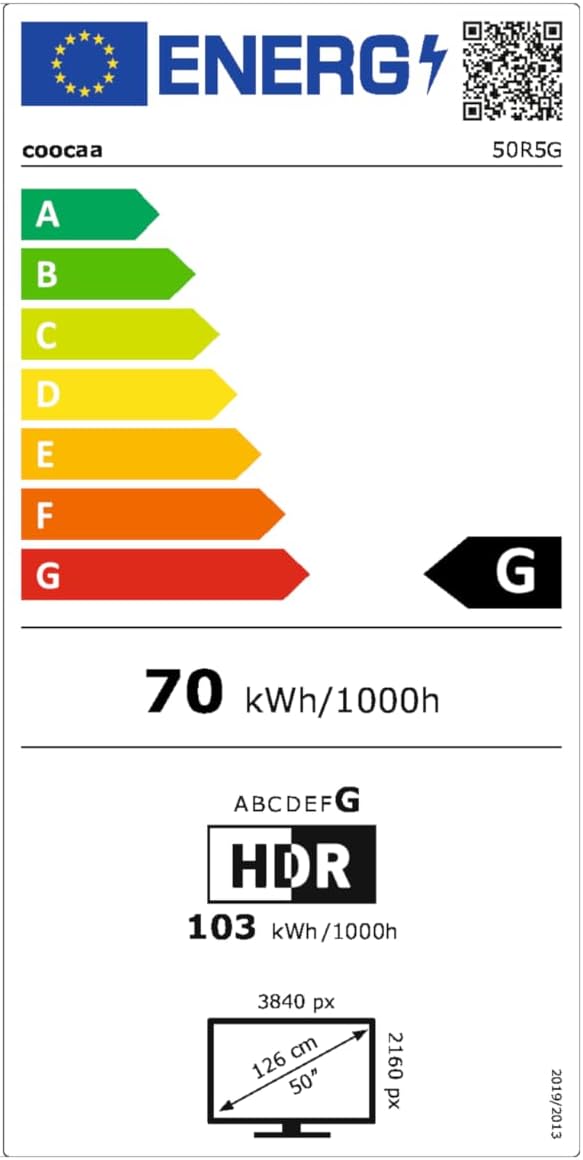
This image presents the EU Energy Label for the coocaa 50R5G TV. It indicates an energy efficiency class of 'G' for both Standard Dynamic Range (SDR) and High Dynamic Range (HDR) content, with power consumption values of 70 kWh/1000h for SDR and 103 kWh/1000h for HDR. The label also shows the screen size of 50 inches (126 cm) and resolution of 3840x2160 pixels. A QR code is included for accessing the EPREL database: EPREL Veritabanı Bağlantısı
8. Garanti ve Destek
Your coocaa ROKU 50R5G TV comes with a manufacturer's warranty. Please refer to the official product documentation for specific terms and conditions.
- General Warranty Period: Satın alma tarihinden itibaren 2 yıl.
- Ürün Desteği: Guaranteed for 7 years.
- Yedek parça: Guaranteed availability for 7 years after the product is no longer placed on the market.
- Yazılım Güncellemeleri: Guaranteed for 8 years after the product is no longer placed on the market.
For technical assistance or warranty claims, please contact coocaa customer support through their official webÜrünün satın alındığı site veya perakendeci.