
giriiş
This manual provides detailed instructions for the setup, operation, and maintenance of your infactory FWS-100 Radio-Controlled Weather Station. Please read this manual thoroughly before using the device to ensure proper function and longevity.
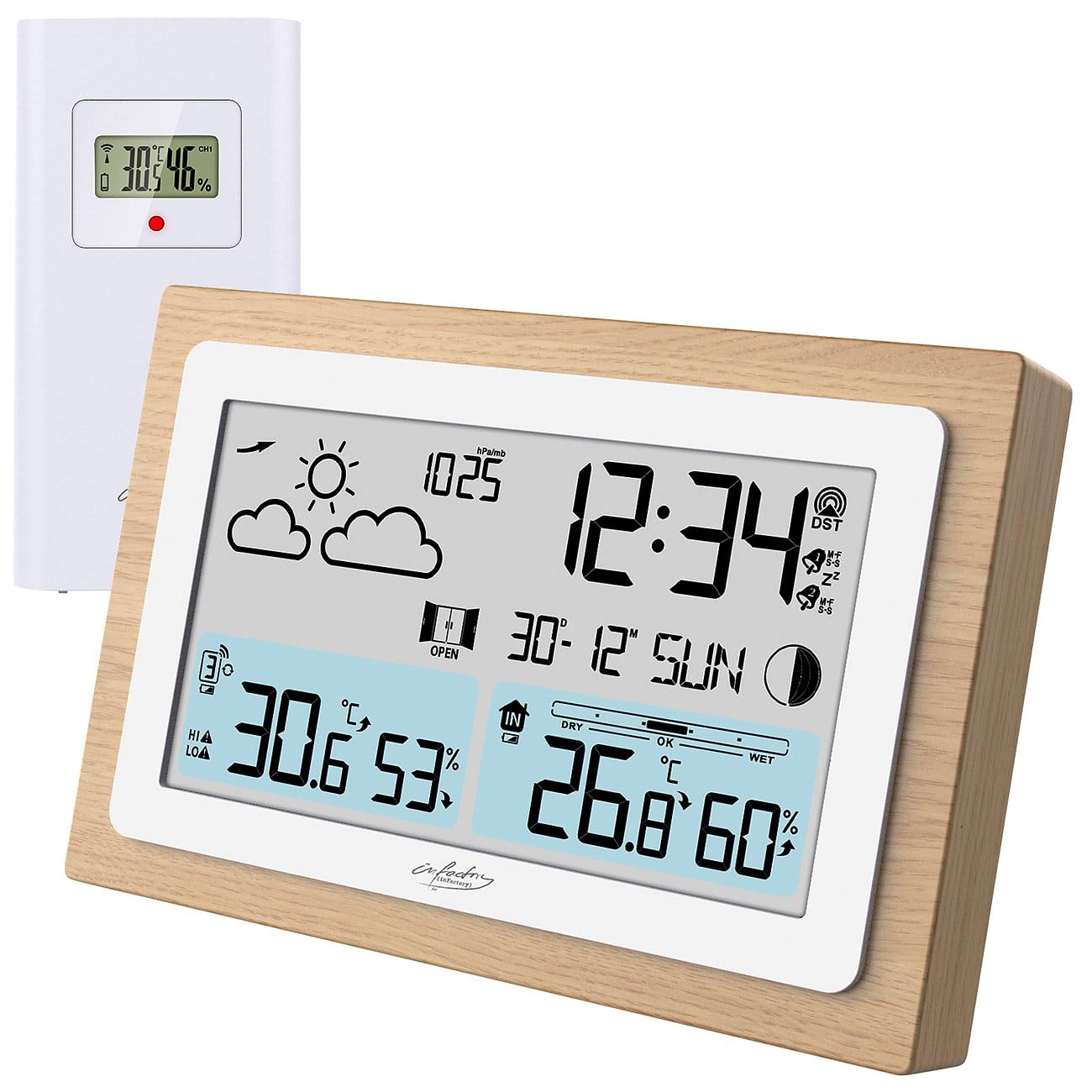
Image: The infactory FWS-100 weather station with its main unit featuring a wooden frame and a separate white outdoor sensor.
Paket İçeriği
- 1x infactory FWS-100 Radio-Controlled Weather Station (main unit)
- 1x Wireless Outdoor Sensor (IP44 splash-proof)
- 1x User Manual (refer to this translated version for English)
Not: Batteries (2x AAA for main unit, 2x AAA for outdoor sensor) and a DC power adapter are not included and must be purchased separately.
Temel Özellikler
- LCD display (11.2 x 6.2 cm) with backlight
- Simultaneous display of indoor and outdoor temperature and humidity
- Weather trend forecast
- Radio-controlled time (DCF signal) with manual setting option
- 12/24 hour format selection
- Date and moon phase display
- Alarm clock with up to two adjustable alarms and snooze function
- Real wood frame design
- Wireless outdoor sensor with up to 60m transmission range (open area)
- Expandable with up to 2 additional outdoor sensors (sold separately)
- Temperature range: Indoor -9.9°C to 50°C; Outdoor -40°C to 70°C
- Power supply: 2x AAA batteries or DC power adapter (not included) for main unit; 2x AAA batteries (not included) for outdoor sensor.
Kurmak
1. Pil Kurulumu
Ana Ünite:
- Ana ünitenin arkasındaki pil bölmesi kapağını açın.
- Insert 2x AAA batteries, observing the correct polarity (+/-).
- Pil bölmesinin kapağını kapatın.
- Alternatively, connect a DC 5V power adapter (not included) to the DC jack for continuous power and backlight.
Dış Mekan Sensörü:
- Dış mekan sensörünün arkasındaki pil bölmesi kapağını açın.
- Insert 2x AAA batteries, observing the correct polarity (+/-).
- Pil bölmesinin kapağını kapatın.

Resim: Arka view of the main weather station unit, showing the battery compartment and control buttons.
2. Sensör Yerleşimi
Place the outdoor sensor in a shaded, dry location, protected from direct sunlight and rain. Ensure it is within the 60-meter transmission range of the main unit. Avoid placing it near large metal objects or electronic devices that may interfere with the wireless signal. The sensor is splash-proof (IP44) but not fully waterproof.
3. İlk Senkronizasyon
After inserting batteries into both units, the main unit will automatically attempt to connect with the outdoor sensor and receive the DCF radio signal for time synchronization. This process may take several minutes. Ensure both units are close to each other during initial setup.
Video: This video demonstrates the general features and setup of a wireless weather station, including sensor placement and display functions.
Kullanım Talimatları
1. Ekran Üzerindeview
The LCD display shows various information simultaneously:
- Sol üst: Weather forecast icons (sunny, cloudy, rainy, etc.)
- Sağ Üst: Time, DCF signal indicator, alarm indicators (Zz for snooze, bell for alarm)
- Orta: Date and day of the week, moon phase
- Sol alt: Outdoor temperature and humidity, signal strength for outdoor sensor
- Sağ Alt: Indoor temperature and humidity, comfort level indicator (DRY, OK, WET)

Resim: Ayrıntılı view of the weather station's LCD display, showing indoor/outdoor temperatures, humidity, time, date, and weather forecast icons.
2. Saat ve Tarih Ayarları
The station automatically sets the time via the DCF radio signal. If the signal is not received or you wish to set it manually:
- Basılı tutun "AYARLAMAK" button (or similar, refer to button layout on back) to enter time setting mode.
- Kullanın "+" Ve "-" Değerleri ayarlamak için düğmeler.
- Basmak "AYARLAMAK" again to confirm and move to the next setting (e.g., 12/24 hour format, hour, minute, year, month, day).
3. Alarm Fonksiyonları
The station supports up to two alarms.
- Basın "ALARM" düğme (veya benzeri) view alarm saatleri.
- Basılı tutun "ALARM" Alarm ayar moduna girmek için
- Kullanmak "+" Ve "-" Alarm saatini ayarlamak için
- Basmak "ALARM" to confirm and switch between Alarm 1 and Alarm 2 settings.
- Alarmı etkinleştirmek/devre dışı bırakmak için tuşuna basın. "ALARM" button repeatedly until the alarm icon appears/disappears.
- When an alarm sounds, press any button (except snooze) to stop it, or press the "KESTİRMEK" button for a temporary delay.
4. Sıcaklık Birimi Seçimi
Santigrat (°C) ve Fahrenheit (°F) arasında geçiş yapmak için tuşuna basın. "C/F" button (or similar, often combined with another button). This usually affects both indoor and outdoor temperature displays.
5. Adding Additional Sensors
The weather station can connect to up to two additional outdoor sensors (not included). To add a new sensor:
- Yeni sensöre pilleri takın.
- On the main unit, press the "CH" (Channel) button to cycle through channels.
- Basılı tutun "CH" button to initiate a search for new sensors. The main unit will display the new sensor's data once connected.
Bakım
- Temizlik: Ana üniteyi ve sensörü yumuşak, kuru bir bezle silin. Aşındırıcı temizleyiciler veya çözücüler kullanmayın.
- Pil Değişimi: Replace batteries in both units when the low battery indicator appears on the display. Ensure correct polarity.
- Depolamak: Cihazı uzun süre saklayacaksanız, sızıntıyı önlemek için tüm pilleri çıkarın.
Sorun giderme
| Sorun | Olası Neden | Çözüm |
|---|---|---|
| Ana ünitede ekran yok. | Dead batteries or incorrect polarity. No power adapter connected. | Replace batteries or check polarity. Connect DC power adapter. |
| Dış ortam sıcaklığı/nem değeri görüntülenmiyor. | Sensor out of range, dead sensor batteries, or interference. | Move sensor closer to main unit. Replace sensor batteries. Re-synchronize sensor (see Setup). Avoid interference sources. |
| Yanlış zaman gösterimi | Weak DCF signal or manual setting required. | Move unit to a location with better signal reception. Manually set the time (see Operating Instructions). |
| Inaccurate outdoor temperature | Sensör doğrudan güneş ışığına veya ısı kaynağına maruz kalmış. | Relocate the outdoor sensor to a shaded area, away from heat sources. |
Özellikler
- Marka: infactory
- Modeli: FWS-100 (ZX7450)
- Görüntüleme Türü: LCD
- LCD Ekran Boyutu: 11.2x6.2 cm
- İç Sıcaklık Aralığı: -9.9°C ila 50°C (14.2°F ila 122°F)
- Dış Sıcaklık Aralığı: -40°C ila 70°C (-40°F ila 158°F)
- Sıcaklık Doğruluğu: ±0.1°C
- Kablosuz İletim Aralığı: 60 metreye kadar (açık alan)
- Outdoor Sensor Protection: IP44 (sıçramaya dayanıklı)
- Power Supply (Main Unit): 2x AAA batteries (not included) or DC 5V power adapter (not included)
- Power Supply (Outdoor Sensor): 2x AAA pil (dahil değildir)
- Boyutlar (Ana Ünite): 14.8x9.8x2.6 cm
- Dimensions (Outdoor Sensor): 9.7x5x3.2 cm
- Ağırlık (Ana Ünite): 256 gr
- Bağlantı: Kablosuz
- Özel Özellikler: Radio-controlled clock, dual alarms, snooze, moon phase, weather forecast, comfort indicator.
Garanti ve Destek
Warranty information is typically provided with your purchase. Please refer to the documentation included in your product packaging or contact your retailer for details regarding warranty coverage and customer support. For technical assistance, please contact infactory customer service.