
1. Giriş
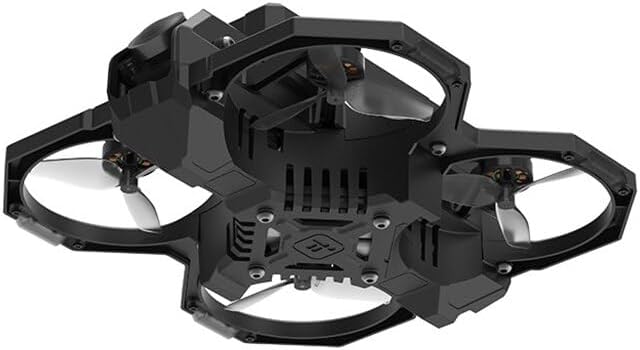
This manual provides essential information for the safe and effective operation of your iFlight Defender-16 2S HD Cinewhoop Drone. Please read this manual thoroughly before operating the drone to ensure proper setup, usage, and maintenance. The Defender-16 is a compact FPV quadcopter designed for high-definition video capture and agile flight.
2. Ürün Bittiview
Temel Özellikler
- No soldering required for assembly; motors and propellers utilize a plug-in mounting method.
- Dedicated VTX mount bracket with central grille opening and air duct design for efficient heat dissipation.
- USER1 preset for video transmitter power supply switch, allowing manual VTX shutdown to conserve power and prevent overheating.
- Crash-protected battery shell with an innovative quick-release structure for easy battery replacement.
- Drone can be disassembled with only 6 screws for convenient maintenance and repair.
- Full plug-and-play high-performance AIO (All-In-One) flight controller with increased redundancy.
- Integrated beeper for quick retrieval in case of accidental loss.
- Injection-molded frame for durability and lightweight construction.
- Customized vibration-damped O3 camera mount for smooth footage and stable Gyro Data.
- Turtle Mode pre-setup for easy recovery after a crash.
Kutuda Neler Var?
- 1 x Defender-16 O3 HD BNF Drone
- 1 x Defender-16 900mAh 25C 2S Battery
- 1 x Defender-16 Type-C Charging Adapter
- 4 x Defender-1809-3 Propellers (pairs)
- 1 x Propeller Removal Tool
Ürün Görselleri

3. Kurulum
3.1 Pil Kurulumu
- Drone'un kapalı olduğundan emin olun.
- Locate the battery compartment, typically on the top or bottom of the drone.
- Insert the provided Defender-16 900mAh 2S battery into the compartment. The quick-release structure allows for easy and secure attachment.
- Connect the battery's power connector to the drone's power input.
3.2 Pervane Bağlantısı
- Her bir pervanenin doğru dönüş yönünü belirleyin (saat yönünde dönüş için CW, saat yönünün tersine dönüş için CCW).
- Align the propeller with the motor shaft. The Defender-16 uses a plug-in mounting method, eliminating the need for screws.
- Gently push and twist the propeller onto the motor shaft until it is securely seated.
- Repeat for all four motors. Use the provided propeller removal tool for detachment when necessary.
3.3 Binding with Transmitter (ELRS 2.4GHz)
Refer to your ELRS 2.4GHz transmitter's manual for specific binding procedures. Generally, this involves putting both the drone's receiver and the transmitter into binding mode. Ensure both devices are powered on and in close proximity during the binding process.
4. Kullanım Talimatları
4.1 Uçuş Öncesi Kontrol
- Ensure the battery is fully charged and securely connected.
- Verify all propellers are correctly attached and free from damage.
- Gevşek kablo veya bileşen olup olmadığını kontrol edin.
- Confirm your FPV goggles (e.g., DJI Goggles 2) are powered on and receiving a clear video feed.
- Ensure your transmitter is powered on and bound to the drone.
4.2 Arming and Takeoff
- Uçağı düz, düz bir yüzeye yerleştirin.
- Arm the motors using the designated switch on your transmitter (refer to your transmitter's configuration). The motors will spin slowly.
- Gently increase the throttle to lift off.
4.3 Uçuş Modları
The Defender-16 supports various flight modes, including Manual Mode, which allows for maximum control and agility. Familiarize yourself with your transmitter's flight mode switch assignments.
4.4 Video Transmitter (VTX) Control
The USER1 preset on the flight controller is configured as a video transmitter power supply switch. This allows you to manually turn off the VTX when the drone is idle, conserving power and preventing overheating. Consult your flight controller's documentation for details on how to activate this switch via your transmitter.
4.5 Kaplumbağa Modu
The Defender-16 comes with Turtle Mode pre-setup. If the drone lands upside down after a crash, activate Turtle Mode via your transmitter. This will allow the motors to spin in reverse, flipping the drone back over without needing to retrieve it manually.
4.6 İniş
Reduce throttle slowly to descend. Once on the ground, disarm the motors immediately using the designated switch on your transmitter.
5. Bakım
5.1 Genel Temizlik
Regularly clean the drone to remove dust, dirt, and debris. Use a soft brush or compressed air. Avoid using liquids directly on electronic components.
5.2 Pervane Muayenesi ve Değişimi
Inspect propellers before and after each flight for cracks, bends, or other damage. Damaged propellers can affect flight performance and safety. Replace any damaged propellers immediately using the provided propeller removal tool.
5.3 Pil Bakımı
- Always use the provided Defender-16 Type-C Charging Adapter or a compatible 2S LiPo charger.
- Pili aşırı şarj etmeyin veya aşırı deşarj etmeyin.
- Store batteries in a cool, dry place at storage voltage (approximately 3.8V per cell).
- Discontinue use if the battery shows signs of swelling or damage.
5.4 Disassembly for Repair
The Defender-16 is designed for easy maintenance. The drone can be disassembled by removing only 6 screws, providing access to internal components for repair or replacement.
6. Sorun Giderme
6.1 Drone Lost Signal / Crashed
- The integrated beeper can assist in locating the drone. Activate the beeper via your transmitter if configured.
- If the drone is upside down, activate Turtle Mode to flip it over.
6.2 Görüntü Akışı Yok
- Ensure your FPV goggles are on the correct frequency/channel.
- Check VTX power status. If USER1 preset is used, ensure the VTX is powered on.
- Inspect the O3 Air Unit and its connections for any damage or dislodged cables.
6.3 Drone Not Arming
- Ensure the transmitter is powered on and bound to the drone.
- Akü bağlantısını ve şarj seviyesini kontrol edin.
- Verify that the drone is on a flat, level surface. Some flight controllers prevent arming if the drone is not level.
- Check for any error messages in your FPV goggles or flight controller OSD.
7. Özellikler
| Flight Electronics | Defender-16/20 F411 AIO |
| Video İletimi | DJI O3 Air Unit (naked version) |
| Frame Wheelbase | 81mm |
| Motorlar | Defender-16 1002 14000KV |
| Pervaneler | Defender-16 1809-3 (3-blade) |
| Takeoff Weight (incl. 900mAh battery) | 120 gr |
| Boyutlar (U×G×Y) | 121x117x47mm |
| Max Speed (Manual Mode) | 55 Km/H |
| Max Hover Time (with 2S 900mAh battery) | Yaklaşık. 6 dakika |
| Maksimum Rüzgar Hızı Direnci | Seviye 3 |
| Antenler | Çift Antenler |
| FOV (tek ekran) | 155° |
| Çalışma Sıcaklık Aralığı | -10° ila 40° C (14° ila 104° F) |
| Güç Girişi | 7.4-26.4V |
| Video Transmission Specifications (DJI O3 Air Unit) | |
| İletişim Bant Genişliği | Maksimum 40 MHz |
| İletişim Frekansı | 2.400-2.4835 GHz (RX only), 5.725-5.850 GHz (RX and TX) |
| End-to-End Latency (with DJI Goggles 2, 1080p/100fps) | 30 ms kadar düşük |
| End-to-End Latency (with DJI Goggles 2, 1080p/60fps) | 40 ms kadar düşük |
| Max Video Transmission Bitrate | 50 Mb/sn |
| Maksimum Video İletim Menzili | 10 km (FCC), 2 km (CE), 6 km (SRRC) |
8. Garanti ve Destek
For warranty information, technical support, or service inquiries, please refer to the official iFlight webSiteyi ziyaret edin veya doğrudan müşteri hizmetleriyle iletişime geçin. Satın alma belgenizi herhangi bir garanti talebi için saklayın.
Official iFlight Store: Visit the iFlight Store on Amazon