
giriiş
The COMPUTHERM E280 Wi-Fi Thermostat allows you to control connected heating or cooling devices, such as boilers or air conditioning systems, via your smartphone or tablet over the internet. This thermostat is compatible with any two-wire thermostatic connector and supports both 24V and 230V control circuits. It is particularly useful for managing heating/cooling in homes, apartments, or holiday residences, especially when occupancy schedules are irregular.
Equipped with a connectable floor temperature sensor, the E280 is ideal for controlling underfloor heating systems. It features two potential-free relays that can operate simultaneously, allowing independent control of two devices. This enables the thermostat to manage a pump and a zone valve in addition to the main boiler, facilitating multi-zone heating systems without requiring a separate zone control system.

Image: The Computherm E280 Wi-Fi Thermostat displaying room temperature and set temperature, alongside a smartphone showing the thermostat's control application.
Paket İçeriği
Paketi açtıktan sonra, tüm bileşenlerin eksiksiz ve hasarsız olduğundan emin olun.
- Computherm E280 Wi-Fi Thermostat unit
- Zemin sıcaklık sensörü
- Montaj vidaları ve dübeller
- Kullanım Kılavuzu (bu belge)

Image: The Computherm E280 thermostat, its floor sensor, mounting hardware, and printed user manuals as found in the product packaging.
Kurulum ve Yükleme
Önemli: Installation should only be performed by a qualified electrician or heating engineer. Ensure the main power supply is disconnected before commencing any wiring.
1. Termostatın Montajı
- Choose a suitable location on an interior wall, away from direct sunlight, drafts, or heat sources, at approximately 1.5 meters (5 feet) from the floor.
- Carefully separate the front panel from the backplate of the thermostat.
- Mark the drilling points on the wall using the backplate as a template.
- Drill holes, insert wall plugs, and secure the backplate to the wall using the provided screws.
2. Kablo Bağlantıları
The Computherm E280 features two potential-free relays (K1 and K2) for controlling heating/cooling systems and an optional floor sensor.

Resim: Arka view of the Computherm E280 thermostat, detailing the terminal block for electrical connections, including power input, relay outputs (K1 and K2), and the floor sensor input.
- Güç Kaynağı (L, N): Connect the live (L) and neutral (N) wires of your 230V AC power supply.
- Relay K1 (COM, NO, NC): This relay is typically used for controlling the main heating/cooling device (e.g., boiler).
- İletişim: Common terminal.
- HAYIR: Normally Open (connect to this for heating applications where the circuit closes to activate).
- Kuzey Karolina: Normally Closed (connect to this for cooling applications where the circuit opens to activate).
- Relay K2 (COM, NO): This relay can be used for an auxiliary device, such as a pump or zone valve.
- İletişim: Common terminal.
- HAYIR: Normalde Açık.
- Zemin Sensörü: Connect the wires from the external floor temperature sensor to the designated terminals.
3. Son Montaj
- Once wiring is complete and secure, carefully reattach the front panel of the thermostat to the backplate.
- Restore power to the system. The thermostat display should illuminate.
Kullanım Talimatları
The Computherm E280 can be operated directly via its touch buttons or remotely via the dedicated smartphone application.
1. Initial Power-On and Wi-Fi Connection
- After power-on, the thermostat will display the current room temperature and default settings.
- Download the "Computherm" or "Smart Life" app from your smartphone's app store (iOS or Android).
- Follow the in-app instructions to add a new device and connect your E280 thermostat to your 2.4 GHz Wi-Fi network. This typically involves putting the thermostat into pairing mode (refer to the app or thermostat's quick start guide for specific button presses).
2. Basic Thermostat Functions (On-Device)

Resim: Ayrıntılı view of the Computherm E280 thermostat's digital display, showing current room temperature, set temperature, day, and time, along with the touch-sensitive control buttons below the screen.
- Güç düğmesi (⏻): Termostatı açmak veya kapatmak için basın.
- Mod Düğmesi (↻): Cycle through operating modes (e.g., Heating, Cooling, Auto, Manual).
- Set Button (⏱): Access settings or programming menus.
- Yukarı/Aşağı Oklar (▲ / ▼): Sıcaklık ayar noktalarını ayarlayın veya menü seçeneklerinde gezinin.
3. Remote Control via Smartphone App
The smartphone app provides comprehensive control and monitoring capabilities:
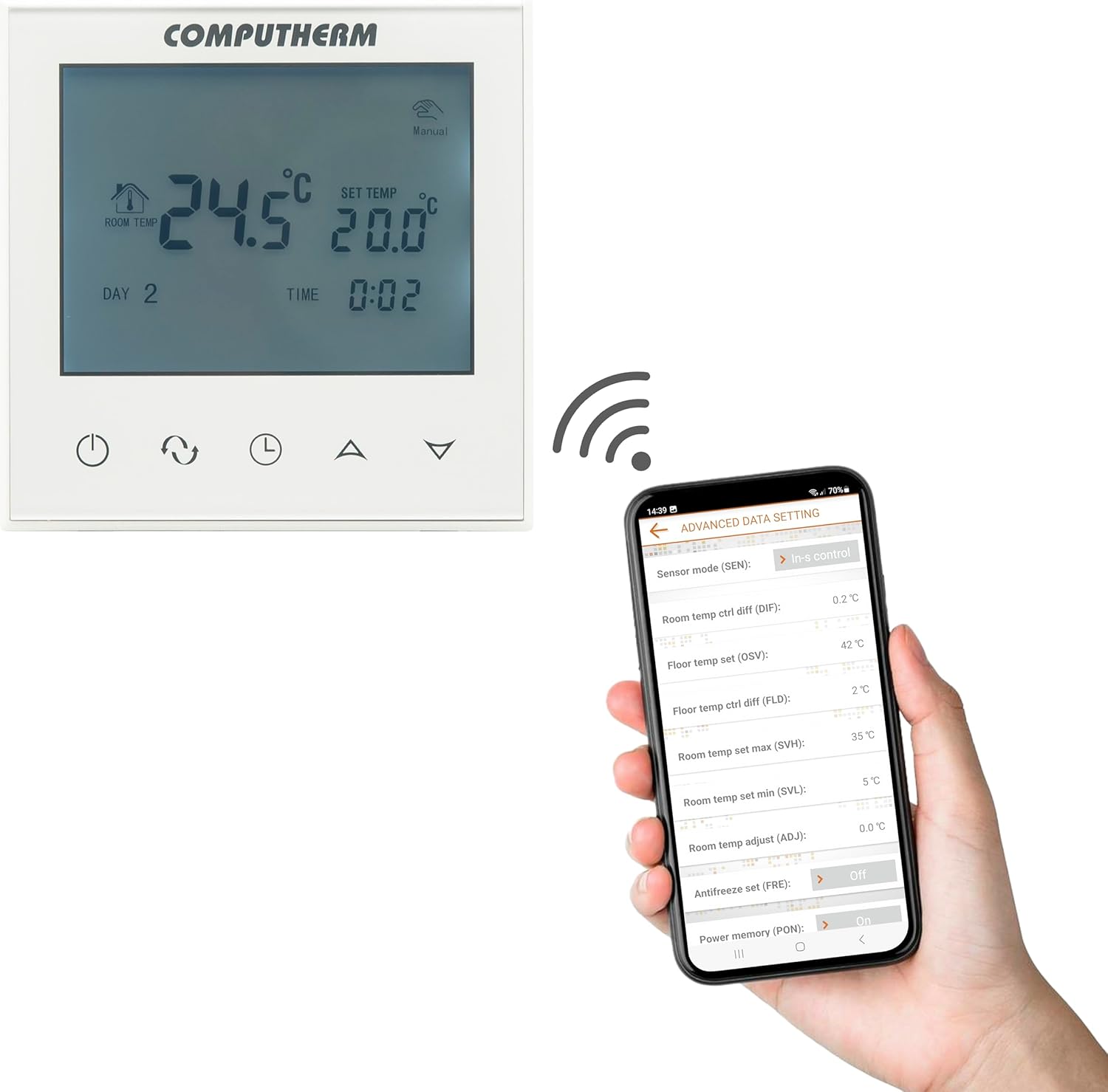
Image: A smartphone screen displaying the advanced settings interface of the Computherm E280 thermostat app, showing options like sensor mode, temperature differentials, and antifreeze settings.
- Sıcaklık Ayarı: Easily change the set temperature from anywhere.
- Planlama: Create and modify weekly heating/cooling schedules.
- Mod Seçimi: Switch between heating, cooling, and manual modes.
- Gelişmiş Ayarlar: Configure parameters such as temperature calibration, switching sensitivity, floor sensor limits, and antifreeze protection.
- İzleme: View current room and floor temperatures, operating status, and historical data.
Bakım
The Computherm E280 thermostat requires minimal maintenance to ensure optimal performance.
- Temizlik: Termostatın ekranını silin veasinYumuşak, kuru bir bezle silin. Aşındırıcı temizleyiciler, çözücüler veya kimyasal spreyler kullanmaktan kaçının, çünkü bunlar yüzeye veya iç bileşenlere zarar verebilir.
- Sensör Kontrolü: Periodically ensure that the internal and external (floor) temperature sensors are free from obstructions or debris that could affect accurate readings.
- Yazılım Güncellemeleri: Keep the smartphone application updated to the latest version to benefit from new features and performance improvements. The thermostat's firmware may also receive updates via the app.
Sorun giderme
If you encounter issues with your Computherm E280 thermostat, refer to the following common problems and solutions:
| Sorun | Olası Neden | Çözüm |
|---|---|---|
| Termostat ekranı boş. | Güç kaynağı yok. | Devre kesiciyi ve kablo bağlantılarını kontrol edin. Elektriğin geri geldiğinden emin olun. |
| Wi-Fi'ye bağlanılamıyor. | Hatalı Wi-Fi şifresi, 5GHz ağı veya zayıf sinyal. | Verify Wi-Fi password. Ensure you are connecting to a 2.4 GHz network. Move thermostat closer to router or use a Wi-Fi extender. Restart thermostat and router. |
| Isıtma/soğutma sistemi yanıt vermiyor. | Incorrect wiring, system turned off, or thermostat in wrong mode. | Check wiring connections (refer to Setup section). Ensure heating/cooling system is powered on. Verify thermostat is in the correct operating mode (e.g., Heating). |
| Yanlış sıcaklık okumaları. | Sensor obstruction, thermostat location, or calibration issue. | Ensure sensors are clear. Relocate thermostat if exposed to drafts/direct sunlight. Check app for temperature calibration options. |
If the problem persists, please contact Computherm customer support.
Özellikler
| Özellik | Detay |
|---|---|
| Marka | BİLGİSAYAR |
| Model Numarası | E280 |
| Renk | Beyaz |
| Malzeme | Plastik |
| Ürün Boyutları (U x G x Y) | 1.7x8.6x8.6 cm |
| Ürün Ağırlığı | 370 gram |
| Cilttage | 240 Volts AC (max. 24V DC / 240V AC for relays) |
| Güç Kaynağı | Kablolu Elektrik |
| Bağlantı Teknolojisi | Wi-Fi (s/g/n) 2.4 GHz |
| Sıcaklık Ölçüm Aralığı (İç) | 0 °C - 50 °C (0.1 °C increments) |
| Temperature Measurement Range (Floor Sensor) | 0 °C - 99 °C (0.1 °C increments) |
| Sıcaklık Ölçüm Doğruluğu | ± 0.5 °C |
| Ayarlanabilir Sıcaklık Aralığı | 5 °C - 99 °C (0.5 °C increments) |
| Anahtarlama Hassasiyeti | ± 0.1 °C to ± 1.0 °C (0.1 °C increments) |
| Switchable Current (K1) | 8A (2A inductive load) |
| Switchable Current (K2) | 3A (1A inductive load) |
| Heat Sensor Type (Internal & Floor) | NTC 3950K 10kΩ at 25°C |
| Özel Özellikler | Programmable, Wi-Fi Control, Floor Sensor Included |
| Belirli Kullanımlar | Radiator, Underfloor Heating |
Garanti ve Destek
The Computherm E280 Wi-Fi Thermostat comes with a 2 yıllık garanti Satın alma tarihinden itibaren geçerlidir. Bu garanti, üretim hatalarını ve normal kullanımdaki arızaları kapsar. Garanti talepleriniz için lütfen satın alma belgenizi saklayın.
For technical support, troubleshooting assistance, or warranty inquiries, please contact your retailer or visit the official Computherm webiletişim bilgileri için site.