
giriiş
The Havit Gamenote KB885L mechanical keyboard is engineered for precision, durability, and customization. It features a gasket structure design, providing a soft and stable typing experience while minimizing noise. The full key rollover with multi-key response ensures fast and accurate input, crucial for gaming. With customizable RGB backlighting, you can personalize your keyboard with various lighting modes and effects. The detachable USB-C cable enhances portability and simplifies cable management. This keyboard is built with mechanical switches rated for 50 million key presses, making it suitable for gamers, typists, and professionals who require long-lasting performance.
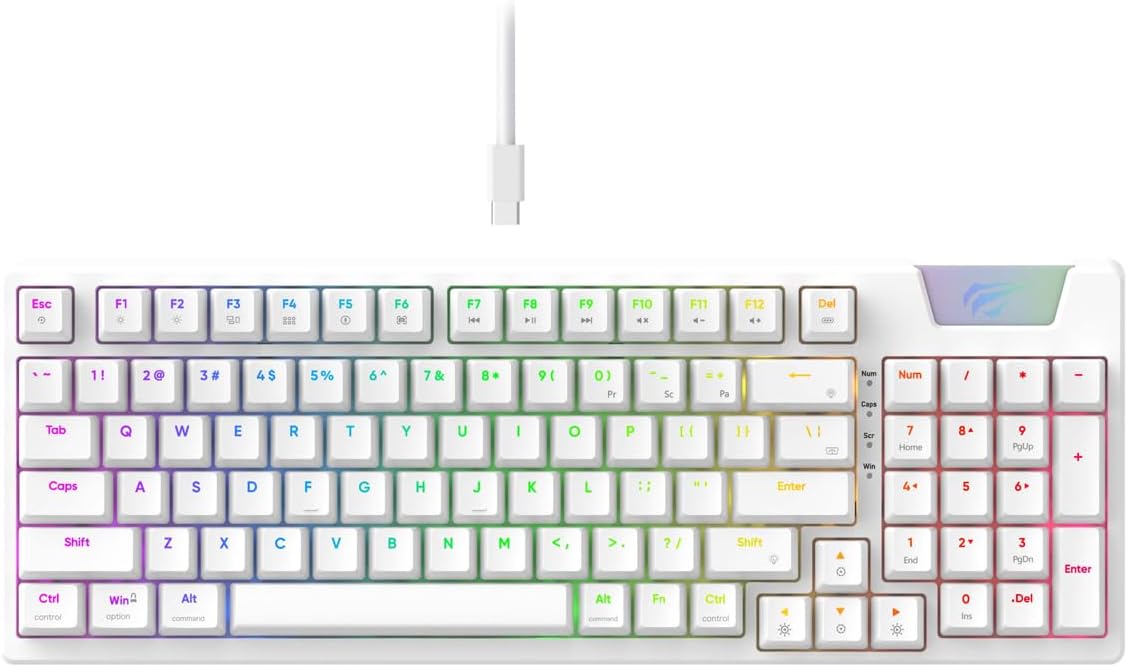
Image: The Havit Gamenote KB885L mechanical keyboard in white, showcasing its full layout and detachable USB-C cable.
Kurulum Kılavuzu
Follow these steps to set up your Havit Gamenote KB885L mechanical keyboard:
- Klavyeyi Paketinden Çıkarın: Klavyeyi ve aksesuarlarını dikkatlice ambalajından çıkarın.
- USB-C Kablosunu Bağlayın: Insert the detachable USB Type-C cable into the port on the keyboard.
- Bilgisayara Bağlan: USB kablosunun diğer ucunu bilgisayarınızdaki boş bir USB bağlantı noktasına takın.
- Sürücü Kurulumu: Klavye tak çalıştır özelliğine sahiptir ve genellikle ek sürücülere ihtiyaç duymaz. İşletim sisteminiz gerekli sürücüleri otomatik olarak algılayıp yükleyecektir.
- Test İşlevselliği: Open a text editor or browser to test key presses and ensure all functions are working correctly.

Image: A close-up of the Havit Gamenote KB885L keyboard highlighting its portable design and detachable cable for easy setup and transport.
Kullanım Talimatları
The Havit Gamenote KB885L keyboard offers various features for an enhanced user experience:
RGB Arka Aydınlatma Kontrolü
Klavyede özelleştirilebilir RGB arka aydınlatma bulunur. Aydınlatma efektlerini ayarlamak için aşağıdaki tuş kombinasyonlarını kullanın:
- Fn + [Tuş]: Cycle through different RGB lighting modes. (Specific key combinations may vary, refer to on-keyboard legends if available).
- Fn + Ok Tuşları: Aydınlatma efektlerinin parlaklığını ve hızını ayarlayın.

Image: The Havit Gamenote KB885L keyboard displaying its vibrant RGB backlighting, illustrating customizable lighting effects.
Tam Tuş Devrilmesi (NKRO)
This keyboard supports Full Key Rollover, meaning every key press is registered independently, regardless of how many keys are pressed simultaneously. This feature is essential for fast-paced gaming and typing, preventing ghosting or missed inputs.
Ergonomik Tasarım
The keyboard is designed with ergonomics in mind to provide comfort during extended use. Its layout and keycap profile aim to reduce strain on your wrists and fingers.

Resim: A view of the Havit Gamenote KB885L keyboard highlighting its ergonomic design for comfortable use.
Bakım
Doğru bakım, klavyenizin uzun ömürlü olmasını ve en iyi performansı göstermesini sağlar:
- Temizlik: Regularly clean the keyboard with a soft, dry cloth. For deeper cleaning, use compressed air to remove dust and debris from between the keycaps. For stubborn dirt, a slightly damp Klavyeye sıvı girmemesine dikkat edilerek, hafif sabunlu bir bez kullanılabilir.
- Dökülmeleri Önleyin: Dahili bileşenlerin hasar görmesini önlemek için sıvıları klavyeden uzak tutun. Sıvı dökülmesi durumunda, klavyeyi hemen çıkarın ve tekrar takmadan önce tamamen kurumasını bekleyin.
- Kablo Bakımı: Handle the detachable USB-C cable with care. Avoid sharp bends or excessive pulling to prevent damage to the cable or connectors.
- Depolamak: Kullanılmadığı zamanlarda klavyeyi temiz, kuru ve aşırı sıcaklıklardan uzak bir ortamda saklayın.
Sorun giderme
If you encounter issues with your Havit Gamenote KB885L keyboard, try the following solutions:
- Klavye Yanıt Vermiyor:
- USB-C kablosunun hem klavyeye hem de bilgisayara güvenli bir şekilde bağlandığından emin olun.
- Klavyeyi bilgisayarınızdaki farklı bir USB bağlantı noktasına takmayı deneyin.
- Sorunun klavyede mi yoksa sisteminizde mi olduğunu belirlemek için klavyeyi başka bir bilgisayarda deneyin.
- RGB Işıkları Çalışmıyor:
- Check if the lighting is turned off using the Fn key combinations.
- Klavyenin USB bağlantısı üzerinden düzgün şekilde beslendiğinden emin olun.
- Anahtarlar Kaydedilmiyor / Hayalet:
- Due to full key rollover, this is unlikely. However, ensure no debris is lodged under the keycap.
- If a specific key is consistently failing, it might indicate a switch issue. Contact support if the problem persists.
Özellikler
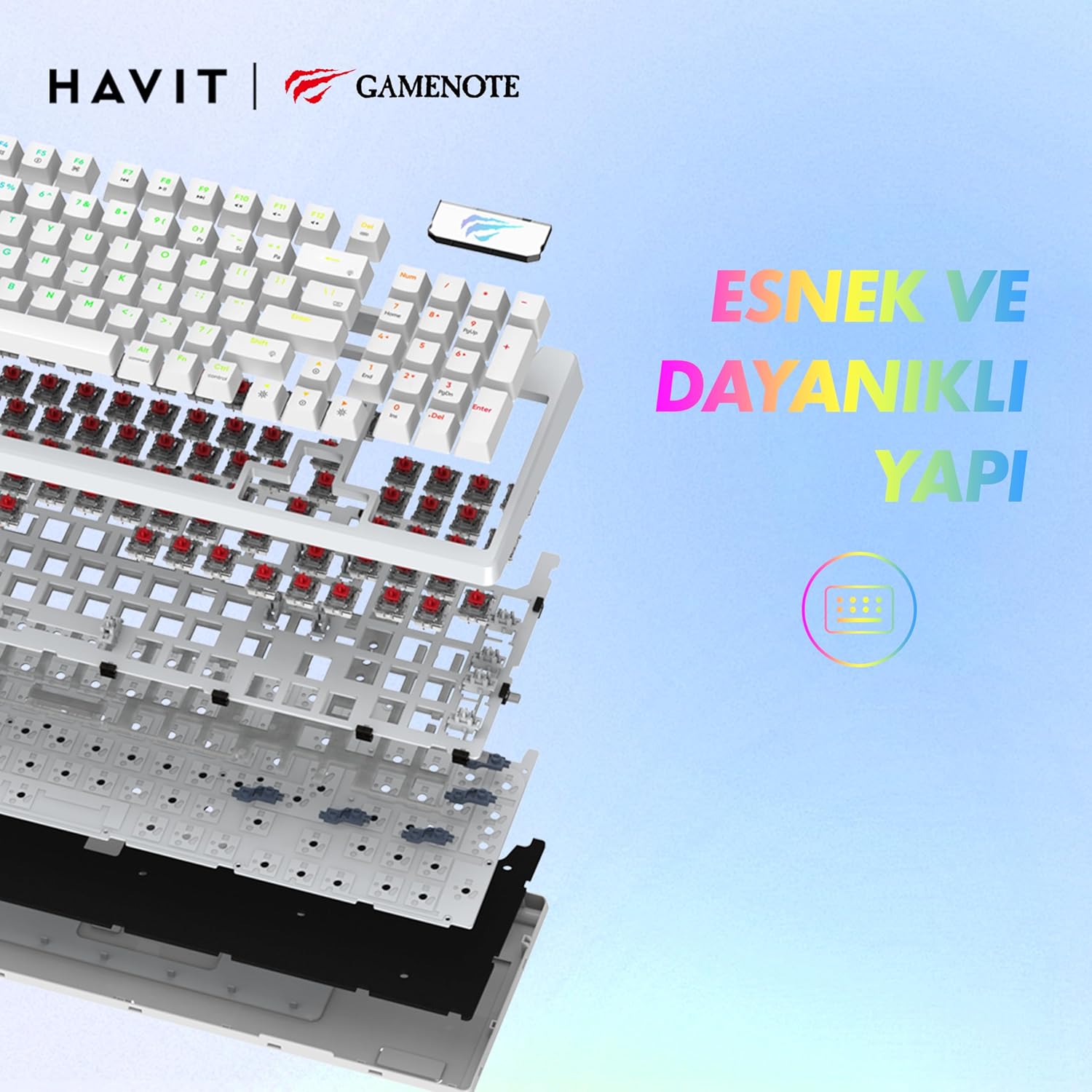
Resim: Patlamış bir view of the Havit Gamenote KB885L keyboard, illustrating its internal gasket structure for enhanced stability and typing feel.
| Özellik | Detay |
|---|---|
| Marka | Havıt |
| Model Numarası | KB885L |
| Uyumlu Cihazlar | Bilgisayar |
| Bağlantı Teknolojisi | USB |
| Klavye Açıklaması | Oyun |
| Önerilen Kullanımlar | Oyun |
| Özel Özellik | Taşınabilir |
| Renk | Beyaz |
| Backlight Color Support | RGB (Red, Green, Blue model) |
| Stil | Modern |
| Ürün Boyutları (U x G x Y) | 38.7x14x4.5 cm |
| Dil | İngilizce |
| Güç Kaynağı | USB Güç |
| Anahtar Türü | Dokunsal |
| Klavye Düzeni | Q klavye |
| El Yönelimi | İki elini de kullanabilen |
| Anahtar Sayısı | 95 |
| Düğme Miktarı | 104 |
| Dahil Bileşenler | USB kablosu |
| Malzeme | Plastik |
| Key Press Lifespan | 50 Million (from description) |

Image: An illustration highlighting the Havit Gamenote KB885L's durable mechanical switches, rated for a 50 million key press lifespan.
Garanti Bilgileri
The Havit Gamenote KB885L Mechanical Keyboard comes with a bir yıllık garanti Satın alma tarihinden itibaren geçerlidir. Bu garanti, üretim hatalarını ve normal kullanımdan kaynaklanan sorunları kapsar. Yanlış kullanım, kazalar, yetkisiz değişiklikler veya uygunsuz bakım nedeniyle oluşan hasarları kapsamaz. Garanti talepleri için lütfen satın alma belgenizi saklayın.
Müşteri Desteği
For further assistance, technical support, or warranty inquiries, please contact Havit customer service through their official website or the retailer where you purchased the product. Have your model number (KB885L) and proof of purchase ready when contacting support.