
Önemli Güvenlik Talimatları
Kurulum işlemine başlamadan önce lütfen tüm talimatları dikkatlice okuyun. Bu talimatlara uyulmaması elektrik çarpmasına, yangına veya kişisel yaralanmaya neden olabilir.
- UYARI: Elektrik çarpması riskini azaltmak için, başlamadan önce devre kesiciden veya sigorta kutusundan elektriğin kapalı olduğundan emin olun.
- Tüm kablolama ulusal ve yerel elektrik kodlarına uygun olmalıdır. Kablolama konusunda bilginiz yoksa, kalifiye bir elektrikçiye danışın.
- The fan must be mounted with a minimum of 7 feet (2.1 meters) clearance from the floor to the trailing edge of the blades.
- Ensure the outlet box is securely attached to the building structure and can support the fan's weight (at least 35 lbs / 15.9 kg).
- Hasarlı kanatlarla vantilatörü çalıştırmayın. Kanatlardan biri hasar görmüşse, tümünü değiştirin.
- Vantilatör kanatlarının dönüş yoluna herhangi bir cisim sokmayın.
Paket İçeriği
Carefully unpack your fan and inspect the contents. You should have the following items:
- Motor Muhafazası Komplesi
- Fan Kanatları (3)
- Bıçak Braketleri
- Downrod Montajı
- Montaj Braketi
- Işık Kiti Montajı
- Duvara Monte Uzaktan Kumanda
- Donanım Paketi (vidalar, rondelalar, kablo somunları)
- Kullanım Kılavuzu
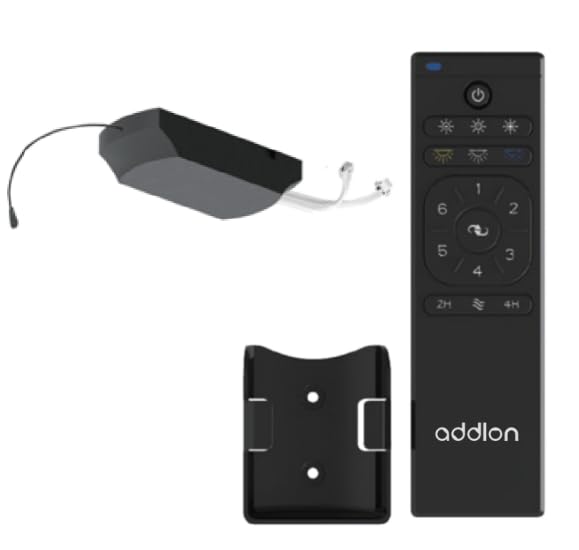
Figure 1: addlon 80-inch 3 Wood Blades Ceiling Fan with Light. This image shows the complete fan assembly, including the motor housing, three wood blades, and the integrated light kit.
Kurulum ve Yükleme
Follow these steps to properly install your addlon ceiling fan. Ensure power is OFF at the circuit breaker before proceeding.
- Montaj Braketi Kurulumu: Secure the mounting bracket to the ceiling outlet box using the screws provided. Ensure the bracket is firmly attached to a structural beam or a fan-rated outlet box.
- Downrod Düzeneği: Insert the downrod through the canopy and coupling cover. Feed the motor wires through the downrod. Secure the downrod to the motor housing with the provided pin and screws.
- Fanı Asmak: Carefully lift the fan assembly and place the downrod ball into the mounting bracket opening. Ensure the tab on the mounting bracket aligns with the slot on the downrod ball.
- Elektrik Bağlantıları: Connect the fan's electrical wires to the house wiring according to the wiring diagram in this manual (typically black to black, white to white, and green/bare copper to ground). Use the provided wire nuts and ensure all connections are secure.
- Bıçak Ataşmanı: Attach each fan blade to its blade bracket using the screws provided. Then, attach the blade brackets to the motor housing. Ensure all screws are tightened securely.
- Işık Kiti Kurulumu: Connect the light kit wires to the fan motor wires (usually blue to blue, white to white). Secure the light kit assembly to the bottom of the fan motor housing. Install the light cover.
- Uzaktan Kumanda Eşleştirme: Once installation is complete and power is restored, follow the remote control pairing instructions provided in the remote control section to synchronize the remote with your fan.
Kullanım Talimatları
Your addlon ceiling fan is operated by the included remote control. Ensure the remote has fresh batteries installed (2x AAA, not included).
- Fan AÇIK/KAPALI: Basın FAN AÇIK/KAPALI Fanı açmak veya kapatmak için düğmesine basın.
- Fan Hız Kontrolü: Kullanın HIZ buttons (usually marked with fan icons or numbers) to cycle through different fan speeds (e.g., Low, Medium, High).
- Işık AÇIK/KAPALI: Basın IŞIK AÇIK/KAPALI ışığı açmak veya kapatmak için düğmeye basın.
- Işık Kısma: If your light kit supports dimming, press and hold the IŞIK button to adjust the brightness. Release when the desired brightness is reached.
- Ters Fonksiyon: Basın TERSİ button to change the direction of the fan blades. This is useful for seasonal comfort (downward airflow for cooling in summer, upward airflow for circulating warm air in winter). Allow the fan to stop completely before reversing direction.
- Zamanlayıcı Fonksiyonu: Some models include a timer function. Press the ZAMANLAYICI button (e.g., 1H, 2H, 4H) to set the fan to turn off automatically after a set period.
Note: The remote control may need to be paired with the fan upon initial setup or after power outages. Refer to the remote control's specific instructions for pairing procedures.
Bakım
Regular maintenance ensures the longevity and optimal performance of your addlon ceiling fan. Always turn off power at the circuit breaker before performing any maintenance.
- Temizlik: Yumuşak bir d kullanınamp cloth to clean the fan blades and motor housing. Do not use abrasive cleaners or solvents, as these can damage the finish.
- Bıçak Bakımı: Periyodik olarak bıçak vidalarının sıkılığını kontrol edin. Gevşek vidalar sallanmaya ve gürültüye neden olabilir.
- Ampul Değişimi: If the light bulb needs replacement, ensure the power is off. Allow the bulb to cool before removing. Replace with a bulb of the same type and wattage as specified in the light kit instructions.
- Yıllık Kontrol: Annually, check all connections and screws for tightness. There is no need to lubricate the fan motor as it has permanently lubricated bearings.
Sorun giderme
Before contacting customer support, try these troubleshooting steps for common issues:
| Sorun | Olası Neden | Çözüm |
|---|---|---|
| Fan başlamıyor | No power to the fan; Loose wire connections; Remote control not paired or dead batteries. | Check circuit breaker; Verify all wire connections; Replace remote batteries and re-pair remote. |
| Işık çalışmıyor | Gevşek kablo bağlantısı; Arızalı ampul; Uzaktan kumanda sorunu. | Check light kit wiring; Replace bulb; Check remote batteries and pairing. |
| Fan sallanıyor | Gevşek bıçak vidaları; Dengesiz bıçaklar; Gevşek montaj braketi. | Tüm bıçak vidalarını sıkın; Bıçakları dengelemek için bir dengeleme kiti (dahil değildir) kullanın; Montaj braketinin sağlam bir şekilde takılı olduğundan emin olun. |
| Gürültülü çalışma | Gevşek vidalar; Motor sesi; Bıçakların bir engele çarpması. | Tüm vidaları kontrol edin ve sıkın; hiçbir kablonun motor gövdesine sürtünmediğinden emin olun; bıçakların herhangi bir engelden arındırılmış olduğunu doğrulayın. |
Özellikler
| Özellik | Detay |
|---|---|
| Marka | eklenti |
| Örnek | 80-inch 3 Wood Blades Ceiling Fan with Light |
| Stil | Modern |
| Oda Tipi | Yatak odası oturma odası |
| Denetleyici Türü | Uzaktan kumanda |
| Malzeme | Wood (Blades) |
| Bıçak Sayısı | 3 |
| Kontrol Yöntemi | Uzak |
| UPC | 850056663090 |
| ASIN | B0CHJKZ5GD |
Garanti ve Müşteri Desteği
addlon products are manufactured to the highest quality standards and are warranted against defects in materials and workmanship. Please refer to the warranty card included with your purchase for specific terms and conditions.
For technical assistance, replacement parts, or general inquiries, please contact addlon customer support:
- Webalan: addlon Official Store on Amazon
- E-posta: support@addlon.com (placeholder email, as none provided)
- Telefon: 1-800-XXX-XXXX (placeholder phone, as none provided)
Please have your model number (80-inch 3 Wood Blades Ceiling Fan with Light) and purchase date available when contacting support.