giriiş
This manual provides detailed instructions for the setup, operation, and maintenance of your SHOPBUY Smart Fitness Watch Model HTC U20. This device is designed to track daily activities, monitor health metrics, and provide notifications from your connected smartphone.
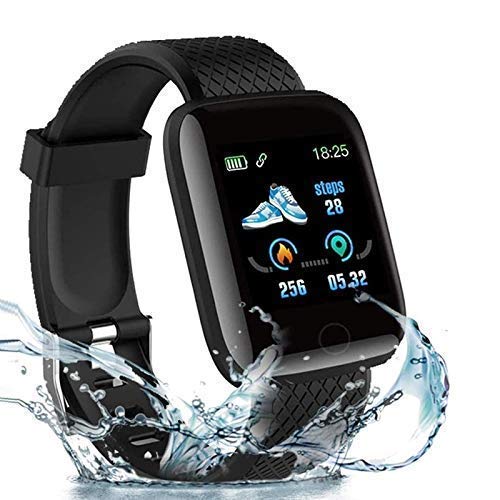
Image: The SHOPBUY Smart Fitness Watch Model HTC U20, showcasing its design and water resistance.
Paket İçeriği
Paketi açtığınızda, tüm öğelerin mevcut olduğundan emin olun:
- 1 x SHOPBUY Smart Fitness Watch (Model HTC U20)
Kurulum Kılavuzu
1. Cihazın Şarj Edilmesi
The SHOPBUY Smart Fitness Watch features a direct USB charging port. To charge, detach one side of the wristband to reveal the USB connector. Insert this connector into a standard USB port on a mobile charger, laptop, or power bank.

Image: The watch being charged via its integrated USB plug, connected to a power adapter.

Image: A four-panel illustration demonstrating how to detach the strap and plug the watch into a USB port for charging.
2. Yardımcı Uygulamanın Yüklenmesi
To access all features and synchronize data, install the Fitpro application from your device's app store (Google Play Store for Android or Apple App Store for iOS).
3. Akıllı Telefonunuzla Eşleştirme
- Akıllı telefonunuzda Bluetooth'un etkinleştirildiğinden emin olun.
- Open the Fitpro application.
- Follow the in-app instructions to search for and connect to your Smart Fitness Watch. Ensure location services are also enabled on your phone during the pairing process.
- The watch's time will automatically synchronize with your phone after successful pairing.
Kullanım Talimatları
Temel Gezinme
The watch features a touchscreen display for navigation. Swipe left, right, up, or down to access different functions and menus. Tap to select an option.
Etkinlik Takibi
The watch automatically tracks daily steps, distance covered, and calories burned. This data can be viewed directly on the OLED display or in detail within the Fitpro application.

Image: A user wearing the SHOPBUY Smart Fitness Watch while engaged in daily activities, demonstrating its integration into a routine.
Bildirimler
Once paired with your smartphone, the watch will display notifications for incoming calls, SMS messages, and various social media applications (e.g., Facebook, WhatsApp, LinkedIn, Instagram, Twitter). You can view the full text of messages on the watch display. Call rejection functionality is also available.
Uyku İzleme
The watch monitors your sleep patterns, providing data on sleep duration, deep sleep, light sleep phases, and awake times. This information is accessible through the Fitpro application.
Heart Rate and Blood Pressure Monitoring
The device includes sensors for heart rate and blood pressure monitoring. Real-time data can be viewed on the watch and synchronized with the Fitpro application for historical tracking.

Image: The watch display showing blood pressure monitoring data, indicating real-time health tracking capabilities.
Temel Özellikler
- Entegre USB Şarjı: Direct USB port for convenient charging without a separate cable.
- Tüm Gün Aktivite Takibi: Adımları, mesafeyi, yakılan kaloriyi ve aktif dakikaları izler.
- Akıllı bildirimler: Displays call, SMS, and social media alerts (Facebook, WhatsApp, LinkedIn, Instagram, Twitter).
- Sağlık Takibi: Includes heart rate sensor and sleep monitor.
- Uyumluluk: Works with both Android and iOS mobile phones and Android tablets.
- Görüntülemek: 1.3-inch OLED touchscreen with 240x240 resolution.
- Bağlantı: Bluetooth for seamless pairing with smartphones.
- Suya Dayanıklılık: IP67 waterproof level, suitable for daily use and splashes.
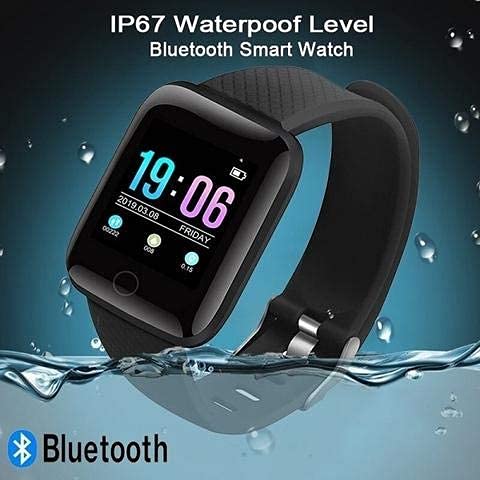
Image: The SHOPBUY Smart Fitness Watch submerged in water, illustrating its IP67 waterproof rating.
Bakım
To ensure the longevity and optimal performance of your Smart Fitness Watch, follow these maintenance guidelines:
- Temizlik: Saati ve kayışını düzenli olarak yumuşak, kuru bir bezle silin. İnatçı kirler için, biraz daha yumuşak bir bez kullanın.amp bez kullanılabilir, ardından kurutulabilir.
- Suya Maruz Kalma: While the watch is IP67 waterproof, avoid prolonged submersion or exposure to hot water, steam, or chemicals. Dry the watch thoroughly if it gets wet.
- Depolamak: Saatinizi kullanmadığınız zamanlarda serin ve kuru bir yerde saklayın.
- Şarj: Şarj için yalnızca uyumlu USB güç kaynaklarını kullanın.
Sorun giderme
If you encounter issues with your Smart Fitness Watch, refer to the following common solutions:
- Saat açılmıyor: Ensure the watch is fully charged. Connect it to a USB power source for at least 30 minutes.
- Telefonla eşleştirilemiyor:
- Telefonunuzda Bluetooth'un etkin olduğunu doğrulayın.
- Ensure location services are active on your phone.
- Hem telefonunuzu hem de saatinizi yeniden başlatın.
- Make sure the Fitpro app is installed and running.
- Yanlış zaman gösterimi: The watch time synchronizes with your phone via the Fitpro app. Ensure successful pairing.
- Bildirimler görünmüyor:
- Check notification permissions for the Fitpro app in your phone's settings.
- Saatinizin Bluetooth aracılığıyla telefonunuza bağlı olduğundan emin olun.
Teknik Özellikler
| Marka | ALIŞVERİŞSatın al |
| Örnek | HTC U20 |
| Görüntü Türü | OLED |
| Ekran Boyutu | 1.3 inç |
| Çözünürlük | 240x240 |
| Bağlantı | Bluetooth, USB |
| Uyumlu Cihazlar | Android and iOS Mobile Phones, Android Tablets |
| İşletim Sistemi | Akıllı Saat İşletim Sistemi |
| Malzeme | Plastik |
| Ürün Ağırlığı | 70 gr |
| Suya Dayanıklılık | IP67 |
Garanti ve Destek
Bu ürün bir 3 ay garanti from the date of purchase. To activate your warranty or for any support inquiries, please contact SHOPBUY customer service. Details for reaching out can typically be found on the product packaging or the retailer's webalan.