giriiş
The SHOPBUY 1D-116 Smart Fitness Watch is designed to help you monitor your daily activities and stay connected. This manual provides essential information for setting up, operating, and maintaining your device to ensure optimal performance.
Kurmak
1. Cihazın Şarj Edilmesi
Before first use, fully charge your smart fitness watch. The watch features a direct USB plug for convenient charging.
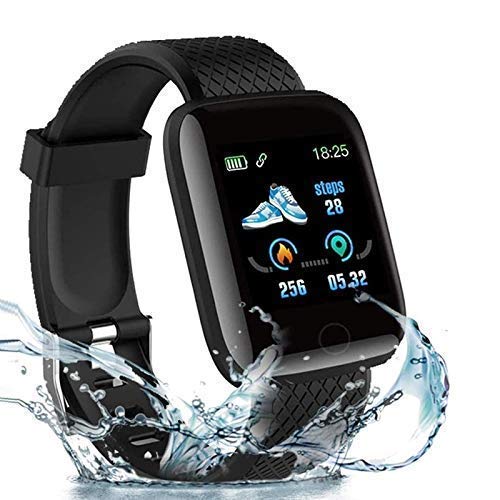
Image: The smartwatch features a USB direct plug for easy charging. It can be charged using a computer, mobile phone charger, or power bank.
Şarj etmek için:
- Carefully detach one side of the wristband to reveal the USB charging port.
- Plug the exposed USB port directly into a standard USB charger (e.g., mobile phone charger, laptop USB port, or power bank).
- The watch display will show a charging indicator. Ensure the watch is fully charged before initial setup.

Image: Step-by-step guide illustrating how to remove the strap to access the USB charging port and connect it to a power source.
2. Uygulama Kurulumu ve Eşleştirme
To utilize all features and set the correct time, you must install the 'Fitpro' application on your mobile phone.
- Download the 'Fitpro' application from your device's app store (Google Play Store for Android or Apple App Store for iOS).
- Ensure Bluetooth and Location services are enabled on your mobile phone.
- Open the Fitpro application and follow the on-screen instructions to search for and connect to your SHOPBUY 1D-116 Smart Fitness Watch.
- Once connected, the watch will automatically sync its time and data with your phone.
Cihazın Çalıştırılması
1. Daily Activity Tracking
The watch tracks your daily activities, including steps taken, distance covered, and calories burned. You can view this data directly on the OLED display or in detail within the Fitpro app.
2. Bildirimler
Receive notifications for calls, messages, and social media alerts directly on your wrist. The watch displays alerts from platforms such as Facebook, WhatsApp, LinkedIn, Instagram, and Twitter, ensuring you do not miss important communications.
3. Sağlık İzleme
The watch includes features for monitoring your health metrics. Access these functions through the color touchscreen interface.
- Nabız İzleme: Gün boyunca kalp atış hızınızı takip edin.
- Uyku İzleme: Track your sleep patterns, including duration, deep sleep, light sleep phases, and awake times.

Image: The smartwatch displays health data directly on its screen. Real-time data can also be synchronized with the phone application.
4. Dokunmatik Ekran Arayüzü
Navigate through the watch's functions and pre-installed apps using the responsive color touchscreen. Swipe and tap to access different features and settings.
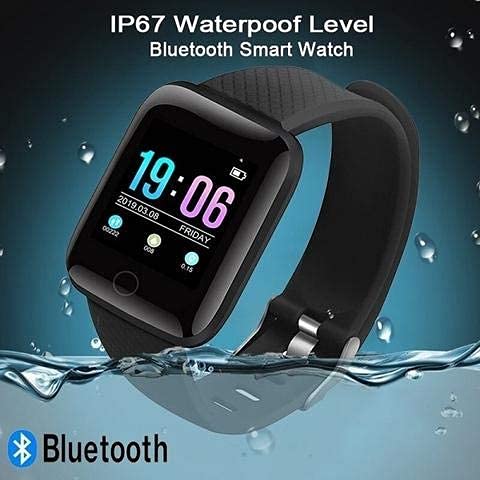
Image: The smartwatch in use during daily activities, such as working on a laptop.
Bakım
1. Temizlik
Regularly clean your watch and strap with a soft, dry cloth. Avoid using harsh chemicals or abrasive materials that could damage the device.
2. Suya Dayanıklılık
The SHOPBUY 1D-116 Smart Fitness Watch has an IP67 waterproof rating, meaning it is resistant to dust and can withstand immersion in water up to 1 meter for 30 minutes. It is suitable for daily use and light water exposure, but not recommended for swimming or showering.

Image: The smartwatch demonstrating its IP67 waterproof capability.
Sorun giderme
- Saat açılmıyor: Ensure the watch is fully charged. Connect it to a USB power source and check for the charging indicator.
- Telefonla eşleştirilemiyor: Make sure Bluetooth and Location services are active on your phone. Restart both the watch and your phone, then try pairing again through the Fitpro app.
- Yanlış zaman gösterimi: Ensure the watch is successfully connected and synced with the Fitpro app. The time will automatically update upon successful synchronization.
- Bildirimler görünmüyor: Check app permissions for Fitpro on your phone to ensure it has access to notifications. Verify that notifications are enabled within the Fitpro app settings.
- Hatalı faaliyet verileri: Ensure the watch is worn snugly on your wrist. Calibrate the app if an option is available, or restart the watch and app.
Özellikler
| Özellik | Detay |
|---|---|
| Marka | ALIŞVERİŞSatın al |
| Örnek | 1D-116 (also referred to as Xiaomi Mi 11 in some listings) |
| Ekran Teknolojisi | OLED |
| Ekran Boyutu | 1.3 inç |
| Çözünürlük | 240x240 |
| İşletim Sistemi Uyumluluğu | Android, iOS |
| Kablosuz Tip | Bluetooth |
| Bağlayıcı Türü | Bluetooth, USB |
| Cihaz Arayüzü | Dokunmatik ekran |
| Malzeme | Plastik |
| Ürün Ağırlığı | 70 gr |
| Özel Özellikler | All-day activity tracking, Heart Rate Sensor, Sleep Monitor, Notification alerts |
| Suya Dayanıklılık | IP67 |
Garanti Bilgileri
This product comes with a 3-month warranty from the date of purchase. To activate your warranty or for any warranty-related inquiries, please reach out to the manufacturer or seller through your purchase platform.
Destek
For further assistance, technical support, or questions not covered in this manual, please refer to the support section of the Fitpro application or contact the customer service provided by your retailer.