1. Giriş
This manual provides essential instructions for the proper use and care of your SHOPBUY Smart Fitness Watch Model vivo Y75. This device is designed to help you track your daily activities, monitor your health metrics, and receive notifications directly on your wrist.
Temel özellikler şunlardır:
- Daily activity tracking (steps, calories, distance)
- Kalp atış hızı izleme
- Sleep monitoring (duration, deep sleep, light sleep, awake times)
- Notification display for calls, messages, and social media apps
- 1.3-inch LED touchscreen display
- Bluetooth connectivity for smartphone synchronization
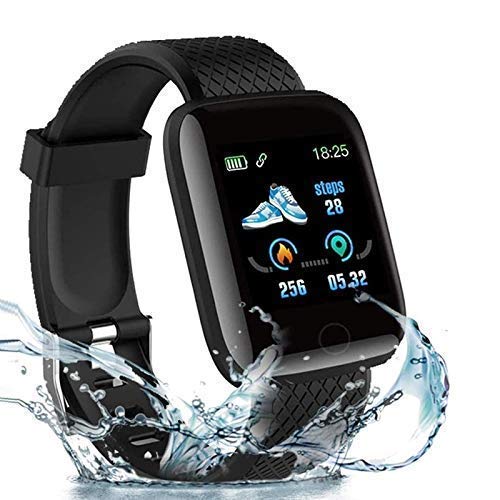
Şekil 1.1: The SHOPBUY Smart Fitness Watch displaying activity data, including steps, calories, and distance, with water splashes indicating its water resistance.
2. Kurulum
2.1 Cihazı Şarj Etme
Before initial use, fully charge your smart fitness watch. The device features a direct USB plug for convenient charging.
- Gently pull the strap to detach it from the watch body, revealing the USB connector.
- Insert the USB connector into a standard USB port on a mobile charger, laptop, or power bank.
- The watch display will show a charging indicator. Allow the device to charge until the battery icon indicates a full charge.

Şekil 2.1: The smart fitness watch connected directly to a USB port for charging, illustrating the integrated USB plug design.

Şekil 2.2: A visual guide demonstrating the four steps to charge the smart fitness watch: 1) Holding the watch, 2) Detaching the strap to reveal the USB connector, 3) The watch with the strap detached, and 4) Plugging the watch into a USB power source.
2.2 Uygulama Kurulumu ve Eşleştirme
To unlock full functionality and synchronize data, install the Fitpro Akıllı telefonunuzdaki uygulama.
- İndir Fitpro app from your device's app store (Google Play Store for Android, Apple App Store for iOS).
- Akıllı telefonunuzda Bluetooth'un etkinleştirildiğinden emin olun.
- Açın Fitpro app and follow the on-screen instructions to search for and connect to your smart fitness watch. You may need to enable location services on your phone for successful pairing.
- Once connected, the watch's time and date will automatically synchronize with your phone.
3. Kullanım Talimatları
3.1 Temel Gezinme
The smart fitness watch features a touchscreen interface. Swipe left/right or up/down to navigate through different functions and menus. Tap to select an option.
3.2 Etkinlik Takibi
The watch automatically tracks your daily activity:
- Adımlar: Gün boyunca atılan adım sayısını sayar.
- Mesafe: Attığınız adımlara göre kat edilen mesafeyi tahmin eder.
- Yakılan Kaloriler: Calculates estimated calories burned during activity.
Yapabilirsiniz view your daily activity summary directly on the watch's OLED display or in more detail within the Fitpro app.
3.3 Kalp Atış Hızı ve Uyku Takibi
The watch includes sensors for monitoring your heart rate and sleep patterns.
- Kalp Atış Hızı: Access the heart rate function on the watch to initiate a measurement. Real-time data can also be synchronized to the Fitpro app.
- Uyku Monitörü: Wear the watch during sleep to track sleep duration, identify deep and light sleep phases, and record awake times. Detailed sleep analysis is available in the Fitpro app.
3.4 Bildirimler
Once paired with your smartphone via the Fitpro app, the watch will display notifications for:
- Incoming calls (with options to receive or reject)
- Text messages (SMS)
- Takvim uyarıları
- Social media applications (e.g., Facebook, WhatsApp, LinkedIn, Instagram, Twitter)
Ensure notification permissions are enabled for the Fitpro app in your phone's settings to receive these alerts.
4. Bakım
4.1 Temizlik
To maintain the watch's appearance and functionality:
- Wipe the watch body and strap regularly with a soft, dry cloth.
- Cihazınıza zarar verebileceğinden, sert kimyasallar veya aşındırıcı malzemeler kullanmaktan kaçının.
4.2 Suya Dayanıklılık
The SHOPBUY Smart Fitness Watch has an IP67 waterproof rating, meaning it is resistant to dust and can withstand immersion in water up to 1 meter for 30 minutes. It is suitable for daily use, such as hand washing or light rain exposure. However, it is not recommended for swimming, diving, or prolonged exposure to water.
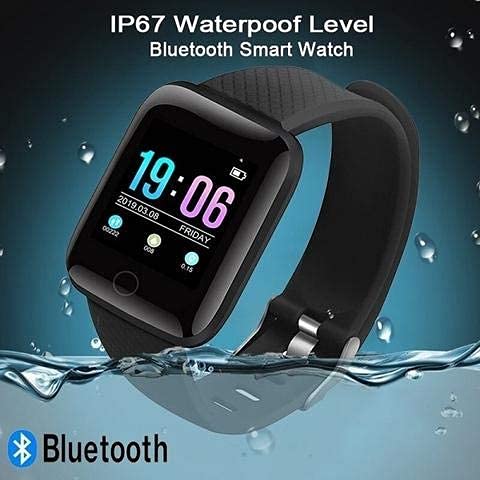
Şekil 4.1: The smart fitness watch partially submerged in water, highlighting its IP67 waterproof level and Bluetooth connectivity.
5. Sorun Giderme
- Saat açılmıyor: Ensure the watch is fully charged. Connect it to a USB power source and check for the charging indicator.
- Telefonla eşleştirilemiyor:
- Telefonunuzda ve saatinizde Bluetooth'un etkin olduğundan emin olun.
- Make sure the Fitpro app is installed and open.
- Check if location services are enabled on your phone.
- Restart both your phone and the watch, then attempt pairing again.
- Saat/Tarih hatalı: The watch's time and date synchronize automatically with your phone via the Fitpro app. Ensure the watch is successfully paired with the app.
- Bildirim alamıyor:
- Verify that the watch is connected to the Fitpro app.
- Check notification permissions for the Fitpro app in your phone's settings.
- Ensure notification settings are enabled within the Fitpro app for the desired applications.
- Hatalı faaliyet verileri: Ensure the watch is worn snugly on your wrist. For best results, wear it slightly above your wrist bone.
6. Özellikler
| Özellik | Detay |
|---|---|
| Marka | ALIŞVERİŞSatın al |
| Örnek | vivo Y75 |
| Görüntü Türü | OLED |
| Ekran Boyutu | 1.3 inç |
| Çözünürlük | 240x240 |
| Bağlantı | Bluetooth, USB |
| Uyumlu Cihazlar | Android and iOS Mobile Phones, Tablets, Laptops |
| İşletim Sistemi | Android, iOS (via app) |
| Malzeme | Plastik |
| Ürün Ağırlığı | 70 gr |
| Suya Dayanıklılık | IP67 Seviyesi |
7. Garanti ve Destek
7.1 Garanti Bilgileri
Bu ürün bir 3 ay garanti from the date of purchase. To activate your warranty or for any warranty-related inquiries, please reach out to the seller or manufacturer directly.
7.2 Müşteri Desteği
For further assistance, technical support, or questions not covered in this manual, please contact SHOPBUY customer service through the platform where the product was purchased.