
1. Giriş
The DROK Digital Control Step-Down Module is a high-quality power module designed for reliable power supply across a wide range of electronic devices and projects. This manual provides essential information for safe and effective use of the product.
2. Temel Özellikler
- Digital Control and Easy Operation: Hassas hacim ayarı sağlar.tage and current settings. Converts a wide input voltage range of 10V to 100V to an adjustable output of 0V to 60V. Supports a maximum output capacity of 720W and current control from 0 to 12A, ensuring stable power supply for various applications.
- High-Quality Construction and Advanced Control Technology: Utilizes high-quality power devices and precision operational amplifiers, combined with CV and CC loops, to achieve superior module performance. Advanced microprocessor control allows for simple and quick parameter adjustment using buttons and an encoder.
- Excellent Heat Dissipation Design: Features a built-in cooling fan and external protective MOSFETs to enhance cooling performance, ensuring stable operation even under high load conditions. The LCD1602 display clearly shows output status.
- Precise Output Adjustment: Çıkış hacmitage and current can be precisely adjusted via button operation, catering to diverse needs. Its compact design offers high output and efficiency, providing stable and reliable power for projects.
- Çoklu Koruma Fonksiyonları: Equipped with multiple protection features including Input Low Voltage Protection (LVP), Output Over Voltage Protection (OVP), and Output Over Current Protection (OCP), providing comprehensive safety for connected devices.
3. Ürün Özellikleri
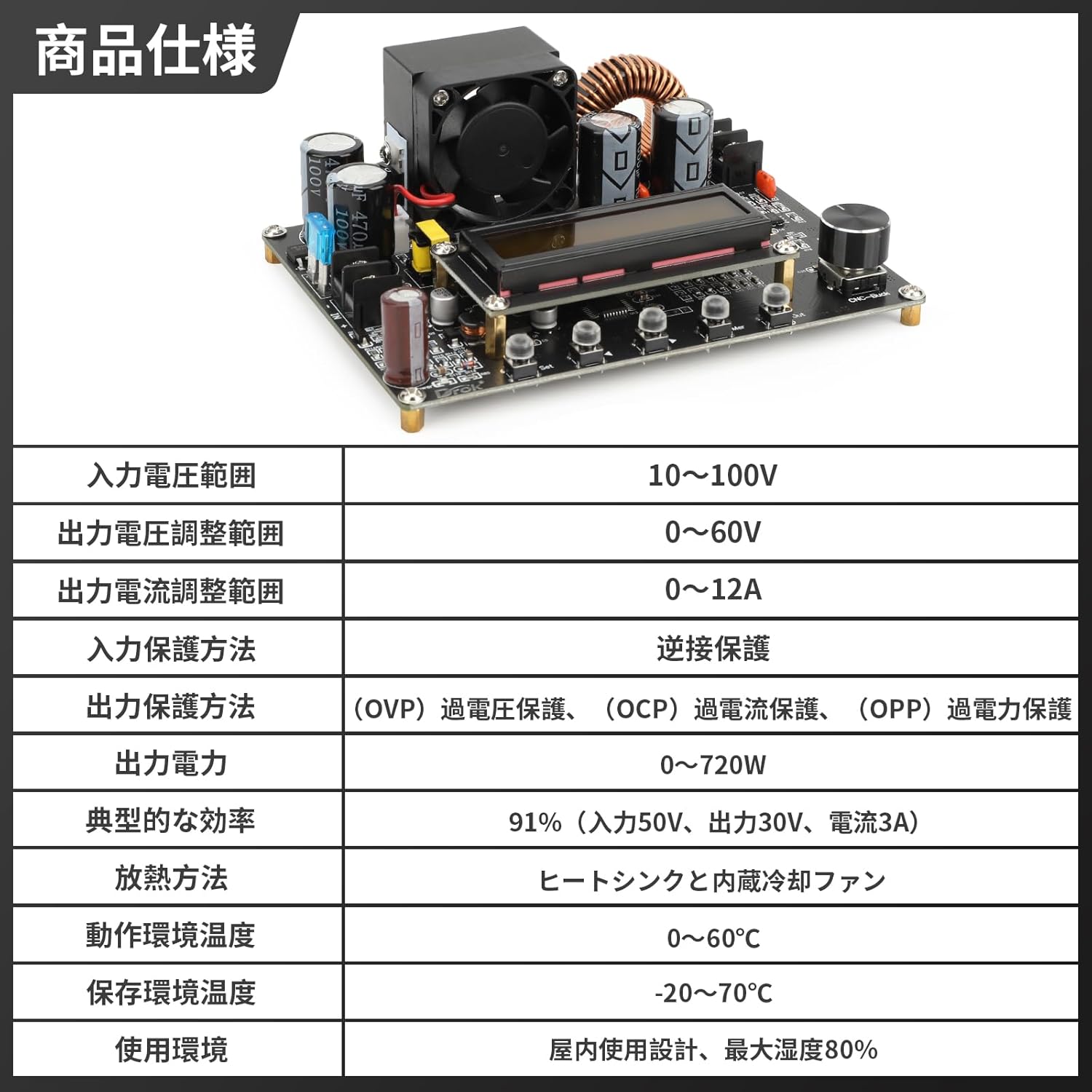
Şekil 3.1: Ayrıntılı Ürün Özellikleri
| Şartname | Değer |
|---|---|
| Giriş Voltage Aralık | 10V ~ 100V |
| Çıkış Hacmitage Ayar Aralığı | 0V ~ 60V |
| Output Current Adjustment Range | 0A ~ 12A |
| Input Protection Method | Ters Bağlantı Koruması |
| Output Protection Methods | Aşırı Hacimtage Protection (OVP), Over Current Protection (OCP), Over Power Protection (OPP) |
| Çıkış Gücü | 0W ~ 720W |
| Tipik Verimlilik | 91% (Input 50V, Output 30V, Current 3A) |
| Isı Yayılım Yöntemi | Heat Sink and Built-in Cooling Fan |
| Çalışma Ortamı Sıcaklığı | 0°C ~ 60°C |
| Depolama Ortam Sıcaklığı | -20°C ~ 70°C |
| Kullanım Ortamı | Indoor use, maximum humidity 80% |
4. Ürün Bittiview

Şekil 4.1: Ana view of the DROK DC-DC Step-Down Converter.

Figure 4.2: Front and side dimensions of the converter module.

Şekil 4.3: Ayrıntılı view of the module display, input/output ports, encoder knob, and operation buttons.

Figure 4.4: Visual representation of the multiple protection functions including reverse connection, output over-voltage, çıkış hacminin altındatage, and output over-current protection.

Figure 4.5: The LCD1602 display provides clear real-time output status and facilitates precise digital control.

Şekil 4.6: Ör.amples of various application scenarios for the converter, including laboratory and research environments, electronic device repair, industrial automation and testing, and education and training.
5. Kurulum
Before connecting the module, ensure all power sources are disconnected. Observe proper polarity when making connections to prevent damage to the module or connected devices.
- Giriş Bağlantısı: Connect your DC power source (10V-100V) to the 'IN+' and 'IN-' terminals on the module. Ensure the input voltage belirtilen aralıktadır.
- Çıkış Bağlantısı: Connect your load to the 'OUT+' and 'OUT-' terminals.
- İlk Güçlendirme: After verifying all connections, apply power to the input. The LCD display will illuminate, showing the current settings.
6. Kullanım Talimatları
The module features an LCD display, an encoder knob, and several buttons for operation.
6.1. Ekran Modları
Press the 'SW' button to cycle through different display modes:
- Giriş Voltage / Çıkış Hacmitage
- Output Current / Output Power
- Çıkış Hacmitage / Output Current
- Temperature / Accumulated Capacity (Ah)
6.2. Çıkış Voltajını Ayarlamatage ve Güncel
- Cilttage Ayarlama: Rotate the encoder knob clockwise to increase the output voltage, and counter-clockwise to decrease it. The display will show the adjusted voltage.
- Mevcut Ayarlama: To adjust the output current, press the 'U/I' button. The display will switch to current adjustment mode. Rotate the encoder knob to set the desired current limit.
- Çıkış AÇIK/KAPALI: Press the 'ON/OFF' button to enable or disable the output.
7. Bakım
To ensure optimal performance and longevity of your DROK DC-DC Step-Down Converter, follow these maintenance guidelines:
- Temiz tut: Regularly clean the module, especially the heat sink and fan, to prevent dust accumulation which can hinder heat dissipation. Use a soft, dry cloth.
- Havalandırma: Ensure adequate ventilation around the module during operation. Do not obstruct the cooling fan.
- Nemden Kaçının: Keep the module away from moisture and corrosive environments.
- Bağlantıları Denetle: Periodically check all input and output connections for tightness and signs of wear.
8. Sorun Giderme
Dönüştürücünüzle ilgili sorunlarla karşılaşırsanız, aşağıdaki yaygın sorunlar ve çözümlere bakın:
| Sorun | Olası Neden | Çözüm |
|---|---|---|
| No display/No output | No input power, incorrect wiring, or input voltage outside range. | Check input power supply, verify wiring polarity, ensure input voltage 10-100V'tur. |
| Çıkış hacmitagkararsız | Loose connections, excessive load, or faulty input power. | Secure all connections, reduce load, or test with a stable input power source. |
| Aşırı akım/Aşırı voltajtage koruma tetiklendi | Load drawing too much current, or output voltage set too high for the load. | Reduce load, adjust output current limit, or verify output voltage ayarı. |
| Modül aşırı ısınma | Insufficient ventilation, excessive load, or fan malfunction. | Ensure proper airflow, reduce load, clean fan/heat sink, or replace fan if faulty. |
9. Garanti ve Destek
DROK products are designed for reliability and performance. For any technical support or warranty inquiries, please contact your retailer or the manufacturer directly. Keep your purchase receipt as proof of purchase.