
1. Giriş
The IHSENO Mini WiFi Smart Switch Relay is a compact and intelligent device designed to integrate your traditional lighting and appliances into a smart home system. It operates on 2.4GHz WiFi and is compatible with the Tuya Smart Life App, allowing for remote control, voice commands via Alexa and Google Home, and intelligent scheduling.

Resim 1.1: Üzeriview of the IHSENO Mini WiFi Smart Switch Relay and its packaging.
Temel Özellikler:
- Mini WiFi Smart Switch: Designed for 2.4GHz WiFi, enabling whole-house intelligence through the Tuya APP.
- Tuya Smart Life App Control: Connects with other smart devices for intelligent scene linkage.
- Customize Different Scene Modes: Allows setting scenes like 'Reading' or 'Movie' and controlling various smart devices.
- Alexa & Google Home Enabled: Supports voice control for hands-free operation.
- Kompakt Tasarım: Fits into most standard electrical boxes, even with existing wiring.
2. Güvenlik Bilgileri
Kurulum ve çalıştırmadan önce lütfen tüm güvenlik talimatlarını dikkatlice okuyun. Bu talimatlara uyulmaması elektrik çarpmasına, yangına veya diğer tehlikelere yol açabilir.
- Profesyonel Kurulum Önerilen: Elektrik işleri, yetkili bir elektrikçi tarafından yapılmalıdır.
- Kurulumdan Önce Gücü Kapatın: Cihazı kurmadan veya bakımını yapmadan önce mutlaka devre kesiciden elektriği kesin.
- Sadece İç Mekanda Kullanım: Bu cihaz, kuru ortamlarda iç mekan kullanımı için tasarlanmıştır.
- Cilttage ve Mevcut Derecelendirmeler: Belirtilen hacmi aşmayıntage (AC 100-240V) and current (3 Amps) derecelendirmeleri.
- Kablolama: Ensure all wiring connections are secure and comply with local electrical codes. Input and output connections cannot be reversed.

Image 2.1: Safety and Certification details for the Mini Smart Switch.
3. Kurulum ve Kurulum
The IHSENO Mini WiFi Smart Switch Relay is designed for easy integration into your existing electrical system. It supports both 1-way and 2-way control setups.
Kablolama Şemaları:
Önemli: Always ensure the power is OFF at the circuit breaker before performing any wiring. Input and output connections cannot be reversed.

Image 3.1: Wiring Method 1 - Direct connection to a lamp ve şebeke elektriği.

Image 3.2: Wiring Method 2 - Connection with a 1-way wall switch.

Image 3.3: Wiring Method 3 - Connection with a 2-way wall switch.
Uygulama Eşleştirme:
- İndir Tuya Akıllı or Akıllı Hayat Akıllı telefonunuzun uygulama mağazasından uygulamayı indirin.
- Hesabınıza kaydolun veya giriş yapın.
- Akıllı telefonunuzun bir 2.4 GHz WiFi ağına bağlı olduğundan emin olun.
- Power on the smart switch. The indicator light should blink rapidly, indicating it's in pairing mode. If not, refer to the troubleshooting section for resetting the device.
- In the app, tap '+' to add a device. Select 'Electrical' > 'Switch (Wi-Fi)' or allow the app to auto-discover the device.
- Eşleştirme işlemini tamamlamak için ekrandaki talimatları izleyin.
4. Kullanım Talimatları
Once installed and paired, you can control your IHSENO Mini WiFi Smart Switch Relay through various methods.
4.1. Uygulama Uzaktan Kumandası
Control your connected devices from anywhere using the Tuya Smart Life App, as long as your smartphone and the switch are connected to the internet.

Image 4.1: WiFi Remote Control functionality.

Image 4.2: App Remote Control in action, showing control of a lamp.
4.2. Ses Kontrolü
Integrate your smart switch with Amazon Alexa or Google Assistant for convenient voice commands.
- Alexa veya Google Home uygulamasını açın.
- Link your Tuya Smart Life account to the voice assistant.
- Cihazları keşfedin.
- Use commands like "Alexa, turn on the lamp" or "Hey Google, turn off the kitchen light."
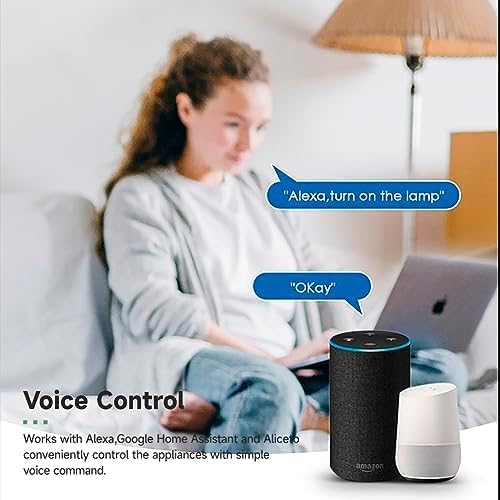
Image 4.3: Voice control with Alexa and Google Home.
4.3. Intelligent Timing and Scene Modes
Set schedules, countdowns, and create custom scene modes within the Tuya Smart Life App.
- Zamanlama: Schedule devices to turn on/off at specific times (e.g., 23:30 Off).
- Bisikletçilik: Set recurring schedules (e.g., 08:00 ON Everyday).
- Geri sayım: Cihazın belirli bir süre sonra kapanması için bir zamanlayıcı ayarlayın.
- Sahne Modları: Combine multiple smart devices to activate with a single command or schedule (e.g., 'Movie Night' scene dims lights and turns on entertainment).
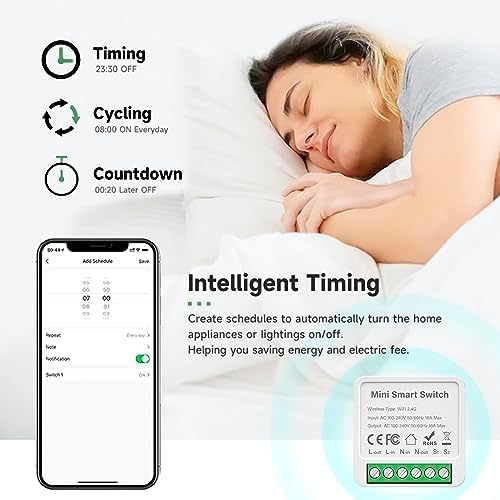
Image 4.4: Intelligent Timing features in the app.
4.4. Paylaşım Fonksiyonu
Share control of your smart devices with family members through the Tuya Smart Life App.

Image 4.5: Sharing function for family members.
5. Bakım
To ensure the longevity and optimal performance of your IHSENO Mini WiFi Smart Switch Relay, follow these simple maintenance guidelines:
- Temizlik: Cihazı temizlemek için yumuşak ve kuru bir bez kullanın. Sıvı temizleyiciler veya aerosoller kullanmayın.
- Çevre: Cihazı aşırı neme, aşırı sıcaklıklara veya doğrudan güneş ışığına maruz bırakmaktan kaçının.
- Denetleme: Kablo bağlantılarını aşınma veya gevşeklik açısından düzenli olarak kontrol edin.
6. Sorun Giderme
If you encounter issues with your IHSENO Mini WiFi Smart Switch Relay, refer to the following common problems and solutions:
- Cihaz eşleşmiyor:
- WiFi ağınızın 2.4 GHz olduğundan emin olun. Cihaz 5 GHz WiFi'yi desteklemiyor.
- Check that the device is powered on and the indicator light is blinking rapidly. If not, power cycle the device or perform a factory reset (refer to app instructions for reset procedure).
- Move the device closer to your WiFi router during pairing.
- Uygulamada cihaz çevrimdışı:
- Verify your home WiFi network is active and has internet access.
- Check the power supply to the smart switch.
- WiFi yönlendiricinizi yeniden başlatın.
- Ses kontrolü çalışmıyor:
- Ensure your Tuya Smart Life account is correctly linked to Alexa or Google Home.
- Check the device name in the voice assistant app; ensure it's easy to pronounce and recognize.
- Sesli asistan cihazınızın internete bağlı olduğundan emin olun.
- Fiziksel anahtar yanıt vermiyor:
- Ensure all wiring connections are secure and correct according to the diagrams.
- Check if the physical switch itself is functional.
7. Özellikler
Technical specifications for the IHSENO Mini WiFi Smart Switch Relay:

Resim 7.1: Detaylı ürün özellikleri.
| Şartname | Detay |
|---|---|
| Marka | IHSENO |
| Örnek | B0CF1FYYBN |
| Kablosuz Tip | kablosuz 2.4G |
| Giriş Voltage | AC 100-240V 50/60Hz |
| Çıkış Hacmitage | AC 100-240V 50/60Hz |
| Maksimum Akım Değeri | 3 Amps (Note: Product image shows 16A Max, but product specifications list 3 Amps. Please verify with product packaging.) |
| Montaj Tipi | Yüzey Montajı |
| İletişim Malzemesi | Bakır |
| Malzeme | PC V0 (Fireproof) |
| Boyut | 41x20x41mm (approx. 1.6*0.8*1.6 inches) |
| Çalışma Modu | (ON)-ON-OFF |
| Anahtar Türü | 1 yollu |
| Anahtar Stili | Basmalı Düğme |
| Uygulama Uyumluluğu | Smart Life (Support iOS & Android) |
8. Garanti ve Destek
IHSENO is committed to providing high-quality products and customer satisfaction.
If you have any questions about this product, please feel free to contact our customer service team. We aim to reply within 24 hours to assist you with any inquiries or issues.
Belirli garanti şartları ve koşulları için lütfen satın alma belgelerinize bakın.