
1. Giriş
The CALEX Smart Home Indoor Ambiance Aroma Diffuser 590100500 is designed to enhance your indoor environment by improving air quality, diffusing pleasant aromas, and providing ambient lighting. This smart device integrates seamlessly into your smart home ecosystem, offering control through the Calex app, voice commands, and programmable features.
Temel özellikler şunlardır:
- Aroma diffusion with essential oils.
- Realistic flame effect for ambiance.
- Adjustable ambient lighting with 16 million color options.
- Smart control via Calex app (timers, programmable scenarios).
- Voice control compatibility with Google Assistant, Siri, and Amazon Alexa.
- 300ml water tank capacity with automatic shut-off.
2. Güvenlik Bilgileri
Please read all safety instructions before using the device to prevent injury or damage.
- Always place the diffuser on a stable, flat surface away from direct sunlight, heat sources, and electronic devices.
- Do not exceed the maximum water fill line (300ml) to prevent overflow.
- Yalnızca temiz musluk suyu veya damıtılmış su kullanın. Sıcak su kullanmayın.
- Only use 100% pure, water-soluble essential oils. Other oils or corrosive liquids may damage the device.
- Cihazı çocukların ve evcil hayvanların erişemeyeceği yerde saklayın.
- Do not cover the mist outlet during operation.
- Unplug the device from the power outlet before cleaning or refilling.
- The device features an automatic shut-off function when the water tank is empty, and sends a notification to your phone.
- A built-in safety configuration will cause the diffuser to flash if the remaining water in the tank needs to cool down after a maximum of 72 hours of continuous operation.
- Cihazı kendiniz onarmaya veya değiştirmeye çalışmayın. Yardım için müşteri desteğiyle iletişime geçin.
3. Paket İçeriği
Paketin içinde tüm öğelerin mevcut olduğundan emin olun:
- CALEX Smart Home Indoor Ambiance Aroma Diffuser (Model 5901000500)
- Güç Adaptörü
- Kullanıcı Kılavuzu
4. Ürün Bittiview
Familiarize yourself with the components of your aroma diffuser.
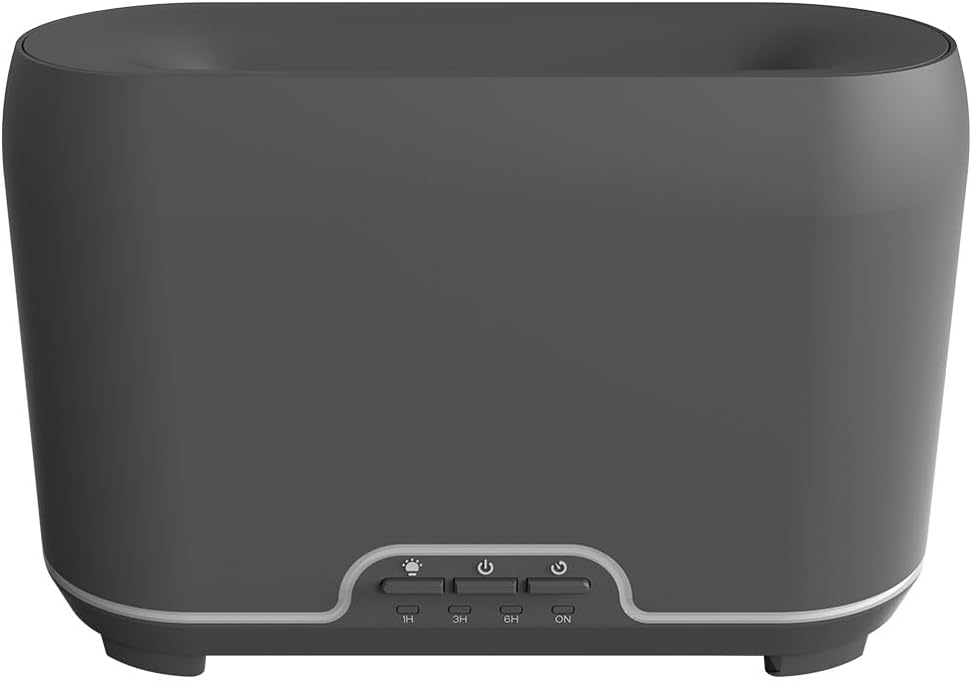
Resim: Ön view of the CALEX Smart Home Aroma Diffuser, showing the control panel with buttons for light, power, and timer settings (1H, 3H, 6H, ON).

Image: The CALEX Smart Home Aroma Diffuser operating on a wooden table, displaying its ambient flame effect and mist output.
The diffuser typically consists of a water tank, an ultrasonic plate, a mist outlet, and a control panel with buttons for power, light, and timer functions. The power input port is usually located at the back or bottom of the device.
5. Kurulum
İlk kurulum için şu adımları izleyin:
- Atama: Difüzörü düz ve sağlam bir yüzeye yerleştirin.
- Açık Kapak: Gently remove the top cover of the diffuser.
- Su deposunu doldur: Fill the water tank with clean water up to the 300ml maximum fill line. Do not overfill.
- Esansiyel Yağı Ekleyin: Add a few drops of your preferred essential oil directly into the water tank.
- Kapağı Kapatın: Üst kapağı güvenli bir şekilde yerine takın.
- Gücü bağlayın: Plug the power adapter into the diffuser's power input port, then plug the adapter into a wall outlet.
- Calex Uygulamasını İndirin: Download the free Calex Smart app from your smartphone's app store (available for iOS and Android).
- WiFi'ye bağlanın: Follow the in-app instructions to connect your diffuser to your home WiFi network. Ensure your WiFi is 2.4GHz.
6. Kullanım Talimatları
The CALEX Smart Home Aroma Diffuser can be operated via the Calex app or its integrated control buttons.
6.1 Using the Calex Smart App
The Calex app provides full control over your diffuser's functions:
- Güç Açma/Kapatma: Turn the diffuser on or off remotely.
- Sis Kontrolü: Adjust the mist output level.
- Işık Kontrolü: Change the ambient light color from over 16 million options, adjust brightness, and select lighting modes.
- Alev Etkisi: Activate or deactivate the flame effect.
- Zamanlayıcılar: Set schedules for the diffuser to turn on or off automatically.
- Programmable Scenarios: Create custom scenarios based on time, weather, or other smart home triggers.
- Bildirimler: Receive alerts when the water tank is empty.
6.2 Ses Kontrolü
Integrate your diffuser with voice assistants for hands-free control:
- Google Asistan: Link your Calex account in the Google Home app. Use commands like "Hey Google, turn on the diffuser."
- Siri: Create custom shortcuts in the Apple Home app or through the Calex app for Siri commands.
- Amazon Alexa: Enable the Calex skill in the Alexa app. Use commands like "Alexa, set diffuser light to blue."
6.3 Manual Control Buttons
The control panel on the diffuser allows for basic operation:
- Güç Düğmesi: Press once to turn on/off the mist and flame effect.
- Işık Düğmesi: Press to cycle through light colors or turn the light on/off.
- Timer Buttons (1H, 3H, 6H, ON): Select a desired operating duration. The diffuser will automatically shut off after the selected time. 'ON' typically means continuous operation until water runs out or manually turned off.
7. Bakım
Regular cleaning ensures optimal performance and extends the lifespan of your diffuser.
- Günlük Temizlik: Her kullanımdan sonra, tankta kalan suyu boşaltın. Tankın içini temiz, yumuşak bir bezle silin.
- Haftalık Temizlik: For a more thorough clean, unplug the device. Add a small amount of white vinegar (about 10ml) to the water tank and let it sit for 10-15 minutes to dissolve mineral buildup. Gently wipe the ultrasonic plate with a cotton swab or soft brush. Rinse the tank thoroughly with clean water, avoiding the air outlet.
- Dış Temizlik: Difüzörün dışını yumuşak bir bezle silin.amp bezle silin. Aşındırıcı temizleyiciler veya çözücüler kullanmayın.
- Ensure the device is completely dry before refilling or storing.
8. Sorun Giderme
Sorunlarla karşılaşırsanız aşağıdaki yaygın sorunlara ve çözümlere bakın:
| Sorun | Olası Neden | Çözüm |
|---|---|---|
| Sis veya zayıf sis yok | Düşük su seviyesi Ultrasonik plaka kirli Sis çıkışı tıkalı | Refill water to the appropriate level. Ultrasonik plakayı bakım talimatlarına uygun şekilde temizleyin. Sis çıkış deliğinin açık olduğundan emin olun. |
| Cihaz açılmıyor | Güç yok Su deposu boş Cihaz arızası | Güç bağlantısını ve duvar prizini kontrol edin. Su deposunu doldurun. Sorun devam ederse müşteri desteği ile iletişime geçin. |
| Uygulama bağlantı sorunları | Yanlış WiFi şifresi Yönlendirici çok uzakta 2.4GHz vs 5GHz WiFi | WiFi şifresini doğrulayın. Move diffuser closer to the router. Ensure your router is broadcasting a 2.4GHz network and connect to it. |
| Alev efekti çalışmıyor | Feature deactivated in app Cihaz arızası | Check app settings to ensure flame effect is enabled. Müşteri desteğiyle iletişime geçin. |
9. Özellikler
| Özellik | Şartname |
|---|---|
| Model Numarası | 5901000500 |
| Marka | KALEKS |
| Kapasite | 300 Mililitre |
| Malzeme | Plastik |
| Otomatik Kapanma | Evet |
| Bağlantı | Wi-Fi (2.4GHz) |
| Kontrol Yöntemleri | Calex Smart App, Voice Control (Google Assistant, Siri, Amazon Alexa), Manual Buttons |
| Işık Seçenekleri | 16 Milyon Renk |
| Önerilen Kullanım Alanı | Medium space |
| Uluslararası Ürün Kodu (EAN/UPC) | 08712879157090 |
10. Garanti ve Destek
Garanti bilgileri veya teknik destek için lütfen satın alma işleminizle birlikte verilen belgelere bakın veya doğrudan satıcı/üretici ile iletişime geçin. Garanti talepleri için satın alma belgenizi saklayın.