
BOTHSTAR YJ42
Kullanıcı Kılavuzu
Double Sided Keyless Door Knob Lock with Fingerprint and Keypad
Brand: BOTHSTAR | Model: YJ42
1. Giriş
Thank you for choosing the BOTHSTAR Double Sided Keyless Door Knob Lock. This advanced smart lock provides secure and convenient access control for both interior and exterior doors. With multiple unlocking methods including fingerprint, keypad code, and traditional key, it offers enhanced security and flexibility for homes, offices, and various other settings. This manual will guide you through the installation, setup, operation, and maintenance of your new smart doorknob.

Figure 1.1: BOTHSTAR Double Sided Keyless Door Knob Lock (Satin Nickel)
2. Önemli Güvenlik Bilgileri
- Kurulum ve kullanımdan önce tüm talimatları dikkatlice okuyun.
- Kilidi sökmeye veya değiştirmeye çalışmayın. Bu, hasara neden olabilir ve garantiyi geçersiz kılabilir.
- Keep backup keys in a secure location outside the property.
- Ensure proper battery installation and replace batteries when the low battery voice prompt is activated.
- This product is designed for specific door thickness and backset. Verify compatibility before installation.
- While the lock is IPX6 waterproof, avoid prolonged submersion or direct high-pressure water spray.
3. Paket İçeriği
Carefully unpack the box and ensure all components are present and in good condition. If any items are missing or damaged, please contact customer support.
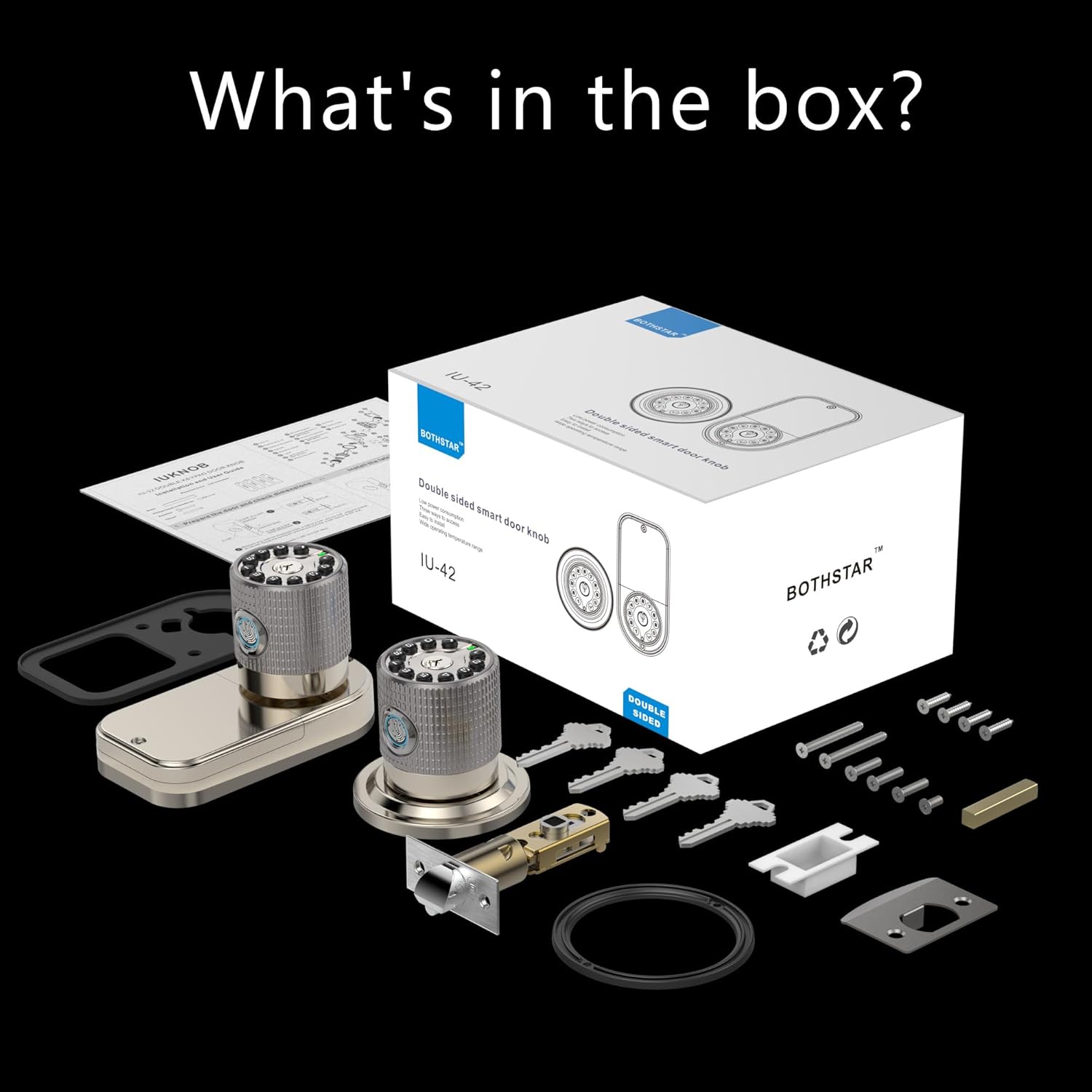
Figure 3.1: What's in the box?
- Double Sided Fingerprint Door Knob (Exterior)
- Double Sided Fingerprint Door Knob (Interior)
- Adjustable Latch (2-3/8" or 2-3/4")
- Grev plakası
- Montaj Vidaları ve Donanımı
- Physical Keys (Set of 4)
- Kurulum Şablonu
- Kullanıcı Kılavuzu
4. Kurulum Kılavuzu
Kuruluma başlamadan önce kapınızın aşağıdaki özelliklere uygun olduğundan emin olun:
- Door Thickness: 1-1/4" to 3-7/8" (32mm to 98mm)
- Arka mesafe: 2-3/8" (60 mm) veya 2-3/4" (70 mm) için ayarlanabilir.

Figure 4.1: Door thickness and latch dimensions
Kurulum Adımları:
- Kapıyı Hazırlayın: If replacing an existing lock, remove it. Use the provided template to mark and drill holes if installing on a new door.
- Mandalı takın: Insert the latch into the door edge. Ensure the latch bolt faces the correct direction (slanted side towards the door frame). Secure with screws.
- Install the Exterior Knob: Feed the cable from the exterior knob through the door hole. Align the knob with the latch and secure it.
- İç Düğmeyi Takın: Connect the cable from the exterior knob to the interior knob. Align the interior knob with the mounting plate and secure it with screws.
- Pilleri Takın: Open the battery cover on the interior knob and insert 4 AAA batteries (not included), ensuring correct polarity.
- Test İşlemi: After installation, test the mechanical operation of the latch and knobs.
5. İlk Kurulum ve Programlama
The BOTHSTAR smart lock offers multiple functions for enhanced security and convenience.

Figure 5.1: Multi-function & Security Features
5.1 Adding Fingerprints (Up to 100)
- Press the 'Set' button on the interior knob. The lock will prompt for administrator fingerprint.
- Place your finger on the fingerprint sensor. The lock will beep and prompt you to lift and place your finger multiple times for a complete scan.
- Once successfully registered, the lock will confirm with a voice prompt.
- Repeat for additional fingerprints.
5.2 Adding User Codes (Up to 50)
- Press the 'Set' button. Enter the administrator code (default is 123456) followed by '#'.
- Press '1' to add a user code.
- Enter your desired 6-10 digit user code, then press '#'.
- Re-enter the same user code and press '#' to confirm.
- The lock will confirm successful addition.
5.3 Setting Auto-Lock Function
The auto-lock feature can be set to automatically lock the door after a specified delay (2 seconds to 12 hours).
- Press the 'Set' button. Enter the administrator code followed by '#'.
- Press '3' to enter auto-lock settings.
- Enter the desired delay time in seconds (e.g., '5' for 5 seconds) or hours (e.g., '12H' for 12 hours), then press '#'.
- The lock will confirm the setting.
6. Operasyon
The BOTHSTAR smart lock provides convenient access from both sides of the door.

Figure 6.1: Double-sided access with multiple unlock methods
6.1 Parmak İzi ile Kilit Açma
- Kayıtlı parmağınızı parmak izi sensörüne yerleştirin.
- The lock will verify the fingerprint (approx. 0.25s) and unlock.
- Kapıyı açmak için düğmeyi çevirin.
6.2 Unlocking with Keypad Code
- Enter a registered user code on the keypad.
- Press the '#' key.
- The lock will verify the code and unlock.
- Kapıyı açmak için düğmeyi çevirin.
6.3 Fiziksel Anahtarla Kilit Açma
- Insert the physical key into the keyhole.
- Kapıyı açmak için anahtarı çevirin.
- Kapıyı açmak için düğmeyi çevirin.
6.4 Kapının Kilitlenmesi
- Otomatik Kilit: If auto-lock is enabled, the door will lock automatically after the set delay once closed.
- Manuel Kilit: Kapıyı manuel olarak kilitlemek için tuş takımındaki '#' tuşuna 2 saniye basılı tutun.
7. Bakım
7.1 Pil Değişimi
- The lock will provide a voice prompt when batteries are low.
- İç düğmedeki pil kapağını açın.
- Replace all 4 AAA batteries with new, high-quality alkaline batteries. Ensure correct polarity.
- In case of completely dead batteries, the lock can be temporarily powered via a 5V USB-C cord for emergency access.
7.2 Temizlik
- Clean the lock surface with a soft, damp Kumaş.
- Yüzey kaplamasına ve elektronik bileşenlere zarar verebileceğinden, aşındırıcı temizleyiciler, çözücüler veya sert kimyasallar kullanmayın.
- En iyi performansı elde etmek için parmak izi sensörünü temiz ve kuru tutun.
8. Sorun Giderme
| Sorun | Olası Neden | Çözüm |
|---|---|---|
| Kilit yanıt vermiyor. | Bitmiş piller. | Replace batteries. Use USB-C for emergency power. |
| Parmak izi tanınmadı. | Finger is wet/dirty, sensor is dirty, or fingerprint not registered correctly. | Parmak izini ve sensörü temizleyin. Gerekirse parmak izini yeniden kaydedin. |
| Keypad code not working. | Incorrect code entered, code not registered, or keypad malfunction. | Verify code. Re-register code. Check for keypad damage. |
| Kilit otomatik olarak kilitlenmiyor. | Auto-lock feature disabled or incorrect delay set. | Check auto-lock settings and enable/adjust as needed. |
| Kilit alışılmadık sesler çıkarıyor. | Mechanical obstruction or internal issue. | Check for obstructions around the latch. If problem persists, contact support. |
9. Ürün Özellikleri
| Özellik | Şartname |
|---|---|
| Marka | İKİ YILDIZ |
| Model Adı | YJ42 LOCK |
| Kilit Tipi | Şifreli kilit |
| Özel Özellikler | Double sided fingerprint, Double sided keypad |
| Malzeme | Zinc Alloy, Metal Handle |
| Renk | Saten Nikel |
| Ürün Boyutları | 8 x 4 x 4 inç |
| Ürün Ağırlığı | 3.58 pound (1.63 Kilogram) |
| Kapı Kalınlığı Uyumluluğu | 1-1/4" to 3-7/8" |
| Latch Bolt Specifications | 2-3/8" or 2-3/4" adjustable |
| Güç Kaynağı | 4 x AAA Piller (dahil değildir) |
| Acil Güç | 5V USB-C |
| Su Geçirmezlik Derecesi | IPX6 |
| Çalışma Sıcaklığı | -22°F ila +176°F (-30°C ila +80°C) |
| Parmak İzi Kapasitesi | 100 |
| Kullanıcı Kodu Kapasitesi | 50 |
10. Garanti ve Destek
BOTHSTAR provides a comprehensive warranty and dedicated customer support for your smart lock.
Garanti Bilgileri:
- Ücretsiz Değiştirme: Enjoy a free replacement for your product within 1 year from the date of purchase.
- Ömür Boyu Satış Sonrası Müşteri Hizmeti: We are committed to providing support for the lifetime of your product.
Teknik Destek:
For any technical assistance, troubleshooting, or warranty claims, please contact our 24/7 online technical support. Refer to the contact information provided on the product packaging or the official BOTHSTAR webalan.
Ask a question about this manual
Ask about setup, troubleshooting, compatibility, parts, safety, or missing instructions. Manuals+ will review the question and use this page’s manual context to help answer it.