
giriiş
Thank you for choosing the Nuvance Professional Hair Clipper. This manual provides essential information for the safe and effective use, maintenance, and troubleshooting of your new hair clipper. Please read these instructions thoroughly before first use and keep them for future reference.
Önemli Güvenlik Talimatları
Elektrik çarpması, yaralanma veya yangın riskini azaltmak için her zaman şu temel güvenlik önlemlerine uyun:
- Cihazı suya veya başka sıvılara daldırmayın.
- Keep the appliance away from water sources, especially when charging.
- Kablosu veya fişi hasarlıysa ya da düzgün çalışmıyorsa, saç kesme makinesini kullanmayın.
- Bu cihaz, fiziksel, duyusal veya zihinsel yetenekleri kısıtlı veya deneyim ve bilgi eksikliği olan kişiler tarafından, güvenliklerinden sorumlu bir kişi tarafından cihazın kullanımıyla ilgili olarak gözetim veya talimat verilmediği sürece kullanılmak üzere tasarlanmamıştır.
- Çocukların cihazla oynamamalarını sağlamak için gözetim altında tutulmaları gerekir.
- Yalnızca üretici tarafından sağlanan aksesuarları kullanın.
- Unplug the clipper before cleaning or performing maintenance.
- Store the clipper in a dry place when not in use.
Paket İçeriği
Paketin içinde tüm öğelerin mevcut olduğundan emin olun:
- Nuvance Professional Hair Clipper
- 12 Kılavuz Tarak (çeşitli uzunluklarda)
- USB Şarj Kablosu
- Temizleme Fırçası
- Bıçak Yağı
- Kullanıcı Kılavuzu
Ürün Bittiview
Familiarize yourself with the components of your Nuvance Hair Clipper.

Şekil 1: Nuvance Hair Clipper components. This image shows the clipper from the side, highlighting the stainless steel blade, the blade adjustment lever, the power on/off switch, the battery indicator screen, and the USB charging port. The overall height of the clipper is indicated as 18.5 cm.
- Paslanmaz Çelik Bıçak: High-quality cutting blades for precise trimming.
- Blade Adjustment Lever: Allows fine-tuning of cutting length from 0.8mm to 2.0mm without a guide comb.
- Güç Açma/Kapama Anahtarı: Activates and deactivates the clipper.
- Dijital gösterge: Pil seviyesini ve şarj durumunu gösterir.
- USB Şarj Noktası: USB şarj kablosunu bağlamak için.
- Guide Comb Attachments: Various sizes for different hair lengths.
Kurmak
Kesme Makinesini Şarj Etme
Before first use, fully charge the clipper. A full charge typically takes approximately 3 hours and provides extended cordless operation.
- Tıraş makinesinin kapalı olduğundan emin olun.
- Insert the USB charging cable into the charging port at the bottom of the clipper.
- Connect the other end of the USB cable to a USB power adapter (not included) or a compatible USB port (e.g., computer, power bank).
- The digital display will show the charging progress. Once fully charged, the display will indicate 100%.

Şekil 2: USB charging and digital display. The image illustrates the clipper being charged via a USB cable, with the digital screen showing the battery percentage. It also highlights the power switch for quick operation.
Kılavuz Tarakların Takılması
The clipper comes with 12 guide combs to achieve various hair lengths from 0.8mm to 25mm.

Şekil 3: Guide comb lengths. This image displays different guide comb attachments, indicating their respective trimming lengths: 1.5mm, 3mm, 4.5mm, 6mm, 10mm, 13mm, 19mm, and 25mm. It also mentions 4 reserve attachments for 1, 2, 3, and 4.
- Tercih ettiğiniz saç uzunluğuna uygun kılavuz tarağını seçin.
- Kılavuz tarağı, tıraş makinesinin bıçağıyla hizalayın ve yerine oturana kadar sıkıca bastırın.
- Çıkarmak için tarağı bıçaktan yavaşça çekin.
Kullanım Talimatları
Temel İşlemler
- Ensure the clipper is charged and a guide comb is securely attached (if desired).
- Press the Power On/Off switch to turn on the clipper.
- Hold the clipper with the blade pointing downwards.
- Tıraş makinesini saçların uzama yönünün tersine doğru yavaşça hareket ettirin.
- After use, press the Power On/Off switch to turn off the clipper.
Adjusting Cutting Length (without guide comb)
The blade adjustment lever allows for precise cutting length adjustments from 0.8mm to 2.0mm without a guide comb.
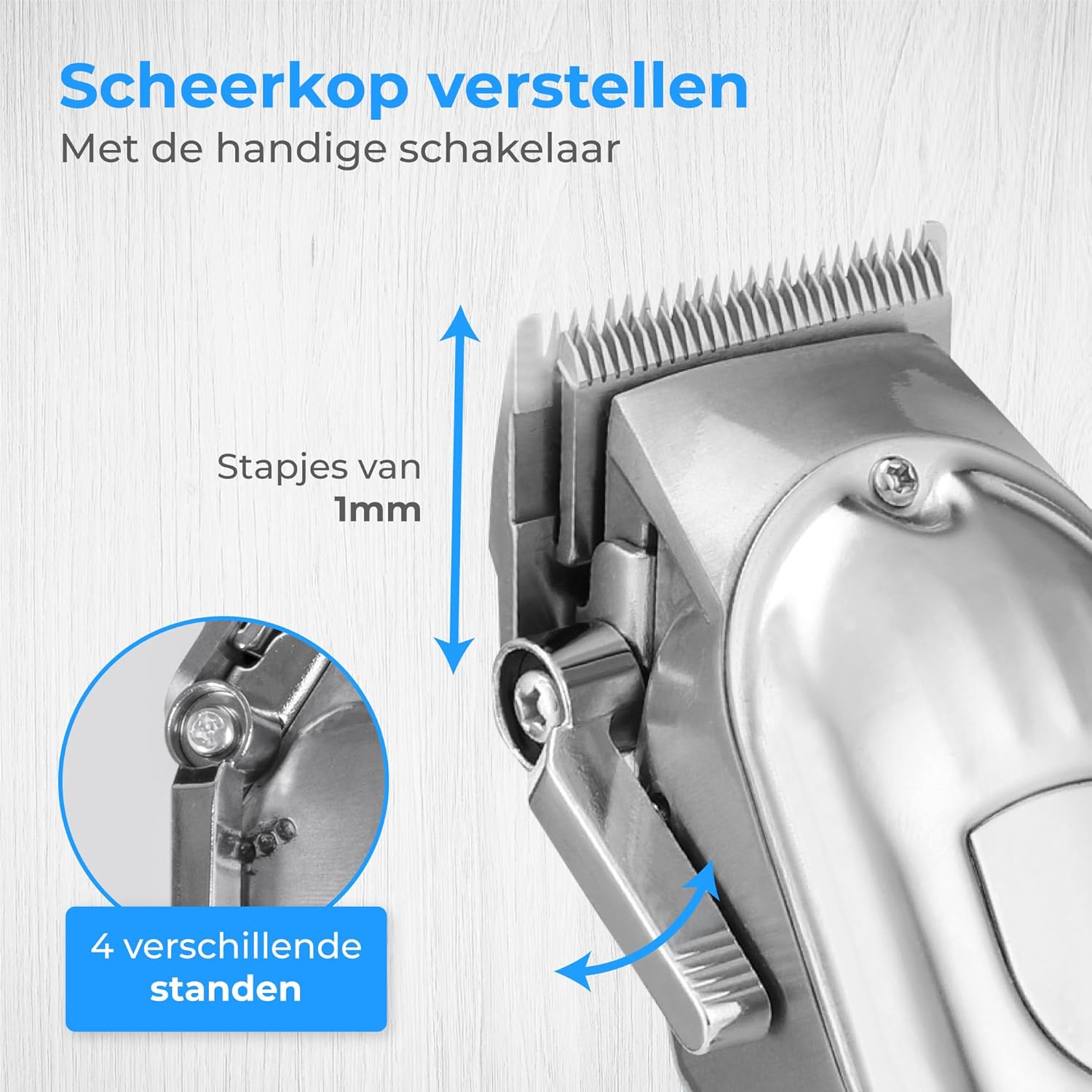
Şekil 4: Blade adjustment lever. This image focuses on the side of the clipper, illustrating the lever that allows for fine adjustment of the blade's cutting length in 1mm increments, offering 4 different settings.
- Move the lever up for a shorter cut (closer to 0.8mm).
- Move the lever down for a longer cut (closer to 2.0mm).
Trimming Hair and Beard
This clipper is suitable for various grooming needs, including head hair, beard, and body hair.

Şekil 5: Multi-functional use. This image highlights the clipper's ability to trim hair on various body parts, including head hair, beard, chest, and stomach, indicating its versatile application.
- For head hair: Start with a longer guide comb and gradually reduce the length until the desired style is achieved.
- For beard trimming: Use a guide comb to maintain an even length. For detailing, remove the guide comb and use the blade adjustment lever.
- For body hair: Use appropriate guide combs for sensitive areas.
Bakım
Bıçakların Temizlenmesi
Düzenli temizlik, en iyi performansı sağlar ve tıraş makinenizin ömrünü uzatır.
- Tıraş makinesini kapatın ve fişini çekin.
- Takılı olan kılavuz tarağı çıkarın.
- Bıçaklardaki gevşek tüyleri temizlemek için verilen temizleme fırçasını kullanın.
- For a more thorough clean, the blades can be carefully detached (refer to specific instructions if provided in the physical manual for blade removal). Rinse detached blades under running water and ensure they are completely dry before reattaching. Do not rinse the clipper body.
Bıçakların Yağlanması
Apply a few drops of the supplied blade oil to the blades after every few uses to maintain sharpness and smooth operation.
- Apply 1-2 drops of oil to the top of the blades.
- Yağı eşit şekilde dağıtmak için saç kesme makinesini birkaç saniye çalıştırın.
- Fazla yağı yumuşak bir bezle silin.
Sorun giderme
| Sorun | Olası Neden | Çözüm |
|---|---|---|
| Clipper açılmıyor. | Pil bitmiş. | Tıraş makinesini tam şarj edin. |
| Saç kesme makinesi saçları çekiyor veya kötü kesiyor. | Bıçaklar körelmiş, kirli veya yağlanmamış. | Bıçakları temizleyin ve yağlayın. Sorun devam ederse, bıçakların değiştirilmesi gerekebilir. |
| Clipper alışılmadık bir ses çıkarıyor. | Bıçaklar düzgün hizalanmamış veya yağlanmamış. | Bıçakların temiz ve yağlı olduğundan emin olun. Bıçakların doğru şekilde takılıp takılmadığını kontrol edin. |
| Dijital ekran çalışmıyor. | Unit is off or battery is completely dead. | Turn on the clipper or connect to charger. |
Özellikler
- Modeli: HF-8933
- Marka: nüvans
- Güç Kaynağı: USB Şarj Edilebilir
- Bıçak Malzemesi: Paslanmaz çelik
- Kesim Uzunlukları: 0.8mm - 25mm (with 12 guide combs)
- Pil Göstergesi: Dijital Ekran
Garanti ve Destek
Nuvance products are manufactured to high-quality standards. For warranty information or technical support, please refer to the contact details provided with your purchase or visit the official Nuvance webalan.
Herhangi bir garanti talebiniz için lütfen satın alma belgenizi saklayın.