
1. Giriş
This manual provides detailed instructions for the installation, operation, and maintenance of your SECULINK C17-4MP Dual-Band WiFi Dome Security Camera. This camera is designed for outdoor surveillance, featuring 4MP resolution, pan/tilt/zoom capabilities, automatic tracking, human detection, and color night vision. Please read this manual thoroughly before use to ensure proper functionality and safety.
2. Paket İçeriği
Paketinizde tüm öğelerin mevcut olduğundan emin olun:
- SECULINK C17-4MP Dome Security Camera
- Güç Adaptörü (Şarj Cihazı)
- Montaj Vidaları ve Duvar Dübelleri
- Ağ Kablosu için Su Geçirmez Kit (varsa)
- Hızlı Başlangıç Kılavuzu
3. Ürün Bittiview
The SECULINK C17-4MP camera features a robust dome design suitable for outdoor environments. Key components include:
- Kamera Lensi: Foo video yakalartage.
- Kızılötesi LED'ler: Gece görüşü için aydınlatma sağlayın.
- White Light LEDs (Floodlight): Enhance color night vision and act as a deterrent.
- Mikrofon: Ses girişi ve çift yönlü iletişim için.
- Konuşmacı: Ses çıkışı ve çift yönlü iletişim için.
- Antenler: For dual-band 2.4GHz/5GHz Wi-Fi connectivity.
- Mikro SD Kart Yuvası: 256 GB'a kadar yerel depolamayı destekler.
- Sıfırlama Düğmesi: Fabrika ayarlarına sıfırlama için.
- Güç girişi: DC 12V güç girişi.

Resim 3.1: Üzeriview of the SECULINK C17-4MP camera and its mobile application interface.
4. Kurulum
4.1 Uygulama İndirme ve Hesap Kaydı
- İndir SECUEYE mobile application from the App Store (iOS) or Google Play Store (Android).
- Uygulamayı açın ve ekrandaki yönergeleri izleyerek yeni bir hesap kaydedin veya mevcut bir hesabınız varsa giriş yapın.
4.2 Kamerayı Açma
Connect the provided power adapter to the camera's power port and plug it into an electrical outlet. The camera will initiate its self-test sequence, indicated by a rotating motion and status light changes.
4.3 Wi-Fi'ye Bağlanma
The SECULINK C17-4MP supports dual-band Wi-Fi (2.4GHz and 5GHz) for flexible network connectivity.
- Mobil cihazınızın, kamerayı bağlamayı planladığınız Wi-Fi ağına bağlı olduğundan emin olun.
- In the SECUEYE app, tap the "Add Device" or "+" icon.
- Fotoğraf makinenizin modelini seçin veya fotoğraf makinesindeki QR kodunu tarayın (varsa).
- Follow the app's instructions to enter your Wi-Fi network name (SSID) and password.
- The app will guide you through the pairing process, which may involve scanning a QR code displayed on your phone with the camera lens or listening for an audio prompt.
- Once connected, the camera's status light will indicate a successful connection (refer to the app or quick start guide for specific light indicators).
4.4 Kamerayı Monte Etme
The camera is designed for wall mounting and is IP65/IP66 weatherproof, making it suitable for outdoor installation.
- Choose a suitable mounting location that provides the desired viewaçısına sahip ve Wi-Fi kapsama alanındadır.
- (Varsa) montaj şablonunu veya kamera tabanını kullanarak duvardaki delik yerlerini işaretleyin.
- Delikler açın ve dübelleri yerleştirin.
- Verilen vidaları kullanarak kamera tabanını duvara sabitleyin.
- Attach the camera body to the base.
- Ensure all cable connections are secure and protected from weather using the waterproof kit if necessary.
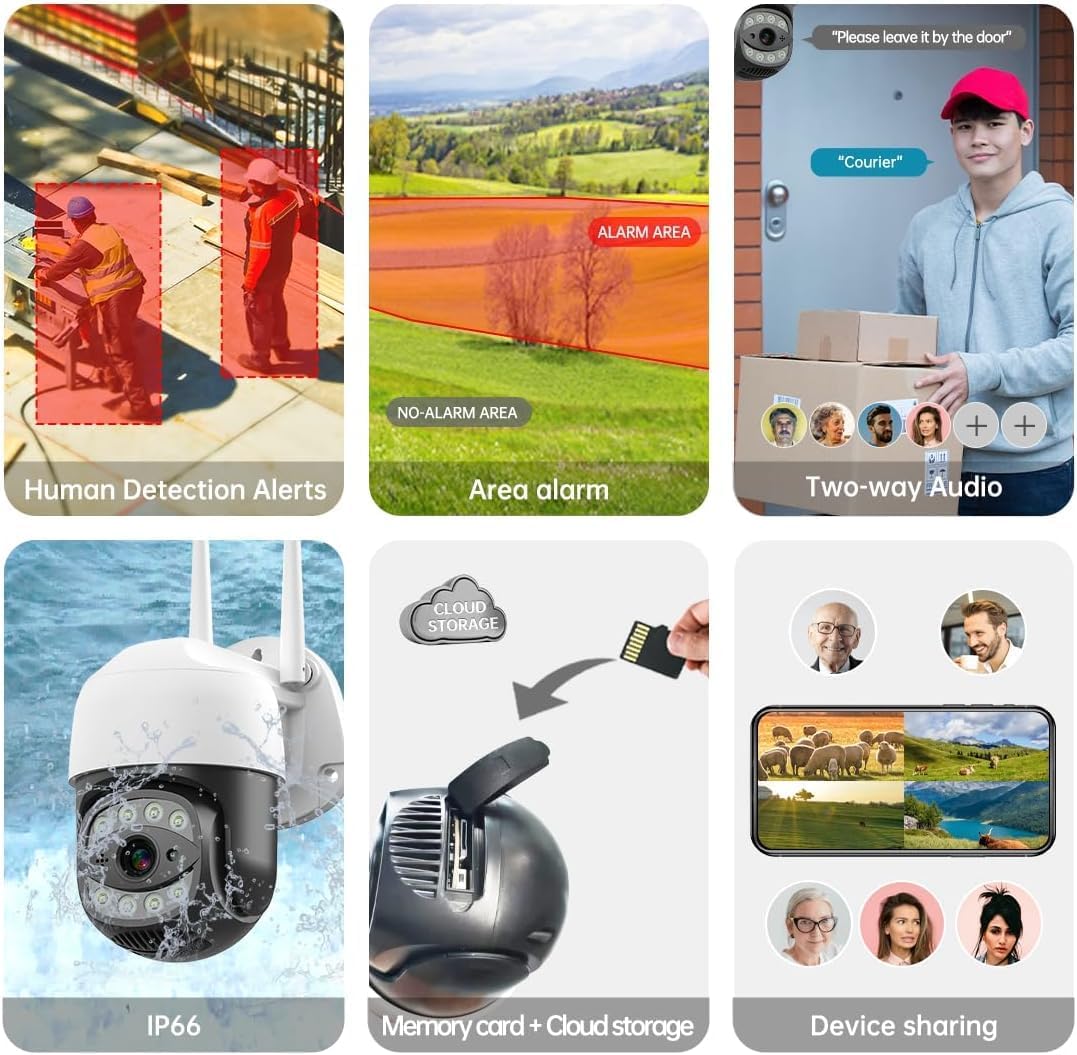
Image 4.1: The SECULINK C17-4MP camera is rated IP66 for dust and water resistance, suitable for various weather conditions.
5. Kullanım Talimatları
5.1 Canlı View ve Oynatma
Canlı video yayınına erişin ve tekrarview kaydedilmiş footage through the SECUEYE app. The camera provides 4MP (2560x1440p) resolution for clear images.

Image 5.1: Visual comparison demonstrating the enhanced clarity of 5MP resolution over lower resolutions.
5.2 Pan, Tilt, and Digital Zoom (PTZ)
Kameranın kontrolünü sağlayın viewing angle remotely using the SECUEYE app. The camera offers:
- Yatay Dönüş: 335 derece
- Dikey Eğim: 90 derece
- Dijital Yakınlaştırma: 10x büyütme
Use pinch-to-zoom gestures on your mobile device to digitally zoom in on specific areas of interest.

Image 5.2: Demonstrates controlling the camera's pan and tilt functions via the mobile app.

Image 5.3: Illustration of the 10x digital zoom feature, allowing closer inspection of details.
5.3 Automatic Tracking and Human Motion Detection
The camera features intelligent detection capabilities to enhance security monitoring.
- Otomatik Takip: When enabled, the camera will automatically detect and follow moving human figures within its field of view, recording their path.
- İnsan Hareketi Algılama: Advanced algorithms distinguish human activity from other movements (e.g., pets, swaying branches), reducing false alarms.
- Uyarılar: Upon detection, the camera can send real-time alerts to your mobile phone.
- Floodlight and Sound Alarm: Built-in spotlights activate upon motion detection at night, and a security siren can be triggered as an additional deterrent.

Image 5.4: The camera's AI Humanoid Detection identifies human presence and sends alerts.

Image 5.5: The camera's automatic tracking capability follows detected human movement.

Image 5.6: Illustrates the camera's ability to differentiate human activity from other movements, reducing false alarms.
5.4 Gece Görüş Modları
The camera offers multiple night vision options for clear surveillance in low-light conditions:
- Kızılötesi (IR) Gece Görüşü: Uses IR LEDs to provide black and white video in complete darkness, with a range of up to 100ft (30m).
- Renkli Gece Görüşü: Utilizes white light LEDs (floodlight) to capture full-color video at night when motion is detected or manually activated.
- Starlight Sensor: Enhances low-light performance to produce clearer images even without additional illumination.

Image 5.7: Demonstrates the different night vision modes: infrared (black and white), white light (color), and full-color night vision.

Image 5.8: The camera's infrared night vision provides visibility up to 20 meters in darkness.
5.5 İki Yönlü Ses
The built-in microphone and speaker allow for real-time two-way communication through the SECUEYE app. You can listen to audio from the camera's location and speak through the camera's speaker.
5.6 Depolama Seçenekleri
Kamera, kaydedilen yiyecekler için iki temel depolama yöntemini desteklemektedir.tage:
- Mikro SD kart: Insert a Micro SD card (up to 256GB, sold separately) into the designated slot for local storage. The camera can record 24/7 or motion-triggered videos.
- Bulut Depolama: Optional cloud storage services are available through the SECUEYE app for secure, remote backup of your recordings.
5.7 Cihaz Paylaşımı
You can share access to your camera's live feed and recordings with family members or trusted individuals through the SECUEYE app, allowing multiple users to monitor the property simultaneously.
6. Bakım
To ensure optimal performance and longevity of your SECULINK C17-4MP camera, consider the following maintenance tips:
- Lensi temizleyin: Periodically wipe the camera lens with a soft, clean, lint-free cloth to remove dust, dirt, or water spots that may affect image clarity. Avoid abrasive cleaners.
- Güç Bağlantısını Kontrol Edin: Ensure the power adapter and cable remain securely connected and free from damage, especially in outdoor environments.
- Donanım Yazılımı Güncellemeleri: Regularly check the SECUEYE app for available firmware updates. Updates often include performance improvements, new features, and security enhancements.
- Montajı İnceleyin: Periodically check the camera's mounting for stability, especially after severe weather conditions.
7. Sorun Giderme
If you encounter issues with your SECULINK C17-4MP camera, refer to the following common troubleshooting steps:
7.1 Kamera Wi-Fi'ye Bağlanmıyor
- Wi-Fi Sinyalini Kontrol Edin: Ensure the camera is within range of your Wi-Fi router. Weak signals can cause connection issues.
- Verify Network Credentials: Double-check that the Wi-Fi network name (SSID) and password entered in the app are correct.
- Yönlendirici Uyumluluğu: Confirm your router supports 2.4GHz or 5GHz bands, and that the camera is attempting to connect to a compatible band.
- Cihazları Yeniden Başlatın: Power cycle both your Wi-Fi router and the camera.
- Kamerayı Sıfırla: If issues persist, perform a factory reset on the camera (refer to the quick start guide for reset button location and procedure) and attempt the setup process again.
7.2 Düşük Görüntü Kalitesi
- Lensi Temizle: Kamera lensinin temiz olduğundan ve üzerinde leke veya kir olmadığından emin olun.
- Ağ Bant Genişliği: A slow internet connection can affect live stream quality. Check your network speed.
- Aydınlatma Koşulları: Ensure adequate lighting for optimal image quality, especially for color night vision.
7.3 Hareket Algılama Çalışmıyor veya Çok Hassas
- Hassasiyeti Ayarlayın: In the SECUEYE app settings, adjust the motion detection sensitivity level.
- Algılama Bölgeleri: Configure specific detection zones to monitor only relevant areas and exclude areas with frequent irrelevant motion (e.g., public roads, swaying trees).
- Check Schedule: Ensure motion detection is enabled for the desired time periods in the app.
7.4 SD karta kayıt yapılmıyor
- Insert SD Card Correctly: Ensure the Micro SD card is inserted properly into the slot.
- SD Kartı Biçimlendir: Format the SD card through the camera settings in the SECUEYE app.
- Card Capacity/Health: Ensure the SD card is not full or corrupted. Try a different, known-good SD card if necessary.
- Kayıt Ayarları: Verify that continuous recording or motion-triggered recording is enabled in the app settings.
8. Özellikler
| Özellik | Şartname |
|---|---|
| Örnek | C17-4MP |
| Çözünürlük | 4MP (2560x1440p Max) |
| Görüntü Sensörü | CMOS |
| Odak Uzaklığı | 3.6mm |
| Tava Döndürme Açısı | 335 ° Yatay |
| Eğim Dönüş Açısı | 90 ° Dikey |
| Dijital Zoom | 10x |
| Gece Görüşü | IR-Cut, Starlight, LED (Color Night Vision) |
| Kızılötesi Mesafesi | 100 feet'e (30 metre) kadar |
| Ses | Built-in Microphone and Speaker (Two-Way Audio) |
| Suya Dayanıklılık | IP65, IP66 (Waterproof) |
| Bağlantı | Dual-Band Wi-Fi (2.4GHz/5GHz), Wired Ethernet |
| Depolamak | Mikro SD Kart (256 GB'a kadar), Bulut Depolama |
| Güç | DC 12V, 9 Watts |
| Çalışma Sıcaklığı | -10°C ila +50°C (14°F ila 122°F) |
| Uygulama Uyumluluğu | SECUEYE (iOS, Android) |
| Boyutlar | 7 x 7 x 5 inç (Paket) |
| Ürün Ağırlığı | 1.2 pound |
9. Garanti ve Destek
For warranty information and technical support, please refer to the official SECULINK website veya doğrudan müşteri hizmetleriyle iletişime geçin. Garanti talepleri için satın alma kanıtı olarak satın alma makbuzunuzu saklayın.
Üretici: SECULINK