
JTEMAN JT-L36
JTEMAN Cell Phone Stand with Wireless Bluetooth Speaker and Alarm Clock - User Manual
Model: JT-L36
giriiş
Satın aldığınız için teşekkür ederizasing the JTEMAN Cell Phone Stand with Wireless Bluetooth Speaker and Alarm Clock. This multi-functional device is designed to enhance your daily routine by combining essential features into one compact and stylish unit. It serves as a high-quality Bluetooth speaker, a reliable alarm clock with a clear display, and a stable, adjustable stand for your mobile devices. Please read this manual carefully to ensure proper use and optimal performance.
Güvenlik Bilgileri
- Cihazı aşırı sıcaklıklara, doğrudan güneş ışığına veya yüksek neme maruz bırakmayın.
- Cihazı düşürmekten veya güçlü darbelere maruz bırakmaktan kaçının.
- Keep away from water and other liquids. If the device comes into contact with liquid, disconnect it immediately and allow it to dry completely before reuse.
- Cihazı kendiniz sökmeye, onarmaya veya değiştirmeye çalışmayın. Tüm servis işlemlerini yetkili personele yaptırın.
- Yalnızca verilen şarj kablosunu veya sertifikalı bir eşdeğerini kullanın.
- Çocukların erişemeyeceği yerde saklayınız.
Paket İçeriği
- JTEMAN Cell Phone Stand with Wireless Bluetooth Speaker and Alarm Clock (Model: JT-L36)
- C Tipi Şarj Kablosu
- Kullanıcı Kılavuzu
Ürün Bittiview
Familiarize yourself with the components and controls of your JTEMAN device:
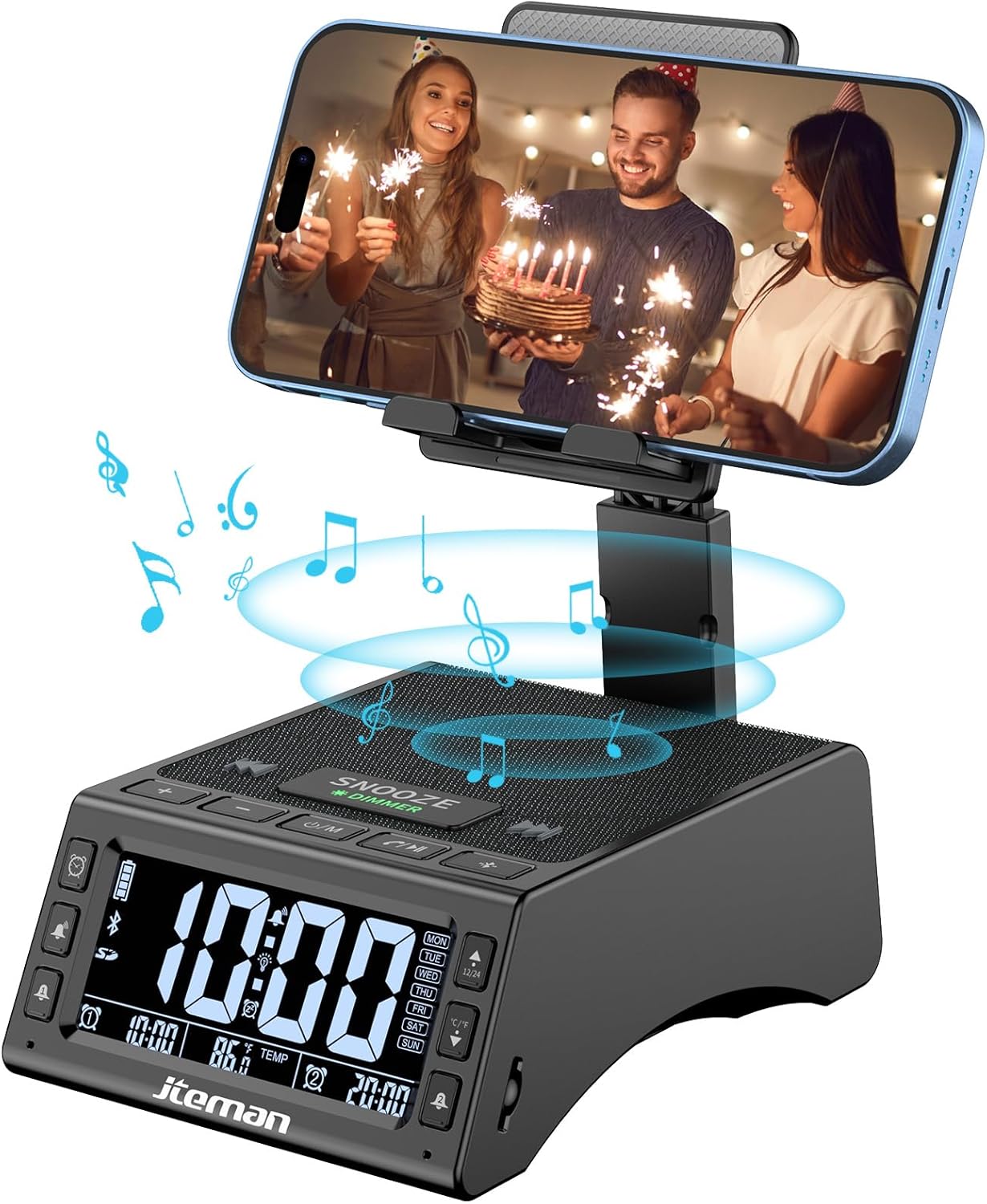
Şekil 1: Ön view of the JTEMAN device with a smartphone on the adjustable stand, displaying the time and temperature.

Şekil 2: Üzeriview highlighting the multi-functional aspects including Bluetooth speaker, 12/24H time display, temperature display, foldable phone stand, TF card support, microphone, charging station, dual alarm clocks, and 9 ringtones.
Kontroller ve Bağlantı Noktaları:
- Ekran Görüntüsü: Shows time, temperature, day of the week, and alarm indicators.
- Erteleme/Karartma Düğmesi: Press to snooze an active alarm (5 minutes); long press to adjust display brightness (4 levels).
- Power On/Off/Mode Button: Long press to power on/off; short press to cycle through modes (Bluetooth, TF Card).
- Play/Pause/Answer Button: Controls music playback; answers/ends calls.
- Sesi Aç/Sonraki Parça Düğmesi: Increases volume; short press for next track.
- Sesi Azaltma/Önceki Parça Düğmesi: Decreases volume; short press for previous track.
- Bluetooth Eşleştirme Düğmesi: Bluetooth eşleştirme modunu başlatır.
- Alarm 1 & Alarm 2 Buttons: For setting and managing dual alarms.
- Mikrofon: Eller serbest görüşme için.
- C Tipi Giriş Bağlantı Noktası: Cihazı şarj etmek için.
- C Tipi Çıkış Bağlantı Noktası: Harici cihazları şarj etmek için.
- TF Kart Girişi: TF karttan doğrudan müzik çalmak için.
- Adjustable Phone Stand: Foldable and extendable for various viewing angles. Features anti-slip pads and base for stability.
Kurmak
1. İlk Şarj
- Connect the provided Type-C charging cable to the Type-C Giriş Bağlantı Noktası cihazda.
- Connect the other end of the cable to a compatible USB power adapter (not included) and plug it into a wall outlet.
- Ekran şarj durumunu gösterecektir. Cihazı ilk kullanımdan önce tamamen şarj edin.

Figure 3: The device connected via Type-C for charging itself and an external phone.
2. Saat ve Tarihin Ayarlanması
- Upon powering on, the device should automatically synchronize the current time.
- If manual adjustment is needed, refer to the detailed instructions in the full user manual (included in the package).
- To switch between 12/24 hour format or °F/°C temperature display, use the dedicated buttons or refer to the full manual.

Figure 4: The HD display showing time, temperature, and alarm settings with brightness adjustment levels.
Kullanım Talimatları
1. Using the Phone Stand
- The integrated phone stand can be pulled up from the back of the unit.
- Standın yüksekliğini ve açısını tercihinize göre ayarlayın viewing position. The stand is designed to be stable and strong, accommodating devices from 4.0 to 13 inches.
- When not in use, the stand can be folded back into the unit for a compact form factor.

Figure 5: Demonstrates the adjustable height and angle of the phone stand, along with its anti-slip features and foldable design.
2. Bluetooth Hoparlör Fonksiyonu
- Güç Açık: Long press the Power On/Off/Mode button. The device will enter Bluetooth pairing mode, indicated by a flashing Bluetooth icon on the display.
- Eşleştirme: On your smartphone or other Bluetooth-enabled device, search for “JT-L36” in the Bluetooth settings and select it to pair. A confirmation sound will indicate successful pairing.
- Müzik Çalma: Once paired, you can play audio from your device through the JTEMAN speaker. Use the Play/Pause, Volume Up/Next Track, and Volume Down/Previous Track buttons to control playback.
3. TF Kart Oynatma
- Insert a TF card (not included) with audio fileTF kart yuvasına takın.
- The device will automatically switch to TF Card mode and begin playing music. If not, short press the Mode button to select TF Card mode.
4. Alarm Clock Features
- Alarmların Ayarlanması: Use the Alarm 1 and Alarm 2 buttons to set up to two independent alarms. Follow the on-screen prompts to set the time and alarm frequency (e.g., Mon-Fri, Sat-Sun, Mon-Sun).
- Erteleme İşlevi: When an alarm sounds, press the large SNOOZE button on top to activate a 5-minute snooze.
- Parlaklık Ayarı: Long press the SNOOZE/DIMMER button to cycle through four levels of display brightness, including an off setting for minimal light disturbance.
5. Eller Serbest Arama
- When a call comes in while your phone is connected via Bluetooth, press the Play/Pause/Answer button to answer the call.
- Net iletişim için yerleşik mikrofonu kullanın.
- Press the Play/Pause/Answer button again to end the call.
6. Harici Cihazların Şarj Edilmesi
- Connect your external device (e.g., smartphone, tablet) to the Type-C Çıkış Bağlantı Noktası on the JTEMAN unit using a compatible charging cable.
- The JTEMAN device will provide power to charge your external device.
Bakım
- Cihazı yumuşak ve kuru bir bezle temizleyin. Aşındırıcı temizleyiciler veya çözücüler kullanmayın.
- Tüm portların toz ve kalıntılardan arındırılmış olduğundan emin olun.
- Uzun süre kullanılmayacaksa cihazı serin ve kuru bir yerde saklayın.
Sorun giderme
| Sorun | Olası Neden | Çözüm |
|---|---|---|
| Cihaz açılmıyor. | Low battery; power adapter/cable issue. | Charge the device fully. Check power adapter and cable connections. |
| Hoparlörden ses gelmiyor. | Volume too low; not paired correctly; wrong mode. | Increase volume on both device and connected phone. Re-pair Bluetooth. Ensure correct mode (Bluetooth/TF Card). |
| Bluetooth eşleştirme başarısız. | Device too far; pairing mode not active; interference. | Ensure device is in pairing mode and within 10 meters. Turn off other Bluetooth devices. Try restarting both devices. |
| Alarm çalmıyor. | Alarm not set; alarm volume too low; alarm disabled. | Verify alarm settings and ensure it's enabled. Increase alarm volume. |
| Phone not charging via output port. | Cable issue; device battery low; incompatible device. | Ensure the JTEMAN device is charged. Try a different charging cable. Confirm your phone is compatible with Type-C charging. |
Özellikler
| Marka | JTEMAN |
| Model Numarası | JT-L36 |
| Ürün Boyutları | 6.1 x 4.3 x 2.1 inç |
| Ürün Ağırlığı | 1.26 pound |
| Renk | Siyah |
| Donanım Arayüzü | USB 2.0 |
| Toplam USB Bağlantı Noktaları | 2 (Type-C Input, Type-C Output) |
| Uyumluluk | 4.0-13 inch devices |
Garanti ve Destek
JTEMAN products are manufactured with high standards of quality. For specific warranty information, please refer to the warranty card included in your product packaging or visit the official JTEMAN website. If you encounter any issues or have questions not covered in this manual, please contact JTEMAN customer support through the contact information provided on the product packaging or webalan.
Garanti talepleri için lütfen satın alma belgenizi saklayın.