
1. Giriş
Thank you for choosing the LIFETIME GD-BL 44-Inch Ergonomic Z-Shaped Gaming Desk. This manual provides essential information for the safe assembly, operation, and maintenance of your new desk. Please read it thoroughly before use and retain it for future reference.
2. Güvenlik Bilgileri
- Ağırlık sınırı: Do not exceed the maximum weight recommendation of 150 pounds (68 kg) on the desktop. Overloading can cause instability and damage.
- Toplantı: Follow assembly instructions carefully to ensure stability and safety. Ensure all screws and fasteners are tightened securely before use.
- Atama: Masayı düz ve sağlam bir yüzeye yerleştirin. Malzemenin bozulmasını önlemek için yüksek nemli veya doğrudan güneş ışığı alan yerlere koymaktan kaçının.
- Çocuklar: Montaj sırasında boğulma tehlikesini önlemek için küçük parçaları ve ambalaj malzemelerini çocuklardan uzak tutun.
- Kablolar: Utilize the wire management features to prevent tripping hazards and protect cables from damage.
3. Paket İçeriği
Montaja başlamadan önce tüm bileşenlerin mevcut olduğundan emin olun. Herhangi bir parça eksik veya hasarlıysa, lütfen müşteri hizmetleriyle iletişime geçin.
- Desktop (Carbon Fiber Surface)
- Z-Shaped Leg Frames (Alloy Steel)
- Crossbars/Support Beams
- Ayarlanabilir Tesviye Ayakları
- Bardak tutucu
- Kulaklık Kancası
- Kablo Yönetim Tepsisi
- Montaj Donanımı (vidalar, alyan anahtarı, vb.)
- Kullanım Kılavuzu
4. Kurulum ve Montaj
The desk requires assembly and includes all necessary tools. Follow the provided instructions for a quick setup in approximately 30 minutes.
- Bileşenleri Paketinden Çıkarın: Çizilmeleri önlemek için tüm parçaları ambalajından dikkatlice çıkarın ve yumuşak, temiz bir yüzeye serin.
- Ayak çerçevelerini takın: Secure the Z-shaped leg frames to the underside of the desktop using the provided screws and Allen wrench. Ensure the frames are oriented correctly.
- Çapraz çubukları takın: Attach any reinforcing crossbars or support beams between the leg frames as indicated in the detailed assembly diagram.
- Dengeleme Ayaklarını Ayarlayın: Screw the adjustable leveling feet into the bottom of the leg frames. Adjust them to ensure the desk is stable and level on your floor.
- Aksesuarları Takın: Install the cup holder, headphone hook, and cable management tray to the designated locations on the desk.
Video: Montaj bittiview for a similar gaming desk. This video demonstrates the general process of assembling a desk with a metal frame and desktop, including attaching legs and ensuring stability. Note that specific steps may vary slightly from your model.

Resim: Visual representation of the desk dimensions, highlighting the 44-inch width, 23.5-inch depth, and 29.5-inch height. This helps in planning your space for the desk.
5. Çalışma Prensibi ve Özellikleri
Your LIFETIME GD-BL gaming desk is designed for optimal functionality and comfort.
- Spacious Carbon Fiber Surface: 44" x 23.5" boyutlarındaki masaüstü şunları sağlar: ample space for multiple monitors, keyboards, mice, and other gaming or work essentials. The carbon fiber texture is stylish and durable.
- Ergonomic Z-Shaped Design: The unique Z-shaped alloy steel legs offer superior stability and a modern aesthetic, minimizing wobble during intense use.
- Integrated Cup Holder: A convenient, expandable cup holder is attached to the side of the desk, keeping your beverages secure and preventing spills on the desktop.
- Kulaklık Kancası: A dedicated hook allows you to hang your gaming headset or headphones, keeping them within reach and off the desktop.
- Kablo Yönetimi: The integrated cable management tray helps organize and conceal power cords and peripheral cables, maintaining a clean and clutter-free workspace.
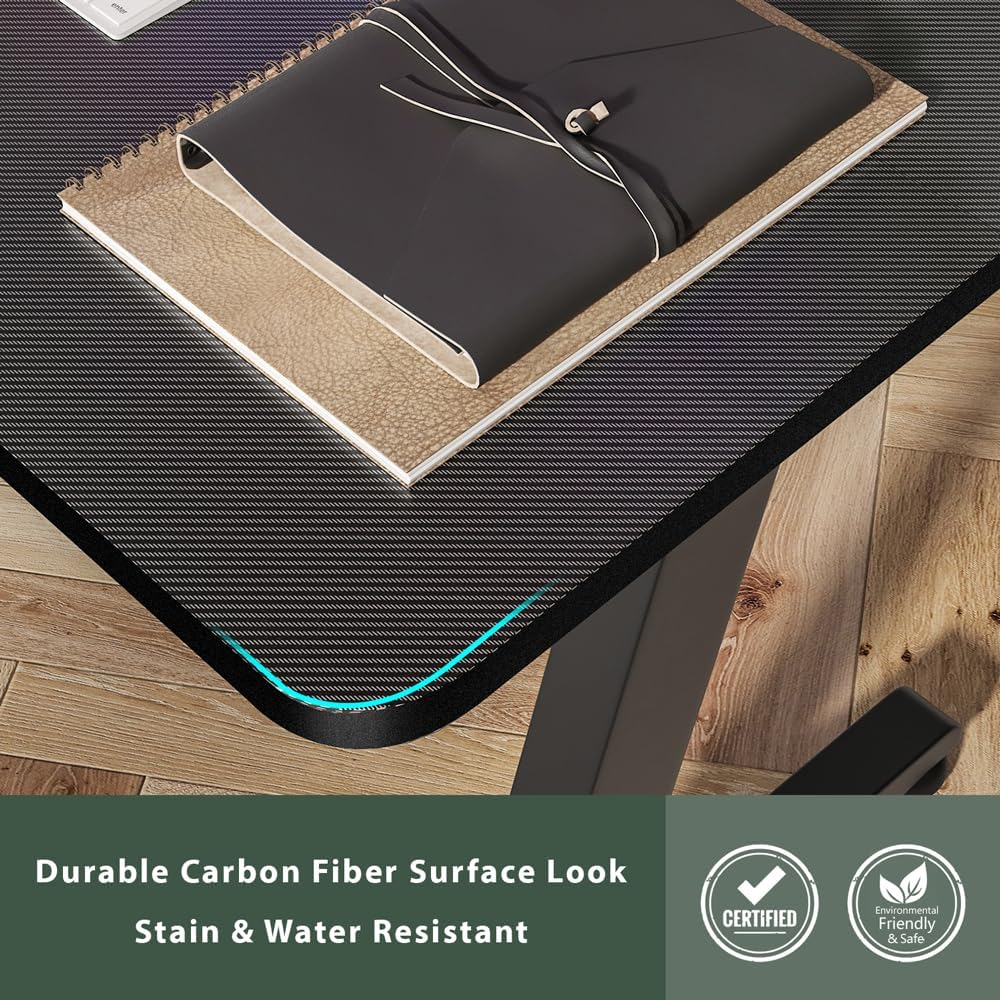
Resim: Ayrıntılı view of the carbon fiber surface, showcasing its texture and finish. This surface is designed for durability and a modern aesthetic.

Resim: The desk set up in a room, demonstrating the practical use of the integrated cup holder and the overall spaciousness for a gaming setup.
6. Bakım
Masanızın uzun ömürlü ve güzel görünmesini sağlamak için aşağıdaki bakım yönergelerini izleyin:
- Temizlik: Masaüstünü ve çerçeveyi yumuşak bir bezle silin.amp Kumaşı aşındırmayın. Cilaya zarar verebilecek aşındırıcı temizleyicilerden veya sert kimyasallardan kaçının.
- Dökülmeler: Clean up spills immediately to prevent staining, especially on the carbon fiber surface.
- Bağlantı Elemanları: Tüm vida ve bağlantı elemanlarının sıkılığını düzenli olarak kontrol edin. Stabiliteyi korumak için gerekirse tekrar sıkın.
- Isıdan Kaçının: Do not place hot items directly on the desktop without a protective coaster.
7. Sorun Giderme
Masaüstünüzle ilgili herhangi bir sorunla karşılaşırsanız, aşağıdaki yaygın çözümlere başvurabilirsiniz:
- Masa Sallanıyor:
- Tüm montaj vidalarının güvenli bir şekilde sıkıldığından emin olun.
- Zemin yüzeyindeki düzensizlikleri dengelemek için ayakların altındaki dengeleme ayaklarını ayarlayın.
- Kayıp parçalar:
- Double-check all packaging materials. Small parts may be tucked away.
- Refer to the package contents list. If parts are genuinely missing, contact LIFETIME customer support.
- Yüzey Çizikleri:
- While the carbon fiber surface is durable, deep scratches may occur from sharp objects. Use a desk mat to protect the surface.
8. Özellikler
| Marka | ÖMÜR BOYU |
| Model Numarası | GD-BL |
| Ürün Boyutları (U x G x Y) | 44 x 23.5 x 29.5 inç |
| Masa Üstü Kalınlığı | 1.2 inç |
| Maksimum Ağırlık Önerisi | 150 Pound (68 kg) |
| Üst Malzeme Türü | Karbon Fiber |
| Taban Malzemesi | Alaşımlı Çelik |
| Renk | Siyah |
| Montaj Süresi (Yaklaşık) | 30 dakikadır. |
| Tüm Montaj Aletlerini İçerir | Evet |
9. Garanti ve Destek
LIFETIME is committed to providing high-quality products. For warranty information, product support, or to report missing/damaged parts, please visit the official LIFETIME webSite üzerinden satın alabilir veya doğrudan müşteri hizmetleriyle iletişime geçebilirsiniz. Garanti talepleriniz için satın alma fişinizi saklayın.
Ek bilgi ve destek için lütfen şu adresi ziyaret edin: LIFETIME Store on Amazon.