
giriiş
Welcome to the instruction manual for your Galax Revolution 06 (Rev-06) Mid Tower ATX Gaming Cabinet. This manual provides essential information for the proper setup, operation, maintenance, and troubleshooting of your new computer case. Please read this manual thoroughly before installation and retain it for future reference.

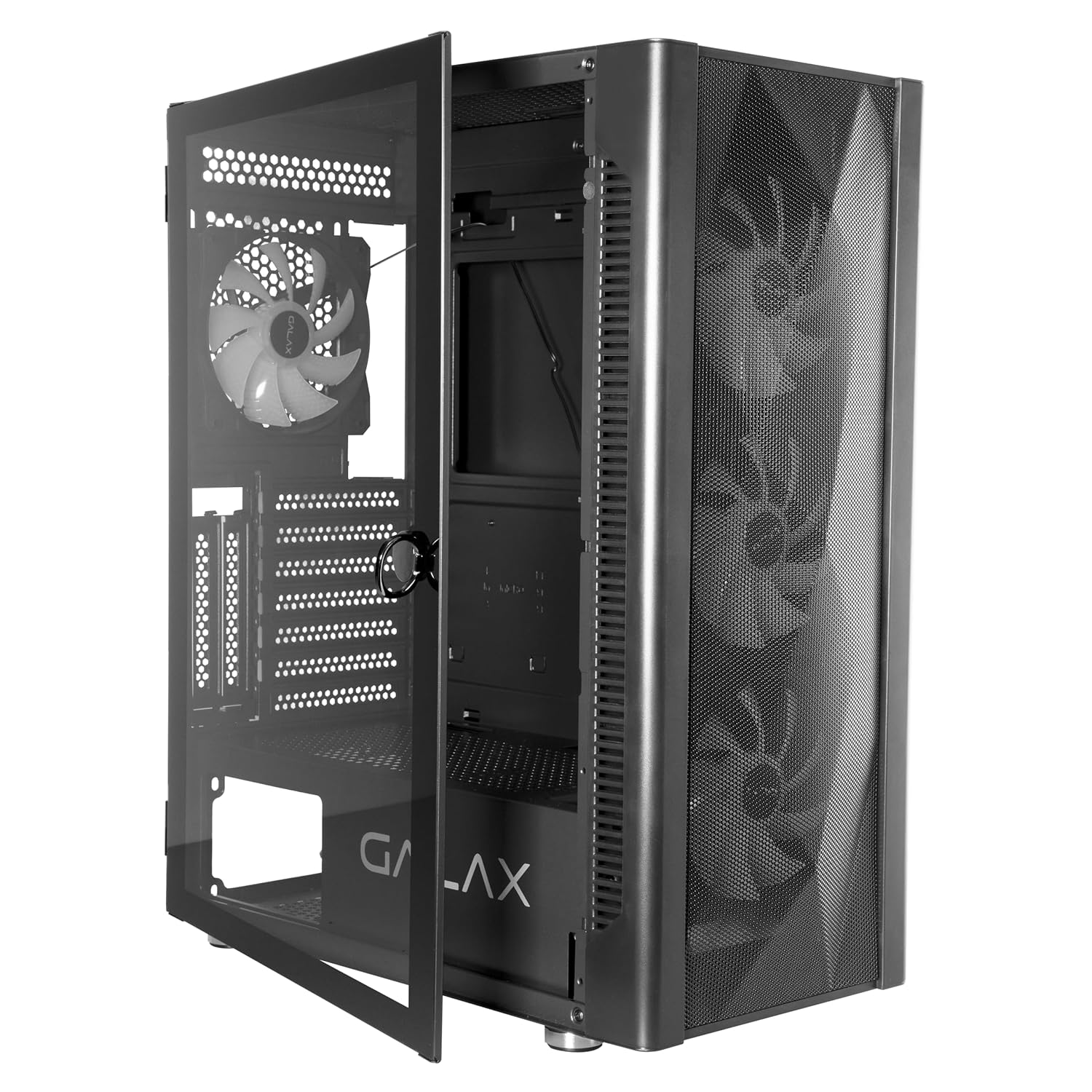
Resim: Ön view of the Galax Revolution 06 gaming cabinet.
Güvenlik Bilgileri
- Always disconnect power from the power supply unit (PSU) before installing or servicing any components inside the cabinet.
- Handle tempered glass panels with extreme care to prevent breakage. Avoid impacts or dropping the panel.
- Avoid exposing the cabinet to extreme temperatures, direct sunlight, or high humidity.
- Keep small parts, such as screws and accessories, out of reach of children.
- Ensure proper grounding of your computer system to prevent electrical hazards.
Paket İçeriği
Lütfen paketinizde tüm öğelerin mevcut olduğundan emin olun:
- Galax Revolution 06 Mid Tower ATX Gaming Cabinet
- 4 Pre-installed RGB Cooling Fans
- Accessory Kit (includes various screws, standoffs, and cable ties)
- Kullanım Kılavuzu (bu belge)
Ürün Bittiview
The Galax Revolution 06 is a mid-tower ATX gaming cabinet engineered for optimal airflow and component visibility. It features a mesh front panel for superior cooling performance and a hinged magnetic tempered glass side panel for easy access and a clear view İç bileşenlerinizin.
Temel Özellikler:
- Üstün Soğutma: Equipped with 4 pre-installed RGB cooling fans and a mesh front panel to ensure peak airflow.
- Temizlemek View: Hinged magnetic tempered glass door provides a crystal-clear view of your PC system's interior.
- Ön Panel Bağlantısı: Includes 1x USB 3.0, 2x USB 2.0, 3.5mm Microphone port, 3.5mm Headphone port, Reset Button, and Power Button.
- Sıvı Soğutma Desteği: Versatile radiator mounting options for Front (240mm/280mm/360mm), Top (240mm/280mm), and Rear (120mm).
- Ekran Kartı Desteği: 330 mm uzunluğa kadar olan ekran kartlarını destekler.
Ön Panel G/Ç Bağlantı Noktaları:

Resim: Ayrıntılı view of the front panel connectivity, including USB 3.0, USB 2.0, microphone, headphone, reset, and power buttons.
Kurmak
1. Davayı Hazırlama
- Dolabı sağlam, düz bir yüzeye yerleştirin.
- Gently pull the handle to open the hinged tempered glass side panel.
- Remove any protective films from the glass and other surfaces.
2. Anakart Kurulumu
- Identify the correct standoff positions for your motherboard (ATX, Micro-ATX, Mini-ITX).
- Install the necessary standoffs from the accessory kit into the corresponding holes on the motherboard tray.
- Carefully place your motherboard into the cabinet, aligning it with the installed standoffs and the rear I/O shield opening.
- Secure the motherboard with screws provided in the accessory kit.

Image: Empty internal view of the case, illustrating motherboard mounting points and cable routing options.
3. Güç Kaynağı Ünitesi (PSU) Kurulumu
- Install the PSU into its designated compartment at the bottom rear of the cabinet.
- Güç kaynağını kasanın arka tarafındaki vidalarla sabitleyin.
4. Grafik Kartı (GPU) Kurulumu
- Kasanın arka tarafındaki gerekli PCIe yuva kapaklarını çıkarın.
- Ekran kartınızı anakart üzerindeki uygun PCIe yuvasına takın.
- Secure the GPU with screws. The cabinet supports GPUs up to 330mm in length.
5. Depolama Sürücüsü Kurulumu
- Install 2.5-inch SSDs or 3.5-inch HDDs into the available drive bays. Refer to the cabinet's internal layout for specific mounting points and methods.
6. Kablo Yönetimi
- Utilize the cable routing holes and tie-down points behind the motherboard tray to manage cables neatly. This practice improves airflow and enhances the aesthetic appeal of your build.
Resim: Eskiample of internal component installation and organized cable routing within the cabinet.
7. Fan ve Radyatör Montajı (İsteğe Bağlı)
- The cabinet comes with 4 pre-installed RGB fans. Additional fans or liquid cooling radiators can be installed in the following locations:
- Ön: Supports 240mm, 280mm, or 360mm radiators.
- Tepe: Supports 240mm or 280mm radiators.
- Arka: Supports a 120mm radiator.
İşletim
- Once all internal components are installed and cables are securely connected, close the tempered glass side panel.
- Connect your monitor, keyboard, mouse, and other peripherals to your system.
- Connect the power cable to the power supply unit (PSU) and then to a wall outlet.
- Press the power button located on the front panel of the cabinet to start your system.
- The pre-installed RGB fans will illuminate upon power-on, providing visual effects and cooling.
Bakım
Toz Filtresi Temizliği
- The cabinet features a magnetic dust filter on the top panel. Regularly remove and clean this filter to maintain optimal airflow and prevent dust buildup inside the system.
- To clean, simply lift the magnetic filter, gently brush off accumulated dust, or rinse with water if necessary. Ensure it is completely dry before reattaching.
Tempered Glass Care
- Clean the tempered glass panel with a soft, lint-free cloth and a non-abrasive glass cleaner.
- Avoid using harsh chemicals, abrasive materials, or excessive force, as these can scratch or damage the glass.
Genel Temizlik
- Periodically use compressed air to remove dust from internal components, fan blades, and mesh panels to ensure efficient cooling.
Sorun giderme
Sistem Açılmıyor
- Check all power connections: ensure the PSU is connected to the wall outlet, the 24-pin ATX power cable and 8-pin CPU power cable are securely connected to the motherboard, and the front panel power switch cable is correctly connected to the motherboard's front panel header.
- Verify that the power switch on the back of the PSU is in the "ON" (I) position.
Fanlar dönmüyor / RGB ışıkları yanmıyor
- Ensure that all fan power cables and RGB cables are correctly connected to the motherboard or any included fan/RGB controller.
- Gevşek bağlantıları kontrol edin.
Ekran Çıkışı Yok
- Confirm that your monitor is connected to the graphics card (or motherboard integrated graphics, if applicable) and is powered on.
- Reseat the graphics card and RAM modules to ensure they are properly seated in their slots.
For further assistance, refer to your motherboard manual or contact Galax support.
Özellikler
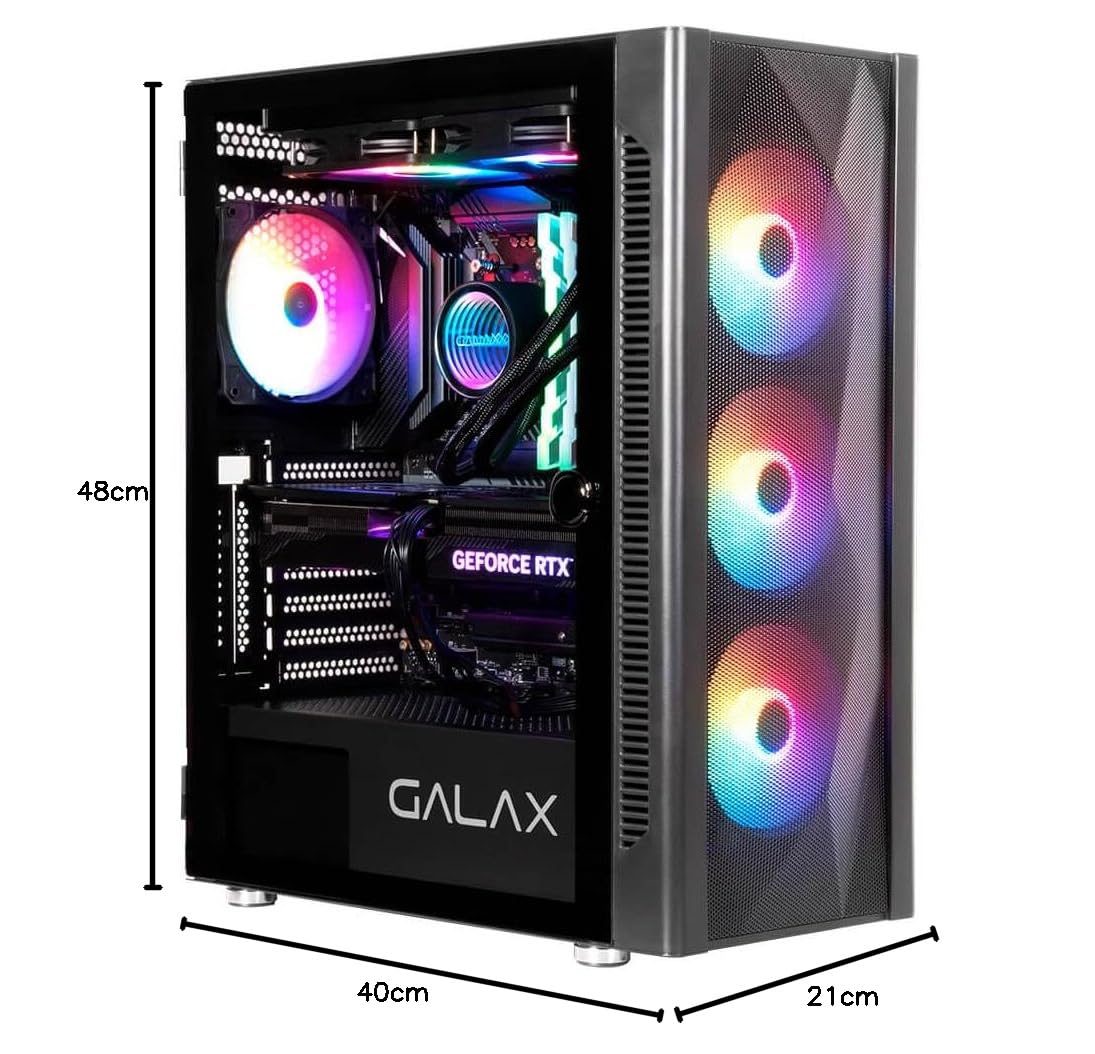
Image: Dimensions and internal layout diagram with key specifications.
| Marka | Galax |
| Model Serisi | Revolution 06 Black (Rev-06) |
| Ürün Model Numarası | CGG6AGBA4B0 |
| Dava Türü | Orta kule |
| Renk | Siyah |
| Ürün Boyutları (UxGxY) | 40x21x48 cm |
| Ürün Ağırlığı | 4.3 kilo |
| Anakart Uyumluluğu | ATX, Mikro ATX, Mini ITX |
| Önceden yüklenmiş Fanlar | 4 RGB Fan |
| Ön Panel G / Ç | 1x USB 3.0, 2x USB 2.0, 3.5mm Microphone, 3.5mm Headphone, Reset, Power |
| Sıvı Soğutma Desteği | Front (240/280/360mm), Top (240/280mm), Rear (120mm) |
| Grafik Kartı Uzunluğu | 330mm'ye kadar |
Garanti ve Destek
Garanti Bilgileri
This Galax Revolution 06 Gaming Cabinet comes with a 1 yıllık garanti from the date of purchase. Please retain your proof of purchase for all warranty claims. The warranty covers manufacturing defects under normal use. Damage resulting from improper installation, misuse, unauthorized modifications, or accidents is not covered.
Üretici Detayları
Üretici: Galaxy Microsystems Ltd., Hong Kong, Kowloon Bay, Wang Chiu Rd, 33, Exchange Tower, Room 1601, 16th Floor.
İthalatçı (Hindistan): Technology And Gadgets, Gala no.142/143, 1st Floor, Building no.6, Mittal Industrial Estate, Marol, Andheri (East), Mumbai - 400059., Mumbai, India, Maharashtra.
Teknik Destek
For technical support, warranty inquiries, or further assistance, please contact your local retailer or refer to the official Galax support channels available on their webalan.