
1. Önemli Güvenlik Bilgileri
Please read these instructions carefully before installation. If you do not understand these instructions or have doubts about the safety of the installation, please contact a qualified installer. The manufacturer is not responsible for damage or injury caused by incorrect mounting or operation.
- Ağırlık Kapasitesi: This TV wall mount is designed for TVs weighing up to 110 lbs (50 kg)Bu ağırlık sınırını aşmayın.
- TV Boyutu Uyumluluğu: Çoğuyla uyumludur 40-82 inç flat or curved TVs.
- VESA Uyumluluğu: Supports VESA mounting patterns from 200x100mm ila 600x400mm. Verify your TV's VESA pattern before installation.
- Duvar Tipi: This mount is designed for installation on ahşap saplamalar or solid concrete/brick walls. Yalnızca alçıpan üzerine montaj yapmayın.
- UL Listelenmiştir: This product is UL Listed, indicating it meets specific safety standards.
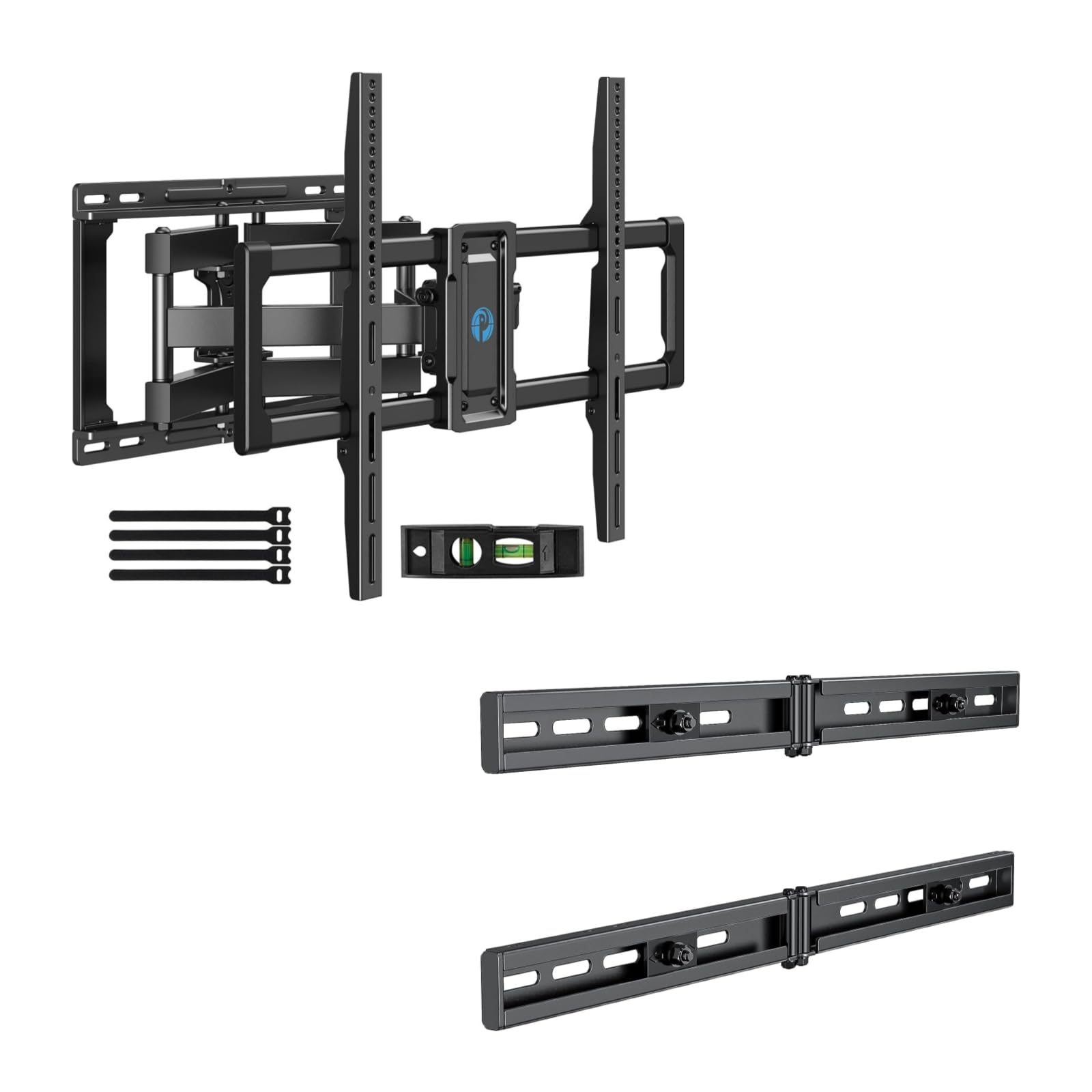
Image 1.1: Reinforced stability of the mount, highlighting heavy-duty steel arms and UL certification for safety and durability.
2. Paket İçeriği
Please check to ensure all components are present and undamaged before beginning installation. If any parts are missing or defective, contact Pipishell customer service.
2.1 Gerekli Araçlar (Dahil Değildir)
- Kalem
- Damızlık Bulucu
- Drill with appropriate drill bits (e.g., 5/32" (4mm) for wood studs, 3/8" (10mm) for concrete)
- Seviye
- Ölçüm bandı
- Lokma anahtar veya ayarlanabilir anahtar
- Yıldız uçlu tornavidalar
2.2 Hardware and Components (Included)
- Duvar Plakası Montajı
- TV Konsolları (2)
- Extension Brackets (2)
- Various TV Screws, Washers, and Spacers (M4, M6, M8)
- Lag Bolts and Concrete Anchors
- Seviye Kabarcık
- Kablo Bağları
3. Kurulum ve Kurulum
3.1 Kurulum Öncesi Kontroller
- Verify your TV's weight, size, and VESA pattern are within the mount's specifications.
- İstenileni belirleyin viewTelevizyonunuz için ideal yükseklik.
- Locate the wall studs using a stud finder. Mark the center of the studs.
3.2 Duvar Plakasının Takılması
The extension bracket feature allows for installation on wood studs with spacing between 16 and 24 inches.
- Position the wall plate assembly on the wall at your desired height, ensuring it is level. Mark the drill holes.
- For wood stud installation, drill pilot holes (e.g., 5/32" or 4mm) into the center of the studs. For concrete/brick, drill pilot holes (e.g., 3/8" or 10mm) and insert concrete anchors.
- Attach the wall plate to the wall using the provided lag bolts. Tighten securely.

Image 3.1: The extended wall plate design provides a flexible solution for mounting on walls with stud spacing between 16 and 24 inches.

Image 3.2: This feature helps center your TV for optimal viewing, even when wall studs are not perfectly centered.
3.3 Attaching TV Brackets to TV
- Televizyonunuzu dikkatlice, yüzü aşağı bakacak şekilde yumuşak ve temiz bir yüzeye yerleştirin.
- Select the appropriate screws, washers, and spacers for your TV's VESA mounting holes.
- Attach the two TV brackets to the back of your TV. Ensure they are securely fastened and evenly spaced.
3.4 Televizyonu Duvar Plakasına Monte Etme
- Yardım alarak televizyonu dikkatlice kaldırın ve televizyon askı aparatlarını duvardaki plakaya takın.
- Televizyonun duvardaki montaj plakasına sağlam bir şekilde oturduğundan emin olun.
- Tighten the safety screws or locking mechanisms on the TV brackets to prevent accidental dislodgement.
4. Operating the TV Mount
This full motion mount allows for flexible adjustment to achieve the best viewaçı.
4.1 Döner Ayar
The mount allows for a swivel range of +/-45°. Gently push or pull the TV to the desired left or right angle.

Image 4.1: The mount offers a smooth swivel motion of up to 45 degrees in either direction for flexible viewIng.
4.2 Eğim Ayarı
Adjust the tilt angle from +5° ila -15° to reduce glare and optimize viewing. This adjustment is tool-free.

Image 4.2: Easily adjust the TV's vertical angle from +5° to -15° without tools to minimize glare and improve comfort.
4.3 Uzatma ve Geri Çekme
The mount allows the TV to extend from the wall by 2.89 inç ila 16.3 inç. Gently pull the TV forward or push it back towards the wall to adjust the distance.

Image 4.3: Adjust the TV's distance from the wall, extending up to 16.3 inches or retracting to 2.89 inches for optimal viewboşluk.
5. Bakım
- Düzenli Kontroller: Tüm vidaların ve bağlantıların sıkı ve güvenli olduğundan emin olmak için düzenli olarak kontrol edin.
- Temizlik: Montaj parçasını yumuşak, kuru bir bezle temizleyin. Aşındırıcı temizleyicilerden veya çözücülerden kaçının.
- Yağlama: The moving parts are designed for smooth operation. No lubrication is typically required. If movement becomes stiff, check for debris or loose components.
6. Sorun Giderme
- Televizyon düz durmuyor: Check the level of the wall plate during installation. Most mounts have a post-installation leveling adjustment. Refer to the specific mechanism on your mount.
- Difficulty adjusting swivel/tilt/extension: Ensure no cables are snagged or obstructing movement. Check if any adjustment knobs or screws are overtightened. The mount features improved torque accuracy for smoother movement.
- Montaj aparatı duvarda gevşek duruyor: Immediately remove the TV from the mount. Re-check all wall plate fasteners and ensure they are securely anchored into the studs or concrete. If issues persist, consult a professional installer.
- TV brackets do not fit TV: Verify your TV's VESA pattern matches the mount's compatibility (200x100mm to 600x400mm). Ensure you are using the correct screws and spacers for your TV model.
7. Özellikler
| Özellik | Şartname |
|---|---|
| Montaj Tipi | Duvara Montaj |
| Hareket Türü | Eklemleme (Tam Hareket) |
| Marka | Kabuklu deniz hayvanı kabuğu |
| Malzeme | Alaşımlı Çelik |
| Uyumlu Cihazlar | Televizyon |
| Minimum Supported Screen Size | 40 inç |
| Maximum Supported Screen Size | 82 inç |
| Maksimum Ağırlık Kapasitesi | 110 lbs (50 kg) |
| VESA Uyumluluğu | 200x100mm ila 600x400mm |
| Dönme Aralığı | +/-45 Derece |
| Eğim Aralığı | +5 / -15 Degrees (Tool-Free) |
| Duvar uzantısı | 2.89 - 16.3 İnç |
8. Garanti ve Müşteri Desteği
Pipishell products are designed for durability and performance. For warranty information or technical assistance, please contact Pipishell customer support through their official webÜrünün satın alındığı site veya perakendeci.
Destek ekibiyle iletişime geçerken lütfen ürün modelinizi ve satın alma tarihini hazır bulundurun.