
giriiş
Welcome to the user manual for your new Candy Smart Pro Washing Machine. This appliance is designed to provide efficient and convenient laundry care with advanced features such as intelligent KG detection, delayed start, and remote control via the Simply-Fi app. Please read this manual carefully before using the appliance to ensure safe and optimal operation.

Şekil 1: Ön view of the Candy Smart Pro Washing Machine, showcasing its sleek white design and central control panel.
Güvenlik Bilgileri
Yaralanmaları veya cihazda hasarı önlemek için her zaman aşağıdaki güvenlik önlemlerine uyun:
- Cihazın uygun şekilde topraklandığından emin olun.
- Çocukların çamaşır makinesiyle oynamasına veya çalıştırmasına izin vermeyin.
- Cihazınızı temizlemeden veya herhangi bir bakım yapmadan önce fişini çekin.
- Yanıcı maddelerle kirlenmiş eşyaları yıkamayın.
- Çamaşır makinesinin etrafındaki alanı engellerden arındırın.
Kutuda Neler Var?
Upon unpacking your Candy Smart Pro Washing Machine, please ensure all the following components are present:
- Kullanıcı Kılavuzu
- Tahliye Hortumu
- Çamaşır Makinesi Ünitesi
Kurulum ve Yükleme
Çamaşır makinenizin performansı ve uzun ömrü için doğru kurulum çok önemlidir. Cihazın kalifiye bir teknisyen tarafından kurulması önerilir.
1. Paketten Çıkarma ve Konumlandırma
- Tüm ambalaj malzemelerini dikkatlice çıkarın.
- Remove the transport bolts from the rear of the machine. These bolts secure the drum during transit and must be removed before operation. Refer to the diagram below for bolt locations.
- Place the washing machine on a firm, level surface. Ensure there is adequate space around the unit for ventilation and access.

Şekil 2: Dimensions of the washing machine: 85cm height, 60cm width, 53cm depth. Ensure sufficient space for installation.
2. Su ve Drenaj Bağlantıları
- Connect the water inlet hose to a cold water tap. Ensure a tight seal to prevent leaks.
- Insert the drain hose into a suitable drain pipe or sink, ensuring it is securely positioned to prevent dislodgement during operation.
3. Elektriksel bağlantı
- Güç kablosunu topraklı bir elektrik prizine takın. Uzatma kablosu veya adaptör kullanmayın.
Kullanım Talimatları
Your Candy Smart Pro washing machine offers a variety of programs and smart features for optimal laundry care.
Kontrol Paneli Bittiview

Şekil 3: The control panel features a program selector dial, a digital display, and touch buttons for various functions.
- Program Seçici Kadranı: İstenilen yıkama programını seçmek için kullanılır.
- Dijital gösterge: Shows program duration, error codes, and selected options.
- Fonksiyon Düğmeleri: Allow selection of temperature, spin speed, delayed start, and other special functions.
Çamaşır Yükleme

Şekil 4: Open the door and load laundry into the drum, ensuring not to overload the machine.
Open the washing machine door and load your laundry into the drum. Do not overload the machine; leave enough space for clothes to tumble freely. The intelligent KG detector will automatically adjust water and electricity consumption based on the load weight.
Bir Yıkama Programının Seçilmesi
- Turn the program selector dial to choose the appropriate wash program for your laundry type (e.g., Cotton, Synthetics, Delicates).
- Adjust the temperature and spin speed using the corresponding buttons on the control panel if desired.
- Kullanmak için Gecikmeli Başlatma function, press the relevant button and set the desired delay time (up to 24 hours).
- Döngüyü başlatmak için Başlat/Duraklat düğmesine basın.
Simply-Fi App Connectivity
The Candy Smart Pro washing machine can be controlled remotely via the Simply-Fi app (Wi-Fi + BLE connection). This allows you to manage cycles, receive washing advice, and monitor the appliance from your smartphone.
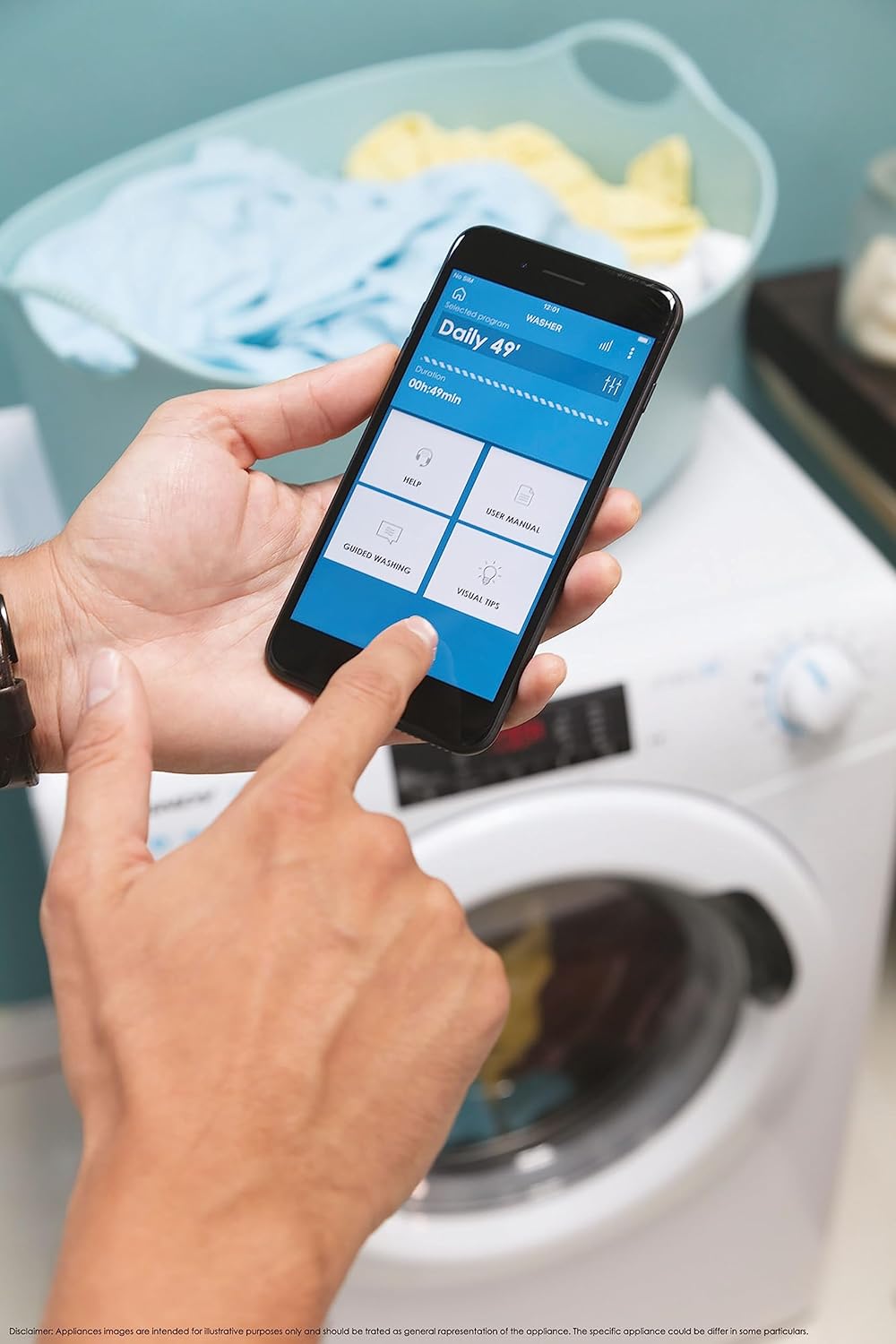
Şekil 5: Control your washing machine remotely using the Simply-Fi app on your smartphone.
- Download the Simply-Fi app from your smartphone's app store.
- Çamaşır makinenizi evinizin Wi-Fi ağına bağlamak için uygulama içindeki talimatları izleyin.
- Once connected, you can access additional programs, monitor cycle status, and receive maintenance reminders.
Bakım
Regular maintenance ensures the efficiency and extends the lifespan of your washing machine.
Deterjan Bölmesinin Temizlenmesi
- Deterjan çekmecesini dışarı çekin.
- Remove any residue and rinse thoroughly under running water.
- Çekmeceyi yerine takın.
Filtreyi Temizleme
- Filtre kapağını makinenin ön alt kısmında bulun.
- Kalan suyu toplamak için altına sığ bir kap koyun.
- Unscrew the filter slowly to drain water, then remove and clean it of lint and debris.
- Filtreyi iyice yerine vidalayın.
Tambur Temizleme
- Run a hot wash cycle with no laundry and a washing machine cleaner or a cup of white vinegar to remove odors and residue.
Smart Check-Up Function
Utilize the Smart Check-Up function via the Simply-Fi app to monitor the health of your washing machine. It provides notifications for errors or malfunctions, helping you maintain the appliance effectively.
Sorun giderme
Müşteri hizmetleriyle iletişime geçmeden önce lütfen aşağıdaki yaygın sorunlara ve çözümlerine bakın:
| Sorun | Olası Neden | Çözüm |
|---|---|---|
| Makine başlamıyor | Power cord unplugged, door not closed properly, delayed start active. | Check power connection, ensure door is latched, cancel delayed start. |
| Aşırı titreşim/gürültü | Taşıma cıvataları çıkarılmamış, makine düz değil, yük eşit değil. | Remove transport bolts, adjust leveling feet, redistribute laundry inside drum. |
| Su sızıntısı | Hoses loose, drain filter clogged, excessive detergent. | Check hose connections, clean drain filter, use appropriate amount of detergent. |
| Uygulama bağlantı sorunları | Wi-Fi signal weak, app not updated, incorrect pairing. | Ensure strong Wi-Fi signal, update app, re-pair device following app instructions. |
Özellikler
| Özellik | Detay |
|---|---|
| Marka | Şeker |
| Örnek | CSO 1295TW4/1-S |
| Kapasite | 9 Kilogram |
| Boyutlar (YxGxD) | 85x60x53 cm |
| Ağırlık | 65 Kilogram |
| Enerji Verimliliği Sınıfı | B |
| Maksimum Sıkma Hızı | 1200 RPM |
| Bağlantı | Wi-Fi + BLE (Simply-Fi App) |
| Kontrol Türü | Dokunmatik, Kadran |
Garanti ve Destek
Your Candy Smart Pro Washing Machine is covered by a manufacturer's warranty. For specific details regarding the warranty period and terms, please refer to the documentation provided with your purchase or visit the official Candy webalan.
For technical assistance, spare parts, or to schedule a service appointment, please contact Candy customer support. Have your model number (CSO 1295TW4/1-S) and serial number ready when contacting support.
İade politikasi: Ürünü teslim aldıktan sonraki 30 gün içinde fikrinizi değiştirdiğiniz için iade etmek isterseniz, lütfen satıcının iade politikasını inceleyin. website. If you have received a defective or damaged product, please refer to the retailer's help page on defective or damaged products.