
1. Giriş
Thank you for choosing the ieGeek 5MP Solar WiFi Outdoor PTZ Security Camera. This manual provides essential information for the proper installation, operation, and maintenance of your device. Please read it thoroughly before use and retain it for future reference.
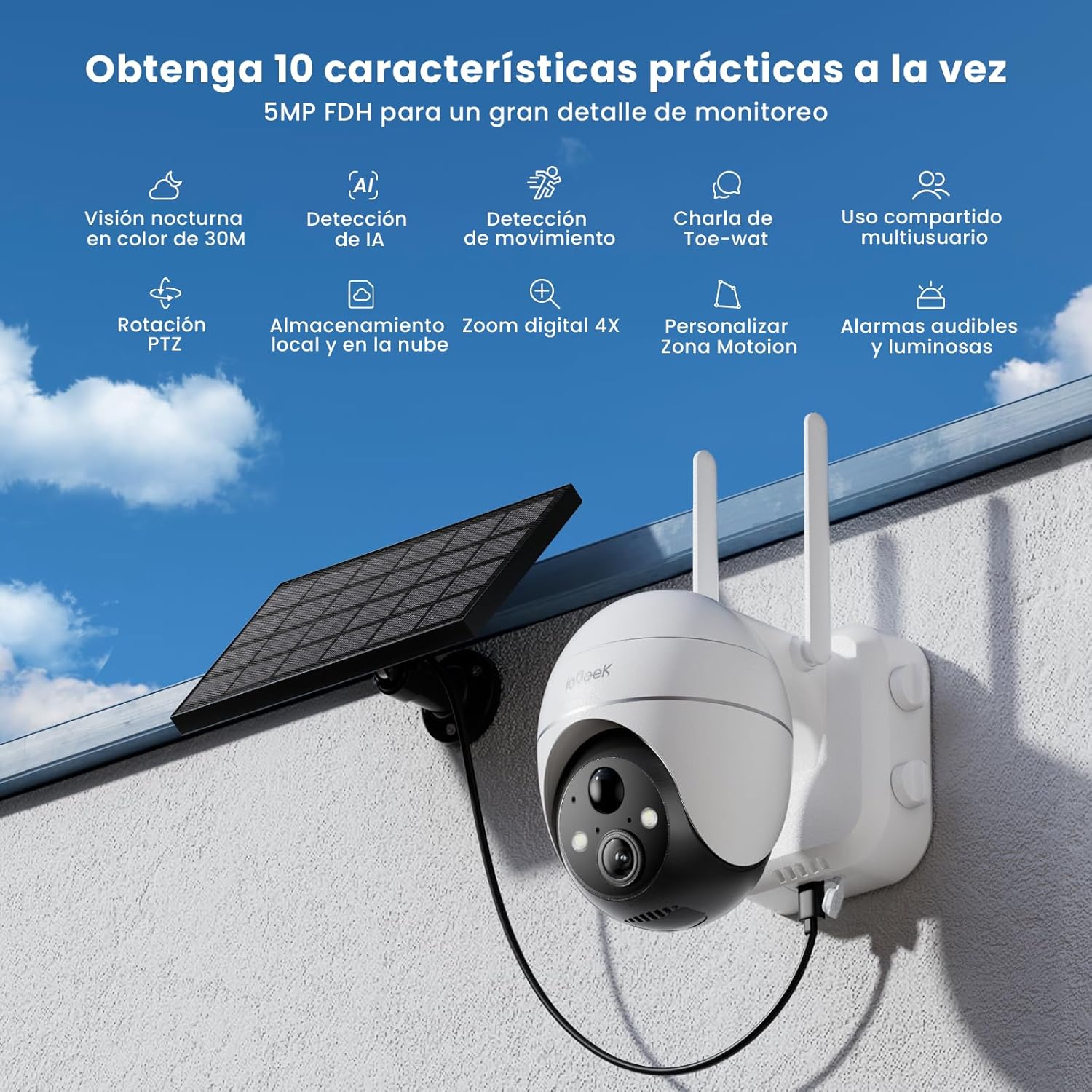
Figure 1: ieGeek 5MP Solar WiFi Outdoor PTZ Security Camera with solar panel, highlighting key features.
2. Ürün Bittiview
2.1 Temel Özellikler
- 5MP Ultra-Clear Resolution: Provides superior visual images with 4x digital zoom for detailed viewIng.
- Solar Power & Long-Lasting Battery: Operates using solar panels, eliminating power cables. The rechargeable battery lasts up to 60 days on a single charge.
- 355° Yatay ve 120° Dikey Hareket: Geniş bir yelpazede ürün yelpazesi sunar view, ensuring comprehensive surveillance without blind spots.
- PIR Human Detection & Instant Alarms: Detects human shapes and sends alarm notifications within 2 seconds.
- Renkli Gece Görüşü: Equipped with motion-activated spotlights for full-color details day and night.
- İki Yönlü Ses: Enables real-time listening and speaking through the camera via the app.
- Yerel ve Bulut Depolama: Supports up to 128GB Micro SD card and offers 7 days of free cloud service.
- Alexa Smart Function: Kamerayı kontrol edin ve view footage using Alexa Smart Voice.
- IP65 Hava Koşullarına Dayanıklı: Designed for outdoor use, resistant to rain, snow, and varying temperatures (-20°C to 50°C).
2.2 Paket İçeriği

Şekil 2: Ürün boyutları ve paket içeriği.
- ieGeek 5MP PTZ Security Camera x 1
- Solar Panel with Bracket x 1
- Kullanıcı Kılavuzu x 1
- Solar Panel User Manual x 1
- Mounting Screws and Expansion Screws x 7 sets
3. Kurulum Kılavuzu
3.1 Pilin Şarj Edilmesi
Before initial use, fully charge the camera's internal battery using the provided USB cable. The solar panel will maintain the charge during outdoor operation.
3.2 Uygulama İndirme ve Hesap Oluşturma
Download the 'ieGeek Cam' app from the Google Play Store or Apple App Store. Follow the in-app instructions to create an account and log in.

Figure 3: Download the 'ieGeek Cam' app.
3.3 Kamera Eşleştirme
- Kamerayı açın.
- Open the 'ieGeek Cam' app and tap 'Add Device'.
- Follow the on-screen prompts to connect the camera to your 2.4GHz Wi-Fi network.
- Telefonunuzda görüntülenen QR kodunu kamera merceğiyle tarayın.
- Bağlantı kurulduktan sonra kameranıza bir isim verin ve kurulumu tamamlayın.
3.4 Kurulum
Choose a location with good Wi-Fi signal and direct sunlight exposure for the solar panel. Use the provided screws and bracket to securely mount the camera and solar panel.

Figure 4: Flexible disassembly and easy installation.

Figure 5: Wireless setup with solar panel connection.
4. Kullanım Talimatları
4.1 Canlı View ve PTZ Kontrolü
Access the live feed through the 'ieGeek Cam' app. Use the on-screen controls to pan 355° horizontally and tilt 120° vertically, adjusting the camera's view ihtiyaç duyulduğu takdirde.

Figure 6: Remote PTZ control via smartphone app.
4.2 Hareket Algılama ve Uyarılar
The camera features PIR human detection. When motion is detected, you will receive an instant alarm notification on your smartphone. Customize motion detection zones and sensitivity settings within the app to reduce false alerts.

Figure 7: Customizable motion detection zones.
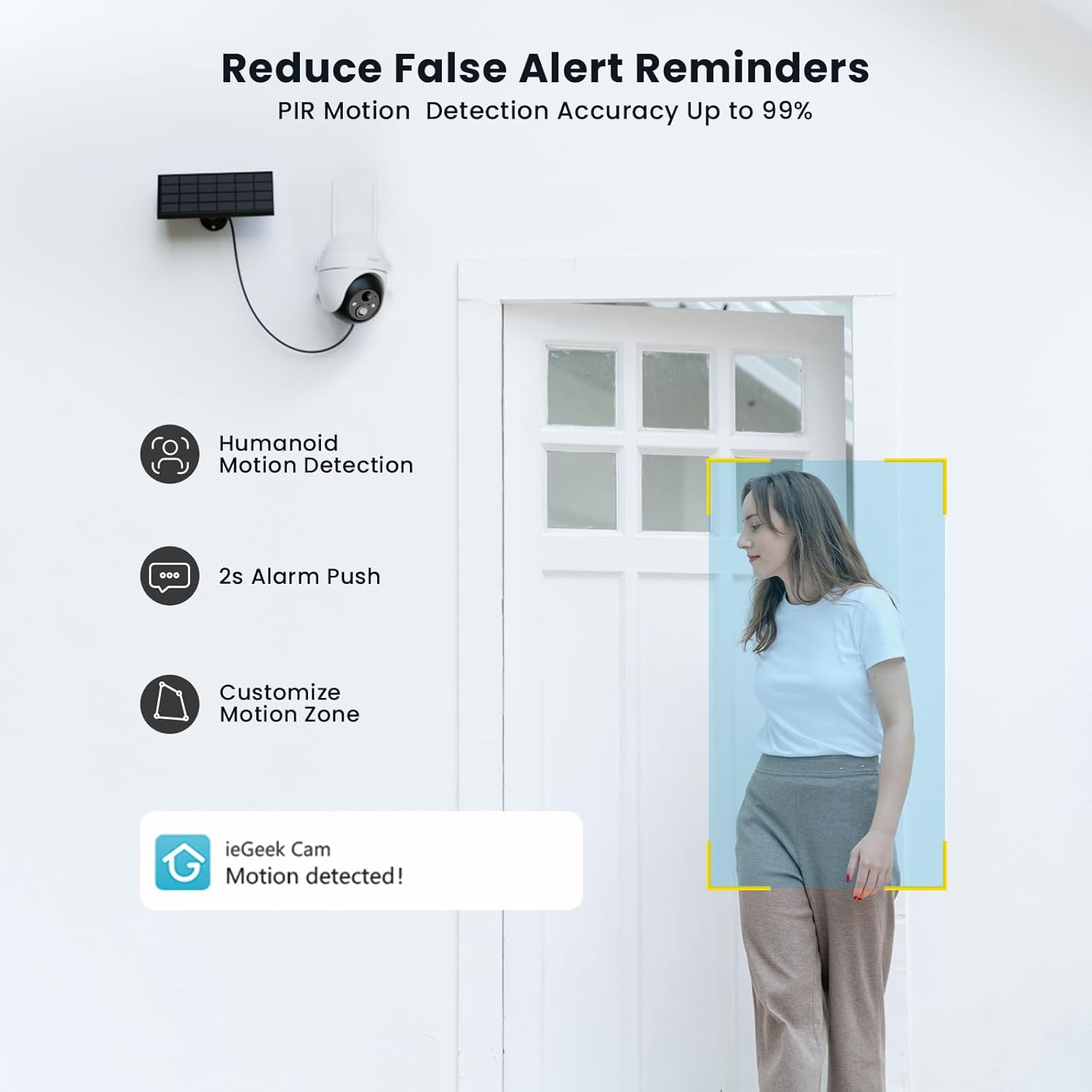
Figure 8: PIR Humanoid Motion Detection.
4.3 İki Yönlü Ses
Utilize the two-way audio feature to communicate with visitors or deter intruders. Tap the microphone icon in the app to speak, and listen through the camera's speaker.

Şekil 9: İki yönlü sesli iletişim.
4.4 Depolama Seçenekleri
The camera supports local storage via a Micro SD card (up to 128GB, purchased separately) and offers 7 days of free cloud storage. Recorded events can be accessed and reviewUygulama üzerinden erişebilirsiniz.

Figure 10: Micro SD card slot for local storage.

Figure 11: Cloud storage options.
5. Bakım
- Lensi temizleyin: Net görüntü kalitesi sağlamak için kamera lensini düzenli olarak yumuşak, kuru bir bezle silin.
- Temiz Güneş Paneli: Keep the solar panel free of dust, dirt, and debris to maximize charging efficiency.
- Pil Seviyesini Kontrol Edin: Monitor the battery status via the app and ensure the solar panel receives adequate sunlight.
- Donanım Yazılımı Güncellemeleri: Keep the camera firmware updated through the app for optimal performance and security.
6. Sorun Giderme
| Sorun | Olası Neden | Çözüm |
|---|---|---|
| Kamera Wi-Fi'ye bağlanmıyor | Yanlış Wi-Fi şifresi; Kamera yönlendiriciden çok uzakta; Sadece 2.4GHz Wi-Fi'yi destekliyor. | Verify password; Move camera closer to router or use a Wi-Fi extender; Ensure your router is set to 2.4GHz. |
| Kötü görüntü kalitesi | Dirty lens; Low light conditions; Network issues. | Lensi temizleyin; Yeterli aydınlatma sağlayın veya renkli gece görüşüne güvenin; Wi-Fi sinyal gücünü kontrol edin. |
| Pil şarj olmuyor | Solar panel obstructed or dirty; Insufficient sunlight; Faulty cable. | Clear obstructions and clean solar panel; Relocate panel to receive more direct sunlight; Check cable connections. |
| Hareket algılama uyarısı yok | Motion detection disabled; Incorrect sensitivity settings; App notifications blocked. | Enable motion detection in app; Adjust sensitivity; Check phone notification settings for the 'ieGeek Cam' app. |
7. Özellikler
| Özellik | Detay |
|---|---|
| Model Adı | ieGeek ZS-GX4S |
| Çözünürlük | 5 MP |
| Bağlantı | Kablosuz (Wi-Fi 2.4GHz) |
| Güç Kaynağı | Battery, Solar Power |
| Pil Kapasitesi | 2000 mAh |
| Pan/Tilt Aralığı | 355° Döndürme, 120° Eğme |
| Dijital Zoom | 4x |
| Gece Görüşü | Renkli Gece Görüşü (Kızılötesi) |
| Hareket Algılama | PIR İnsan Tespiti |
| Ses | Çift Yönlü Ses |
| Depolamak | Mikro SD (128 GB'a kadar), Bulut Depolama |
| Hava koşullarına dayanıklılık | IP65 |
| Çalışma Sıcaklığı | -20°C ila 50°C |
| Boyutlar | 18 x 17 x 12 santimetre |
| Malzeme | Plastik |
| Uyumlu | Amazon Alexa |
8. Garanti ve Destek
ieGeek, güvenilir ürünler ve mükemmel müşteri hizmeti sunmaya kendini adamıştır.
- 2 Yıllık Garanti: Your ieGeek camera is covered by a 2-year warranty from the date of purchase.
- 30 Günlük Para İade Garantisi: Satın aldığınız üründen memnun kalmazsanız, 30 gün içinde iade ederek tam para iadesi alabilirsiniz.
- Ömür Boyu Teknik Destek: ieGeek offers lifetime technical assistance for all its products.
For support, please contact us via email. Our customer service team is available 24/7 to assist you.

Figure 12: ieGeek Customer Support.