
giriiş
This manual provides instructions for the use and maintenance of your Generic ADN-306 remote control, designed for Pioneer AVH-P4450 and AVH-P4450BT multimedia receivers. Please read this manual thoroughly before use to ensure proper operation and to maximize the lifespan of your device.
Ürün Bittiview
The ADN-306 remote control is a high-quality, ergonomic button-controlled device designed to provide convenient operation of your compatible Pioneer auto stereo system. It allows you to control various functions of your multimedia receiver from a distance.
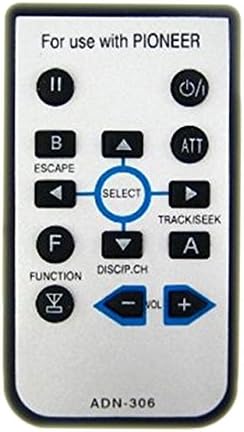
Resim Açıklaması: A rectangular silver-colored remote control with black buttons. The top of the remote reads "For use with PIONEER". Key buttons include: Power (top right), Play/Pause (top left), Escape/B, ATT, Select (center navigation cluster with up, down, left, right arrows), Track/Seek (right of select), Function/F, DISCIP.CH, and Volume controls (- and +). The bottom of the remote shows "ADN-306".
Kurmak
Pil Kurulumu
The remote control comes with a battery included and pre-installed. If replacement is needed in the future, locate the battery compartment on the back of the remote. Open the compartment, remove the old battery, and insert the new battery, ensuring correct polarity (positive and negative terminals are aligned as indicated). Close the compartment securely.
Kullanım Talimatları
This section details the functions of each button on your ADN-306 remote control. Point the remote control directly at the infrared (IR) sensor on your Pioneer multimedia receiver for optimal performance.
- Güç (⏻): Turns the multimedia receiver on or off.
- Play/Pause (II): Toggles playback between play and pause modes for audio or video content.
- B / ESCAPE: Used for backing out of menus, canceling selections, or returning to the previous screen.
- ATT (Attenuate): Mutes or significantly reduces the audio volume temporarily. Press again to restore volume.
- SELECT (Center Button): Confirms selections within menus or activates a highlighted option.
- Yukarı Ok (▲): Navigates up in menus, scrolls through lists, or increases a setting value.
- Aşağı Ok (▼): Navigates down in menus, scrolls through lists, or decreases a setting value.
- Left Arrow (◄): Navigates left in menus, skips backward through tracks, or tunes to a lower frequency station.
- Right Arrow (►) / TRACK/SEEK: Navigates right in menus, skips forward through tracks, or tunes to a higher frequency station.
- F / FUNCTION: Accesses various function modes or settings specific to the multimedia receiver.
- DISCIP.CH: Likely used for disc or channel selection/switching, depending on the current source.
- A: An auxiliary function button; its specific use may vary depending on the current mode or source of the receiver.
- VOL - (Volume Down): Decreases the audio volume.
- VOL + (Sesi Artırma): Increases the audio volume.
Bakım
Uzaktan kumandanızın uzun ömürlü ve düzgün çalışmasını sağlamak için aşağıdaki bakım yönergelerini izleyin:
- Kumandayı yumuşak, kuru bir bezle silerek temiz tutun. Aşındırıcı temizleyiciler veya çözücüler kullanmaktan kaçının.
- Kumandayı aşırı sıcaklıklara, doğrudan güneş ışığına veya yüksek neme maruz bırakmaktan kaçının.
- Do not drop the remote or subject it to strong impacts, as this can damage internal components.
- If the remote will not be used for an extended period (e.g., several months), remove the battery to prevent potential leakage and damage.
Sorun giderme
Uzaktan kumandanızla ilgili sorunlarla karşılaşırsanız, sık karşılaşılan sorunlar ve çözümler için lütfen aşağıdaki tabloya bakın:
| Sorun | Çözüm |
|---|---|
| Uzaktan yanıt vermiyor | Check battery polarity. Replace battery if low or depleted. Ensure there is a clear line of sight between the remote and the receiver's IR sensor. |
| Düğmeler yapışkan veya tepkisiz | Clean the remote surface and around the buttons with a soft, dry cloth. Avoid spills on the remote. |
| Sınırlı çalışma aralığı | Ensure no obstructions are blocking the signal between the remote and the receiver. Replace the battery with a fresh one. |
Özellikler
- Modeli: ADN-306
- Uyumluluk: Pioneer AVH-P4450, AVH-P4450BT Multimedia Receivers
- Denetleyici Tipi: Düğme Kontrolü
- Özellik: Ergonomik tasarım
- Üretici: StreamUSA
- İlk Mevcut: 20 Kasım 2016
Garanti ve Destek
Bu ürün bir 60 Gün Garanti Satın alma tarihinden itibaren geçerlidir. Bu garanti, normal kullanım koşullarındaki üretim hatalarını kapsar. Yanlış kullanım, kazalar, yetkisiz değişiklikler veya uygunsuz bakım nedeniyle oluşan hasarları kapsamaz.
For warranty claims or technical support, please contact your retailer or the manufacturer, StreamUSA. Please retain your proof of purchase (e.g., receipt or order confirmation) as it will be required for any warranty service.