
DBPOWER W32
DBPOWER W32 Projector User Manual
Model: W32
1. Giriş
Satın aldığınız için teşekkür ederizasing the DBPOWER W32 Projector. This manual provides essential information for the safe and efficient operation of your device. Please read it thoroughly before use and keep it for future reference.
Paket İçeriği
Paketinizde tüm öğelerin bulunduğunu doğrulayın:
- DBPOWER W32 Projector
- Uzaktan kumanda
- Güç Kablosu
- HDMI Kablosu
- AV Kablosu
- Kullanım Kılavuzu (bu belge)
- Yükseklik Ayar Vidası

2. Kurulum
2.1 Yerleştirme
Place the projector on a stable, flat surface. Ensure adequate ventilation around the device. For optimal viewing, project onto a smooth, light-colored wall or a projector screen.

2.2 Güç Bağlantısı
- Güç kablosunu projektörün güç girişine bağlayın.
- Güç kablosunun diğer ucunu elektrik prizine takın.
- Projektörü açmak için projektör üzerindeki veya uzaktan kumandadaki güç düğmesine basın.
2.3 Odak ve Trapez Düzeltme
Adjust the focus ring on the projector lens until the image is clear. Use the keystone correction dial to correct any trapezoidal distortion, ensuring a rectangular image.

3. Kullanım Talimatları
3.1 Cihazları Bağlama
The DBPOWER W32 Projector supports various input sources:
- HDMI: Connect to laptops, game consoles (PS3/PS4, X-Box, Switch), TV sticks (Fire TV, Roku Stick), and other HDMI-enabled devices.
- USB BAĞLANTI: Medya oynatımı için USB sürücülerini bağlayın.
- AV: Connect to DVD players or older devices using the included AV cable.
- TF Kartı: Doğrudan medya oynatımı için bir TF kartı takın.

3.2 Kablosuz Bağlantı (WiFi ve Bluetooth)
The projector features built-in WiFi and Bluetooth for seamless wireless connections.
WiFi Screen Mirroring (iOS/Android)
- Select "Screen" from the input source menu to enter the mirroring interface.
- Ensure your iOS/Android device and the projector are connected to the same WiFi network.
- On your iOS device, enable Screen Mirroring and select "DBPOWER-XXXXXX" from the detected devices.
- On your Android device, enable Cast/Wireless Display and select "DBPOWER-XXXX" from the detected devices.

Bluetooth Ses Bağlantısı
Connect external Bluetooth speakers or headphones for an enhanced audio experience.
- Projektörün Bluetooth ayarlarına gidin.
- Projektörde Bluetooth'u etkinleştirin.
- Bluetooth ses cihazınızı eşleştirme moduna alın.
- Select your device from the list on the projector to connect.
3.3 Ses Çıkışı
The projector has two built-in speakers for basic audio. For a more immersive experience, connect external audio devices via Bluetooth or the 3.5mm audio jack.

4. Bakım
4.1 Lensin Temizlenmesi
Use a soft, lint-free cloth specifically designed for optical lenses to clean the projector lens. Do not use abrasive cleaners or solvents.
4.2 Hava Filtresi Temizliği
Regularly check and clean the air filter to ensure proper ventilation and prevent overheating. Refer to the diagram below for the location of the air vents.

4.3 Depolama
When not in use for extended periods, store the projector in a cool, dry place, away from direct sunlight and excessive dust. Use the original packaging or a protective case.
5. Sorun Giderme
| Sorun | Olası Neden | Çözüm |
|---|---|---|
| Resim görüntülenmiyor | Power cable not connected; Incorrect input source selected; Device not connected properly. | Check power connection; Select correct input source (HDMI, USB, AV); Ensure cables are securely connected. |
| Bulanık görüntü | Odak ayarı yapılmadı; Trapez düzeltmesi yapılmadı. | Adjust the focus ring; Adjust the keystone correction dial. |
| Ses yok | Volume too low; External audio device not connected or selected; Muted. | Increase volume; Check external audio connections/Bluetooth pairing; Unmute the projector. |
| Uzaktan kumanda çalışmıyor | Batteries dead; Obstruction between remote and projector; Remote sensor blocked. | Replace batteries; Remove obstructions; Ensure remote is pointed at the projector's IR sensor. |
| Aşırı ısınma | Havalandırmanın engellenmesi; Sıcak ortamda uzun süre kullanım. | Ensure vents are clear; Operate in a well-ventilated area; Allow projector to cool down. |
6. Özellikler
| Özellik | Detay |
|---|---|
| Marka | DBPOWER |
| Model Numarası | W32 |
| Ürün Boyutları | 14.9x11x10.4 cm |
| Ürün Ağırlığı | 970 gr |
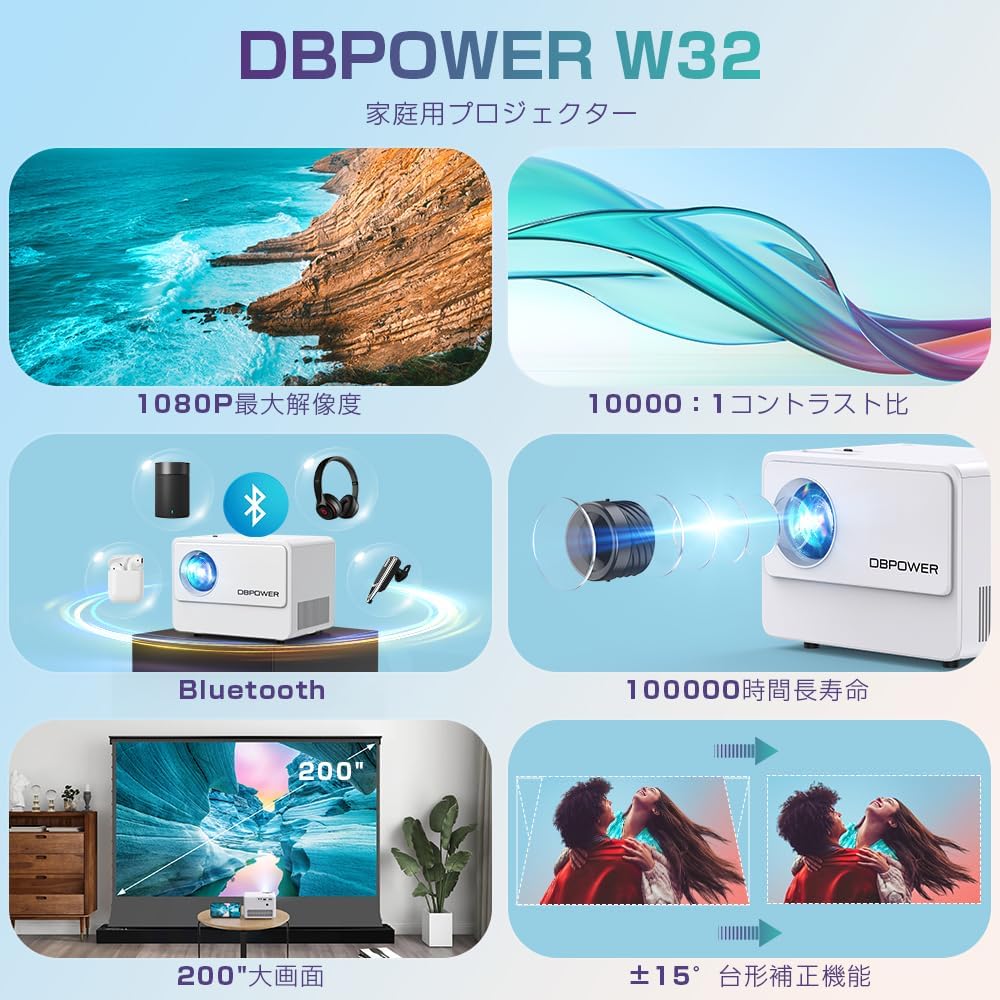
| Parlaklık | 10000 Lumens (equivalent to 300 ANSI Lumens) |
| Yerel Çözünürlük | 1920 x 1080 pixels (1080P) |
| Desteklenen Çözünürlük | 4K'ya kadar |
| Kontrast Oranı | 10,000:1 |
| Lamp Hayat | ≥100,000 saat |
| Bağlantı Teknolojisi | Bluetooth, WiFi, HDMI, USB, AV, TF Card |
| Önerilen Kullanım | Ev Sineması |
| Özel Özellikler | 4K compatible, Bluetooth, Built-in Speaker, Keystone Correction, WiFi |


7. Garanti ve Destek
DBPOWER provides a 12-month warranty from the date of purchase. This warranty covers initial defects and natural failures under normal use. For any issues, including exchanges or returns, please contact our customer support.
Müşteri Desteği
- 24-hour quick response service
- 12 aylık kalite garantisi
- 30-day return validity period
- Dedicated customer support always available
For direct support, you can scan the QR code below to add us on LINE or visit our official store page.

Please note: Customer support is closed on Saturdays, Sundays, and public holidays, as well as during year-end/New Year, Golden Week, and Obon holidays.
Ask a question about this manual
Ask about setup, troubleshooting, compatibility, parts, safety, or missing instructions. Manuals+ will review the question and use this page’s manual context to help answer it.