
1. Giriş
Thank you for choosing the SILENTWARE Air 1000 Black ATX Midi Tower PC Case. This manual provides essential information for the proper installation, operation, and maintenance of your new PC case. Please read this manual thoroughly before beginning the assembly process to ensure a smooth and successful build.
2. Güvenlik Bilgileri
- Bilgisayar kasasının içine herhangi bir bileşen takmadan veya çıkarmadan önce daima güç kaynağını duvar prizinden ayırın.
- Elektrostatik deşarjdan (ESD) kaynaklanan hasarı önlemek için parçaları dikkatli bir şekilde tutun. Antistatik bileklik kullanmayı düşünün.
- Kasanın içindeki keskin kenarlara dikkat edin.
- Do not attempt to modify the case or its components, as this may void your warranty and pose safety risks.
- Keep the case away from water, moisture, and extreme temperatures.
3. Paket İçeriği
Lütfen paketinizde tüm öğelerin mevcut olduğundan emin olun:
- SILENTWARE Air 1000 Black ATX Midi Tower PC Case
- Pre-installed 4x 120mm ARGB Fans
- Accessory box (screws, cable ties, standoffs, etc.)
- Kullanım Kılavuzu (bu belge)
4. Ürün Bittiview
The SILENTWARE Air 1000 is an ATX Midi Tower PC case designed for optimal airflow and component compatibility. It features a mesh front panel for maximum ventilation and a tempered glass side panel to showcase your build.


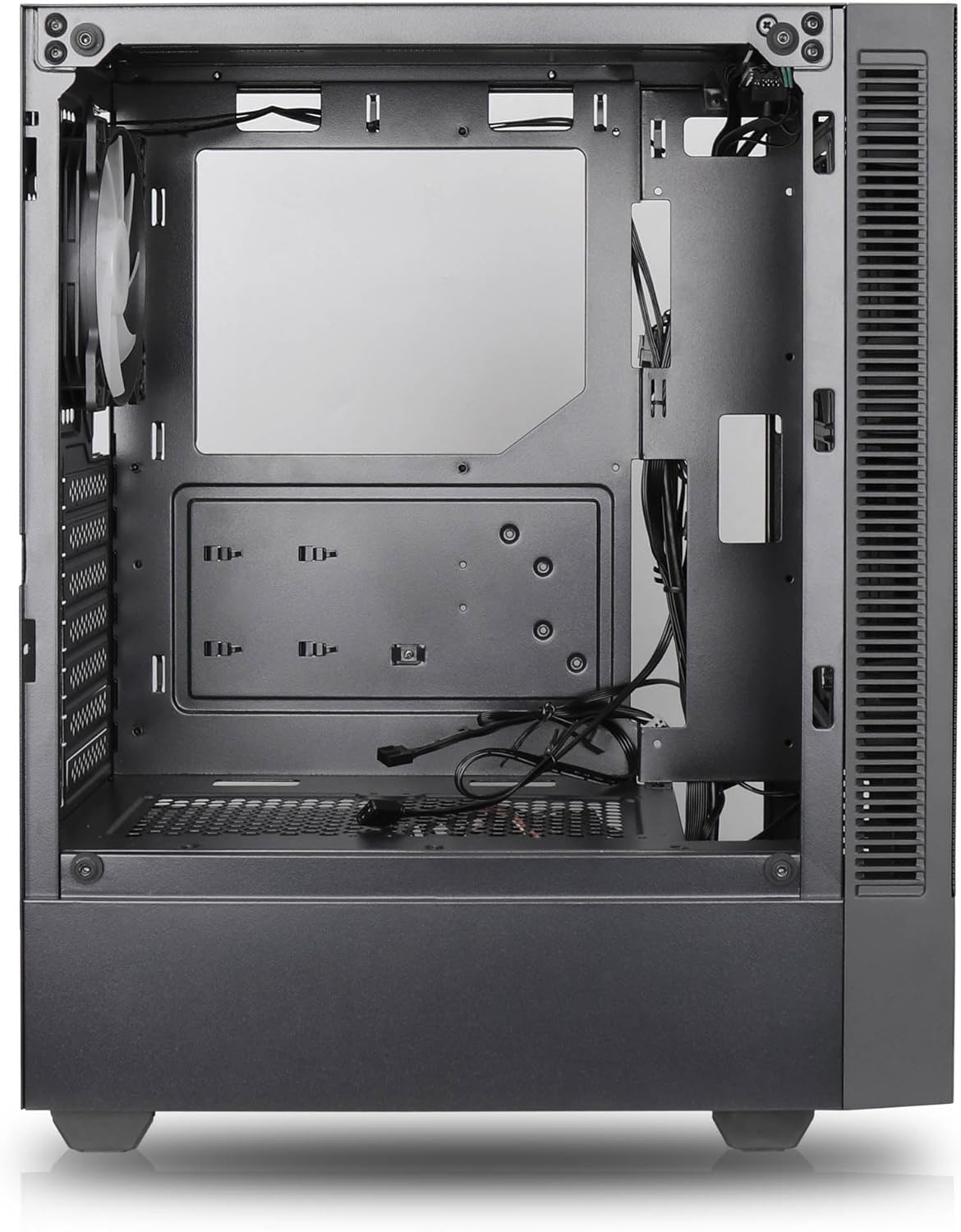

Temel Özellikler:
- Maksimum Hava Akışı: Large mesh front panel and four pre-installed 140mm A-RGB fans with hydraulic bearings ensure excellent ventilation.
- Easy PC Building: Thoughtful design with daisy-chain connections simplifies installation, eliminating the need for additional adapters or controllers.
- Yüksek Kaliteli Tasarım: Genuine tempered glass side panel showcases installed components and provides a minimalist, premium aesthetic.
- Flexible Lighting and Control: 3-pin A-RGB fans and 4-pin fan control allow for impressive lighting effects and easy adjustment of fan speed and curves directly from the motherboard.
- Powerful Component Compatibility: Supports GPUs up to 400mm long, radiators up to 360mm (front and top) and 140mm (rear), and space for up to 4 fans.
- Compact Case with AmpUzay: Midi tower format accommodates E-ATX, ATX, mATX, and ITX motherboards, up to two 2.5" SSDs, two 3.5" HDDs, and ATX power supplies.
5. Kurulum Kılavuzu
Follow these steps for component installation. Refer to your individual component manuals for specific instructions.
5.1. Davayı Hazırlama
- Kılıfı düz ve sağlam bir yüzeye yerleştirin.
- Carefully remove the tempered glass side panel by unscrewing the thumb screws and gently pulling it away. Set it aside on a soft, non-abrasive surface.
- Remove the solid right side panel by unscrewing the thumb screws and sliding it backward.
5.2. Anakart Kurulumu
- G/Ç kalkanını kasanın arka açıklığına takın.
- Ensure the correct standoffs are installed for your motherboard form factor (E-ATX, ATX, mATX, ITX). Adjust or add standoffs as needed.
- Anakartınızı dikkatlice desteklerin üzerine yerleştirin ve vida deliklerini hizalayın.
- Anakartı birlikte verilen vidalarla sabitleyin. Çok fazla sıkmayın.
5.3. Güç Kaynağı Ünitesi (PSU) Kurulumu
- Position the PSU in the dedicated compartment at the bottom rear of the case.
- Ensure the PSU fan faces downwards (if the case has a bottom vent) or upwards, depending on your cooling preference.
- Secure the PSU to the case with the provided screws from the rear.
5.4. Depolama Sürücüsü Kurulumu
2.5" SSD'ler:
- Locate the 2.5" drive mounts (typically behind the motherboard tray).
- Secure the SSDs using the provided screws.
3.5" HDD'ler:
- Locate the 3.5" drive cages (usually near the PSU shroud).
- Slide the HDDs into the drive trays and secure them with screws or tool-less mechanisms if available.
5.5. Grafik Kartı (GPU) Kurulumu
- Kasanın arkasından gerekli PCIe yuvası kapaklarını çıkarın.
- Align your GPU with the PCIe slot on the motherboard and press firmly until it clicks into place.
- GPU'yu vidalarla kasaya sabitleyin.
5.6. Kablo Yönetimi
Kabloları yönetmek için anakart tepsisinin arkasındaki kablo yönlendirme kesiklerini ve bağlama noktalarını kullanın. Bu, hava akışını ve estetiği iyileştirir.
6. Operasyon
6.1. Açma
After all components are installed and cables are connected, reattach the side panels. Connect the power cable to the PSU and a wall outlet, then press the power button on the top I/O panel of the case.
6.2. ARGB Fan Kontrolü
The pre-installed ARGB fans feature 3-pin ARGB connectors for lighting control and 4-pin connectors for fan speed control. These can be connected directly to compatible headers on your motherboard. Use your motherboard's software or BIOS settings to customize lighting effects and fan curves.
7. Bakım
7.1. Temizlik
- Optimum hava akışını sağlamak için toz filtrelerini (varsa) düzenli olarak temizleyin.
- Use a can of compressed air to remove dust from inside the case and components.
- Dış yüzeyleri yumuşak bir bezle silin.amp bez. Sert kimyasallardan kaçının.
- For the tempered glass panel, use a glass cleaner and a microfiber cloth.
8. Sorun Giderme
- Bilgisayar açılmıyor: Check all power connections, including the 24-pin motherboard power, 8-pin CPU power, and GPU power cables. Ensure the PSU switch is in the 'ON' position.
- Fans not spinning/RGB not working: Verify that fan and ARGB headers are correctly connected to the motherboard. Check motherboard software for fan speed and lighting control settings.
- Aşırı Isınma: Ensure proper airflow by checking fan orientation and cleaning dust filters. Verify CPU cooler and GPU cooler are properly seated.
- Görüntü yok: Confirm the monitor cable is connected to the graphics card (not the motherboard integrated graphics, unless you are using integrated graphics). Reseat the graphics card and RAM modules.
9. Özellikler
| Özellik | Şartname |
|---|---|
| Marka | SILENTWARE |
| Model Adı | Silentware Flow 100 ARGB |
| Ürün Model Numarası | AKIŞ100 |
| ASIN | B0CB8CZ5GF |
| Renk | Siyah |
| Dava Türü | Orta kule |
| Malzeme | Temperli Cam |
| Anakart Uyumluluğu | ATX, Mikro ATX, Mini ITX |
| Uyumlu Cihazlar | ATX, mATX, ITX motherboards, GPUs up to 325mm, radiators up to 360mm, 2.5" and 3.5" storage drives |
| Önerilen Kullanımlar | Oyun |
| Soğutma Yöntemi | Hava |
| Önceden yüklenmiş Fanlar | 4 adet 120 mm ARGB Fan |
| Fan Boyutu | 140 Millimeters (Note: Product description mentions 140mm fans, while pre-installed are 120mm. Please verify with product packaging.) |
| Güç Kaynağı Montaj Tipi | Alt Montaj |
| Maksimum GPU Uzunluğu | 400mm |
| Radiator Support (Front/Top) | 360mm'ye kadar |
| Radyatör Desteği (Arka) | 140mm'ye kadar |
| 2.5" Sürücü Yuvaları | 2'e kadar |
| 3.5" Sürücü Yuvaları | 2'e kadar |
10. Garanti ve Destek
For warranty information and technical support, please refer to the official SILENTWARE website or contact your retailer. Specific details regarding spare parts availability and software updates are not available in the provided product information.