
giriiş
Thank you for choosing the Eacam QW33 Smart Sports Watch. This manual provides essential information for setting up, operating, and maintaining your device. Please read it thoroughly to ensure optimal performance and longevity of your smartwatch.

Şekil 1: Ön view of the Eacam QW33 Smart Sports Watch.
Ürün Özellikleri
- Multiple Sports Modes & Customizable Dials: Offers a wide range of sports modes and over 100 watch faces for personalized style.
- Large High-Definition Display: Features a 1.28-inch IPS screen with 240x240 pixel resolution for clear and vibrant visuals.
- IP67 Su ve Toz Geçirmezlik: Designed to withstand splashes, rain, and dust, ensuring durability in various environments.
- Bluetooth Bağlantısı: Seamlessly connects to your smartphone via Bluetooth 5.1 for calls, messages, and notifications.
- Döner Düğme: Allows for easy navigation through menus and interfaces without direct screen touch.
- Intelligent Health Monitoring: Includes 24-hour heart rate monitoring and sleep tracking.
- Multi-functional Support: Supports NFC access control and quick response code payment (after account binding).
Kurulum Kılavuzu
1. Cihazın Şarj Edilmesi
Before first use, fully charge your Eacam QW33 Smart Sports Watch. Use the provided magnetic charging cable. Align the magnetic pins of the charger with the charging contacts on the back of the watch. The watch will vibrate and display a charging indicator.
- Şarj Modu: Magnetic suction.
- Pil Kapasitesi: 260 mAh lityum pil.
- Tam Şarj Süresi: Yaklaşık 2 saat.

Şekil 2: Arka view of the watch showing the heart rate sensor and magnetic charging contacts.
2. Uygulama Kurulumu ve Eşleştirme
To unlock the full potential of your smartwatch, download the companion application on your smartphone. The app allows for data synchronization, watch face customization, and advanced settings.
- Scan the QR code in the watch's manual or search for the designated app in your phone's app store (Google Play Store for Android, Apple App Store for iOS).
- Uygulamayı yükleyip açın.
- Akıllı telefonunuzda Bluetooth'un etkinleştirildiğinden emin olun.
- In the app, follow the on-screen instructions to search for and pair with your Eacam QW33. The watch's Bluetooth name will typically be 'QW33' or similar.
- Eşleştirme isteğini hem telefonunuzda hem de saatinizde onaylayın.
Sistem Uyumluluğu: Android 5.0 ve üzeri, iOS 10.0 ve üzeri.
Kullanım Talimatları
1. Temel Gezinme
The Eacam QW33 features a full touch screen and a rotatable knob for intuitive navigation.
- Dokunmatik Ekran: Swipe left/right, up/down to navigate between screens and menus. Tap to select items.
- Döner Düğme: Rotate the knob to scroll through lists or switch watch faces. Press the knob to return to the previous screen or confirm a selection.

Figure 3: The rotatable knob allows for easy interface switching.
2. Saat Yüzlerini Özelleştirme
The watch supports over 100 creative dials. You can switch them directly on the watch or through the companion app.
- Nöbette: From the home screen, long-press the display to enter the watch face selection menu. Swipe left/right or rotate the knob to browse and tap to select.
- Uygulama aracılığıyla: Open the companion app, navigate to the 'Dial Market' or 'Watch Face' section, and choose from the available options.

Şekil 4: Ör.amples of multiple creative dials available for the watch.
3. Arama Yapma ve Alma
With Bluetooth connected to your smartphone, you can manage calls directly from your watch.
- Arama Yapma: Access the 'Dialer' or 'Contacts' function on the watch. You can dial numbers directly or select from synced contacts.
- Çağrı Alma: Bir arama geldiğinde, saatiniz arayan kimliğini görüntüler. Cevaplamak için yeşil simgeye, reddetmek için kırmızı simgeye dokunun.

Figure 5: The watch displaying an incoming call, allowing direct interaction.
4. Sports Modes and Health Monitoring
The watch supports various sports modes and continuous health tracking.
- Spor Modları: Navigate to the 'Exercise' or 'Sports' menu. Select your desired activity (e.g., running, cycling) to start tracking. The watch will record real-time data such as heart rate, duration, and calories burned.
- Nabız İzleme: Saat, kalp atış hızınızı sürekli olarak izler. View your current heart rate and historical data in the 'Heart Rate' section or the app.
- Uyku Takibi: Uyku düzeninizi otomatik olarak takip etmek için saati yatarken takın. View sleep duration and quality analysis in the app.

Figure 6: The watch supports a variety of professional sports modes.
5. Hava Durumu Tahmini
Once connected to the app, the watch can display real-time weather information.
- Swipe to the weather screen to view current conditions and forecasts for upcoming days.
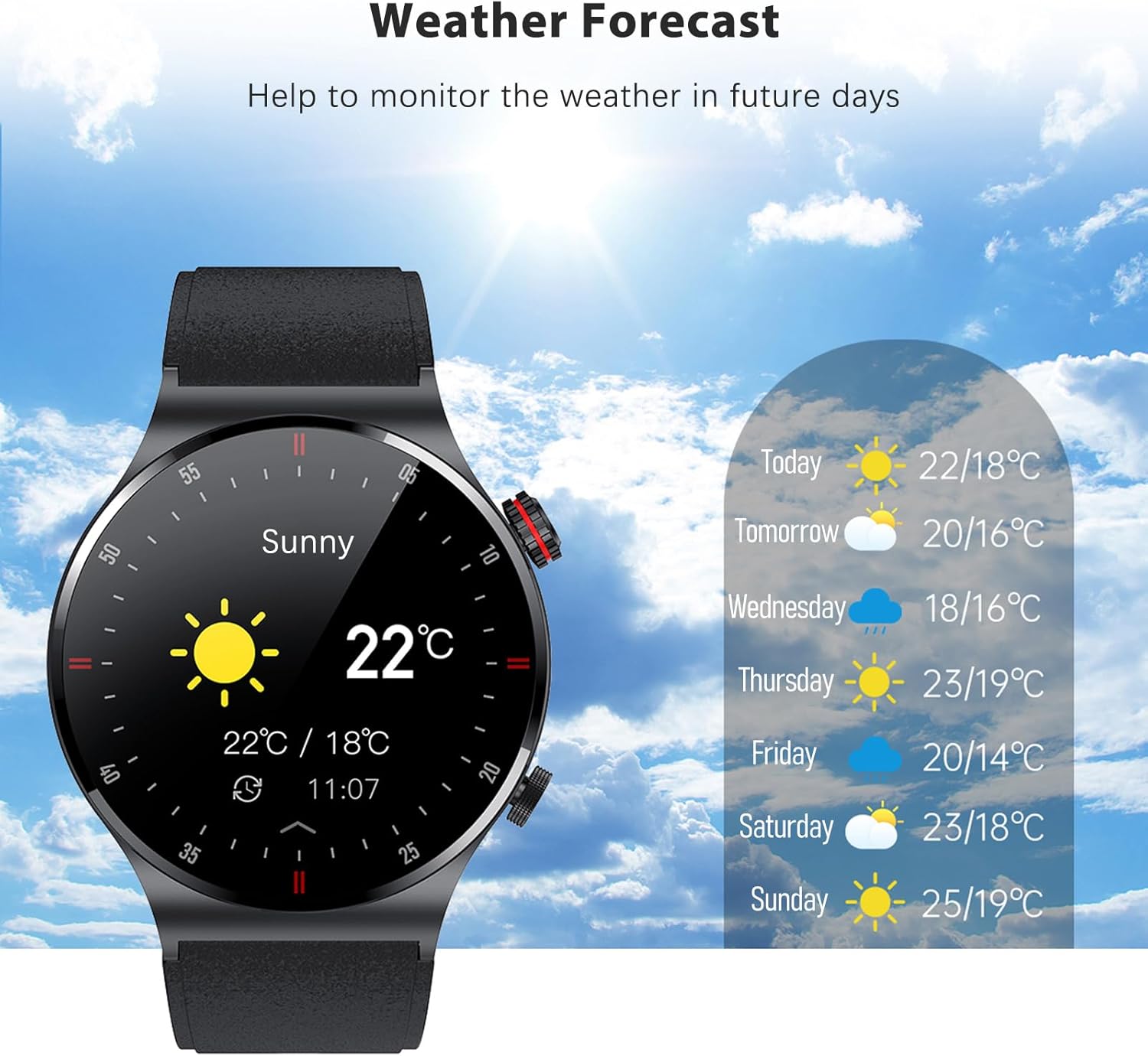
Figure 7: The watch displaying the weather forecast.
Bakım
1. Suya Dayanıklılık (IP67)
The Eacam QW33 is IP67 water and dust resistant. This means it is protected against immersion in water up to 1 meter for up to 30 minutes, and is fully dust-tight.
- It is suitable for daily use, such as hand washing, rain, and splashes.
- Yapamaz use the watch in hot water, saunas, or during deep diving.
- Suya veya yüksek basınçlı su jetlerine uzun süre maruz kalmaktan kaçının.
- If the watch gets wet, wipe it dry with a soft cloth before charging or using buttons.

Figure 8: The watch is IP67 waterproof, protecting it from rain and sweat.
2. Temizleme ve Saklama
- Saatinizi düzenli olarak yumuşak ve kuru bir bezle temizleyin.
- İnatçı lekeler için hafif nemli bir bez kullanın.amp bezle silin ve ardından iyice kurulayın.
- Avoid using harsh chemicals, cleaning solvents, or strong detergents, as they may damage the watch's finish or internal components.
- Saatinizi serin, kuru ve doğrudan güneş ışığından ve aşırı sıcaklıklardan uzak bir yerde saklayın.
3. Pil Bakımı
- Pilin sık sık tamamen bitmesini önleyin.
- Pil seviyesi düşük olduğunda saati şarj edin.
- If storing the watch for an extended period, charge it to about 50% to prevent battery degradation.
Sorun giderme
| Sorun | Olası Neden | Çözüm |
|---|---|---|
| Saat açılmıyor | Düşük pil; Sistem çökmesi | Charge the watch for at least 30 minutes; Press and hold the power button for 10-15 seconds to force restart. |
| Telefonla eşleştirilemiyor | Bluetooth kapalı; Uygulama sorunu; Saat bulunamıyor | Ensure phone Bluetooth is on; Restart phone and watch; Reinstall the app; Reset watch to factory settings. |
| Yanlış sağlık verileri | Improper wearing; Sensor dirty | Ensure watch is snug on wrist; Clean the sensor on the back of the watch. |
| Kısa pil ömrü | Yoğun güç tüketen özelliklerin sık kullanımı; Yüksek ekran parlaklığı | Reduce screen brightness; Limit continuous heart rate monitoring; Turn off unnecessary notifications. |
Özellikler
| Özellik | Detay |
|---|---|
| Ürün Boyutları | 45.7x45.7x12 mm |
| Ürün Ağırlığı | 58 gram |
| Görüntülemek | 1.28 inch IPS screen, 240 x 240px |
| Dokunmatik Ekran | Tam dokunmatik ekran |
| İşlemci | GR5515 |
| Bekleme Süresi | 15 gün |
| Çalışma Zamanı | 5-7 gün |
| Pil | 260 mAh Lityum Pil |
| Şarj Modu | Manyetik Emiş |
| Bluetooth | BLE5.1 |
| Su Geçirmezlik Derecesi | IP67 |
| Sistem Uyumluluğu | Android 5.0 +, iOS 10.0 + |
| Mevcut Diller | Simplified Chinese, English, Italian, Japanese, German, Spanish, French, Russian, Portuguese, Polish, Turkish, Greek, Hebrew, Czech, Hungarian, Arabic |
Garanti ve Destek
Garanti Bilgileri
This product is covered by a standard manufacturer's warranty. Please refer to the warranty card included in your package for specific terms and conditions. Keep your purchase receipt as proof of purchase for warranty claims.
Müşteri Desteği
For any questions, technical assistance, or warranty inquiries, please contact Eacam customer support through the contact information provided on the product packaging or the official Eacam website. Please have your product model number (QW33) and purchase details ready when contacting support.