
Eacam QW33
Eacam Akıllı Spor Saati QW33 Kullanım Kılavuzu
Model: QW33 | Brand: Eacam
giriiş
This manual provides detailed instructions for the Eacam QW33 Smart Sports Watch. It covers essential information regarding product setup, operation, maintenance, and troubleshooting to ensure optimal performance and user experience. The QW33 is a versatile fitness tracker featuring a 1.28-inch high-resolution display, multiple sports modes, and IP67 water and dust resistance.

Figure 1: Eacam QW33 Smart Sports Watch, showcasing its round black design and digital watch face.
Kurmak
1. Cihazın Şarj Edilmesi
Before first use, fully charge your Eacam QW33 Smart Sports Watch.
- Connect the provided magnetic charging cable to the charging points on the back of the watch.
- Kablo ucunu standart bir USB güç adaptörüne (5V/1A önerilir) veya bilgisayarın USB portuna takın.
- Saat ekranı şarj durumunu gösterecektir. Tam şarj genellikle yaklaşık 2 saat sürer.
2. Uygulama Kurulumu ve Eşleştirme
To unlock the full features of your smart watch, download and install the companion application on your smartphone.
- Scan the QR code in the included user manual or search for the official Eacam app in your smartphone's app store (compatible with Android 5.0+ and iOS 10.0+).
- Install and open the application. Follow the on-screen instructions to create an account or log in.
- Akıllı telefonunuzda Bluetooth’u etkinleştirin.
- Uygulama içinde, cihaz eşleştirme bölümüne gidin ve "Cihaz Ekle" veya benzer bir seçeneği belirleyin.
- Select "QW33" from the list of available devices. Confirm the pairing request on both your phone and the watch if prompted.
- Once paired, the watch will synchronize data with your phone, including time and date.
Kullanım Talimatları
1. Temel Gezinme
The Eacam QW33 features a full touch screen and a rotatable knob for intuitive navigation.
- Dokunmatik Ekran: Menüler ve bildirimler arasında gezinmek için sola/sağa, yukarı/aşağı kaydırın. Öğeleri seçmek için dokunun.
- Döner Düğme: Rotate the knob on the side of the watch to scroll through menus or switch watch faces without touching the screen. Press the knob to return to the previous screen or confirm a selection.

Figure 2: The rotatable knob allows for easy menu navigation.

Figure 3: The watch supports multiple menu styles for user preference.
2. Saat Yüzlerini Özelleştirme
The Eacam QW33 offers over 100 customizable watch faces.
- Long-press the watch face to enter the watch face selection mode.
- Swipe left or right to browse through pre-installed watch faces.
- For more options, open the companion app on your smartphone and navigate to the "Dial Market" or "Watch Face" section to download and sync new designs.

Figure 4: Choose from over 100 creative dials to personalize your watch.
3. Spor Modları ve Fitness Takibi
The watch supports multiple sports modes to track your physical activity accurately.
- Access the sports mode menu from the main interface.
- İstediğiniz aktiviteyi seçin (örneğin, koşu, bisiklet sürme, yürüyüş).
- The watch will begin tracking relevant metrics such as heart rate, steps, distance, and calories burned.
- End your workout by following the on-screen prompts. Data will be synchronized with the app.

Figure 5: The watch supports a variety of professional sports modes.
4. Sağlık İzleme
The QW33 provides continuous health monitoring features.
- Nabız İzleme: The watch intelligently monitors your heart rate 24 hours a day using an AI heart rate algorithm. View your current heart rate on the watch or detailed historical data in the app.
- Uyku İzleme: Wear the watch to bed to track your sleep patterns, including deep sleep, light sleep, and awake times. Analyze your sleep quality in the companion app.

Figure 6: The watch features an intelligent heart rate monitoring system.
5. Bluetooth Aramaları ve Bildirimleri
Once paired with your smartphone, the watch allows for convenient communication.
- Arama Yapma: You can make and receive phone calls directly from your watch using its built-in high-definition speakers and microphone. Access the dial pad or contact list on the watch.
- Bildirim Alma: The watch will display notifications for incoming calls, messages, and app alerts from your paired smartphone.

Figure 7: Make and receive phone calls directly from your watch.
6. Ek Özellikler
- Hava Durumu tahmini: View real-time weather updates and future forecasts directly on your watch.
- NFC Access Control & QR Code Payment: The watch supports NFC for access control and quick response code payment after linking your payment account (without internet connection).
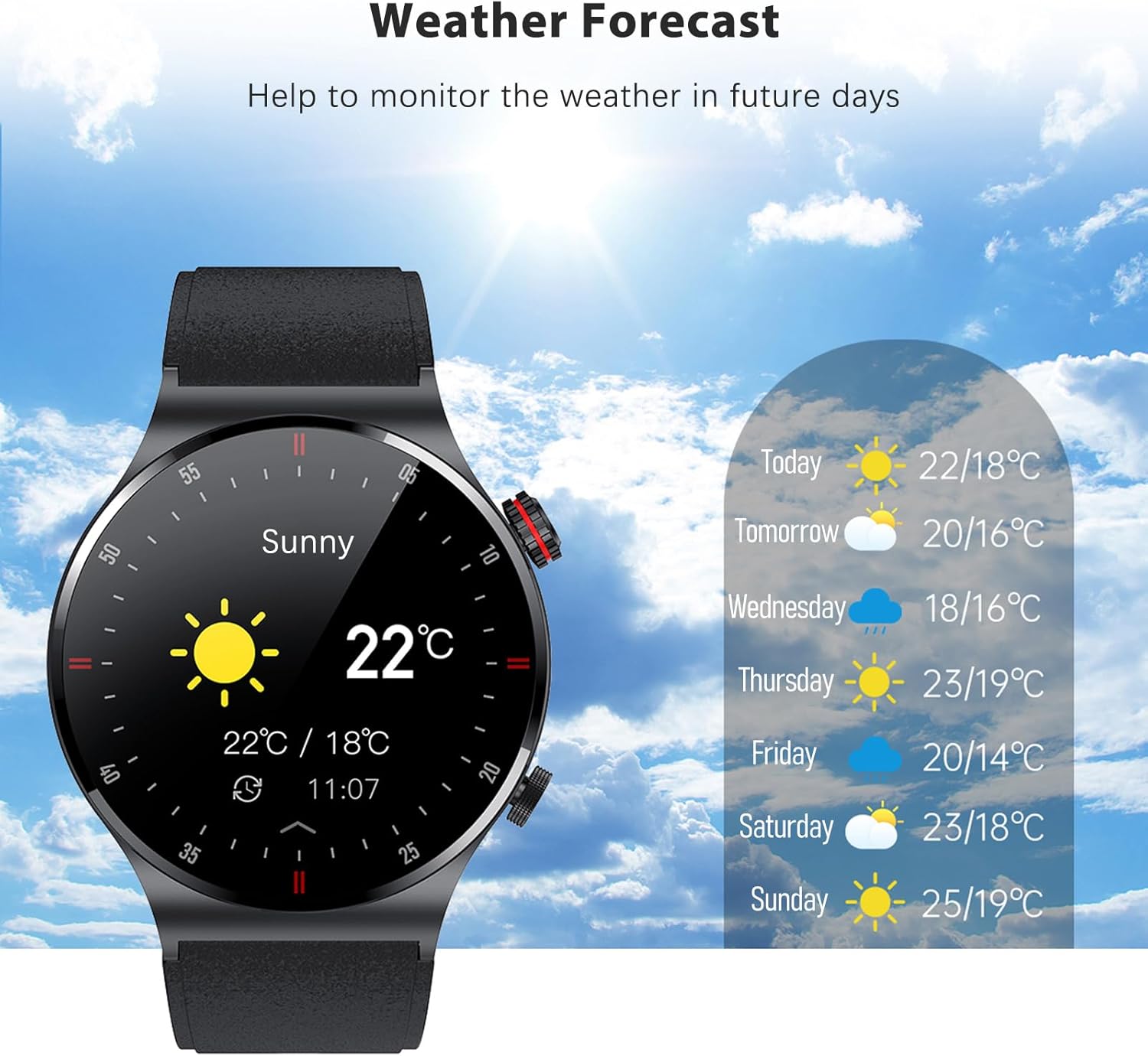
Figure 8: Monitor the weather directly from your watch.
Bakım
1. Su ve Toza Dayanıklılık (IP67)
The Eacam QW33 Smart Sports Watch is rated IP67 for water and dust resistance. This means it is protected against dust ingress and can withstand immersion in water up to 1 meter for 30 minutes.
- It is suitable for daily use, such as hand washing, rain, and accidental splashes.
- Uzun süre suya batırmaktan, sıcak sudan, buhardan veya yüksek basınçlı su jetlerinden kaçının.
- Do not operate the watch buttons or touch the screen while submerged in water.
- After contact with water, wipe the watch dry with a soft cloth.

Figure 9: The watch is designed with IP67 water resistance.
2. Temizlik ve Bakım
- Saati ve kayışını düzenli olarak yumuşak, kuru bir bezle temizleyin.
- Gerekirse biraz d kullanınamp Hafif sabunlu bir bezle silin, ardından kurulayın.
- Saatinizin yüzeyine ve contalarına zarar verebileceğinden, sert kimyasallar, aşındırıcı temizleyiciler veya çözücüler kullanmaktan kaçının.
- Uygun şarjı sağlamak için şarj kontaklarını temiz ve kalıntılardan uzak tutun.
Sorun giderme
If you encounter issues with your Eacam QW33 Smart Sports Watch, refer to the following common solutions.
| Sorun | Olası Çözüm |
|---|---|
| Saat açılmıyor. | Saatin tamamen şarj olduğundan emin olun. En az 30 dakika şarj cihazına bağlayın. Hala açılmıyorsa, yan düğmeye 10-15 saniye basılı tutarak donanımsal sıfırlama işlemi gerçekleştirin. |
| Akıllı telefonla eşleştirilemiyor. |
|
| Inaccurate health data (e.g., heart rate). | Saatin bileğinize sıkıca oturduğundan, bilek kemiğinin yaklaşık bir parmak genişliğinde yukarısında olduğundan emin olun. Saatin arkasındaki sensörü temizleyin. Ölçümler sırasında aşırı hareketten kaçının. |
| Bildirimler görünmüyor. |
|
Özellikler
| Özellik | Detay |
|---|---|
| Model Numarası | QW33 |
| Boyutlar (Ürün) | 45.7x45.7x12 mm |
| Ağırlık (Ürün) | 58 gram |
| Görüntülemek | 1.28-inch IPS, 240 x 240 pixels, Full Touch Screen |
| İşlemci | GR5515 |
| Pil Kapasitesi | 260 mAh Lityum Pil |
| Bekleme Süresi | 15 güne kadar |
| Çalışma Zamanı | 5-7 gün |
| Şarj Modu | Manyetik Emiş |
| Bluetooth Sürümü | BLE5.1 |
| Su Geçirmezlik Derecesi | IP67 |
| Sistem Uyumluluğu | Android 5.0 ve üzeri, iOS 10.0 ve üzeri |
| Özel Özellikler | Heart Rate Monitor, Sleep Monitor, NFC Access Control, QR Code Payment, Bluetooth Calling, Multiple Sports Modes, Customizable Dials, Weather Forecast |
| Mevcut Diller | Simplified Chinese, English, Italian, Japanese, German, Spanish, French, Russian, Portuguese, Polish, Turkish, Greek, Hebrew, Czech, Hungarian, Arabic |
| Menşei ülke | Çin |
Garanti Bilgileri
Specific warranty details for the Eacam QW33 Smart Sports Watch are typically provided with your purchase documentation or on the manufacturer's official website. Please refer to these resources for information regarding warranty period, coverage, and claims process.
Destek
For technical support, product inquiries, or assistance with your Eacam QW33 Smart Sports Watch, please contact Eacam customer service through their official website veya ürün ambalajınızda yer alan iletişim bilgileri.
Ask a question about this manual
Ask about setup, troubleshooting, compatibility, parts, safety, or missing instructions. Manuals+ will review the question and use this page’s manual context to help answer it.