
Della 048-OPAC-6H
Della 10000 BTU Portable Air Conditioner User Manual
Model: 048-OPAC-6H | Brand: Della
1. Önemli Güvenlik Bilgileri
Please read this manual carefully before operating your portable air conditioner. Keep this manual for future reference. Always follow basic safety precautions to reduce the risk of fire, electric shock, or injury.
- Cihazın devrilmesini önlemek için düz ve sağlam bir yüzeye yerleştirildiğinden emin olun.
- Üniteyi hasarlı bir kablo veya fişle çalıştırmayın.
- Hava giriş veya çıkışına parmaklarınızı veya herhangi bir nesneyi sokmayın.
- Üniteyi yanıcı maddelerden ve açık alevlerden uzak tutun.
- Herhangi bir temizlik veya bakım işlemi yapmadan önce mutlaka cihazın fişini çekin.
- Bu cihaz, fiziksel, duyusal veya zihinsel yetenekleri kısıtlı olan veya deneyim ve bilgi eksikliği bulunan kişiler (çocuklar dahil) tarafından, güvenliklerinden sorumlu bir kişi tarafından cihazın kullanımıyla ilgili olarak gözetim veya talimat sağlanmadığı sürece kullanılmak üzere tasarlanmamıştır.
2. Ürün Bittiview
The Della 10000 BTU Portable Air Conditioner is a versatile unit designed to provide cooling, heating, dehumidification, and fan functions for spaces up to 450 sq. ft. It features smart WiFi connectivity for convenient control via a mobile app, a remote control, and an intuitive soft-touch control panel.

Image: Della Portable Air Conditioner unit, remote control, and smartphone displaying the control app.
Key components include the main unit with integrated handle, exhaust hose, window installation kit, and remote control.

Image: Diagram showing the dimensions of the portable air conditioner: 12.2 inches (width) x 12.2 inches (depth) x 27.6 inches (height).
3. Kurulum
3.1 Paketin açılması
Carefully remove the unit and all accessories from the packaging. Retain the original packaging for future storage or transport. Allow the unit to stand upright for at least 24 hours before initial use to allow the refrigerant to settle.
3.2 Yerleştirme
Place the air conditioner on a firm, level surface in a location that allows for proper air circulation. Ensure there is at least 20 inches (50 cm) of space from walls or other objects to allow for adequate airflow around the unit.
3.3 Pencere Kiti Kurulumu
The included window kit is designed for easy installation in both horizontal and vertical sliding windows. No drilling is required.

Image: Diagrams illustrating the installation of the window kit in both horizontal and vertical sliding windows, showing compatibility with window openings from 25.5 to 64.1 inches.
- Assemble the window slider kit by sliding the adjustable panels together to fit your window opening. The kit is compatible with window sizes from 25.5 to 64.1 inches.
- Secure the panels with the provided screws.
- Open the window and place the assembled window kit into the window frame. Extend the panels to fit snugly and close the window against the kit to secure it.
- Ensure the window kit is sealed properly to prevent air leakage. Use foam seals if necessary.
3.4 Egzoz Hortumu Bağlantısı
- Egzoz hortumu bağlantı parçasını egzoz hortumunun bir ucuna takın.
- Pencere kiti adaptörünü egzoz hortumunun diğer ucuna takın.
- Insert the exhaust hose connector into the exhaust outlet on the back of the air conditioner unit.
- Insert the window kit adapter into the opening on the window slider kit.
- Sıcak havanın odaya tekrar girmesini önlemek için tüm bağlantıların güvenli olduğundan emin olun.
3.5 Güç Bağlantısı
Plug the power cord into a grounded 115V/60Hz electrical outlet. Do not use extension cords or power strips.
4. Kullanım Talimatları
4.1 Kontrol Paneli
The unit features an intuitive soft-touch control panel on the top of the unit.
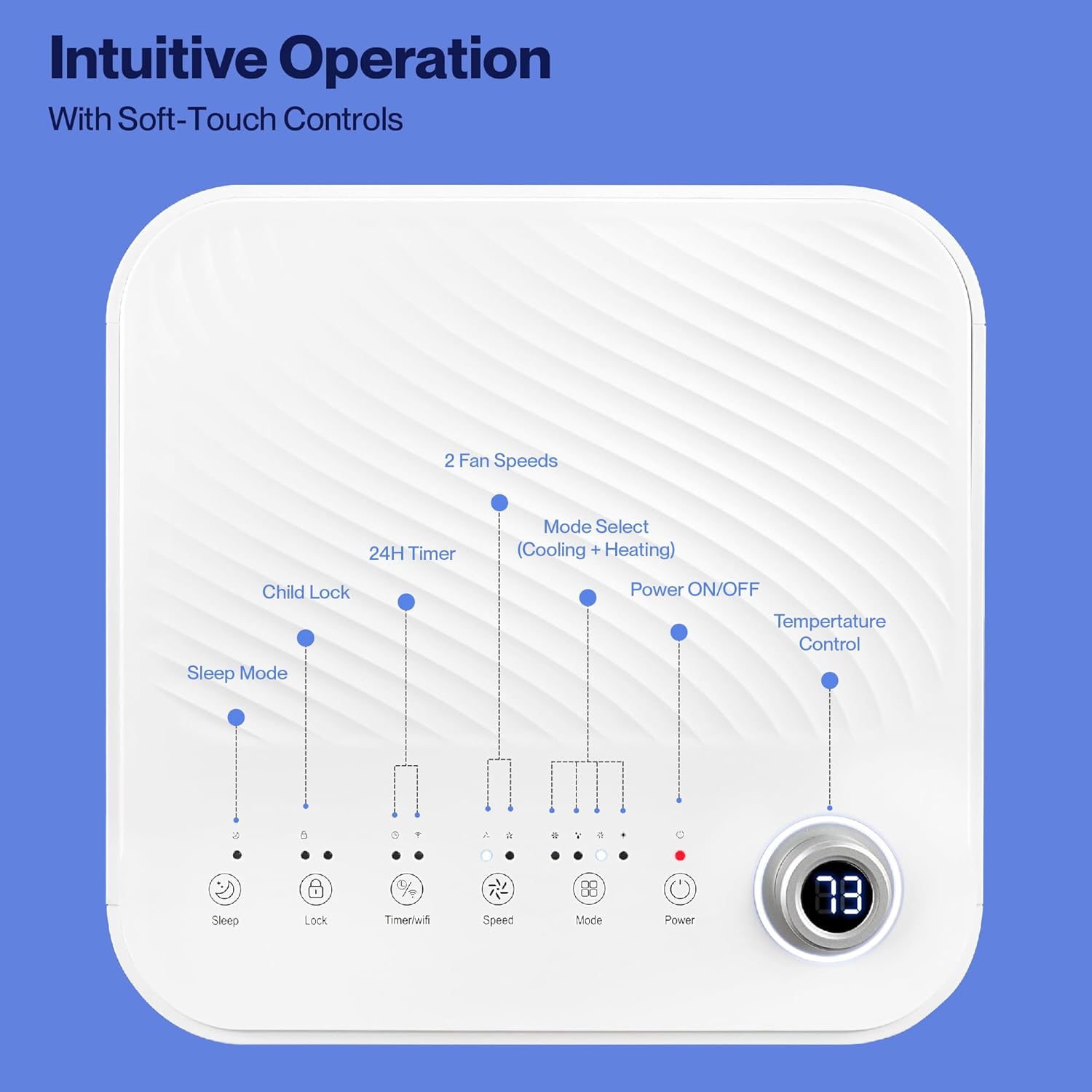
Image: Detailed diagram of the control panel with labels for each button: Sleep, Child Lock, Timer/WiFi, Fan Speed, Mode Select (Cooling + Heating), Power ON/OFF, and Temperature Control with digital display.
- Güç AÇIK/KAPALI: Üniteyi açmak veya kapatmak için basın.
- Mod Seçimi: Cycle through Cooling, Heating, Dehumidification, Ventilation (Fan), and Sleep modes.
- Sıcaklık Kontrolü: İstediğiniz sıcaklığı ayarlamak için yukarı/aşağı ok tuşlarını kullanın.
- Fan Hızı: Select between 2 fan speeds (Low, High).
- Zamanlayıcı: Otomatik açma/kapama işlemi için 24 saatlik bir zamanlayıcı ayarlayın.
- Çocuk Kilidi: Activates or deactivates the child lock function.
- Uyku modu: Daha sessiz çalışma ve kademeli sıcaklık ayarı için uyku modunu etkinleştirir.
4.2 Uzaktan Kumanda
The unit comes with a remote control for convenient operation from a distance. All functions available on the control panel can be accessed via the remote.
4.3 WiFi/Smart App Control
Control your Della Portable Air Conditioner from anywhere using the free DELLA+ app on your smartphone. The unit is compatible with Google Assistant and Amazon Alexa for voice control.

Image: A person relaxing on a couch, using a smartphone to control the air conditioner, with text indicating compatibility with Google Assistant and Amazon Alexa.
- Download the DELLA+ app from your smartphone's app store.
- Klimanızı evinizin WiFi ağına bağlamak için uygulama içi talimatları izleyin.
- Once connected, you can control modes, temperature, fan speed, and set schedules remotely.
The app also supports Smart Geo Location, allowing the unit to automatically turn on or off based on your proximity to home.

Image: A smartphone screen showing a map with a car icon and a notification indicating the AC unit automatically turned on due to Smart Geo Location.
5. Bakım
Regular maintenance ensures optimal performance and extends the lifespan of your unit. Always unplug the unit before cleaning.
5.1 Hava Filtresinin Temizlenmesi
Hava filtresinin kullanıma ve hava kalitesine bağlı olarak iki haftada bir veya daha sık temizlenmesi gerekir.
- Hava filtresi panelini bulun (genellikle cihazın arkasında veya yanında bulunur).
- Filtreyi çıkarın.
- Filtreyi ılık sabunlu suyla yıkayın. İyice durulayın ve tekrar takmadan önce tamamen kurumasını bekleyin.
5.2 Suyun Boşaltılması
The unit has a self-evaporating system, but in high humidity conditions, water may accumulate. The "Water-full indicator" will illuminate when the water tank needs draining.
- Cihazın arka alt kısmında bulunan tahliye deliğinin altına sığ bir kap veya tepsi yerleştirin.
- Tahliye tapasını çıkarın.
- Allow all accumulated water to drain out.
- Tahliye tapasını güvenli bir şekilde yerine takın.
5.3 Depolama
Üniteyi uzun bir süre saklayacaksanız:
- Birikmiş suyun tamamını boşaltın.
- Hava filtresini temizleyin.
- İç kısmın kuruması için cihazı birkaç saat boyunca yalnızca fan modunda çalıştırın.
- Güç kablosunu prizden çıkarın ve düzgünce sarın.
- Üniteyi serin ve kuru bir yerde, tercihen orijinal ambalajında saklayın.
6. Sorun Giderme
Yaygın sorunlar ve çözümleri için bu bölüme bakın.
| Sorun | Olası Neden | Çözüm |
|---|---|---|
| Ünite açılmıyor | No power; Power cord unplugged; Circuit breaker tripped; Water tank full | Elektrik prizini kontrol edin; Elektrik kablosunu takın; Devre kesiciyi sıfırlayın; Su deposunu boşaltın. |
| Ünite etkili bir şekilde soğutmuyor | Air filter dirty; Exhaust hose not properly installed; Room too large; Doors/windows open; Temperature setting too high | Clean air filter; Ensure exhaust hose is sealed; Close doors/windows; Lower temperature setting |
| Ünite gürültülü | Unit not on level surface; Air filter dirty; Obstruction in fan | Place unit on level surface; Clean air filter; Check for obstructions |
| Su sızıntısı | Drain plug loose or missing; Unit tilted | Secure drain plug; Ensure unit is level |
| WiFi bağlantı sorunları | Incorrect WiFi password; Unit too far from router; Router issues | Verify password; Move unit closer to router; Restart router |
Bu çözümleri denedikten sonra sorun devam ederse lütfen müşteri desteğiyle iletişime geçin.
7. Özellikler
| Özellik | Şartname |
|---|---|
| Model Numarası | 048-OPAC-6H |
| Soğutma Kapasitesi | 10000 BTU |
| Kapsama Alanı | 450 Metrekareye kadar Ft. |
| Fonksiyonlar | Cooling, Heating, Dehumidifier, Fan, Sleep Mode |
| Cilttage | 115 Volt |
| Gürültü Seviyesi | 54 dB |
| Soğutucu | R410A |
| Boyutlar (U x G x Y) | 12.2 x 12.2 x 27.6 inç |
| Malzeme | ABS Plastik |
| Özel Özellikler | Portable, Dehumidifier, WiFi Enabled, Remote Control, Built-in Handle, 24-hour timer, Child Lock |
8. Garanti ve Müşteri Desteği
For warranty information or technical assistance, please refer to the warranty card included with your product or visit the official Della website. You may also contact Della customer support directly for further assistance with troubleshooting or parts replacement.
Ask a question about this manual
Ask about setup, troubleshooting, compatibility, parts, safety, or missing instructions. Manuals+ will review the question and use this page’s manual context to help answer it.