
DARKROCK MH200
DARKROCK MH200 Bilgisayar Kasası Kullanım Kılavuzu
Modeli: MH200
1. Giriş
Welcome to the user manual for the DARKROCK MH200 White PC Computer Case. This compact mid-tower case is designed for both office and gaming setups, featuring high-airflow mesh panels and versatile component support. This manual provides detailed information on the case's features, specifications, installation, operation, and maintenance to ensure optimal performance and longevity.
2. Temel Özellikler
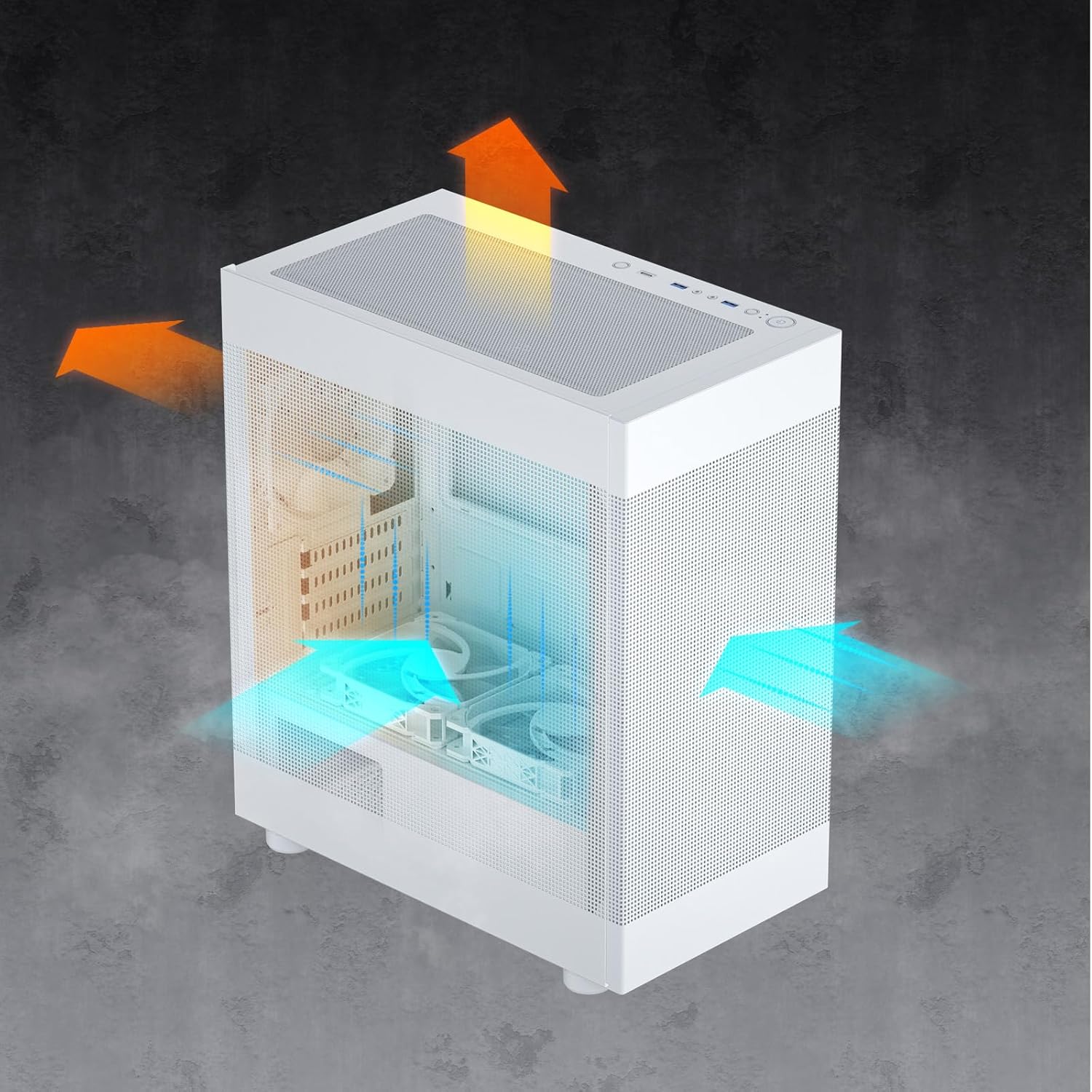
- Premium Cooling Performance: Equipped with front and side mesh panels for enhanced airflow. Top and bottom panels feature magnetic mesh dust filters for easy cleaning and improved thermal management.
- Ready for Upgrade: Spacious interior accommodates CPU coolers up to 165mm in height and graphics cards up to 330mm in length, supporting most NVIDIA GeForce RTX 40 Series GPUs.
- Powerful I/O Panel: Conveniently located top panel with a Type-C port, two USB 3.0 ports, and audio jacks for easy connectivity of peripherals and storage devices.
- Şık ve Modern Tasarım: Available in white, supporting Micro ATX and Mini-ITX motherboards. Includes a pre-installed ARGB 120mm fan in the rear for vibrant lighting effects.
- Various Cooling Options: Supports up to eight fans and a 280mm radiator on the top, ensuring excellent airflow and cooling for your PC components.


3. Özellikler
| Bağlanmak | Detay |
|---|---|
| Marka | KARANLIK |
| Model Adı | MH200 |
| Dava Türü | Orta kule |
| Renk | Beyaz |
| Malzeme | Metal |
| Anakart Uyumluluğu | Mikro ATX, Mini ITX |
| Ürün Boyutları (LxWxY) | 14.17 x 8.35 x 16.53 inç |
| Ürün Ağırlığı | 8.4 pound |
| Maksimum CPU Soğutucu Yüksekliği | 165mm |
| Maksimum GPU Uzunluğu | 330mm |
| Güç Kaynağı Montaj Tipi | Alt Montaj |
| G/Ç Bağlantı Noktaları | 1x Type-C, 2x USB 3.0, Audio Jacks |
| Önceden yüklenmiş Fan | 1x 120mm ARGB fan (rear) |
| Hayran Desteği | 8 adede kadar fan |
| Radyatör Desteği | Up to 280mm (top) |


4. Paket İçeriği
Lütfen kutuyu açtığınızda paket içeriğini kontrol ederek tüm öğelerin mevcut olduğundan emin olun:
- DARKROCK MH200 PC Computer Case (White)
- 1x 120mm ARGB Fan (pre-installed in rear)
- Aksesuar Kutusu (vidalar, kablo bağları, ara parçalar vb.)
- Kullanım Kılavuzu (bu belge)

5. Kurulum ve Kurulum
Follow these steps to install your components into the DARKROCK MH200 case. For detailed visual instructions, please refer to the official Kurulum Kılavuzu (PDF).
- Davayı Hazırlayın: Carefully remove the side panels and front panel by gently pulling them away from the chassis. The mesh panels are designed for easy removal.
- Anakartı Takın: Secure your Micro ATX or Mini ITX motherboard onto the pre-installed standoffs using the appropriate screws from the accessory box.
- Güç Kaynağını (PSU) Takın: Mount your power supply unit in the bottom rear compartment of the case. Ensure proper orientation for cable management.
- Depolama Sürücülerini Kurun: Install 2.5" SSDs behind the motherboard tray and 3.5" HDDs in the removable drive cage located at the bottom front.
- Ekran Kartını (GPU) Takın: Insert your graphics card into the appropriate PCIe slot on your motherboard. Ensure it is securely fastened. The case supports GPUs up to 330mm in length.
- CPU Soğutucusunu Takın: Mount your CPU cooler. The case supports coolers up to 165mm in height.
- Ek Fan/Radyatör Takın: Install any additional cooling fans or liquid radiators as desired. Refer to the specifications section for supported sizes and locations.
- Kablo yönetimi: Route all necessary cables through the cutouts and tie-down points behind the motherboard tray for a clean build and improved airflow.
- Panelleri Yeniden Takın: Once all components are installed and cables are managed, carefully reattach the front and side mesh panels.
6. Operasyon
The DARKROCK MH200 case features a convenient top I/O panel for easy access to essential ports and controls.

- Güç Düğmesi: Press to turn your computer on or off.
- Sıfırlama Düğmesi: Press to restart your computer.
- USB 3.0 Bağlantı Noktaları: Connect high-speed USB devices such as external hard drives, flash drives, or peripherals.
- C Tipi Bağlantı Noktası: Connect modern USB Type-C devices for fast data transfer.
- Ses Jakları: Connect headphones, microphones, or speakers.
- LED Düğmesi: Control the lighting effects of the pre-installed ARGB fan and any other compatible ARGB components connected to the case's controller (if applicable).
7. Bakım
Düzenli bakım, bilgisayar bileşenlerinizin optimum performans göstermesini sağlar ve kullanım ömrünü uzatır.
- Toz Filtresi Temizliği: The top and bottom panels are equipped with magnetic dust filters. Gently remove them and clean with water or a soft brush. Ensure they are completely dry before reattaching.
- Kasa Temizleme: Yumuşak bir d kullanınamp cloth to wipe down the exterior of the case. Avoid abrasive cleaners or solvents.
- İç Toz Giderme: Periodically use compressed air to clear dust from internal components and fans. Ensure the system is powered off and unplugged before performing internal cleaning.
8. Sorun Giderme
If you encounter issues with your DARKROCK MH200 case, refer to the common problems and solutions below:
- Güç Yok:
Çözüm: Ensure the power supply is properly connected to the wall outlet and the motherboard. Check all front panel header connections (Power SW, Reset SW) to the motherboard.
- Fanlar Dönmüyor / ARGB Işıkları Yanmıyor:
Çözüm: Verify that the fan power cables are securely connected to the motherboard or fan controller. Check ARGB connections to the motherboard's ARGB header or dedicated controller. Ensure the LED button on the I/O panel is functioning.
- USB Bağlantı Noktaları Çalışmıyor:
Çözüm: Confirm that the USB 3.0 and Type-C headers from the case are correctly plugged into the corresponding ports on your motherboard.
- Ses Girişleri Çalışmıyor:
Çözüm: Ensure the HD Audio cable from the case is properly connected to the audio header on your motherboard.
- Excessive Dust Buildup:
Çözüm: Regularly clean the magnetic dust filters on the top and bottom panels. Consider increasing fan airflow or adjusting fan curves if temperatures are high due to dust.
9. Garanti ve Destek
DARKROCK products are manufactured to high quality standards. For warranty information, technical support, or to contact customer service, please visit the official DARKROCK store on Amazon or their official webalan.
Official DARKROCK Store: https://www.amazon.com/stores/DARKROCK/page/05A96EC3-7BC6-4877-926F-CDD98356ADCA
Ask a question about this manual
Ask about setup, troubleshooting, compatibility, parts, safety, or missing instructions. Manuals+ will review the question and use this page’s manual context to help answer it.