
ASECAM ASECAM 48 V
ASECAM Super 8MP POE NVR Video Recorder User Manual
Model: ASECAM 48 V
1. Ürün Bittiview
The ASECAM Super 8MP POE NVR (Network Video Recorder) is a high-performance surveillance system designed for comprehensive security monitoring. It supports 8-megapixel resolution cameras, offering superior image clarity compared to standard HD systems. Featuring Power over Ethernet (PoE) technology, it simplifies installation by delivering both power and data through a single Ethernet cable. This NVR integrates advanced features such as AI Face Recognition and H.265 video compression for efficient storage and intelligent monitoring.

Şekil 1.1: Front and Rear Panels of the ASECAM POE NVR. The front panel includes control buttons and indicator lights, while the rear panel features PoE ports for cameras, network, video outputs (VGA, HDMI), and USB ports.
2. Kurulum ve Kurulum
This NVR system is designed for easy plug-and-play installation, thanks to its Power over Ethernet (PoE) capability. This eliminates the need for separate power cables for each camera, simplifying wiring and reducing installation time.
2.1. Sistem Bileşenleri
- ASECAM POE NVR Unit
- POE IP Cameras (sold separately or as part of a kit)
- Ethernet Kabloları
- NVR için Güç Adaptörü
- USB Mouse (for local control)
- Monitor (VGA or HDMI compatible)
2.2. Bağlantı Şeması
Follow the diagram below to connect your NVR and cameras. Ensure all connections are secure before powering on the system.

Şekil 2.1: Comprehensive System Connection Diagram. This diagram illustrates how to connect PoE cameras to the NVR, the NVR to a network router, and video outputs (VGA/HDMI) to a monitor, along with the power supply and USB mouse.
- Connect PoE IP cameras to the "POE" ports on the rear of the NVR using Ethernet cables.
- Connect the NVR's "UP LINK" port to your network router using an Ethernet cable for remote access.
- Connect a monitor to the NVR using either the VGA or HDMI port.
- USB fareyi NVR üzerindeki USB bağlantı noktalarından birine bağlayın.
- Connect the power adapter to the NVR's DC 48V input and plug it into a power outlet.
2.3. Camera Placement and Cable Length
Strategic placement of cameras is crucial for optimal surveillance coverage. The ASECAM POE CCTV system supports a maximum transmission distance of 100 meters (approximately 328 feet) for PoE cameras, allowing for flexible installation in various environments.

Şekil 2.2: Example of Camera Placement within a Property. This illustration demonstrates how multiple cameras can be strategically positioned around a building and connected to the central NVR unit.
3. Kullanım Talimatları
3.1. İlk Açılış ve Kurulum Sihirbazı
Upon first power-on, the NVR will typically guide you through an initial setup wizard. This wizard will help you configure network settings, date/time, and hard drive initialization.
3.2. AI Face Recognition
The NVR supports advanced AI Face Recognition capabilities (requires compatible cameras). This feature enhances security by capturing and identifying facial details, providing valuable information in case of an intrusion or for access control purposes.

Şekil 3.1: AI Face Recognition in Operation. This image demonstrates the system's ability to detect and display multiple faces within the surveillance feed, aiding in identification and monitoring.
3.3. H.265 Video Compression
The NVR utilizes H.265 video compression technology, which offers significant advantages over older standards like H.264. H.265 provides the same high-definition video quality at a lower bitrate, resulting in reduced file sizes and substantial savings in storage space (up to 40-50%). This also lowers bandwidth consumption for remote viewIng.

Şekil 3.2: H.264 vs. H.265 Compression Efficiency. This visual comparison highlights how H.265 achieves similar video quality with significantly less bandwidth and storage requirements compared to H.264.
3.4. Motion Detection Recording and Alerts
The NVR can be configured to record only when motion is detected, optimizing hard drive usage. When motion is detected, the system can automatically send email alerts, ensuring you are notified of important events without constant monitoring. You can define specific motion detection zones to avoid false alarms from areas with constant movement.

Şekil 3.3: Motion Detection and Alert System. This diagram illustrates how the NVR detects motion within defined areas, triggers recording, and sends push notifications or email alerts to the user's mobile device.
3.5. Smart Playback
The smart playback feature allows for efficient review of recorded footage. You can customize search areas and accelerate playback through unimportant video segments, significantly reducing the time required to find specific events.
3.6. Remote Access (P2P)
Access your surveillance system anytime, anywhere, using the P2P (peer-to-peer) technology. Simply download the free smartphone app (available for Android and iPhone) or access via a web interface (e.g., Internet Explorer). Scan the QR code provided by the NVR for easy login.

Şekil 3.4: Uzak Viewing via Mobile Application. This image displays the user interface of the mobile app, showing live video feeds and options for playback, allowing users to monitor their property remotely.
4. Özellikler
Detailed technical specifications for the ASECAM 48 V NVR system:
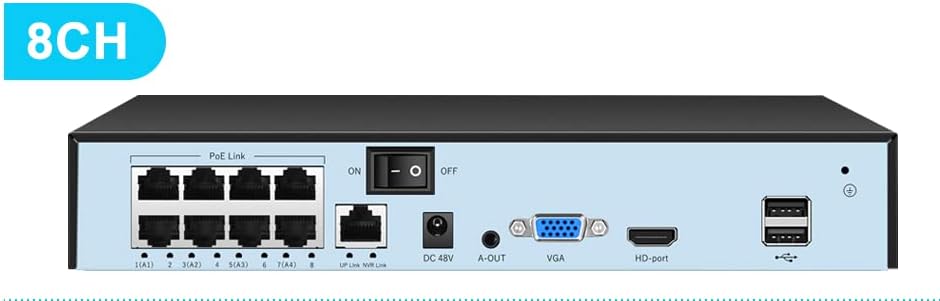
Şekil 4.1: Rear Panel of the 8-Channel ASECAM NVR. This view highlights the 8 PoE ports, network uplink, audio output, VGA, HDMI, and USB ports.
| Özellik | Detay |
|---|---|
| Marka | Generic (Manufactured by ASECAM Smart AI Face Recognition Advanced H.265 Video Compression POE Advantage) |
| Model Numarası | ASECAM 48 V |
| Video Girişi | IP, HDMI |
| Dijital Video Medya Formatı | H.265 |
| Kanal Sayısı | 8 |
| Sabit Sürücü Boyutu | 8 GB (Note: This typically refers to the NVR's internal storage for system files, not necessarily for video recording. An external HDD may be required for extensive video storage.) |
| Uyumlu Cihazlar | Kamera, Akıllı Telefon, Tablet |
| Bağlantı Teknolojisi | HDMI, Ethernet (PoE) |
| Paket Boyutları | 35 x 28.5 x 8 cm; 1.52 kg |
| İlk Mevcut Tarih | 30 Mayıs 2023 |
5. Sorun Giderme
This section provides solutions to common issues you might encounter with your ASECAM NVR system.
- Video Çıkışı Yok:
- Ensure the NVR is powered on and the power indicator light is active.
- Check HDMI/VGA cable connections to both the NVR and the monitor.
- Verify the monitor input source is correctly selected (HDMI/VGA).
- Kameralar Görüntülenmiyor:
- Confirm cameras are properly connected to the NVR's PoE ports.
- Check Ethernet cables for damage or loose connections.
- Ensure cameras are powered on (PoE provides power, but check NVR PoE status indicators).
- If using non-PoE cameras with a PoE switch, ensure they have separate power.
- Uzaktan Erişim Yok:
- Verify the NVR's "UP LINK" port is connected to your router and the network indicator is active.
- Yönlendiricinizin etkin bir internet bağlantısına sahip olduğundan emin olun.
- Check NVR network settings (IP address, gateway, DNS) to ensure they are correct.
- Confirm the mobile app is updated to the latest version and you are using the correct login credentials or QR code.
- Sabit Disk Kayıt Yapmıyor:
- Check if a hard drive is installed and properly connected inside the NVR.
- Ensure the hard drive has been initialized/formatted through the NVR's menu.
- Verify recording schedules and motion detection settings are correctly configured.
- Check hard drive status for errors or full capacity.
6. Bakım
Regular maintenance helps ensure the longevity and optimal performance of your ASECAM NVR system.
- Keep the NVR Clean: Regularly dust the NVR unit to prevent overheating and ensure proper ventilation. Use a soft, dry cloth.
- Kablo Bağlantılarını Kontrol Edin: Periodically inspect all cable connections (power, Ethernet, video) to ensure they are secure and free from damage.
- Monitor Hard Drive Health: Access the NVR's system settings to check the health and status of the installed hard drive. Consider replacing it if errors are reported.
- Donanım Yazılımı Güncellemeleri: Üreticinin kontrol edin website periodically for firmware updates. Updating firmware can improve system stability, add new features, and address security vulnerabilities. Follow update instructions carefully.
- Kamera Lensi Temizliği: For cameras, gently clean the lens with a soft, lint-free cloth to ensure clear image quality. Avoid abrasive materials.
7. Garanti ve Destek
For warranty information, technical support, or service inquiries, please refer to the documentation provided with your purchase or visit the official ASECAM support website. Keep your purchase receipt and product model number (ASECAM 48 V) handy when contacting support.
Çevrimiçi Kaynaklar:
- Product support pages (if available)
- FAQ sections
- Firmware download sections
Ask a question about this manual
Ask about setup, troubleshooting, compatibility, parts, safety, or missing instructions. Manuals+ will review the question and use this page’s manual context to help answer it.