
giriiş
This manual provides comprehensive instructions for the installation, operation, and maintenance of your CANDY RO14126DWMST-S Front-Load Washing Machine. Please read this manual carefully before using the appliance to ensure safe and efficient operation. Keep this manual for future reference.
1. Kurulum ve Kurulum
1.1 Paketin açılması
Carefully remove all packaging materials. This includes the polystyrene base, plastic bags, and any protective films. It is crucial to remove all transport bolts located at the rear of the machine before use. Failure to do so can cause significant damage to the appliance.

Resim 1.1: Ön view of the washing machine with the door open, illustrating the drum for unpacking.
1.2 Konumlandırma
Place the washing machine on a firm, flat surface. Ensure there is sufficient space around the appliance for ventilation and maintenance. Avoid placing it on carpets or other materials that might obstruct the ventilation openings at the base.
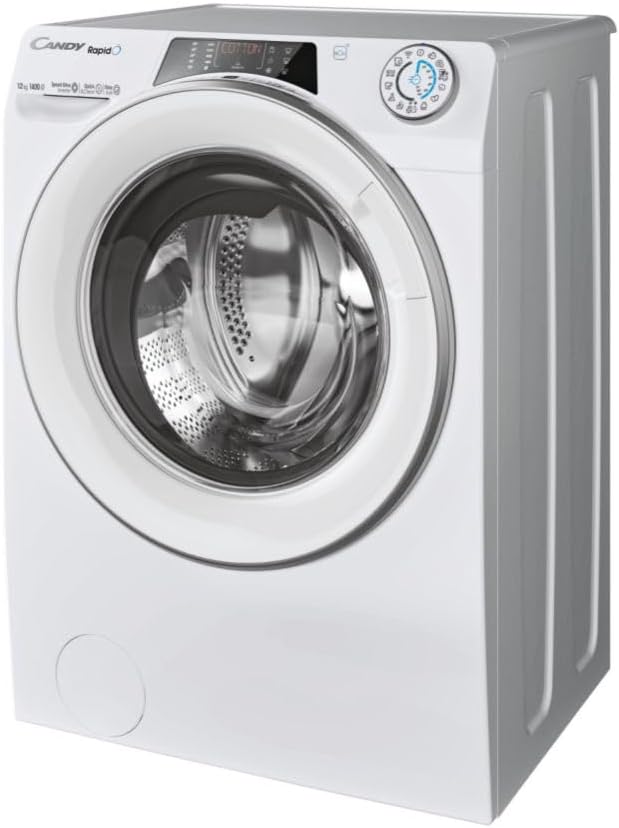
Resim 1.2: Genel view of the washing machine for proper positioning.
1.3 Tesviye
Adjust the machine's feet to ensure it is perfectly level. A level machine reduces vibration and noise during operation. Use a spirit level to check stability in all directions.
1.4 Su Bağlantısı
Connect the water inlet hose to a cold water tap with a 3/4" thread. Ensure the connection is tight to prevent leaks. Do not reuse old hoses.
1.5 Drenaj Bağlantısı
Securely attach the drain hose to a suitable drain pipe or place it over the edge of a sink, ensuring it is properly fixed to prevent displacement during draining.
1.6 Elektrik Bağlantısı
Güç kablosunu topraklı bir elektrik prizine takın. Ses seviyesinin düşük olduğundan emin olun.tage ve frekans değerlerinin cihazın bilgi plakasındaki özelliklerle eşleştiğinden emin olun. Uzatma kablosu veya birden fazla adaptör kullanmayın.
2. Kullanım Talimatları
2.1 Kontrol Paneli Üstüview
The control panel features a program selector dial, a digital display, and various function buttons. The digital display shows program information, time remaining, and error codes.

Image 2.1: Digital control panel with program selector and function buttons.
2.2 Çamaşırların Yüklenmesi
Open the washing machine door and load your laundry. Do not overload the machine; ensure there is enough space for clothes to tumble freely. Close the door firmly until it clicks.
2.3 Deterjan Dispenseri
Pull out the detergent drawer. It typically has three compartments: one for pre-wash detergent, one for main wash detergent, and one for fabric softener. Add the appropriate amount of detergent and softener according to the load size and program selected. Close the drawer gently.

Image 2.2: Detergent dispenser drawer with compartments for detergent and softener.
2.4 Program Seçimi
Turn the program selector dial to choose one of the 15 available wash programs. The digital display will show the default settings for the selected program. You can adjust options like temperature and spin speed using the corresponding buttons.
2.5 Bir Döngüyü Başlatma
Once the program and options are selected, press the 'Start/Pause' button to begin the wash cycle. The machine will automatically proceed through the selected program.
2.6 Smart Features (hOn App)
This washing machine is equipped with Wi-Fi and Bluetooth connectivity. Download the hOn app on your smartphone to access additional features, including over 40 extra programs, personalized advice, and remote control of your appliance. Follow the in-app instructions for pairing your device.
3. Bakım
3.1 Deterjan Çekmecesinin Temizlenmesi
Regularly clean the detergent drawer to prevent detergent residue buildup. Pull out the drawer completely, rinse it under running water, and use a brush to remove any stubborn deposits. Reinsert the drawer.
3.2 Tahliye Filtresinin Temizlenmesi
The drain filter should be cleaned periodically to ensure proper drainage and prevent blockages. Locate the filter cover at the bottom front of the machine. Open the cover, place a shallow container underneath to catch any residual water, and unscrew the filter. Clean the filter under running water, removing any lint or foreign objects. Screw the filter back in and close the cover.

Image 3.1: Drain filter compartment with the filter removed for cleaning.
3.3 Tamburun Temizlenmesi
To maintain hygiene and prevent odors, run a drum cleaning cycle periodically. Consult your hOn app or the machine's program list for a dedicated cleaning program, often using hot water and a descaling agent.
3.4 Dış Temizlik
Çamaşır makinesinin dış yüzeylerini yumuşak bir bezle silin.amp Bez. Cilaya zarar verebilecek aşındırıcı temizleyiciler veya çözücüler kullanmaktan kaçının.
4. Sorun Giderme
Müşteri hizmetleriyle iletişime geçmeden önce, yaygın sorunlar ve çözümleri için lütfen aşağıdaki tabloya bakın.
| Sorun | Olası Neden | Çözüm |
|---|---|---|
| Makine başlamıyor | Power cord not plugged in; Door not closed properly; Program not selected; 'Start/Pause' button not pressed. | Check power connection; Ensure door is latched; Select a program; Press 'Start/Pause'. |
| Su alımı yok | Su musluğu kapalı; Su giriş hortumu bükülmüş veya tıkanmış; Su basıncı çok düşük. | Open water tap; Straighten hose, check for blockages; Check household water pressure. |
| Su akmıyor | Tahliye hortumu kıvrılmış veya tıkanmış; tahliye filtresi tıkanmış. | Straighten drain hose, check for blockages; Clean the drain filter (refer to Section 3.2). |
| Aşırı titreşim/gürültü | Machine not level; Transport bolts not removed; Uneven load in drum. | Adjust leveling feet; Remove transport bolts (refer to Section 1.1); Redistribute laundry evenly. |
| Kötü yıkama sonuçları | Yanlış deterjan dozu; Aşırı yükleme; Yanlış program seçimi. | Use correct detergent amount; Do not overload; Select appropriate program for fabric type and soil level. |
| Ekrandaki hata kodları | Belirli arıza. | Refer to the hOn app or the full user manual for specific error code meanings and solutions. |
5. Özellikler
| Özellik | Detay |
|---|---|
| Örnek | RO14126DWMST-S |
| Marka | ŞEKER |
| Kapasite | 12 kilo |
| Maksimum Sıkma Hızı | 1400 dev/dak |
| Enerji Sınıfı | A |
| Ürün Boyutları (YxGxD) | 85x60x67 cm |
| Ürün Ağırlığı | 77 kilo |
| Renk | Beyaz |
| Malzeme | Stainless Steel, Plastic, Glass |
| Cilttage | 230 Volt |
| Ses Seviyesi | 54 Desibel |
| Ekran Stili | NEDEN OLMUŞ |
| Program Sayısı | 15 (plus 40+ via hOn app) |
| Özel Özellikler | Mix Power System, Wi-Fi + Bluetooth Connectivity, Steam Function |
| Kurulum Yöntemi | Solo |
| Kontrol Tipi | Dokunmak |
6. Garanti Bilgileri
This CANDY washing machine is covered by a manufacturer's warranty. Please refer to the warranty card included with your appliance for specific terms, conditions, and duration of coverage. In case of a defect, you may be eligible for repair or replacement. A 14-day return policy from the date of delivery typically applies for eligible purchases.
7. Müşteri Desteği
For further assistance, technical support, or to schedule a service appointment, please visit the official CANDY website or contact their customer service department. You can find contact details on the CANDY webSitede veya cihazınızla birlikte verilen belgelerde.
Official CANDY Webalan: www.candy-group.com