
1. Giriş
Thank you for choosing the SPLITSKY NZFS Kids Alarm Clock. This device combines an alarm clock, white noise sleep aid, and an 8-mode RGB night light, designed to assist with sleep and wake-up routines for children and adults. Please read this manual thoroughly to understand its features and ensure proper operation.
Güvenlik Bilgileri:
- Cihazı sudan ve yüksek nemli ortamlardan uzak tutun.
- Cihazı kendiniz sökmeye veya onarmaya çalışmayın.
- Use only the provided USB-C power cable or a certified equivalent.
- Cihazın çevresinde uygun havalandırmanın olduğundan emin olun.
2. Paket İçeriği
Paketinizde tüm öğelerin mevcut olduğundan emin olun:
- SPLITSKY NZFS Kids Alarm Clock
- 1.2M (4.7 inch) USB-C Power Cable
- Kullanım Kılavuzu (bu belge)
- 1 x CR2032 Lithium Ion Battery (pre-installed for memory backup)
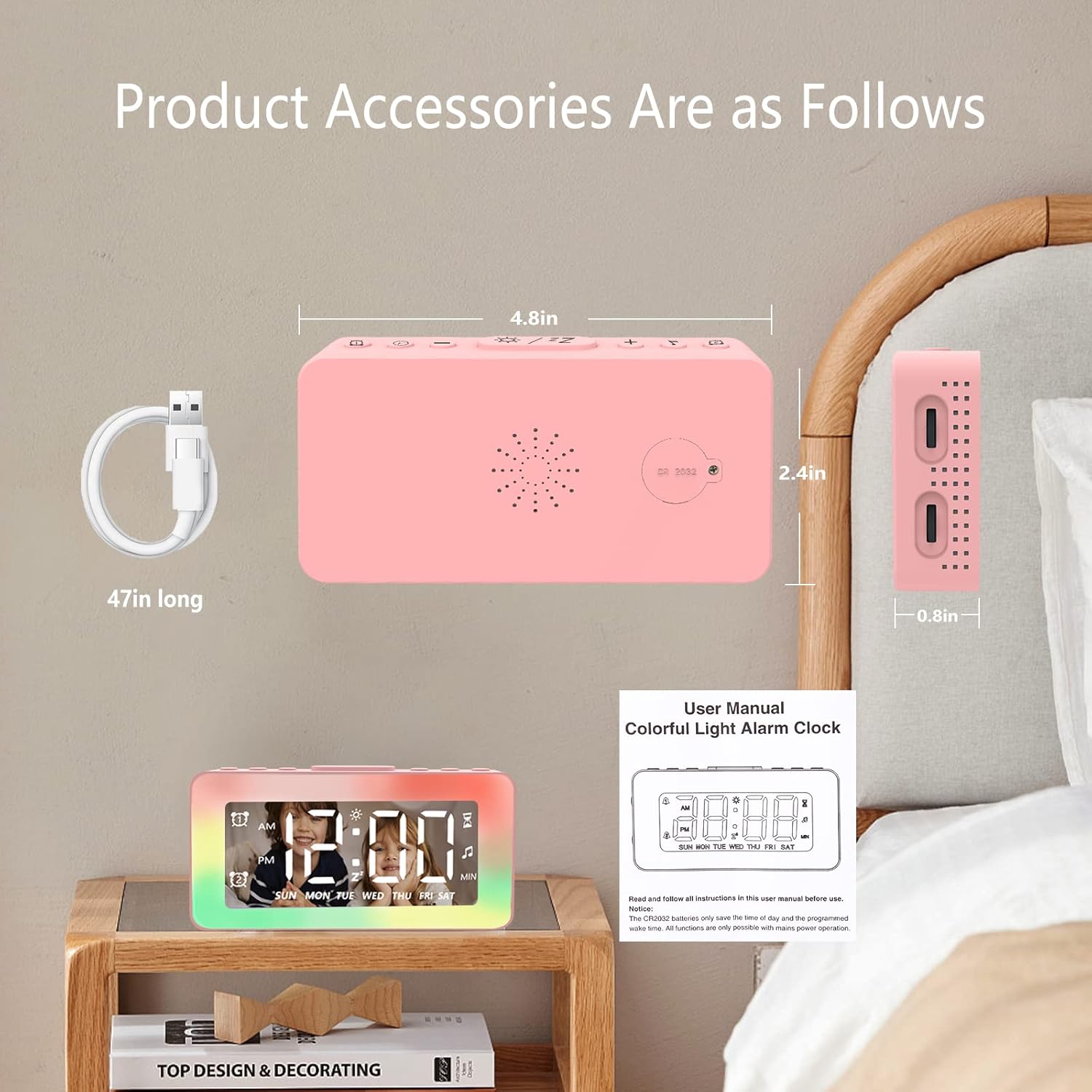
Image: The SPLITSKY NZFS Kids Alarm Clock, a USB-C power cable, and the user manual are included in the package.
3. Ürün Bittiview
Familiarize yourself with the buttons and ports on your alarm clock:

Resim: Ayrıntılı view of the alarm clock's top buttons and side ports, including Alarm 1, Time Setting, Light Minus/Settings, Snooze/Light Mode Switch, Light Plus/Setup, Music Switch, Alarm 2, Volume Setting, Time Brightness Setting, USB Output Charging Port, and Type-C Input Interface.
- Alarm 1 Düğmesi: Set and activate Alarm 1.
- Zaman Ayar Düğmesi: Mevcut saati ayarlayın.
- Light Minus / Settings Button: Decrease light brightness or navigate settings.
- Snooze / Light Mode Switch Button: Activate snooze, or cycle through light modes.
- Light Plus / Setup Button: Increase light brightness or confirm settings.
- Music Switch Button: Cycle through white noise sounds.
- Alarm 2 Düğmesi: Set and activate Alarm 2.
- Volume Setting Wheel (Side): Adjust alarm and white noise volume.
- Time Brightness Setting Wheel (Side): Ekran parlaklığını ayarlayın.
- USB Output Charging Port (Side): Charge external devices.
- Type-C Input Interface (Side): Connect power cable to the alarm clock.
4. Kurulum
4.1 Güç Bağlantısı
- Connect the provided USB-C power cable to the Type-C Input Interface on the side of the alarm clock.
- USB-C kablosunun diğer ucunu uyumlu bir USB güç adaptörüne (dahil değildir) veya bir USB bağlantı noktasına takın.
- The display will illuminate, indicating the clock is powered on.

Image: The SPLITSKY NZFS Kids Alarm Clock is shown powered on and connected via its USB-C port, also demonstrating its capability to charge a smartphone.
4.2 Battery Installation (Memory Backup)
The alarm clock includes a pre-installed CR2032 battery. This battery serves as a memory backup to retain time and alarm settings during a power outage or when the main power is disconnected. It does not power the clock for regular operation.
- If the battery needs replacement, locate the battery compartment on the back of the unit.
- Bölmeyi açmak için küçük bir tornavida kullanın.
- Doğru kutuplara sahip olduğundan emin olarak yeni bir CR2032 pil ile değiştirin.
- Bölmeyi güvenli bir şekilde kapatın.
5. Kullanım Talimatları
5.1 Setting the Time (12H/24H Format)
- Basılı tutun Zaman Ayar Düğmesi until the hour digits begin to flash.
- Kullanın Light Minus / Settings Button (aşağı) veya Light Plus / Setup Button (up) to adjust the hour.
- Basın Zaman Ayar Düğmesi again to move to minute adjustment. Adjust minutes using the Light Minus/Plus buttons.
- Basın Zaman Ayar Düğmesi a third time to select 12-hour or 24-hour format. Adjust using the Light Minus/Plus buttons.
- Basın Zaman Ayar Düğmesi Zaman ayarı modundan çıkmak ve onaylamak için bir kez daha.
5.2 Setting Alarms (Dual Alarm, Daily/Weekday/Weekend Mode)
Saat, iki bağımsız alarmı destekler (Alarm 1 ve Alarm 2).
- Basılı tutun Alarm 1 Düğmesi (for Alarm 1) or Alarm 2 Düğmesi (for Alarm 2) until the alarm hour digits flash.
- Kullanın Light Minus / Settings Button or Light Plus / Setup Button Saati ayarlamak için
- Press the respective Alarm Button again to move to minute adjustment. Adjust minutes using the Light Minus/Plus buttons.
- Press the respective Alarm Button again to select the alarm mode:
- Günlük Mod: Alarm her gün çalıyor.
- Weekday Mode: Alarm Pazartesiden Cumaya kadar çalar.
- Hafta Sonu Modu: Alarm sounds Saturday and Sunday.
- Press the respective Alarm Button once more to confirm and exit alarm setting mode.
- To enable/disable an alarm, short press the Alarm 1 Düğmesi or Alarm 2 DüğmesiEkranda bir alarm simgesi görünecek/kaybolacaktır.
5.3 Erteleme İşlevi
When an alarm sounds, tap the Snooze / Light Mode Switch Button on top to activate snooze. The alarm will pause for 9 minutes and then sound again. This can be repeated multiple times.
5.4 Night Light (8 Modes RGB, 10-level dimming)
The alarm clock features 6 solid color lights and 2 ambient colorful lights.
- Kısa basın Snooze / Light Mode Switch Button to turn on the night light and cycle through the 8 color modes.
- To adjust the brightness (10 levels), use the Light Minus / Settings Button or Light Plus / Setup Button while the night light is active.
- To turn off the night light, continue pressing the Snooze / Light Mode Switch Button ışık sönene kadar.

Image: Multiple SPLITSKY NZFS Kids Alarm Clocks are shown, each displaying a different color from the 8 available RGB night light modes.
5.5 White Noise Sleep Aid (8 Sounds)
The clock offers 8 soothing sounds to aid sleep.
- Kısa basın Müzik Değiştirme Düğmesi to turn on the white noise and cycle through the available sounds.
- To adjust the volume (16 levels), use the Volume Setting Wheel on the side of the clock.
- To turn off the white noise, continue pressing the Müzik Değiştirme Düğmesi until the sound stops.

Image: The SPLITSKY NZFS Kids Alarm Clock is displayed on a bedside table, with icons illustrating the various white noise options such as rain, cicadas, piano, bonfire, waves, birdsong, and church bells.
5.6 Sleep Timer (10-120 minutes)
The sleep timer allows you to set a duration for the white noise and/or night light to play before automatically turning off.
- While white noise or night light is active, press and hold the Müzik Değiştirme Düğmesi (for white noise timer) or Snooze / Light Mode Switch Button (for light timer).
- Kullanın Light Minus / Settings Button or Light Plus / Setup Button to select the desired timer duration (10, 20, 30, 60, 90, 120 minutes).
- Press the respective button again to confirm the timer setting. The timer icon will appear on the display.
5.7 Ekran Parlaklığı Ayarı
Adjust the brightness of the LED time display using the Time Brightness Setting Wheel on the side of the clock.
5.8 USB Şarj Portu
The USB output charging port on the side of the alarm clock can be used to charge other small electronic devices, such as smartphones. Connect your device's charging cable to this port.
6. Bakım
6.1 Temizlik
- Temizlemeden önce cihazın fişinin çekili olduğundan emin olun.
- Yüzeyi yumuşak, kuru bir bezle silin.
- Aşındırıcı temizleyiciler, çözücüler veya kimyasal spreyler kullanmayın.
6.2 Depolama
When not in use for extended periods, store the alarm clock in a cool, dry place, away from direct sunlight and extreme temperatures.
7. Sorun Giderme
If you encounter issues with your SPLITSKY NZFS Kids Alarm Clock, refer to the table below for common problems and solutions.
| Sorun | Olası Neden | Çözüm |
|---|---|---|
| Saat ekranı kapalı veya loş. | Not connected to power; Time brightness set too low. | Ensure USB-C cable is securely connected to a power source. Adjust the Time Brightness Setting Wheel. |
| Alarm çalmıyor. | Alarm not activated; Alarm volume too low. | Check if the alarm icon is displayed. If not, short press the respective Alarm Button to activate. Adjust the Volume Setting Wheel. |
| Time/settings reset after power disconnection. | CR2032 backup battery is depleted or missing. | Replace the CR2032 battery in the battery compartment. |
| Night light or white noise not working. | Function not activated; Sleep timer active. | Kısa basın Snooze / Light Mode Switch Button or Müzik Değiştirme Düğmesi to activate. Check if a sleep timer is set. |
8. Özellikler
| Özellik | Detay |
|---|---|
| Marka | SPLİTKY |
| Model Numarası | NZFS |
| Görüntü Türü | Dijital LED |
| Ürün Boyutları | 3.17"G x 3.17"Y (yaklaşık 8.05 cm G x 8.05 cm Y) |
| Ürün Ağırlığı | 8.1 ons (yaklaşık 230 gram) |
| Güç Kaynağı | Corded Electric (USB-C), Battery Powered (CR2032 for memory) |
| Gece Işığı Modları | 8 (6 solid colors, 2 ambient colorful) with 10-level dimming |
| Beyaz Gürültü Sesleri | 8 rahatlatıcı ses |
| Alarm Tonları | 7 wake-up alarm tones with 16-level volume control |
| Alarm Özellikleri | Dual Alarm, Daily/Weekday/Weekend modes, 9-minute Snooze |
| Zamanlayıcı Fonksiyonu | 10-120 minute sleep timer for sounds and lights |
| Bağlantı | USB-C Input, USB-A Output (for charging external devices) |
| Malzeme | Akrilonitril Bütadien Stiren |
9. Garanti ve Destek
9.1 Garanti Bilgileri
Please refer to the warranty information provided at the time of purchase or contact your retailer for details regarding the product warranty. Keep your proof of purchase for any warranty claims.
9.2 Müşteri Desteği
For technical assistance, troubleshooting beyond this manual, or general inquiries, please contact the seller through the platform where you purchased the product. Provide your order number and a detailed description of the issue for prompt support.