
giriiş
This manual provides detailed instructions for the installation, operation, and maintenance of your BOTHSTAR Keypad Door Knob, Model YJ22-BK. This keyless entry system offers dual-sided access control with keypads and cylinders on both sides, designed for enhanced security and convenience in various environments.
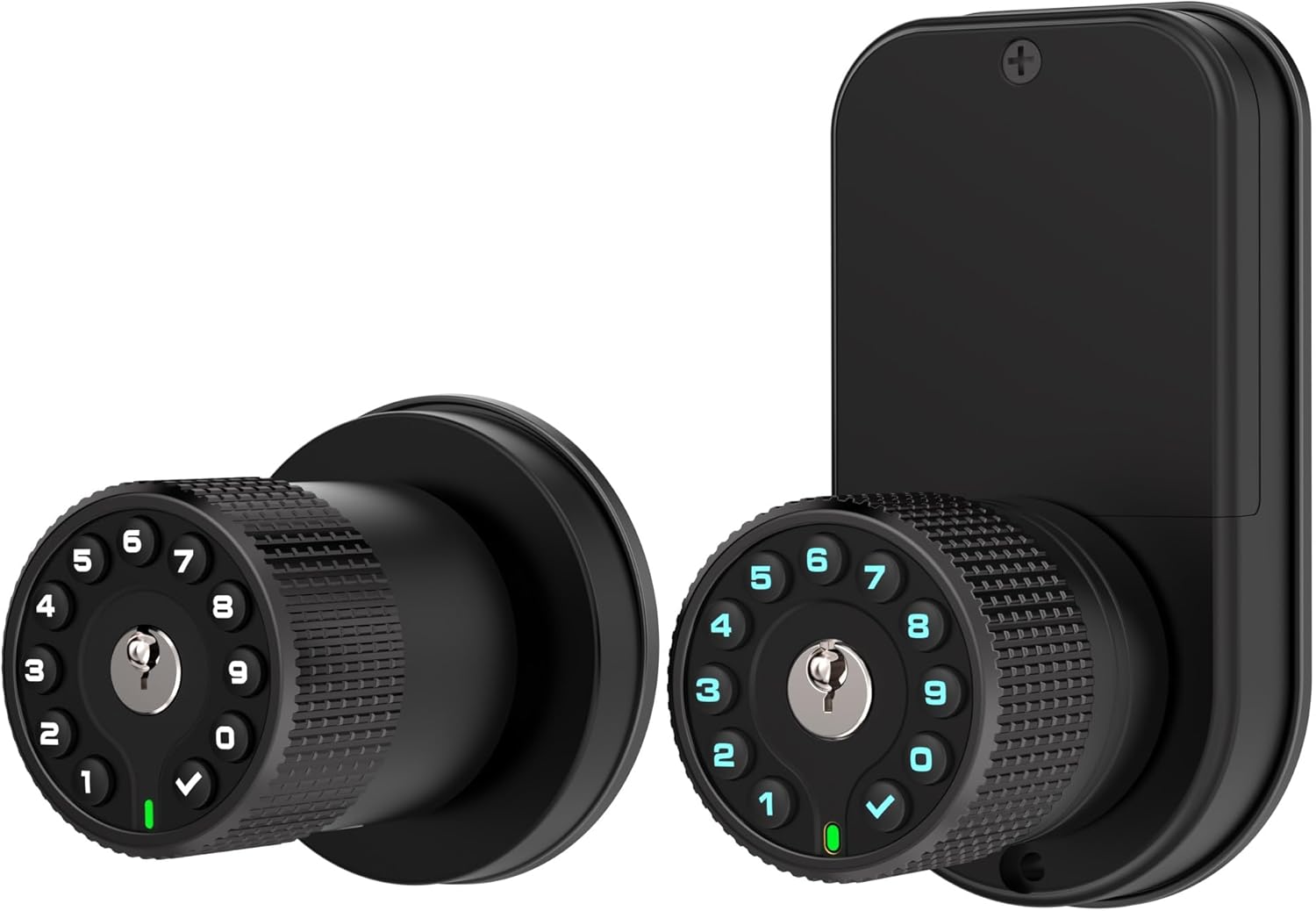
Image: The BOTHSTAR YJ22-BK Keypad Door Knob, displaying both the exterior and interior components of the lock.
Önemli Güvenlik Bilgileri
- Pil Montajı: Ensure correct polarity when installing 4 AAA batteries. Do not mix old and new batteries or different types of batteries.
- Acil durum gücü: In case of battery depletion, use the provided mechanical key or a Type-C USB power source for emergency access.
- Default Code Vulnerability: WARNING: Some units may retain a factory preset code (e.g., 1234567890 followed by the checkmark) that can unlock the door regardless of user-defined codes. It is crucial to test your lock thoroughly after setting your own codes to ensure this default code is not active. If it is, contact customer support immediately as this poses a significant security risk.
- Çevresel Koşullar: The lock is designed for all-weather use (IPX6 rated, -22°F to +176°F). However, avoid direct exposure to extreme conditions beyond these specifications.
- Çocuklar ve Hassas Gruplar: Exercise caution when installing in areas accessible to children or individuals who may inadvertently operate the lock.
Kutuda Neler Var?
Kuruluma başlamadan önce tüm bileşenlerin mevcut olduğundan emin olun:
- Exterior Keypad Knob
- Interior Keypad Knob
- Mandal Mekanizması
- Montaj Plakası
- Grev plakası
- Saldırı Kutusu
- Mechanical Keys (Key Alike)
- Montaj Vidaları
- Kurulum Şablonu
- Kullanıcı Kılavuzu
- (4) AAA Batteries (Not Included)

Image: All components included in the BOTHSTAR YJ22-BK package, laid out next to the product box.
Özellikler
| Marka | İKİ YILDIZ |
| Model Numarası | YJ22-BK |
| Kilit Tipi | Tuş takımı |
| Malzeme | Çinko Alaşımı |
| Renk | Double Sided Matte Black |
| Boyutlar (U x G x Y) | 8.07 x 4.53 x 4.53 inç |
| Ürün Ağırlığı | 3.78 pound |
| Güç Kaynağı | 4 x AAA Piller (dahil değildir) |
| Acil Güç | Type-C USB Şarj Bağlantı Noktası |
| Kullanıcı Kodları | Up to 50 per keypad |
| Kapı Kalınlığı Uyumluluğu | 1-3/8" to 2-3/4" |
| Hava Direnci | IPX6 Rated, -22°F to +176°F |
| Bağlantı Protokolü | Wi-Fi (for remote code generation, not direct lock control) |

Image: Key features of the BOTHSTAR YJ22-BK, including its double-sided design, full waterproof rating, wide temperature tolerance, dual keypads, and robust metal construction.
Kurulum Kılavuzu
Follow these steps carefully for proper installation. It is recommended to restore factory settings after installation.

Image: Visual representation of the 8-step installation process for the keypad door knob.
- Mandalı yükleyin: Kilit mekanizmasını kapı kenarına yerleştirin. Kilit cıvatasının kapınızın açılma yönüne doğru baktığından emin olun.
- Install Outside Knob: Place the exterior keypad knob through the door, aligning it with the latch.
- Montaj Plakasını Takın: Secure the mounting plate to the door frame, ensuring it is flush and stable.
- Pass the Cable: Carefully route the power cable from the exterior knob through the designated hole in the mounting plate to the interior side.
- Güç Kablosunu Bağlayın: Connect the power cable to the interior knob's circuit board. Ensure a secure connection.
- Align Inside Knob: Align the interior knob with the mounting plate and the spindle from the latch.
- Install Inside Knob: Secure the interior knob to the mounting plate using the provided screws.
- Fabrika Ayarlarına Geri Dön: After installation, it is highly recommended to perform a factory reset to clear any pre-existing codes and ensure proper functionality. Refer to the "Operating Instructions" section for details on factory reset.
Önemli Notlar:
- The lock is auto-lock by default. The knob cannot rotate the latch without a code or key.
- The mechanical key requires slightly more force than a common mechanical lock due to the independent design of the knob and key mechanism.
Kullanım Talimatları
This section details how to use your BOTHSTAR Keypad Door Knob.
1. Kullanıcı Kodlarının Ayarlanması
Each keypad can store up to 50 unique user codes. Refer to the specific programming instructions in the included quick start guide for detailed steps on adding, deleting, and modifying user codes. The anti-peeping feature allows you to enter random digits before or after your actual code to prevent others from guessing your entry sequence.

Resim: Üzeriview of the multi-functional capabilities of the BOTHSTAR YJ22-BK, such as managing user codes, anti-peeping security, and different locking modes.
2. Otomatik Kilit Modu
The lock can be configured to automatically lock after a set period. The default auto-lock time is typically 4 seconds, but this can be adjusted from 2 seconds up to 12 hours. This feature ensures your door is always secured after closing.
3. Manual Lock Mode (Passage Mode)
For situations with frequent entry and exit, you can activate manual lock mode (also known as passage mode). In this mode, the door will remain unlocked until manually locked, allowing free passage without requiring a code each time. Consult your quick start guide for instructions on enabling/disabling this mode.

Image: Visual explanation of the Auto Lock and Manual Lock functionalities, demonstrating how the lock can be set to automatically secure or remain open.
4. Password Synchronization
When the sync switch is activated, any code changes made on one side of the lock will automatically update on the other side, simplifying code management for both exterior and interior keypads.
5. Low Battery Indicator & Emergency Power
The lock features a low battery indicator to alert you when batteries need replacement. In case of complete battery depletion, you can use the mechanical key for entry or connect a Type-C USB power source to the emergency charging port to temporarily power the lock and enter your code.
6. Sessiz Mod
The lock can be set to silent mode, disabling audible feedback for keypad presses and locking/unlocking actions. This is useful for quiet environments or late-night entries.
7. Remote Code Generation
The system supports generating unique remote codes via a dedicated website interface. These codes can be configured with specific unlock times or usage limits and do not require internet connectivity at the lock itself for activation. This allows for granting temporary access to guests or service providers.

Image: Depiction of two individuals sharing an entry code, illustrating the remote code generation feature for secure access.
Bakım
- Pil Değişimi: Replace all 4 AAA batteries when the low battery indicator activates. Use high-quality alkaline batteries for optimal performance and longevity.
- Temizlik: Clean the keypad and knob surfaces with a soft, damp Bez. Cilaya veya elektronik bileşenlere zarar verebilecek aşındırıcı temizleyicilerden veya çözücülerden kaçının.
- Yağlama: Periodically check the latch mechanism for smooth operation. If necessary, apply a small amount of graphite lubricant to the latch bolt. Do not lubricate the electronic components.
Sorun giderme
- Lock does not respond to keypad entry:
- Check batteries: Replace all 4 AAA batteries if they are low or depleted.
- Ensure correct code: Verify you are entering the correct user code followed by the checkmark.
- Emergency power: If batteries are completely dead, use the mechanical key or connect a Type-C USB power source.
- Lock does not engage/disengage properly:
- Check alignment: Ensure the lock components are correctly aligned and not obstructed.
- Door frame: Verify the strike plate and strike box are properly installed and aligned with the latch bolt.
- Mechanical issue: Inspect the latch mechanism for any physical damage or debris.
- Factory preset code (e.g., 1234567890) still works after setting new codes:
- This indicates a potential security vulnerability. Perform a factory reset as per the quick start guide. If the issue persists, immediately contact BOTHSTAR customer support for assistance.
- Keypad is unresponsive or erratic:
- Fabrika ayarlarına sıfırlama işlemini gerçekleştirin.
- Ensure the power cable connection between the interior and exterior units is secure.
- Contact customer support if the issue continues.
Garanti ve Destek
The BOTHSTAR Keypad Door Knob YJ22-BK comes with a 1 yıllık üretici garantisi. BOTHSTAR also provides lifetime after-sales customer service Ve 24/7 online technical support.
For technical assistance, warranty claims, or any questions regarding your product, please contact BOTHSTAR customer support through their official channels.