
6711A20111K
Kullanıcı Kılavuzu
AC A/C Remote Control for LG/Goldstar Air Conditioner
giriiş
This manual provides comprehensive instructions for the setup, operation, and maintenance of your new Generic AC A/C Remote Control, model 6711A20111K. This remote is designed as a replacement for various LG and Goldstar air conditioner models, including 6711A20111K, 6711A90023E, 6711A20010A, and 6711A20111F. Please read this manual thoroughly before use to ensure proper functionality and longevity of your device.
Kurulum ve Pil Takma
Before using the remote control, batteries must be installed correctly.
Pil Tipi:
- AAA pil gerektirir.
Kurulum Adımları:
- Uzaktan kumandanın arkasındaki pil bölmesini bulun.
- Pil kapağını açmak için aşağı doğru kaydırın.
- İki adet yeni AAA pil takın ve pozitif (+) ve negatif (-) kutupların bölmenin içindeki işaretlerle hizalandığından emin olun.
- Pil kapağını güvenli bir şekilde yerine oturana kadar yerine kaydırın.
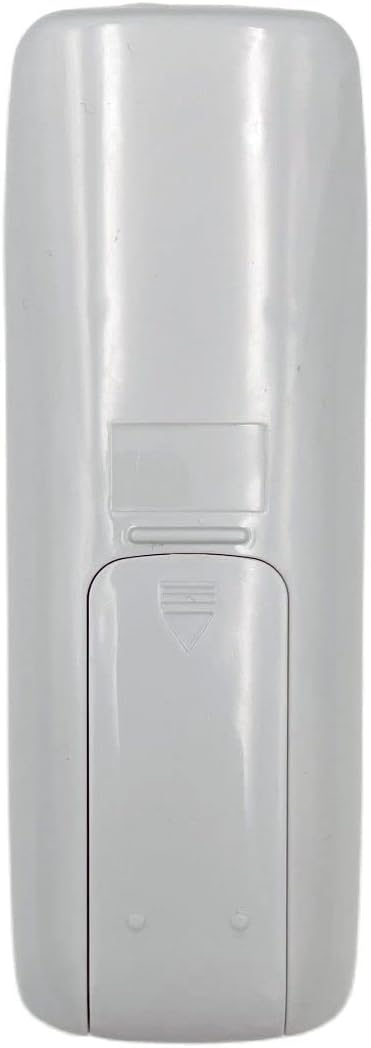
Image: Back of the remote control with the battery cover. This view helps identify the battery compartment for installation.
Önemli: If the remote is not working after battery installation, try rolling the batteries inside the compartment to ensure good contact with the springs. Ensure the remote is compatible with your specific LG or Goldstar air conditioner model. This remote typically does not require programming as it is a direct replacement for the specified models.
Kullanım Talimatları
This remote control operates via infrared (IR) technology. Ensure there is a clear line of sight between the remote and the air conditioner's IR receiver.

Resim: Ön view of the remote control. The LCD screen displays temperature and mode, while various buttons control functions.
Temel Fonksiyonlar:
| Düğme/Gösterge | İşlev |
|---|---|
| Güç Düğmesi (Blue oval button) | Klima cihazını açar veya kapatır. |
| Sıcaklık Yukarı/Aşağı (Grey arrow buttons) | İstenilen sıcaklık ayarını yapar. |
| Mod Düğmesi (Button with sun/water drop/fan icons) | Cycles through operating modes (e.g., Cool, Dry, Fan, Heat). |
| Fan Hızı Düğmesi (Button with fan icon) | Fan hızını ayarlar (örneğin Düşük, Orta, Yüksek, Otomatik). |
| Salıncak Düğmesi (Button with oscillating arrows) | Panjur salınım fonksiyonunu kontrol eder. |
| Zamanlayıcı Düğmesi (Button with clock icon) | Klima için açma/kapama zamanlayıcısını ayarlar. |
| ECONO Button | Activates or deactivates economy mode for energy saving. |
| LCD Ekran | Shows current temperature, operating mode, fan speed, and other settings. |
For specific advanced functions or programming, refer to your air conditioner's original operating manual, as this remote is a replacement and may not support all features of every compatible unit.
Bakım
Doğru bakım, uzaktan kumandanızın uzun ömürlü ve güvenilir çalışmasını sağlar.
- Temizlik: Wipe the remote control with a soft, dry cloth. Do not use liquid cleaners, abrasive cleaners, or chemical solvents, as these can damage the surface or internal components.
- Pil Değişimi: Uzaktan kumandanın menzili azaldığında veya ekran loşlaştığında pilleri değiştirin. Her zaman her iki pili de aynı anda, aynı tipte yeni pillerle değiştirin.
- Depolamak: Uzaktan kumanda uzun süre kullanılmayacaksa, pil sızıntısını ve kumandaya zarar gelmesini önlemek için pilleri çıkarın. Serin ve kuru bir yerde saklayın.
- Damlalardan Kaçının: Protect the remote from physical impact. Dropping the remote can damage internal circuitry or the LCD screen.
Sorun giderme
Uzaktan kumandanızla ilgili sorun yaşıyorsanız, aşağıdaki yaygın sorunlar ve çözümlerine göz atın:
| Sorun | Olası Neden ve Çözüm |
|---|---|
| Remote not working / No response from AC unit. |
|
| Uzaktan kumanda menzili azalmıştır. |
|
| LCD ekran soluk veya boş. |
|
If the problem persists after attempting these solutions, contact customer support or refer to the original air conditioner manual for further assistance.
Özellikler
| Özellik | Detay |
|---|---|
| Model Numaraları | 6711A20111K, 6711A90023E, 6711A20010A, 6711A20111F |
| Marka | Genel |
| Uyumluluk | LG/Goldstar Air Conditioners |
| Bağlantı Teknolojisi | Kızılötesi (IR) |
| Denetleyici Türü | Düğme Kontrolü |
| Özel Özellik | Universal (as a replacement for specified models) |
| Pil Türü | AAA (2 gerekli) |
| Üretici | DAVITU |
| İlk Mevcut Tarih | 25 Nisan 2023 |
Garanti Bilgileri
This product is typically covered by a standard return policy. For specific warranty details, please refer to the seller's policy at the point of purchase. The buybox winner indicates a return policy of 30 days for refund/replacement.
For issues related to defects in materials or workmanship, please contact the seller directly within the specified return period.
Müşteri Desteği
For further assistance, technical support, or inquiries regarding your Generic AC A/C Remote Control, please contact the seller directly through the platform where the purchase was made.
Satıcı: DAVITU
When contacting support, please provide your order number and the model number of your remote control (6711A20111K).
Ask a question about this manual
Ask about setup, troubleshooting, compatibility, parts, safety, or missing instructions. Manuals+ will review the question and use this page’s manual context to help answer it.